
Escali PR500S
എസ്കാലി പിക്കോ PR500S പ്രിസിഷൻ കിച്ചൺ ഫുഡ് സ്കെയിൽ യൂസർ മാനുവൽ
Model: PR500S
ആമുഖം
This manual provides comprehensive instructions for the proper use and maintenance of your Escali Pico PR500S Precision Kitchen Food Scale. Please read this manual thoroughly before operating the device to ensure accurate measurements and extend product longevity.

Image: The Escali Pico PR500S Precision Kitchen Food Scale, a compact gray digital scale with an LCD display and control buttons.
പാക്കേജ് ഉള്ളടക്കം
പായ്ക്ക് അൺപാക്ക് ചെയ്യുമ്പോൾ എല്ലാ ഇനങ്ങളും ഉണ്ടെന്ന് ഉറപ്പാക്കുക:
- Escali Pico PR500S Precision Kitchen Food Scale
- 1 ലിഥിയം അയോൺ ബാറ്ററി (ഉൾപ്പെടുത്തിയിരിക്കുന്നു)
- ഉപയോക്തൃ മാനുവൽ (ഈ പ്രമാണം)
ഉൽപ്പന്ന സവിശേഷതകൾ
The Escali Pico PR500S scale is designed for precision and convenience:
- കോംപാക്റ്റ് ഡിസൈൻ: Ultra-compact for easy storage and portability.
- ഉയർന്ന കൃത്യത: Measures up to 500 grams with 0.1 gram readability.
- ഡിസ്പ്ലേ ഹോൾഡ്: Freezes weight measurements on screen for large items.
- Parts Counting: Counts quantities of small items.
- ടാരെ ഫീച്ചർ: Resets the scale to zero to measure multiple items or subtract container weight.
- യാന്ത്രിക ഷട്ട്-ഓഫ്: Conserves battery life by turning off after five minutes of inactivity.
- LCD ഡിജിറ്റൽ ഡിസ്പ്ലേ: വ്യക്തവും എളുപ്പത്തിൽ വായിക്കാവുന്നതുമായ ഡിസ്പ്ലേ.

Image: Diagram illustrating the key features of the Escali Pico PR500S scale, including its pocket-sized design, parts counting, unit selection, easy-to-read display, tare feature, and audio control buttons.
സജ്ജമാക്കുക
ബാറ്ററി ഇൻസ്റ്റാളേഷൻ
- സ്കെയിലിൻ്റെ അടിഭാഗത്ത് ബാറ്ററി കമ്പാർട്ട്മെൻ്റ് കണ്ടെത്തുക.
- ബാറ്ററി കമ്പാർട്ട്മെൻ്റ് കവർ തുറക്കുക.
- Insert the included Lithium Ion battery, ensuring correct polarity (+/-).
- ബാറ്ററി കമ്പാർട്ട്മെൻ്റ് കവർ സുരക്ഷിതമായി അടയ്ക്കുക.
സ്കെയിൽ ഇപ്പോൾ ഉപയോഗത്തിന് തയ്യാറാണ്.
പ്രവർത്തന നിർദ്ദേശങ്ങൾ
പവർ ഓൺ/ഓഫ്
- സ്കെയിൽ തിരിക്കാൻ ON, അമർത്തുക ഓൺ/സീറോ ബട്ടൺ.
- സ്കെയിൽ തിരിക്കാൻ ഓഫ്, അമർത്തിപ്പിടിക്കുക ഓൺ/സീറോ button for a few seconds until the display turns off.
യൂണിറ്റ് തിരഞ്ഞെടുപ്പ്
The scale can measure in grams (g), ounces (oz), pounds (lb), and pounds + ounces (lb oz).
- സ്കെയിൽ ഓൺ ചെയ്തിരിക്കുമ്പോൾ, അമർത്തുക യൂണിറ്റ് ബട്ടൺ.
- Each press will cycle through the available units. Stop when your desired unit is displayed.
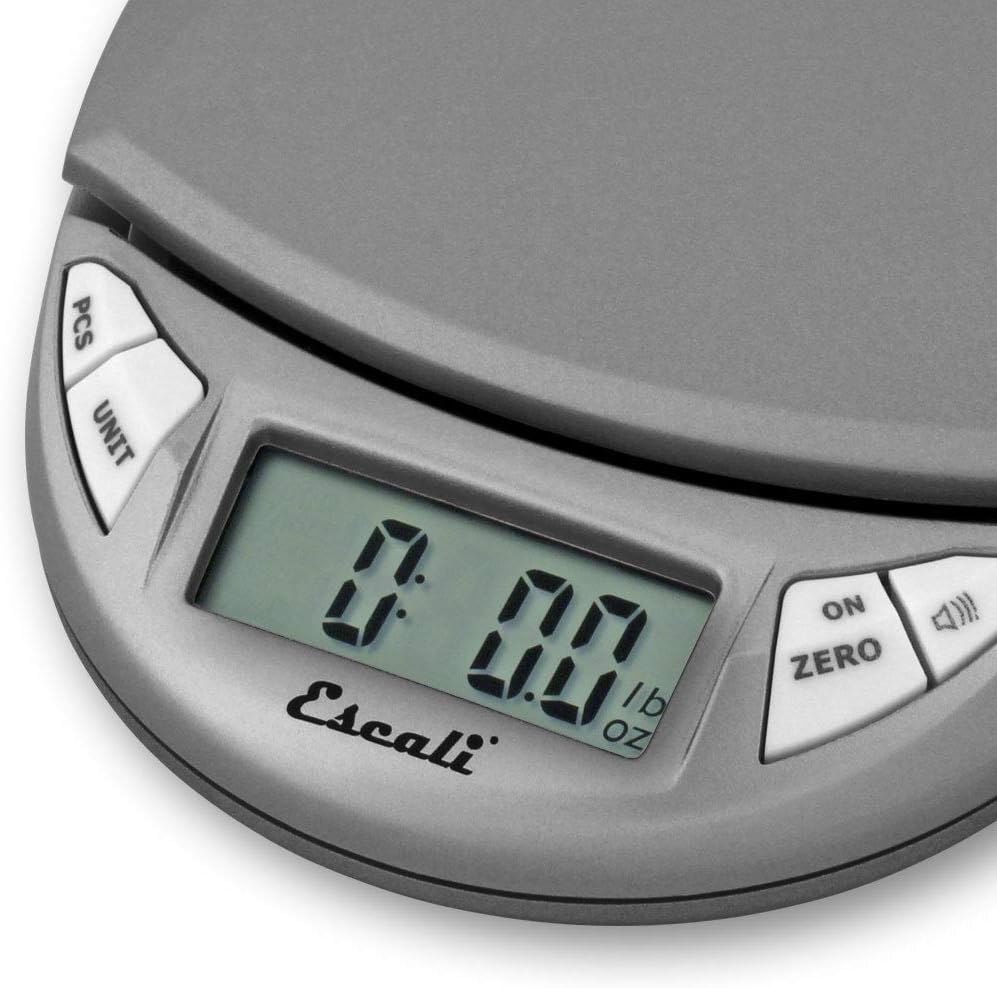
Image: Close-up of the scale's LCD display showing "0.00 lb oz", indicating the unit selection feature.
ടെയർ ഫംഗ്ഷൻ
The Tare function allows you to subtract the weight of a container or to measure multiple ingredients consecutively.
- സ്കെയിൽ പ്ലാറ്റ്ഫോമിൽ ഒരു ഒഴിഞ്ഞ കണ്ടെയ്നർ വയ്ക്കുക.
- അമർത്തുക ഓൺ/സീറോ ബട്ടൺ. ഡിസ്പ്ലേ പൂജ്യത്തിലേക്ക് പുനഃസജ്ജമാക്കും.
- Add the item(s) to be weighed into the container. The display will show only the net weight of the item(s).
- Repeat step 2 to tare additional ingredients.
Parts Counting (PCS)
This feature allows you to count a large number of small, uniformly weighted items.
- Place a known quantity of items (e.g., 10, 20, 50, or 100 pieces) on the scale.
- അമർത്തിപ്പിടിക്കുക പി.സി.എസ് button until a number (e.g., "10", "20") flashes on the display.
- അമർത്തുക യൂണിറ്റ് s തിരഞ്ഞെടുക്കാനുള്ള ബട്ടൺample size that matches the number of items you placed on the scale.
- അമർത്തുക പി.സി.എസ് button again to confirm. The display will now show the count of items.
- You can now add more items, and the scale will display the total count.
- To exit parts counting mode, press the പി.സി.എസ് ബട്ടൺ.
ഡിസ്പ്ലേ ഹോൾഡ്
The Display Hold feature allows you to view the weight of large items even if they obstruct the display.
- Weigh an item.
- അമർത്തുക ഓൺ/സീറോ button (or the button with the speaker icon, depending on model variation) briefly to activate the hold function. The display will show "HOLD" or a similar indicator.
- Remove the item. The weight will remain on the display.
- Press the button again to clear the held reading.

Image: The Escali Pico PR500S scale accurately weighing a bowl of powdered ingredients, surrounded by other bowls of spices.
പരിചരണവും പരിപാലനവും
- വൃത്തിയാക്കൽ: ഡി ഉപയോഗിച്ച് സ്കെയിൽ തുടയ്ക്കുകamp തുണി. സ്കെയിൽ വെള്ളത്തിൽ മുക്കുകയോ ഉരച്ചിലുകളുള്ള ക്ലീനറുകൾ ഉപയോഗിക്കുകയോ ചെയ്യരുത്.
- സംഭരണം: Store the scale in a cool, dry place. Avoid extreme temperatures and humidity.
- ബാറ്ററി: Remove the battery if the scale will not be used for an extended period to prevent leakage.
- കൈകാര്യം ചെയ്യൽ: Handle the scale with care. Avoid dropping or subjecting it to strong impacts, as this can affect accuracy.
ട്രബിൾഷൂട്ടിംഗ്
| പ്രശ്നം | സാധ്യമായ കാരണം | പരിഹാരം |
|---|---|---|
| സ്കെയിൽ ഓണാക്കുന്നില്ല | ഡെഡ് അല്ലെങ്കിൽ തെറ്റായി ഇൻസ്റ്റാൾ ചെയ്ത ബാറ്ററി. | ബാറ്ററി പോളാരിറ്റി പരിശോധിക്കുക. ആവശ്യമെങ്കിൽ ബാറ്ററി മാറ്റിസ്ഥാപിക്കുക. |
| കൃത്യമല്ലാത്ത വായനകൾ | Uneven surface, overload, or damage. | Place scale on a flat, stable surface. Do not exceed maximum capacity (500g). Avoid dropping the scale. |
| Display shows "EEEE" or "O_Ld" | സ്കെയിൽ ഓവർലോഡ് ആണ്. | Remove excess weight immediately. The maximum capacity is 500 grams. |
| ഡിസ്പ്ലേ "ലോ" കാണിക്കുന്നു | കുറഞ്ഞ ബാറ്ററി. | ബാറ്ററി മാറ്റിസ്ഥാപിക്കുക. |
സ്പെസിഫിക്കേഷനുകൾ
- മോഡൽ: PR500S
- ശേഷി: 500 ഗ്രാം (17.6 ഔൺസ്)
- വായനാക്ഷമത: 0.1 ഗ്രാം (0.005 oz)
- യൂണിറ്റുകൾ: Grams (g), Ounces (oz), Pounds (lb), Pounds + Ounces (lb oz)
- ഡിസ്പ്ലേ: എൽസിഡി
- ശക്തി: 1 ലിഥിയം അയോൺ ബാറ്ററി (ഉൾപ്പെടുത്തിയിരിക്കുന്നു)
- അളവുകൾ: ഏകദേശം 4.5 x 3.75 x 1 ഇഞ്ച്
- മെറ്റീരിയൽ: പ്ലാസ്റ്റിക്
- നിറം: Metallic (Gray)
വാറൻ്റിയും പിന്തുണയും
The Escali Pico PR500S Precision Kitchen Food Scale comes with a ലൈഫ് ടൈം ലിമിറ്റഡ് വാറൻ്റി. For detailed warranty information, product support, or service inquiries, please contact Escali customer service.
Visit the official Escali website for contact details and further assistance: www.escali.com
ഉൽപ്പന്ന വീഡിയോകൾ
No relevant official product videos from the seller were found for embedding based on the provided criteria.
Ask a question about this manual
Ask about setup, troubleshooting, compatibility, parts, safety, or missing instructions. Manuals+ will review the question and use this page’s manual context to help answer it.