
ആമുഖം
Thank you for choosing the Decorotika Omar TV Stand Media Console. This manual provides essential information for the safe assembly, proper use, and maintenance of your new furniture. Please read these instructions carefully before beginning assembly and retain them for future reference.
സുരക്ഷാ വിവരങ്ങൾ
- പോറലുകൾ ഉണ്ടാകാതിരിക്കാൻ എല്ലായ്പ്പോഴും മൃദുവും വൃത്തിയുള്ളതുമായ ഒരു പ്രതലത്തിൽ ഉൽപ്പന്നം കൂട്ടിച്ചേർക്കുക.
- Ensure all parts are present and undamaged before assembly. Do not proceed if any parts are missing or damaged.
- Use only the tools specified in the assembly instructions.
- സ്ക്രൂകൾ അമിതമായി മുറുക്കരുത്, കാരണം ഇത് മെറ്റീരിയലിന് കേടുവരുത്തും.
- ശ്വാസംമുട്ടൽ അപകടങ്ങൾ തടയാൻ അസംബ്ലി സമയത്ത് ചെറിയ ഭാഗങ്ങൾ കുട്ടികളിൽ നിന്ന് അകറ്റി നിർത്തുക.
- ടിപ്പിംഗ് തടയാൻ ടിവി സ്റ്റാൻഡ് നിരപ്പായതും സ്ഥിരതയുള്ളതുമായ ഒരു പ്രതലത്തിൽ സ്ഥാപിക്കുക.
- Do not exceed the recommended weight capacity for the TV stand.
ഭാഗങ്ങളുടെ പട്ടിക
Before assembly, verify that all components are included in your package. While specific part numbers are not listed here, typical components include:
- മുകളിലെ പാനൽ
- താഴെയുള്ള പാനൽ
- Side Panels (Left and Right)
- ലംബ ഡിവൈഡറുകൾ
- ബാക്ക് പാനലുകൾ
- Drawer/Door Panels
- Hardware (screws, dowels, cam locks, handles, hinges, etc.)
- കാലുകൾ/അടിസ്ഥാന പിന്തുണകൾ
If any parts are missing or damaged, please contact Decorotika customer support.
സജ്ജീകരണവും അസംബ്ലിയും
Assembly of the Decorotika Omar TV Stand Media Console requires basic household tools, typically a Phillips head screwdriver. Follow the step-by-step instructions provided in the separate assembly guide included with your product. Ensure all connections are secure before placing any items on the stand.

ചിത്രം: കഴിഞ്ഞുview of the Decorotika Omar TV Stand, showing its structural components before full assembly.
It is recommended to have two people for assembly to ensure stability and ease of handling larger panels.
പ്രവർത്തനവും ഉപയോഗവും
The Decorotika Omar TV Stand Media Console is designed to support televisions up to 72 inches. The open shelves and enclosed compartments provide storage for media devices, accessories, and other items.
- ടിവി പ്ലേസ്മെൻ്റ്: Carefully place your television on the top surface, ensuring it is centered and stable. Distribute the weight evenly.
- Media Devices: Utilize the open shelves for devices such as cable boxes, gaming consoles, or soundbars. The design allows for airflow around electronics.
- സംഭരണം: The enclosed compartments are suitable for storing DVDs, remote controls, or other items you wish to keep out of sight.
- കേബിൾ മാനേജുമെന്റ്: While specific cable cutouts are not detailed, route cables neatly behind the unit to maintain a tidy appearance and prevent tripping hazards.
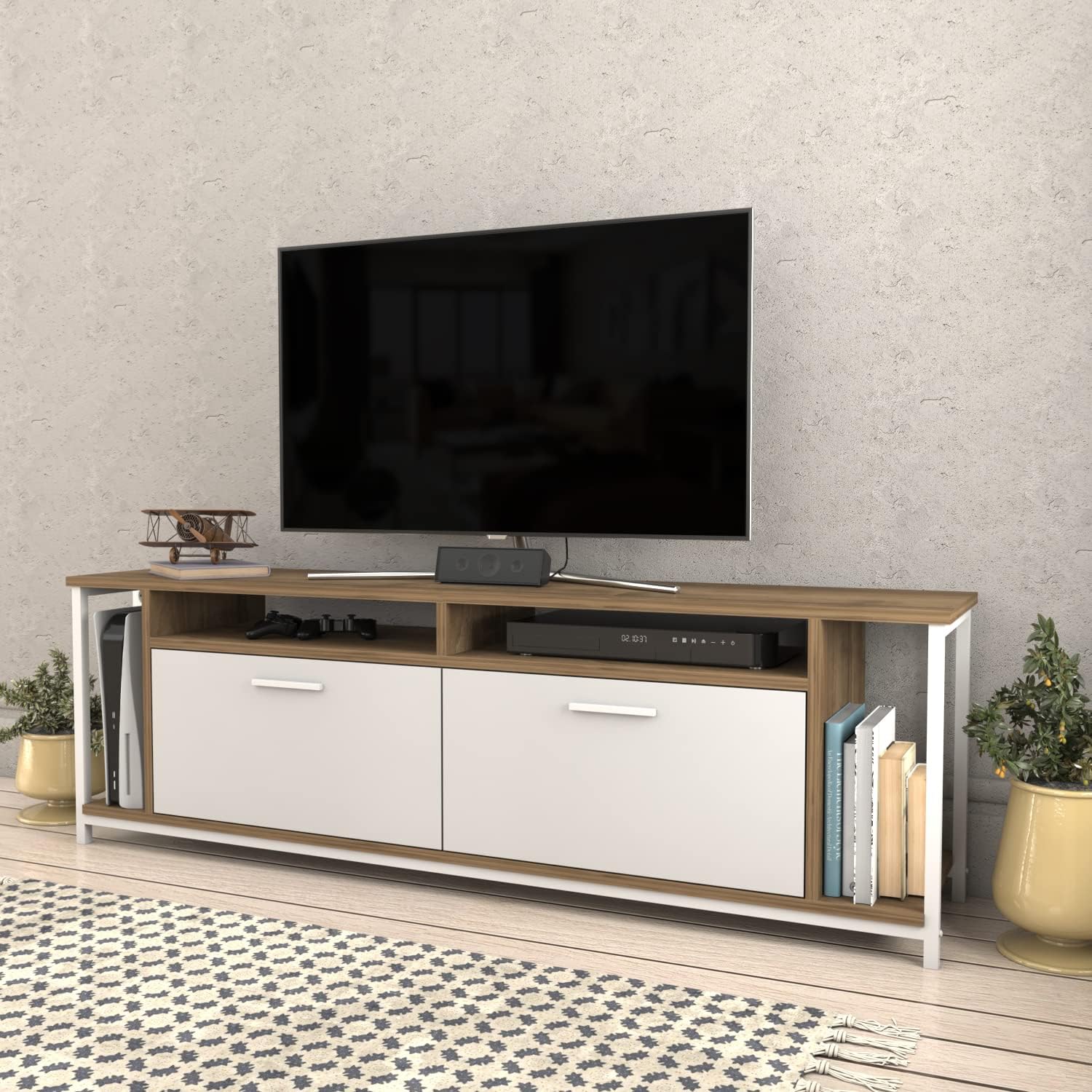
Image: The Omar TV Stand integrated into a living space, showcasing its functionality with a television and various media components.
മെയിൻ്റനൻസ്
ശരിയായ പരിചരണം നിങ്ങളുടെ ടിവി സ്റ്റാൻഡിന്റെ ആയുസ്സും രൂപവും വർദ്ധിപ്പിക്കും.
- വൃത്തിയാക്കൽ: മൃദുവായ, ഡി ഉപയോഗിച്ച് ഉപരിതലങ്ങൾ തുടയ്ക്കുകamp cloth. Avoid abrasive cleaners or harsh chemicals, as these can damage the engineered wood finish.
- ചോർച്ച: ഈർപ്പം കേടുപാടുകൾ തടയാൻ ഏതെങ്കിലും ചോർച്ച ഉടനടി തുടച്ചുമാറ്റുക.
- സൂര്യപ്രകാശം: മങ്ങൽ അല്ലെങ്കിൽ നിറവ്യത്യാസം തടയാൻ നേരിട്ട് സൂര്യപ്രകാശം ദീർഘനേരം എക്സ്പോഷർ ചെയ്യുന്നത് ഒഴിവാക്കുക.
- ചൂട്: ചൂടുള്ള വസ്തുക്കൾ നേരിട്ട് പ്രതലത്തിൽ വയ്ക്കരുത്. കോസ്റ്ററുകളോ സംരക്ഷണ പാഡുകളോ ഉപയോഗിക്കുക.
- ഹാർഡ്വെയർ: സ്ഥിരത ഉറപ്പാക്കാൻ എല്ലാ ഹാർഡ്വെയർ കണക്ഷനുകളും ഇടയ്ക്കിടെ പരിശോധിച്ച് ശക്തമാക്കുക.
ട്രബിൾഷൂട്ടിംഗ്
- വോൾബ്ലി സ്റ്റാൻഡ്: Ensure the stand is on a level surface. Check all screws and connections to confirm they are tightened securely. Adjust any leveling feet if present.
- Doors/Drawers Not Aligning: Review the assembly instructions for the doors/drawers and hinges. Adjust hinges as needed to achieve proper alignment.
- വിട്ടുപോയ ഭാഗങ്ങൾ: If you discover missing parts during assembly, do not attempt to force assembly. Contact Decorotika customer support for assistance.
സ്പെസിഫിക്കേഷനുകൾ
| ഫീച്ചർ | വിശദാംശങ്ങൾ |
|---|---|
| ബ്രാൻഡ് | Decorotika |
| മോഡൽ | Omar TV Stand Media Console |
| മെറ്റീരിയൽ | എഞ്ചിനീയറിംഗ് വുഡ് |
| പ്രത്യേക ഫീച്ചർ | മോടിയുള്ള |
| മൗണ്ടിംഗ് തരം | ഫ്ലോർ മൗണ്ട് |
| ഇൻസ്റ്റലേഷൻ തരം | ഫ്രീസ്റ്റാൻഡിംഗ് |
| അസംബ്ലി ആവശ്യമാണ് | അതെ |
| ഇനത്തിൻ്റെ ഭാരം | 59.9 പൗണ്ട് |
| പാക്കേജ് അളവുകൾ | 68 x 18 x 6 ഇഞ്ച് |
| Overall Dimensions (Approximate) | 63" (160 cm) Width x 20" (50.8 cm) Height x 13.8" (35 cm) Depth |

Image: Technical drawing displaying the precise dimensions of the Omar TV Stand, including width, height, and depth measurements in both inches and centimeters.
വാറൻ്റിയും പിന്തുണയും
Decorotika stands behind the quality of its products. For specific warranty details, please refer to the warranty information included with your purchase or visit the official Decorotika website. If you have any questions, require replacement parts, or need assistance with assembly or usage, please contact Decorotika customer support.
കൂടുതൽ വിവരങ്ങളും ബന്ധപ്പെടാനുള്ള വിശദാംശങ്ങളും നിങ്ങൾക്ക് ഇവിടെ കണ്ടെത്താനാകും Decorotika Brand Store.