
1. ആമുഖം
This manual provides essential information for the safe and effective use of your Huawei Watch Fit 2 Smartwatch. Please read this manual thoroughly before using the device and retain it for future reference.
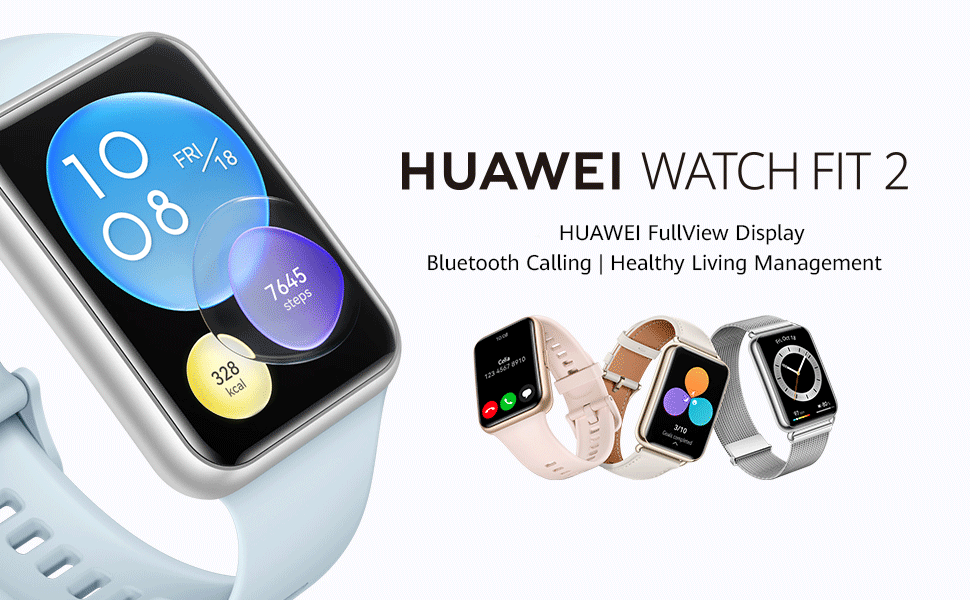
Image: Huawei Watch Fit 2 Smartwatch, showcasing അതിന്റെ മിനുസമാർന്ന രൂപകൽപ്പനയും ഊർജ്ജസ്വലമായ ഡിസ്പ്ലേയും.
2. ബോക്സിൽ എന്താണുള്ളത്?
ഉൽപ്പന്ന പാക്കേജിംഗിൽ എല്ലാ ഇനങ്ങളും ഉണ്ടെന്ന് ഉറപ്പാക്കുക:
- x 1 കാണുക
- Charging Cradle (including the charging cable) x 1
- ദ്രുത ആരംഭ ഗൈഡ് x 1
- Safety Information x 1
- വാറൻ്റി കാർഡ് x 1
3. സജ്ജീകരണം
3.1. വാച്ച് ചാർജ് ചെയ്യുന്നു
Before initial use, fully charge your Huawei Watch Fit 2. Connect the charging cradle to a power source and place the watch onto the cradle, ensuring the magnetic contacts align. The watch display will indicate charging status.

Image: The Huawei Watch Fit 2 being charged on its magnetic cradle.
3.2. നിങ്ങളുടെ ഫോണുമായി ജോടിയാക്കൽ
- ഡൗൺലോഡ് ചെയ്ത് ഇൻസ്റ്റാൾ ചെയ്യുക Huawei ആരോഗ്യ ആപ്പ് on your smartphone (compatible with Android and iOS devices).
- Open the Huawei Health App and navigate to the device pairing section.
- Turn on your Huawei Watch Fit 2.
- Select your watch from the list of available devices in the app and follow the on-screen instructions to complete the pairing process.
3.3. വാച്ച് ധരിക്കുന്നു
Wear the watch comfortably on your wrist, ensuring the sensors on the back are in contact with your skin. Adjust the strap for a snug fit to ensure accurate heart rate and SpO2 monitoring.

ചിത്രം: പിൻഭാഗം view of the Huawei Watch Fit 2, highlighting the sensor array for health tracking.
4. നിങ്ങളുടെ വാച്ച് പ്രവർത്തിപ്പിക്കുക
4.1. ഡിസ്പ്ലേയും നാവിഗേഷനും
The Huawei Watch Fit 2 features a 1.74-inch FullView AMOLED touchscreen display. Swipe up, down, left, or right to navigate through menus, notifications, and widgets. Press the side button to return to the home screen or access the app list.

Image: The watch display showing a grid of application icons.
4.2. ബ്ലൂടൂത്ത് കോളിംഗ്
With Bluetooth calling support, you can answer or reject calls directly from your wrist when connected to your smartphone. The watch also supports quick message replies and importing contacts.

Image: A user interacting with the watch to manage an incoming Bluetooth call.
4.3. സംഗീതം പ്ലേബാക്ക്
The watch supports independent music playback. You can store music directly on the watch and listen via connected Bluetooth headphones, allowing you to enjoy music without carrying your phone.

Image: The watch screen showing music playback interface with controls.
4.4. വോയ്സ് അസിസ്റ്റൻ്റ്
Utilize the integrated voice assistant for quick commands, setting reminders, checking weather, and more. Simply activate the voice assistant and speak your request.

Image: The watch display indicating the voice assistant is active and listening.
4.5. Remote Camera Shutter
Control your smartphone's camera remotely using your watch. This feature is useful for group photos or capturing shots from a distance.

Image: A user taking a photo with their smartphone using the watch as a remote shutter.
4.6. Workout Modes and Health Tracking
The watch offers 97 workout modes and comprehensive health management features, including:
- Accurate heart rate monitoring
- HUAWEI TruSleep 2.0 sleep tracking
- SpO2 (blood oxygen saturation) monitoring
- സ്ട്രെസ് ട്രാക്കിംഗ്
- Quick-Workout Animations and voice-guided warm-up stretches for 7 common workouts.

Image: The watch screen showing active workout tracking with heart rate and calorie data.
5. പരിപാലനം
5.1. ജല പ്രതിരോധം
The Huawei Watch Fit 2 has an IP67 water resistance rating, making it suitable for daily use and light water activities. Avoid prolonged submersion or use in hot water, saunas, or steam rooms, as this may compromise the water resistance.
5.2. വൃത്തിയാക്കലും പരിചരണവും
- Regularly clean the watch screen and strap with a soft, damp തുണി.
- ചാർജ് ചെയ്യുന്നതിന് മുമ്പ് വാച്ചിന്റെ പിൻഭാഗത്തുള്ള ചാർജിംഗ് കോൺടാക്റ്റുകൾ വൃത്തിയുള്ളതും വരണ്ടതുമാണെന്ന് ഉറപ്പാക്കുക.
- ഉയർന്ന താപനിലയിലോ കഠിനമായ രാസവസ്തുക്കളിലോ വാച്ച് തുറന്നുകാട്ടുന്നത് ഒഴിവാക്കുക.
6. പ്രശ്നപരിഹാരം
6.1. കണക്റ്റിവിറ്റി പ്രശ്നങ്ങൾ
- നിങ്ങളുടെ സ്മാർട്ട്ഫോണിൽ ബ്ലൂടൂത്ത് പ്രവർത്തനക്ഷമമാക്കിയിട്ടുണ്ടെന്നും വാച്ച് പരിധിക്കുള്ളിലാണെന്നും ഉറപ്പാക്കുക.
- നിങ്ങളുടെ വാച്ചും സ്മാർട്ട്ഫോണും പുനരാരംഭിക്കുക.
- If issues persist, unpair and re-pair the watch via the Huawei Health App.
6.2. കൃത്യമല്ലാത്ത ആരോഗ്യ ഡാറ്റ
- Ensure the watch is worn snugly on your wrist, with the sensors in proper contact with your skin.
- Clean the sensor area regularly to remove dirt or sweat buildup.
- Update the Huawei Health App and watch firmware to the latest versions.
6.3. കുറഞ്ഞ ബാറ്ററി ലൈഫ്
- സ്ക്രീൻ തെളിച്ചവും സ്ക്രീൻ ഓൺ സമയവും കുറയ്ക്കുക.
- Disable unnecessary notifications or background app refreshes.
- Limit continuous heart rate monitoring or GPS usage if not required.
7 സ്പെസിഫിക്കേഷനുകൾ
| ഫീച്ചർ | വിശദാംശങ്ങൾ |
|---|---|
| മോഡലിൻ്റെ പേര് | Huawei Watch Fit 2 |
| പ്രദർശിപ്പിക്കുക | 1.74-inch AMOLED, 454 x 454 Resolution |
| ഓപ്പറേറ്റിംഗ് സിസ്റ്റം | ആൻഡ്രോയിഡ് |
| മെമ്മറി സ്റ്റോറേജ് കപ്പാസിറ്റി | 32 ജിബി |
| കണക്റ്റിവിറ്റി ടെക്നോളജി | ബ്ലൂടൂത്ത്, യുഎസ്ബി |
| പ്രത്യേക സവിശേഷതകൾ | GPS, Heart Rate Monitor, Notifications, Sleep Monitor, Touchscreen, Voice Assistant |
| ബാൻഡ് മെറ്റീരിയൽ തരം | സിലിക്കൺ |
| ജല പ്രതിരോധ നില | IP67, 1 Metre Depth |
| ബാറ്ററി ശരാശരി ആയുസ്സ് | 10 ദിവസം (സാധാരണ ഉപയോഗം) |
| ഇനത്തിൻ്റെ അളവുകൾ | 46 x 34 x 11 മില്ലിമീറ്റർ |
| ഇനത്തിൻ്റെ ഭാരം | 26 ഗ്രാം |
| അനുയോജ്യമായ ഫോൺ മോഡലുകൾ | Android Devices, iOS Devices |
8. വാറൻ്റിയും പിന്തുണയും
8.1. വാറൻ്റി വിവരങ്ങൾ
The Huawei Watch Fit 2 comes with a 1 വർഷത്തെ നിർമ്മാതാവിൻ്റെ വാറൻ്റി. വിശദമായ നിബന്ധനകൾക്കും വ്യവസ്ഥകൾക്കും ഉൾപ്പെടുത്തിയിരിക്കുന്ന വാറന്റി കാർഡ് പരിശോധിക്കുക.
8.2. ഉപഭോക്തൃ പിന്തുണ
For further assistance, technical support, or warranty claims, please contact Huawei customer service or visit the official Huawei support webസൈറ്റ്.
Importer Contact Information:
Rajendera Trading Corporation, 8 C FLOOR 2ND PLOT 192 KITAB MAHAL DADABHAI NAWROJI ROAD NEW EXCELSIOR CINEMA, FORT MUMBAI-4000051. MAHARASHTRA.
Contact: +91 22 66159295
Email Id: accounts@rtcindia.net.
നിർമ്മാതാവിനെ ബന്ധപ്പെടാനുള്ള വിവരങ്ങൾ:
Goertek Inc NO. 268 DONGFANG ROAD HIGH-TECH INDUSTRIAL DEVELOPMENT DISTRICT WEIFANG SHANDONG CHINA SHANDONG,China-261031
9. ഉൽപ്പന്നം കഴിഞ്ഞുview വീഡിയോ
വീഡിയോ: ഒരു ഓവർview of the Huawei Watch Fit 2, showcasing its design, key features, and various functionalities.