
ആമുഖം
The Victrola Journey+ Cassette Turntable offers a versatile audio experience, combining classic vinyl playback with modern features. This portable suitcase-style unit includes a 3-speed turntable, a built-in cassette player, Bluetooth connectivity for both input and output, auxiliary input, and RCA output. This manual provides detailed instructions for setting up, operating, and maintaining your device to ensure optimal performance and longevity.
സുരക്ഷാ വിവരങ്ങൾ
- ഉൽപ്പന്നം ഉപയോഗിക്കുന്നതിന് മുമ്പ് എല്ലാ നിർദ്ദേശങ്ങളും വായിക്കുക.
- ഭാവി റഫറൻസിനായി മാനുവൽ സൂക്ഷിക്കുക.
- വെള്ളത്തിനടുത്ത് ഈ ഉപകരണം ഉപയോഗിക്കരുത്.
- ഉണങ്ങിയ തുണി ഉപയോഗിച്ച് മാത്രം വൃത്തിയാക്കുക.
- വെന്റിലേഷൻ തുറസ്സുകളൊന്നും തടയരുത്. നിർമ്മാതാവിന്റെ നിർദ്ദേശങ്ങൾക്കനുസൃതമായി ഇൻസ്റ്റാൾ ചെയ്യുക.
- റേഡിയറുകൾ, ഹീറ്റ് രജിസ്റ്ററുകൾ, സ്റ്റൗകൾ, അല്ലെങ്കിൽ മറ്റ് ഉപകരണങ്ങൾ (ഉൾപ്പെടെ) പോലെയുള്ള താപ സ്രോതസ്സുകൾക്ക് സമീപം ഇൻസ്റ്റാൾ ചെയ്യരുത്. ampലൈഫയറുകൾ) ചൂട് ഉത്പാദിപ്പിക്കുന്നത്.
- പ്രത്യേകിച്ച് പ്ലഗുകൾ, കൺവീനിയൻസ് റെസെപ്റ്റക്കിളുകൾ, ഉപകരണത്തിൽ നിന്ന് പുറത്തുകടക്കുന്ന ഇടം എന്നിവയിൽ നടക്കുകയോ നുള്ളുകയോ ചെയ്യുന്നതിൽ നിന്ന് പവർ കോർഡ് സംരക്ഷിക്കുക.
- നിർമ്മാതാവ് വ്യക്തമാക്കിയ അറ്റാച്ച്മെൻ്റുകൾ/ആക്സസറികൾ മാത്രം ഉപയോഗിക്കുക.
- മിന്നൽ കൊടുങ്കാറ്റുകളുടെ സമയത്തോ ദീർഘനേരം ഉപയോഗിക്കാത്ത സമയത്തോ ഈ ഉപകരണം അൺപ്ലഗ് ചെയ്യുക.
- എല്ലാ സേവനങ്ങളും യോഗ്യതയുള്ള സേവന ഉദ്യോഗസ്ഥർക്ക് റഫർ ചെയ്യുക. പവർ സപ്ലൈ കോർഡ് അല്ലെങ്കിൽ പ്ലഗ് കേടാകുക, ദ്രാവകം ഒഴുകുകയോ ഉപകരണങ്ങൾ ഉപകരണത്തിലേക്ക് വീഴുകയോ ചെയ്യുക, ഉപകരണം മഴയോ ഈർപ്പമോ സമ്പർക്കം പുലർത്തുക, സാധാരണയായി പ്രവർത്തിക്കാത്തത് എന്നിങ്ങനെയുള്ള ഏതെങ്കിലും വിധത്തിൽ ഉപകരണത്തിന് കേടുപാടുകൾ സംഭവിക്കുമ്പോൾ സേവനം ആവശ്യമാണ്. , അല്ലെങ്കിൽ ഉപേക്ഷിച്ചു.
ബോക്സിൽ എന്താണുള്ളത്
- Victrola Journey+ Cassette Turntable
- പവർ അഡാപ്റ്റർ
- ഇൻസ്ട്രക്ഷൻ മാനുവൽ
- 45 ആർപിഎം അഡാപ്റ്റർ
- Extra Stylus (Needle)
ഉൽപ്പന്ന സവിശേഷതകളും ഘടകങ്ങളും
Familiarize yourself with the various parts of your Victrola Journey+ Cassette Turntable.

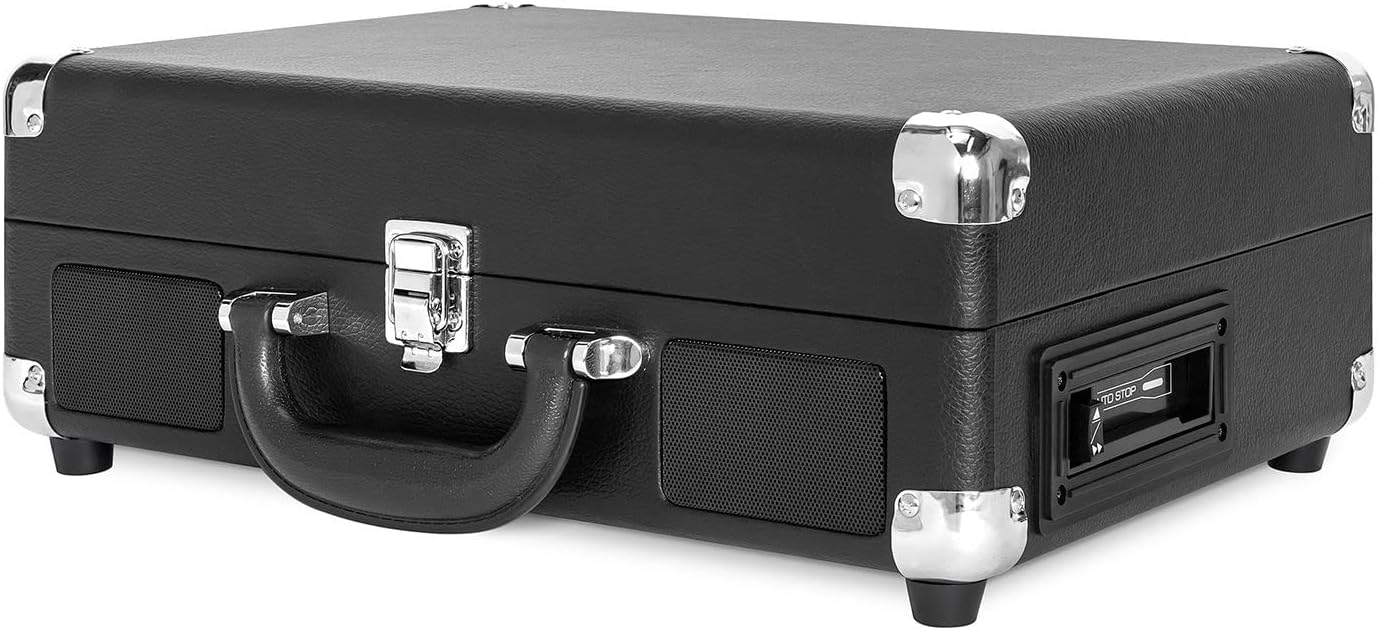

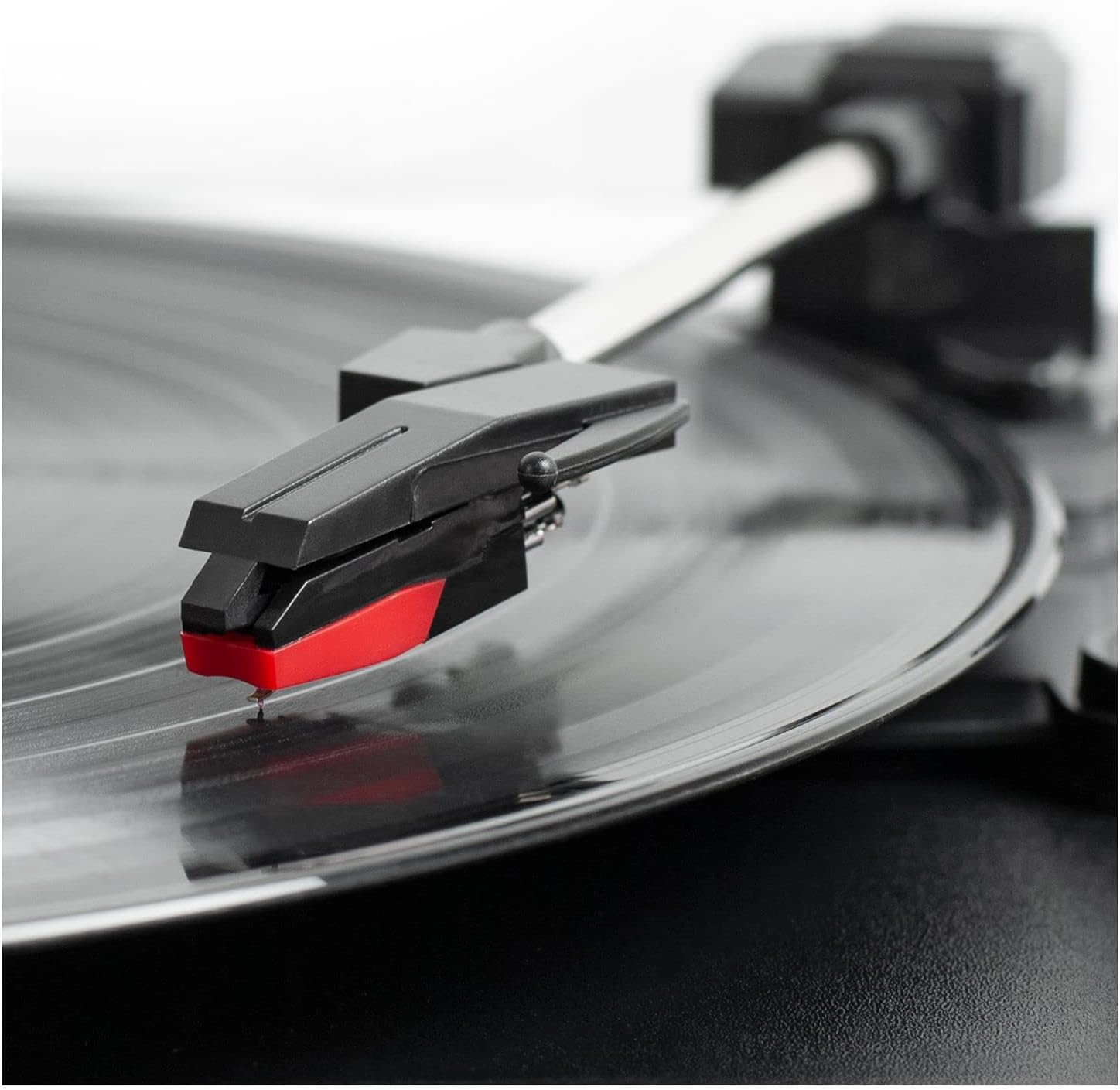
നിയന്ത്രണ പാനൽ ഓവർview
- പവർ/വോളിയം നോബ്: Turns the unit ON/OFF and adjusts the volume.
- സ്പീഡ് സെലക്ടർ: Switch between 33 1/3, 45, and 78 RPM for vinyl records.
- ഓട്ടോ സ്റ്റോപ്പ് സ്വിച്ച്: Enables or disables the auto-stop function for the turntable.
- ഫംഗ്ഷൻ സ്വിച്ച്: Selects between PHONO/TAPE, LINE IN, BT IN, and BT OUT modes.
- ഹെഡ്ഫോൺ ജാക്ക്: ഹെഡ്ഫോണുകൾ ഉപയോഗിച്ച് സ്വകാര്യ ശ്രവണത്തിനായി.
- ലൈൻ ഇൻ ജാക്ക്: ഒരു 3.5mm കേബിൾ വഴി ബാഹ്യ ഓഡിയോ ഉപകരണങ്ങൾ ബന്ധിപ്പിക്കുക.
- Cassette Player Controls: Play, Fast Forward, Rewind, Stop/Eject.
- ആർസിഎ ഔട്ട്പുട്ട് ജാക്കുകൾ (എൽ/ആർ): ബാഹ്യ സ്പീക്കറുകളിലേക്ക് കണക്റ്റുചെയ്യുക അല്ലെങ്കിൽ ഒരു ampജീവൻ.
- ഡിസി ഇൻ ജാക്ക്: പവർ അഡാപ്റ്റർ ബന്ധിപ്പിക്കുക.
സജ്ജമാക്കുക
- അൺപാക്ക്: Carefully remove the turntable from its packaging and ensure all accessories are present.
- പ്ലേസ്മെൻ്റ്: നേരിട്ടുള്ള സൂര്യപ്രകാശം, താപ സ്രോതസ്സുകൾ, അമിതമായ പൊടി അല്ലെങ്കിൽ വൈബ്രേഷൻ എന്നിവയിൽ നിന്ന് അകലെ ഒരു പരന്നതും സ്ഥിരതയുള്ളതുമായ പ്രതലത്തിൽ യൂണിറ്റ് സ്ഥാപിക്കുക.
- പവർ കണക്ഷൻ: Connect the DC plug of the power adapter to the DC IN jack on the back of the unit. Plug the AC adapter into a wall outlet.
- സ്റ്റൈലസ് പ്രൊട്ടക്ടർ നീക്കം ചെയ്യുക: സൂചിയിൽ നിന്ന് വെളുത്ത പ്ലാസ്റ്റിക് സ്റ്റൈലസ് പ്രൊട്ടക്ടർ സൌമ്യമായി നീക്കം ചെയ്യുക.
- ടോൺആം അൺലോക്ക് ചെയ്യുക: ടോൺആം സ്വതന്ത്രമായി ചലിക്കാൻ അനുവദിക്കുന്നതിന് ടോൺആം ലോക്ക് വിടുക.
പ്രവർത്തന നിർദ്ദേശങ്ങൾ
വിനൈൽ റെക്കോർഡുകൾ പ്ലേ ചെയ്യുന്നു
- Open the lid and place a vinyl record on the turntable platter.
- Select the appropriate speed (33 1/3, 45, or 78 RPM) using the Speed Selector switch. Use the 45 RPM adapter for 7-inch records with large center holes.
- Turn the Power/Volume knob clockwise to turn on the unit and adjust to a low volume.
- Set the Function Switch to PHONO/TAPE.
- Lift the tonearm using the cueing lever and position it over the desired track on the record.
- ക്യൂയിംഗ് ലിവർ ഉപയോഗിച്ച് ടോൺആം റെക്കോർഡിലേക്ക് പതുക്കെ താഴ്ത്തുക. റെക്കോർഡ് പ്ലേ ചെയ്യാൻ തുടങ്ങും.
- നിങ്ങൾ ആഗ്രഹിക്കുന്ന ശ്രവണ നിലയിലേക്ക് വോളിയം ക്രമീകരിക്കുക.
- At the end of the record, if the Auto Stop switch is ON, the platter will stop spinning. If OFF, the platter will continue to spin. Manually lift the tonearm and return it to the tonearm rest.
കാസറ്റ് പ്ലെയർ ഉപയോഗിക്കുന്നു
- Set the Function Switch to PHONO/TAPE.
- Insert a cassette tape into the side-loading slot until it clicks into place.
- പ്ലേബാക്ക് ആരംഭിക്കാൻ PLAY ബട്ടൺ അമർത്തുക.
- Use the Fast Forward (FF) and Rewind (REW) buttons to navigate tracks.
- പ്ലേബാക്ക് നിർത്തി ടേപ്പ് പുറത്തെടുക്കാൻ STOP/EJECT ബട്ടൺ അമർത്തുക.
- പവർ/വോളിയം നോബ് ഉപയോഗിച്ച് വോളിയം ക്രമീകരിക്കുക.

Bluetooth Input (BT IN)
Stream music wirelessly from your Bluetooth-enabled device to the turntable's built-in speakers.
- യൂണിറ്റ് ഓണാക്കാൻ പവർ/വോളിയം നോബ് ഘടികാരദിശയിൽ തിരിക്കുക.
- Set the Function Switch to BT IN. The Bluetooth indicator light will flash.
- Enable Bluetooth on your external device and search for "Victrola Journey+".
- Select "Victrola Journey+" to pair. Once paired, the indicator light will stop flashing.
- Start playing music on your device. Adjust the volume on both your device and the turntable.
Bluetooth Output (BT OUT - Vinyl Stream Technology)
Stream audio from your vinyl records to an external Bluetooth speaker.
- നിങ്ങളുടെ ബാഹ്യ ബ്ലൂടൂത്ത് സ്പീക്കർ പെയറിംഗ് മോഡിലാണെന്ന് ഉറപ്പാക്കുക.
- Turn the Power/Volume knob clockwise to turn on the turntable.
- Set the Function Switch to BT OUT. The Bluetooth indicator light will flash.
- The turntable will automatically search for and connect to your external Bluetooth speaker. Once connected, the indicator light will stop flashing.
- Play a vinyl record as described above. The audio will stream to your external speaker.
- Adjust the volume on your external Bluetooth speaker.
Auxiliary Input (LINE IN)
Connect non-Bluetooth audio devices using a 3.5mm audio cable.
- Connect one end of a 3.5mm audio cable to the LINE IN jack on the turntable.
- മറ്റേ അറ്റം നിങ്ങളുടെ ബാഹ്യ ഉപകരണത്തിന്റെ ഹെഡ്ഫോൺ ജാക്കിലേക്കോ ഓഡിയോ ഔട്ട്പുട്ടിലേക്കോ ബന്ധിപ്പിക്കുക.
- യൂണിറ്റ് ഓണാക്കാൻ പവർ/വോളിയം നോബ് ഘടികാരദിശയിൽ തിരിക്കുക.
- Set the Function Switch to LINE IN.
- Start playing music on your external device. Adjust the volume on both your device and the turntable.
ആർസിഎ put ട്ട്പുട്ട്
ടർടേബിൾ ഒരു ബാഹ്യ ഉപകരണവുമായി ബന്ധിപ്പിക്കുക ampമെച്ചപ്പെടുത്തിയ ശബ്ദത്തിനായി ലിഫയർ അല്ലെങ്കിൽ പവർഡ് സ്പീക്കറുകൾ.
- Connect RCA cables (not included) to the RCA OUT jacks (red for right, white for left) on the back of the turntable.
- Connect the other end of the RCA cables to the corresponding input jacks on your ampലൈഫയർ അല്ലെങ്കിൽ പവർഡ് സ്പീക്കറുകൾ.
- Ensure the Function Switch is set to PHONO/TAPE for vinyl or cassette playback.
- നിങ്ങളുടെ ബാഹ്യ ഓഡിയോ സിസ്റ്റത്തിൽ വോളിയം ക്രമീകരിക്കുക.
ഹെഡ്ഫോൺ ഔട്ട്പുട്ട്
For private listening, plug any standard 3.5mm headphones into the HEADPHONE jack.
മെയിൻ്റനൻസ്
- യൂണിറ്റ് വൃത്തിയാക്കൽ: മൃദുവായതും ഉണങ്ങിയതുമായ തുണി ഉപയോഗിച്ച് പുറംഭാഗം തുടയ്ക്കുക. കഠിനമായ രാസവസ്തുക്കളോ അബ്രാസീവ് ക്ലീനറുകളോ ഉപയോഗിക്കരുത്.
- സ്റ്റൈലസ് കെയർ: The stylus is delicate. Handle it with care. Clean the stylus periodically with a soft brush, brushing from back to front. Replace the stylus if sound quality deteriorates or if it is visibly damaged.
- റെക്കോർഡ് കെയർ: രേഖകൾ വൃത്തിയായും പൊടി രഹിതമായും സൂക്ഷിക്കുക. വളച്ചൊടിക്കൽ തടയാൻ അവ സ്ലീവുകളിൽ ലംബമായി സൂക്ഷിക്കുക.
- കാസറ്റ് പരിചരണം: Store cassettes away from direct sunlight and heat. Avoid touching the tape surface.
ട്രബിൾഷൂട്ടിംഗ്
| പ്രശ്നം | സാധ്യമായ കാരണം | പരിഹാരം |
|---|---|---|
| ശക്തിയില്ല | പവർ അഡാപ്റ്റർ ബന്ധിപ്പിച്ചിട്ടില്ല അല്ലെങ്കിൽ ഔട്ട്ലെറ്റ് പ്രവർത്തിക്കുന്നില്ല. | പവർ അഡാപ്റ്റർ സുരക്ഷിതമായി ബന്ധിപ്പിച്ചിട്ടുണ്ടെന്നും പ്രവർത്തിക്കുന്ന ഒരു ഔട്ട്ലെറ്റിൽ പ്ലഗ് ചെയ്തിട്ടുണ്ടെന്നും ഉറപ്പാക്കുക. |
| സ്പീക്കറുകളിൽ നിന്ന് ശബ്ദമില്ല | Volume too low; Function switch incorrect; External speakers not connected/powered. | Increase volume. Set Function switch to correct source (PHONO/TAPE, BT IN, LINE IN). Check external speaker connections and power. |
| Record skips or sound distortion | Dirty or damaged record; Dirty or worn stylus; Unit not on a stable surface. | Clean record. Clean or replace stylus. Place unit on a stable, level surface. |
| ബ്ലൂടൂത്ത് ജോടിയാക്കൽ പ്രശ്നങ്ങൾ | Device too far; Incorrect mode selected; Device already paired. | Ensure device is within range. Select correct BT IN/OUT mode. Disconnect from other Bluetooth devices. |
| കാസറ്റ് പ്ലേ ചെയ്യുന്നില്ല | Tape inserted incorrectly; Function switch incorrect. | Ensure tape is fully inserted. Set Function switch to PHONO/TAPE. |
സ്പെസിഫിക്കേഷനുകൾ
- ബ്രാൻഡ്: വിക്ടോല
- മോഡൽ നമ്പർ: VSC-500BTC-BLK
- കണക്റ്റിവിറ്റി ടെക്നോളജി: ബ്ലൂടൂത്ത്
- ഊർജ്ജ സ്രോതസ്സ്: കോർഡഡ് ഇലക്ട്രിക്
- പരമാവധി ഭ്രമണ വേഗത: 78 ആർപിഎം
- പ്രത്യേക സവിശേഷതകൾ: AUX Input, Built-In Speaker, Portable, RCA Output, Cassette Player, Vinyl Stream Technology
- മെറ്റീരിയൽ: പ്ലാസ്റ്റിക്
- ഇനത്തിൻ്റെ ഭാരം: 3.51 കിലോഗ്രാം
- ഇനത്തിന്റെ അളവുകൾ (L x W x H): 14"L x 11"W x 5"H
- അന്തർനിർമ്മിത മീഡിയ: Turntable, Cassette Player
- ഉൾപ്പെടുത്തിയ ഘടകങ്ങൾ: Turntable, Power Adapter, 45 RPM Adapter, Extra Stylus
വാറൻ്റിയും പിന്തുണയും
For warranty information, technical support, or service inquiries, please refer to the contact information provided in your product packaging or visit the official Victrola webസൈറ്റ്. വാറന്റി ക്ലെയിമുകൾക്കായി നിങ്ങളുടെ വാങ്ങലിന്റെ തെളിവ് സൂക്ഷിക്കുക.