
ആമുഖം
Thank you for choosing the Byron Wireless Doorbell Kit DBY-22321NP. This kit provides a reliable and convenient solution for your home or office, featuring a wireless range of up to 150 meters, 16 selectable melodies, and adjustable volume control. This manual will guide you through the installation, operation, and maintenance of your new doorbell system to ensure optimal performance and longevity.
സുരക്ഷാ വിവരങ്ങൾ
- ഇൻസ്റ്റാൾ ചെയ്യുന്നതിനും ഉപയോഗിക്കുന്നതിനും മുമ്പ് എല്ലാ നിർദ്ദേശങ്ങളും ശ്രദ്ധാപൂർവ്വം വായിക്കുക.
- Do not expose the units to extreme temperatures, direct sunlight, or excessive moisture.
- Use only the specified battery types. Ensure correct polarity when inserting batteries.
- ബാറ്ററികൾ കുട്ടികൾക്ക് ലഭ്യമാകാതെ സൂക്ഷിക്കുക. വിഴുങ്ങിയാൽ ഉടൻ വൈദ്യസഹായം തേടുക.
- യൂണിറ്റുകൾ സ്വയം തുറക്കാനോ നന്നാക്കാനോ ശ്രമിക്കരുത്. എല്ലാ സേവനങ്ങളും യോഗ്യതയുള്ള ഉദ്യോഗസ്ഥർക്ക് റഫർ ചെയ്യുക.
- Dispose of old batteries and electronic waste responsibly according to local regulations.
പാക്കേജ് ഉള്ളടക്കം
എല്ലാ ഇനങ്ങളും ഉണ്ടെന്ന് ഉറപ്പാക്കാൻ പാക്കേജ് ഉള്ളടക്കങ്ങൾ പരിശോധിക്കുക:
- 1x Wireless Doorbell Chime Unit (Receiver)
- 1x Wireless Push Button (Transmitter)
- Mounting hardware (screws, wall plugs, adhesive pad)
- Batteries (for push button, and possibly for chime if battery-operated)
- ഉപയോക്തൃ മാനുവൽ (ഈ പ്രമാണം)

Figure 1: Main components of the Byron Wireless Doorbell Kit.
സജ്ജീകരണവും ഇൻസ്റ്റാളേഷനും
1. ബാറ്ററികൾ ഇൻസ്റ്റാൾ ചെയ്യുന്നു
For the Push Button (Transmitter):
- Gently pry open the back cover of the push button unit.
- Insert the supplied battery (e.g., CR2032 lithium battery) into the battery compartment, ensuring correct polarity (+/-).
- പിൻ കവർ സുരക്ഷിതമായി അടയ്ക്കുക.
For the Chime Unit (Receiver):
The chime unit may be battery-operated or plug-in. If battery-operated, open the battery compartment on the back and insert the required batteries (e.g., 3x AA batteries), observing polarity. If plug-in, simply plug it into a standard wall outlet.
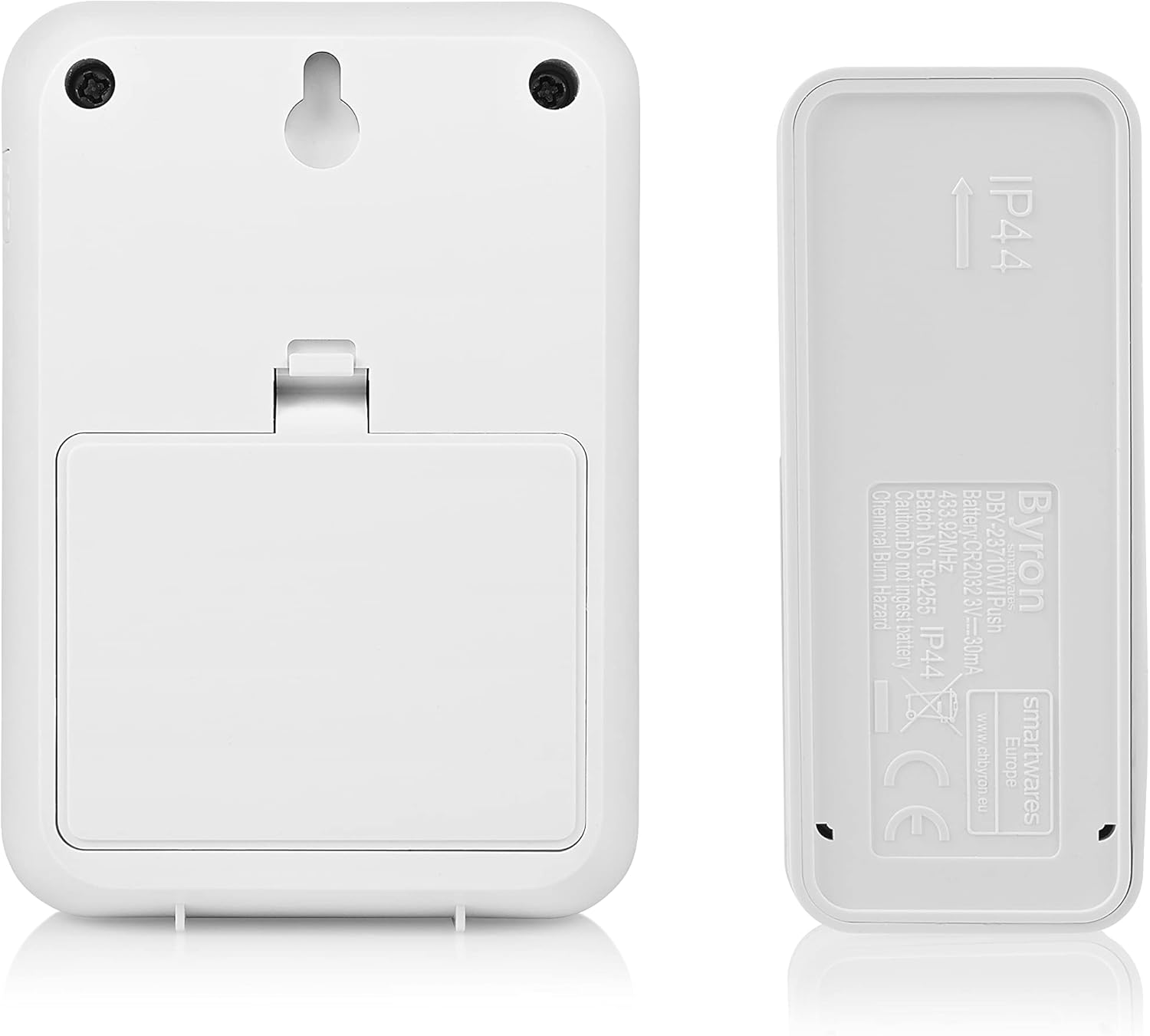
ചിത്രം 2: പിൻഭാഗം view of the chime unit and push button, illustrating battery compartments and mounting options.
2. പുഷ് ബട്ടൺ മൌണ്ട് ചെയ്യുന്നു
Choose a suitable location near your entrance, away from direct metal surfaces which can interfere with the wireless signal. The push button is typically weather-resistant (IP44 rated).
- സ്ക്രൂകൾ ഉപയോഗിച്ച്: Mark the desired mounting holes, drill pilot holes if necessary, and secure the push button using the provided screws and wall plugs.
- പശ പാഡ് ഉപയോഗിച്ച്: Clean the mounting surface thoroughly. Peel off the protective film from the adhesive pad and firmly press the push button onto the surface for at least 30 seconds.
3. ചൈം യൂണിറ്റ് സ്ഥാപിക്കൽ
Place the chime unit in a central location within your home where the sound can be easily heard. Consider the maximum wireless range of 150 meters. Avoid placing it near large metal objects or other electronic devices that might cause interference.

Figure 3: Close-up of the push button, showing the clear nameplate cover.
4. ജോടിയാക്കൽ (ആവശ്യമെങ്കിൽ)
Most Byron doorbell kits come pre-paired. If your chime does not ring when the push button is pressed, you may need to pair them:
- On the chime unit, locate the pairing button (often a small button inside the battery compartment or on the side).
- Press and hold the pairing button for a few seconds until an indicator light flashes or a sound is heard.
- Within 10 seconds, press the push button. The chime unit should ring, indicating successful pairing.
- ജോടിയാക്കൽ പരാജയപ്പെട്ടാൽ, പ്രക്രിയ ആവർത്തിക്കുക.
പ്രവർത്തന നിർദ്ദേശങ്ങൾ
1. മാറ്റുന്ന ഈണങ്ങൾ
Your doorbell kit offers 16 different melodies. To change the melody:
- Locate the melody selection button on the chime unit. This is often a small button on the side or front.
- Press the button repeatedly to cycle through the available melodies. The chime will play each melody as you select it.
- Stop pressing when you hear your desired melody. It will be saved automatically.

ചിത്രം 4: വശം view of the chime unit, indicating the location of control buttons.
2. വോളിയം ക്രമീകരിക്കുന്നു
To adjust the volume level of the chime unit:
- Locate the volume control button on the chime unit. This might be a dedicated button or integrated with the melody selection.
- Press the button to cycle through different volume levels (e.g., High, Medium, Low, Mute).
- Select the volume level that best suits your needs.
മെയിൻ്റനൻസ്
- വൃത്തിയാക്കൽ: മൃദുവായതും ഉണങ്ങിയതുമായ തുണി ഉപയോഗിച്ച് യൂണിറ്റുകൾ തുടയ്ക്കുക. അബ്രാസീവ് ക്ലീനറുകളോ ലായകങ്ങളോ ഉപയോഗിക്കരുത്.
- ബാറ്ററി മാറ്റിസ്ഥാപിക്കൽ:
- If the push button stops working or its range decreases, replace the battery (e.g., CR2032).
- If the chime unit's sound becomes weak or it stops ringing (and it's battery-operated), replace its batteries (e.g., AA).
- Always replace all batteries at the same time and ensure correct polarity.
- പരിസ്ഥിതി സംരക്ഷണം: തരംതിരിക്കാത്ത മുനിസിപ്പൽ മാലിന്യമായി ഇലക്ട്രിക്കൽ ഉപകരണങ്ങൾ തള്ളരുത്. പ്രത്യേക ശേഖരണ സൗകര്യങ്ങൾ ഉപയോഗിക്കുക. ലഭ്യമായ ശേഖരണ സംവിധാനങ്ങളെക്കുറിച്ചുള്ള വിവരങ്ങൾക്ക് നിങ്ങളുടെ പ്രാദേശിക സർക്കാരുമായി ബന്ധപ്പെടുക.
ട്രബിൾഷൂട്ടിംഗ്
| പ്രശ്നം | സാധ്യമായ കാരണം | പരിഹാരം |
|---|---|---|
| Chime does not ring when push button is pressed. |
|
|
| Chime rings intermittently or has reduced range. |
|
|
| Chime volume is too low or too high. | വോളിയം ക്രമീകരണം ക്രമീകരിക്കേണ്ടതുണ്ട്. | Adjust the volume using the volume control button on the chime unit. |
സ്പെസിഫിക്കേഷനുകൾ
| ഫീച്ചർ | വിശദാംശങ്ങൾ |
|---|---|
| മോഡൽ നമ്പർ | DBY-22321NP |
| അളവുകൾ (L x W x H) | 2.91 x 7 x 10.05 cm (Chime Unit); (Push Button dimensions not specified, but implied to be smaller) |
| ഭാരം | 104 grams (total kit) |
| വയർലെസ് ശ്രേണി | 150 മീറ്റർ വരെ (തുറന്ന സ്ഥലം) |
| മെലഡികൾ | തിരഞ്ഞെടുക്കാവുന്ന 16 മെലഡികൾ |
| വോളിയം ലെവലുകൾ | ക്രമീകരിക്കാവുന്ന |
| Power Supply (Push Button) | Battery (e.g., CR2032, included) |
| Power Supply (Chime Unit) | Battery (e.g., 3x AA, required) or Plug-in (model dependent) |
| വാല്യംtage | 4.5 Volts (for battery-operated chime) |
| IP Rating (Push Button) | IP44 (കാലാവസ്ഥയെ പ്രതിരോധിക്കുന്നത്) |
വാറൻ്റിയും പിന്തുണയും
Byron products are manufactured to high quality standards. This product is covered by a standard manufacturer's warranty against defects in materials and workmanship. Please refer to the warranty card included in your package or visit the official Byron webവിശദമായ വാറന്റി നിബന്ധനകൾക്കും വ്യവസ്ഥകൾക്കും സൈറ്റ്.
For technical support, troubleshooting assistance, or to inquire about spare parts, please contact Byron customer service through their official website or the contact information provided with your purchase. When contacting support, please have your product model number (DBY-22321NP) and purchase details ready.
കൂടുതൽ വിവരങ്ങളും പിന്തുണയും നിങ്ങൾക്ക് ഇവിടെ കണ്ടെത്താനാകും: www.byron.com