1. ആമുഖം
This manual provides essential information for the proper setup, operation, and maintenance of your Hotsmtbang Replacement Remote Control. This remote is designed to be a direct replacement for various Metz Smart LED LCD HDTV TV models, ensuring seamless compatibility and ease of use.
The remote control is pre-programmed and requires no additional setup or coding. Simply insert the batteries, and it will be ready for immediate use with your compatible Metz television.
2. ഉൽപ്പന്നം കഴിഞ്ഞുview
Familiarize yourself with the components of your new remote control.

ചിത്രം 2.1: ഫ്രണ്ട് view of the Hotsmtbang Replacement Remote Control, showing all buttons including power, number pad, navigation, volume, channel, and special function keys.
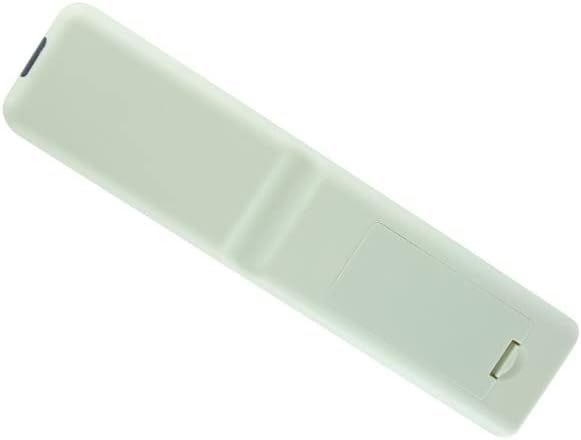
ചിത്രം 2.2: തിരികെ view of the Hotsmtbang Replacement Remote Control, showing the smooth, ergonomic design and the battery compartment cover.

ചിത്രം 2.3: തിരികെ view of the Hotsmtbang Replacement Remote Control with the battery compartment cover removed, revealing the slots for two AAA batteries.
3. സജ്ജീകരണം
Setting up your new remote control is a simple process that primarily involves installing the batteries.
3.1 ബാറ്ററി ഇൻസ്റ്റാളേഷൻ
- റിമോട്ട് കൺട്രോളിന്റെ പിൻഭാഗത്ത് ബാറ്ററി കമ്പാർട്ട്മെന്റ് കണ്ടെത്തുക.
- Slide the battery compartment cover downwards or press the latch and lift to remove it.
- Insert two (2) new AAA batteries into the compartment, ensuring the positive (+) and negative (-) terminals align correctly with the markings inside the compartment.
- സുരക്ഷിതമായി ക്ലിക്ക് ചെയ്യുന്നതുവരെ ബാറ്ററി കമ്പാർട്ട്മെന്റ് കവർ തിരികെ സ്ഥലത്തേക്ക് സ്ലൈഡുചെയ്ത് മാറ്റിസ്ഥാപിക്കുക.
പ്രധാനപ്പെട്ടത്: This remote control is pre-programmed and requires no additional programming or pairing. It will function immediately after battery installation.
4. പ്രവർത്തന നിർദ്ദേശങ്ങൾ
Once batteries are installed, your remote is ready to operate your compatible Metz TV. Point the remote directly at the TV's infrared sensor for optimal performance.
4.1 അടിസ്ഥാന പ്രവർത്തനങ്ങൾ
- പവർ: ടിവി ഓണാക്കുകയോ ഓഫാക്കുകയോ ചെയ്യുന്നു.
- നമ്പർ ബട്ടണുകൾ (0-9): ചാനലുകൾ നേരിട്ട് തിരഞ്ഞെടുക്കുന്നു.
- VOL +/-: വോളിയം ലെവൽ ക്രമീകരിക്കുന്നു.
- CH +/- (or PR +/-): ചാനലുകൾ ക്രമത്തിൽ മാറ്റുന്നു.
- മ്യൂട്ട്: ടിവി ശബ്ദം മ്യൂട്ട് ചെയ്യുകയോ അൺമ്യൂട്ട് ചെയ്യുകയോ ചെയ്യുന്നു.
- മെനു: ടിവിയുടെ പ്രധാന മെനു ആക്സസ് ചെയ്യുന്നു.
- നാവിഗേഷൻ ബട്ടണുകൾ (മുകളിലേക്ക്, താഴേക്ക്, ഇടത്, വലത്): മെനു ഓപ്ഷനുകളിലൂടെ നാവിഗേറ്റ് ചെയ്യുന്നു.
- OK (or ENTER): മെനുകളിലെ തിരഞ്ഞെടുപ്പുകൾ സ്ഥിരീകരിക്കുന്നു.
- പുറത്ത്: നിലവിലെ മെനുവിൽ നിന്നോ സ്ക്രീനിൽ നിന്നോ പുറത്തുകടക്കുന്നു.
- SOURCE (or INPUT): ഇൻപുട്ട് ഉറവിടങ്ങൾ (HDMI, AV, മുതലായവ) തിരഞ്ഞെടുക്കുന്നു.
- BACK (or RETURN): മുമ്പത്തെ സ്ക്രീനിലേക്കോ ചാനലിലേക്കോ മടങ്ങുന്നു.
Refer to your Metz TV's original user manual for specific functions of advanced buttons if present on this replacement remote.
5. പരിപാലനം
Proper care and maintenance will extend the life of your remote control.
- വൃത്തിയാക്കൽ: Use a soft, dry cloth to clean the remote control. Do not use liquid cleaners or aerosols.
- ബാറ്ററി മാറ്റിസ്ഥാപിക്കൽ: റിമോട്ടിന്റെ പ്രതികരണം മന്ദഗതിയിലാകുകയോ പ്രവർത്തിക്കുന്നത് നിർത്തുകയോ ചെയ്യുമ്പോൾ ബാറ്ററികൾ മാറ്റിസ്ഥാപിക്കുക. എല്ലായ്പ്പോഴും ഒരേ സമയം രണ്ട് ബാറ്ററികളും ഒരേ തരത്തിലുള്ള (AAA) പുതിയവ ഉപയോഗിച്ച് മാറ്റിസ്ഥാപിക്കുക.
- സംഭരണം: റിമോട്ട് ദീർഘനേരം ഉപയോഗിക്കുന്നില്ലെങ്കിൽ, ചോർച്ചയും കേടുപാടുകളും തടയാൻ ബാറ്ററികൾ നീക്കം ചെയ്യുക. തണുത്തതും വരണ്ടതുമായ സ്ഥലത്ത് സൂക്ഷിക്കുക.
- കേടുപാടുകൾ ഒഴിവാക്കുക: Do not drop the remote, expose it to extreme temperatures, or immerse it in water.
6. പ്രശ്നപരിഹാരം
നിങ്ങളുടെ റിമോട്ട് കൺട്രോളിൽ പ്രശ്നങ്ങൾ അനുഭവപ്പെടുകയാണെങ്കിൽ, ഇനിപ്പറയുന്ന ട്രബിൾഷൂട്ടിംഗ് ഘട്ടങ്ങൾ പരീക്ഷിക്കുക:
- റിമോട്ട് പ്രതികരിക്കുന്നില്ല:
- ശരിയായ പോളാരിറ്റിയോടെ (+/-) ബാറ്ററികൾ ശരിയായി ചേർത്തിട്ടുണ്ടെന്ന് ഉറപ്പാക്കുക.
- പഴയ ബാറ്ററികൾ പുതിയ AAA ബാറ്ററികൾ ഉപയോഗിച്ച് മാറ്റിസ്ഥാപിക്കുക.
- റിമോട്ട് കൺട്രോളിനും ടിവിയുടെ ഇൻഫ്രാറെഡ് സെൻസറിനും ഇടയിൽ തടസ്സങ്ങളൊന്നുമില്ലെന്ന് ഉറപ്പാക്കുക.
- Ensure you are within the effective range of the TV's sensor.
- ഇടയ്ക്കിടെയുള്ള പ്രവർത്തനം:
- This often indicates low battery power. Replace batteries.
- Check for strong light sources (like direct sunlight or bright fluorescent lights) that might interfere with the infrared signal.
If the problem persists after trying these steps, please contact the seller for further assistance.
7 സ്പെസിഫിക്കേഷനുകൾ
| ഫീച്ചർ | വിശദാംശങ്ങൾ |
|---|---|
| ബ്രാൻഡ് | ജനറിക് (Hotsmtbang) |
| മോഡൽ അനുയോജ്യത | Metz 40MTB2000, 40MTB2000Z, 32MTB2000, 32MTB2000Z, 40MTB7000, 40MTB7000Z Smart LED LCD HDTV TVs |
| ബാറ്ററികൾ ആവശ്യമാണ് | 2 x AAA (ഉൾപ്പെടുത്തിയിട്ടില്ല) |
| പ്രത്യേക ഫീച്ചർ | അധിക പ്രോഗ്രാമിംഗ് ആവശ്യമില്ല |
| ASIN | B0B2P2T116 |
| മാതൃരാജ്യം | ചൈന |
8. വാറൻ്റിയും പിന്തുണയും
This manual does not contain specific warranty information. For details regarding warranty coverage, returns, or technical support, please refer to the product listing on the retailer's webസൈറ്റ് അല്ലെങ്കിൽ വിൽപ്പനക്കാരനെ നേരിട്ട് ബന്ധപ്പെടുക.
As per product information, this remote is sold by Hotsmtbang. Please reach out to them for any support inquiries.
9. ഔദ്യോഗിക ഉൽപ്പന്ന വീഡിയോകൾ
There are no official product videos provided by the seller for this item.


