
ആമുഖം
This manual provides comprehensive instructions for the installation, operation, and maintenance of your johgee 2-Zone WiFi Sprinkler Timer. This smart irrigation system allows for remote control and automated watering schedules, enhancing efficiency and convenience for your garden, yard, or lawn. Please read this manual thoroughly before use to ensure proper functionality and longevity of the device.
ഉൽപ്പന്നം കഴിഞ്ഞുview
ഘടകങ്ങൾ
The johgee Sprinkler Timer system includes the following main components:
- Sprinkler Timer Unit: The main device with two outlets for hose connections.
- Wi-Fi Hub: Connects the timer to your home Wi-Fi network for remote control.
- Hose Adapters/Connectors: For connecting the timer to your faucet and hoses.

Image: The johgee 2-Zone WiFi Sprinkler Timer unit, showing its two outlets, control buttons, and indicator lights, alongside the compact Wi-Fi hub and various hose connection accessories.
പ്രധാന സവിശേഷതകൾ
- Smart Intelligent Irrigation System: Connects to 2.4GHz WiFi for remote programming and management via the Smart Life App.
- 2 Separate Flexible Programming Zones: Each of the two outlets can be individually programmed with up to 10 different irrigation plans.
- Timed and Cyclic Irrigation Modes: Offers flexible scheduling options, including setting irrigation duration and soaking times within a period.
- Intelligent Weather-Dependent Irrigation: Features a rain delay function (1 to 7 days) to postpone watering based on weather conditions or soil moisture.
- മൾട്ടി-സീൻ ആപ്ലിക്കേഷൻ: Suitable for various outdoor watering needs, including gardens, lawns, and yards.
- ശബ്ദ നിയന്ത്രണം: Compatible with Alexa for convenient voice commands.
സജ്ജമാക്കുക
അൺബോക്സിംഗും പ്രാരംഭ സജ്ജീകരണവും
- ബാറ്ററികൾ ചേർക്കുക: Open the battery compartment on the sprinkler timer unit and insert 4 x 1.5V AA ALKALINE batteries. Ensure correct polarity.
- ഫ്യൂസെറ്റിലേക്ക് കണക്റ്റുചെയ്യുക: Screw the sprinkler timer unit onto your outdoor hose faucet. Ensure a tight connection to prevent leaks. The timer features a 360° rotating connector for easy installation.
- ഹോസുകൾ ബന്ധിപ്പിക്കുക: Attach your garden hoses to the Zone 1 and Zone 2 outlets at the bottom of the timer.

Image: A diagram illustrating the quick installation process for the johgee Sprinkler Timer, showing connections for USA-type (3/4" hose faucet) and EU-type (1/2" hose faucet) setups, including O-rings and quick connectors.
ആപ്പ് ഇൻസ്റ്റാളേഷനും ജോടിയാക്കലും
- സ്മാർട്ട് ലൈഫ് ആപ്പ് ഡൗൺലോഡ് ചെയ്യുക: Scan the QR code on the product packaging or search for "Smart Life" in your mobile app store (Google Play for Android, App Store for iOS). You can also download it from http://smartapp.tuya.com/smartlife.
- രജിസ്റ്റർ ചെയ്യുക/ലോഗിൻ ചെയ്യുക: Open the Smart Life App and register a new account or log in if you already have one.
- Plug in Wi-Fi Hub: Plug the Wi-Fi Hub into a power outlet within 15 meters (49.2 feet) of your sprinkler timer unit. Ensure it is within range of your 2.4GHz Wi-Fi network.
- ഉപകരണം ചേർക്കുക: In the Smart Life App, tap the "+" icon to add a new device. Follow the on-screen instructions to pair the Wi-Fi Hub and then the Sprinkler Timer. Ensure your phone's Bluetooth is enabled for easier discovery.

Image: A user interacting with the Smart Life App on a smartphone, demonstrating remote control capabilities for the johgee Sprinkler Timer, with the Wi-Fi hub plugged into a wall outlet.

Image: An illustration showing the recommended maximum distance of 15 meters (49.2 feet) between the Wi-Fi Hub (plugged into an indoor outlet) and the outdoor Sprinkler Timer unit for optimal connectivity.
പ്രവർത്തന നിർദ്ദേശങ്ങൾ
സ്മാർട്ട് ലൈഫ് ആപ്പ് നിയന്ത്രണം
Once paired, you can control and monitor your johgee Sprinkler Timer from anywhere using the Smart Life App. The app provides individual control for each of the two outlets (Zone 1 and Zone 2), allowing for highly customized watering plans.

Image: The Smart Life App interface displaying options for controlling two separate outlets (Zone 1 and Zone 2) and indicating the capability for up to 40 individual watering plans.
Programming Watering Schedules
The app supports various programming modes to suit your irrigation needs:
- Timed Irrigation: Set specific start and end times for watering, with options for weekly cycles, odd days, even days, or every few days.
- Cyclic Irrigation: Define a watering duration and a soaking time within a set period. This allows for multiple shorter watering sessions to improve water absorption and reduce runoff.

Image: A screenshot of the Smart Life App showing the interface for setting up timed or scheduled irrigation, with options for start/end times and daily/weekly recurrence.

Image: A screenshot of the Smart Life App demonstrating the cyclic irrigation mode setup, allowing users to define watering duration and interval time within a specified period for up to 20 separate programs.
മഴ കാലതാമസം പ്രവർത്തനം
To conserve water and prevent overwatering during rainy periods, use the rain delay function. In the Smart Life App, you can set a delay for 1 to 7 days, pausing all scheduled irrigation.
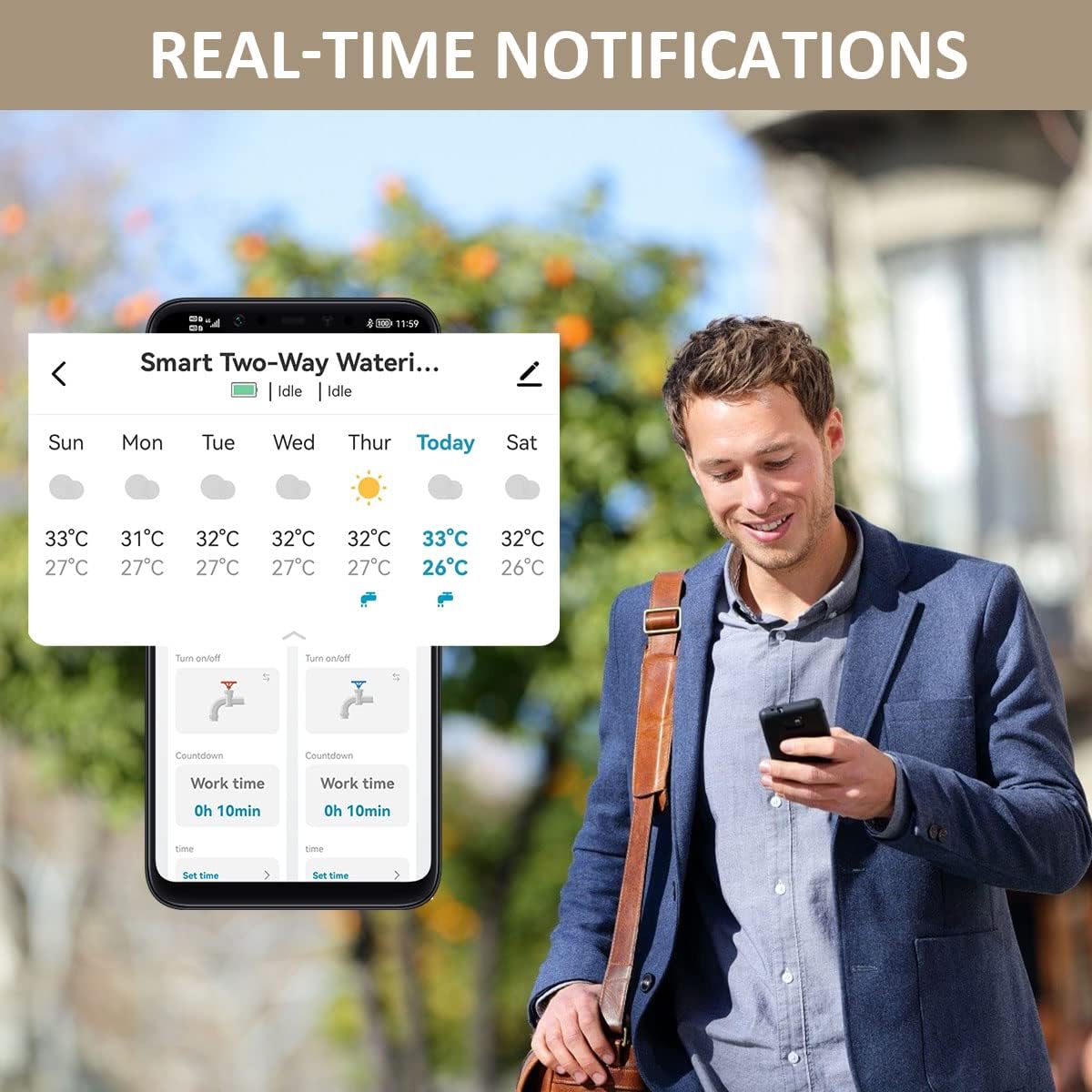
Image: The Smart Life App interface showing the rain delay option, allowing users to postpone watering for 1 to 7 days, with current weather information displayed.
മാനുവൽ നനവ്
For immediate watering needs, you can manually activate or deactivate either zone directly from the Smart Life App or by pressing the corresponding button on the timer unit.
അലക്സയ്ക്കൊപ്പം വോയ്സ് കൺട്രോൾ
The johgee Sprinkler Timer is compatible with Amazon Alexa. Once integrated with your Alexa account via the Smart Life skill, you can use voice commands such as:
- "Alexa, open the 2 zone Wifi water timer."
- "Alexa, close the 2 zone Wifi water timer."
- "Alexa, turn on Zone 1."
- "Alexa, turn off Zone 2."

Image: A man in a kitchen setting, demonstrating the use of Alexa voice commands to control the 2-zone WiFi water timer, with speech bubbles showing example കമാൻഡുകൾ.
മെയിൻ്റനൻസ്
- ബാറ്ററി മാറ്റിസ്ഥാപിക്കൽ: Replace batteries when the low battery indicator appears in the app or on the device. Use only 1.5V AA ALKALINE batteries. Rechargeable batteries (1.3V) may not provide sufficient power for reliable operation.
- വൃത്തിയാക്കൽ: Periodically clean the exterior of the timer unit with a damp തുണി. അബ്രാസീവ് ക്ലീനറുകൾ ഉപയോഗിക്കരുത് അല്ലെങ്കിൽ യൂണിറ്റ് വെള്ളത്തിൽ മുക്കരുത്.
- ശൈത്യകാല സംഭരണം: Before the first frost, disconnect the timer from the faucet, remove batteries, and store the unit indoors in a dry, protected area to prevent freezing damage.
- ചോർച്ച പരിശോധിക്കുക: Regularly inspect all connections for leaks. Ensure O-rings are properly seated and connections are tight.
ട്രബിൾഷൂട്ടിംഗ്
| പ്രശ്നം | സാധ്യമായ കാരണം | പരിഹാരം |
|---|---|---|
| Timer not connecting to App/Wi-Fi. | Incorrect Wi-Fi password, hub out of range, 5GHz Wi-Fi network, pairing issue. |
|
| Water not flowing or timer not turning off. | Low batteries, water pressure issues, valve malfunction, programming error. |
|
| കണക്ഷനുകളിൽ നിന്ന് വെള്ളം ചോരുന്നു. | Loose connections, damaged O-rings, incorrect installation. |
|
| App settings not saving or updating. | App glitch, connectivity issue. |
|
ഉൽപ്പന്ന സവിശേഷതകൾ
| സ്പെസിഫിക്കേഷൻ | വിശദാംശങ്ങൾ |
|---|---|
| മോഡൽ | SGW02W |
| പ്രവർത്തന താപനില | 4.5-45°C (40.1-113°F) |
| വാട്ടർപ്രൂഫ് റേറ്റിംഗ് | IP55 |
| പ്രവർത്തന സമ്മർദ്ദം | 0.04-0.8Mpa (5.8-116 PSI) |
| വൈദ്യുതി വിതരണം | 4 x 1.5V AA ALKALINE Batteries |
| ഹോസ് ടാപ്പ് കണക്ഷൻ | 3/4" External Thread |
| മെറ്റീരിയൽ | അക്രിലോണിട്രൈൽ ബ്യൂട്ടാഡീൻ സ്റ്റൈറൈൻ (എബിഎസ്) |
| ഇനത്തിൻ്റെ ഭാരം | 400 ഗ്രാം (0.88 പൗണ്ട്) |
| പാഴ്സൽ അളവുകൾ | 15.4 x 14.9 x 6.3 സെ.മീ (6.06 x 5.87 x 2.48 ഇഞ്ച്) |
| സ്ക്രീൻ വലിപ്പം | 2 ഇഞ്ച് |
| ക്രമീകരണങ്ങളുടെ എണ്ണം | 22 |
വാറൻ്റിയും പിന്തുണയും
For warranty information or technical support, please refer to the product packaging or contact johgee customer service directly. Keep your purchase receipt for warranty claims.