
1. ആമുഖം
The SofaBaton U2 is a universal remote control designed to consolidate control of multiple home entertainment devices. It supports both Infrared (IR) and Bluetooth devices, allowing management of up to 15 different components such as Smart TVs, DVD/Blu-ray players, set-top boxes (STB), projectors, and streaming players. The remote features an OLED screen, a scroll wheel for device selection, and programmable macro functions.
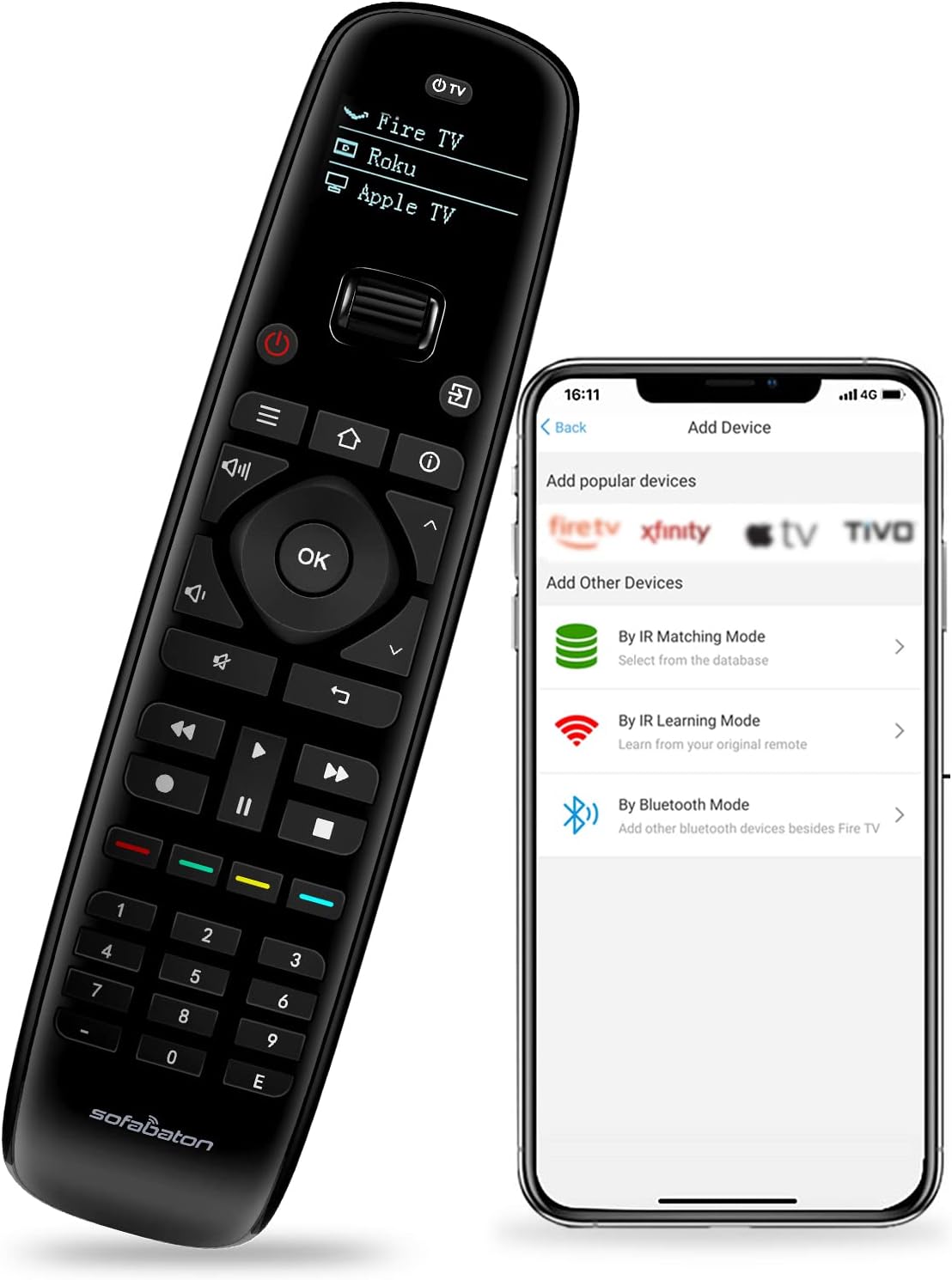
Image 1.1: The SofaBaton U2 remote control shown alongside its companion smartphone application interface, illustrating the device setup process.
2. സജ്ജീകരണം
2.1 ബാറ്ററി ഇൻസ്റ്റാളേഷൻ
The SofaBaton U2 remote requires two AA batteries for operation. To install the batteries:
- റിമോട്ടിന്റെ പിൻഭാഗത്ത് ബാറ്ററി കമ്പാർട്ട്മെന്റ് കവർ കണ്ടെത്തുക.
- Press and hold the black tab located above the battery compartment.
- While holding the tab, slide down the battery compartment cover to remove it.
- ശരിയായ പോളാരിറ്റി (+/-) ഉറപ്പാക്കിക്കൊണ്ട് രണ്ട് AA ബാറ്ററികൾ ഇടുക.
- സുരക്ഷിതമായി ക്ലിക്ക് ചെയ്യുന്നതുവരെ ബാറ്ററി കമ്പാർട്ട്മെന്റ് കവർ തിരികെ സ്ഥലത്തേക്ക് സ്ലൈഡുചെയ്ത് മാറ്റിസ്ഥാപിക്കുക.

Image 2.1: Illustration of the battery compartment on the SofaBaton U2 remote, showing the process of inserting AA batteries.
2.2 Smartphone App Download and Device Pairing
The SofaBaton U2 is configured using a smartphone application. This app allows you to add devices from a cloud database, learn IR signals, and pair Bluetooth devices.
- Download the SofaBaton app from your device's app store (available for Apple iOS and Android).
- ഒരു അക്കൗണ്ട് സൃഷ്ടിക്കുന്നതിനോ ലോഗിൻ ചെയ്യുന്നതിനോ ആപ്പ് തുറന്ന് ഓൺ-സ്ക്രീൻ നിർദ്ദേശങ്ങൾ പാലിക്കുക.
- Select the option to add a new device. You will be presented with several pairing modes:
- ഐആർ മാച്ചിംഗ് മോഡ്: ഇതിനായി തിരയുക your device by brand and model number within the app's extensive code library. This database supports over 500,000 devices from 6,000+ brands.
- IR ലേണിംഗ് മോഡ്: If your device is not found in the database, you can use the original remote control to teach the U2 remote specific functions. Point the original remote at the U2's IR receiver and press the desired button.
- ബ്ലൂടൂത്ത് മോഡ്: For compatible Bluetooth devices (e.g., Fire TV), select this option to pair the U2 remote directly.
- Once a device is successfully added, it will appear on the U2 remote's OLED screen.

Image 2.2: The SofaBaton app interface demonstrating access to a cloud database for device code matching.
3. പ്രവർത്തന നിർദ്ദേശങ്ങൾ
3.1 ഉപകരണ തിരഞ്ഞെടുപ്പ്
The SofaBaton U2 features an ergonomic scroll wheel for quick switching between configured devices. Rotate the scroll wheel to cycle through the devices listed on the OLED screen. Press the scroll wheel to select the desired device.
3.2 Basic Control Functions
After selecting a device, the remote's buttons will control that specific device. The U2 remote includes standard buttons for power, volume, channel, navigation, playback controls (play, pause, fast forward, rewind, stop), and a numeric keypad.

ചിത്രം 3.1: മുൻഭാഗം view of the SofaBaton U2 remote control, highlighting its button layout and OLED screen.
3.3 Programmable Macros
Macros allow you to execute a sequence of up to 10 commands with a single button press. These commands can be from the same device or different devices. Macros are configured via the SofaBaton smartphone app.
- Open the SofaBaton app and navigate to the settings for your U2 remote.
- Select the 'Macro' or 'Customize Key' option.
- Choose a button on the U2 remote to assign the macro to.
- Add the desired sequence of commands, specifying the device for each command.
- Save the macro. When the assigned button is pressed on the U2 remote, the sequence will execute.

Image 3.2: Visual representation of macro programming, showing how multiple commands can be assigned to a single button on the SofaBaton U2 remote.
3.4 Infrared (IR) Signal Range
The U2 remote offers an upgraded infrared signal range of up to 35 feet, providing reliable control over your devices from a greater distance.

Image 3.3: Diagram illustrating the extended 35-foot infrared signal range of the SofaBaton U2 remote control.
3.5 Raise to Wake Feature
The OLED screen on the U2 remote automatically illuminates when the remote is picked up, enhancing visibility in various lighting conditions. The screen will automatically turn off after a period of inactivity to conserve battery power.
4. പരിപാലനം
4.1 വൃത്തിയാക്കൽ
To clean the remote, use a soft, dry cloth. Avoid using abrasive cleaners, solvents, or harsh chemicals, as these can damage the remote's surface or internal components.
4.2 ബാറ്ററി മാറ്റിസ്ഥാപിക്കൽ
Replace the AA batteries when the remote's performance diminishes or the OLED screen indicates low power. Refer to Section 2.1 for battery installation instructions.
5. പ്രശ്നപരിഹാരം
- റിമോട്ട് പ്രതികരിക്കുന്നില്ല:
- ബാറ്ററി ലെവലുകൾ പരിശോധിച്ച് ആവശ്യമെങ്കിൽ മാറ്റിസ്ഥാപിക്കുക.
- Ensure the remote is pointed directly at the device's IR receiver.
- Verify that the correct device is selected on the U2 remote's OLED screen.
- ഉപകരണം കമാൻഡുകളോട് പ്രതികരിക്കുന്നില്ല:
- Confirm that the device is properly configured in the SofaBaton app. Try re-pairing the device or using the IR learning function.
- റിമോട്ടിനും ഉപകരണത്തിനും ഇടയിൽ തടസ്സങ്ങളൊന്നുമില്ലെന്ന് ഉറപ്പാക്കുക.
- For Bluetooth devices, ensure the device's Bluetooth is enabled and the remote is within range.
- Scroll wheel is not functioning correctly:
- ഏതെങ്കിലും അവശിഷ്ടങ്ങൾ നീക്കം ചെയ്യാൻ സ്ക്രോൾ വീലിന് ചുറ്റും സൌമ്യമായി വൃത്തിയാക്കുക.
- Restart the remote by removing and reinserting the batteries.
- OLED screen is blank:
- The screen may be off due to inactivity; pick up the remote to activate the 'Raise to Wake' feature.
- ബാറ്ററി ലെവലുകൾ പരിശോധിക്കുക.
6 സ്പെസിഫിക്കേഷനുകൾ
| ഫീച്ചർ | വിശദാംശങ്ങൾ |
|---|---|
| ഉൽപ്പന്ന അളവുകൾ | 6 x 3 x 0.01 ഇഞ്ച് |
| ഇനത്തിൻ്റെ ഭാരം | 10.2 ഔൺസ് |
| ഇനം മോഡൽ നമ്പർ | U2 |
| ബാറ്ററികൾ | 2 AA ബാറ്ററികൾ ആവശ്യമാണ് |
| നിർമ്മാതാവ് | SofaBaton |
| പ്രത്യേക സവിശേഷതകൾ | Digital Display, Ergonomic, Lightweight, Pre Programmed, Universal |
| നിറം | കറുപ്പ് |
| പിന്തുണയ്ക്കുന്ന ഉപകരണങ്ങളുടെ പരമാവധി എണ്ണം | 15 |
| അനുയോജ്യമായ ഉപകരണങ്ങൾ | DVD/Blu-ray Player, Home Theater, Set Top Box, Stereo System, Television |
7. വാറൻ്റിയും പിന്തുണയും
7.1 വാറൻ്റി വിവരങ്ങൾ
Please refer to the warranty card included with your product or visit the official SofaBaton website for detailed warranty terms and conditions. Warranty coverage typically includes manufacturing defects for a specified period from the date of purchase.
7.2 ഉപഭോക്തൃ പിന്തുണ
For technical assistance, troubleshooting, or inquiries regarding your SofaBaton U2 Universal Remote Control, please contact SofaBaton customer support. Contact information can usually be found on the manufacturer's webസൈറ്റ് അല്ലെങ്കിൽ ഉൽപ്പന്ന പാക്കേജിംഗിൽ.
8. പ്രധാന കുറിപ്പുകൾ
- The SofaBaton U2 remote control does not support Wireless (Wi-Fi) devices. It is compatible with Infrared (IR) and Bluetooth devices only.
- Ensure your smartphone has an active internet connection when using the SofaBaton app for device setup and database access.