
H2263D
User Manual: Havit H2263D Metal Decoration Single Port Headphone 3.5mm - White
മോഡൽ: H2263D
1. ആമുഖം
വാങ്ങിയതിന് നന്ദി.asing the Havit H2263D Metal Decoration Single Port Headphone. This manual provides essential information for the proper setup, operation, and maintenance of your new headphones. Please read this manual thoroughly before use to ensure optimal performance and longevity of the product.
2 സുരക്ഷാ വിവരങ്ങൾ
- കേൾവിക്ക് കേടുപാടുകൾ സംഭവിക്കാതിരിക്കാൻ ഉയർന്ന ശബ്ദത്തിൽ ദീർഘനേരം കേൾക്കുന്നത് ഒഴിവാക്കുക.
- വാഹനമോടിക്കുമ്പോഴോ, സൈക്കിൾ ചവിട്ടുമ്പോഴോ, അല്ലെങ്കിൽ ആംബിയന്റ് ശബ്ദങ്ങൾ കേൾക്കേണ്ട സാഹചര്യങ്ങളിലോ ഹെഡ്ഫോണുകൾ ഉപയോഗിക്കരുത്.
- Keep the headphones away from water, moisture, and extreme temperatures.
- ഹെഡ്ഫോണുകൾ വേർപെടുത്താനോ പരിഷ്ക്കരിക്കാനോ ശ്രമിക്കരുത്. ഇത് വാറന്റി അസാധുവാക്കുകയും കേടുപാടുകൾക്ക് കാരണമാവുകയും ചെയ്യും.
- Clean the headphones with a soft, dry cloth only.
3. പാക്കേജ് ഉള്ളടക്കം
തുറക്കുമ്പോൾ പാക്കേജ് ഉള്ളടക്കം പരിശോധിക്കുക. ഏതെങ്കിലും ഇനങ്ങൾ നഷ്ടപ്പെട്ടാലോ കേടുപാടുകൾ സംഭവിച്ചാലോ, നിങ്ങളുടെ റീട്ടെയിലറെ ബന്ധപ്പെടുക.
- Havit H2263D Headphones (1 unit)
- Integrated 3.5mm Audio Cable (1 unit)
- ഉപയോക്തൃ മാനുവൽ (ഈ പ്രമാണം)

Image: Havit H2263D headphones showing the integrated 3.5mm audio cable and inline control.
4. ഉൽപ്പന്നം കഴിഞ്ഞുview
The Havit H2263D headphones feature a comfortable over-ear design with metal decoration. They are equipped with a single 3.5mm audio jack for universal compatibility.

ചിത്രം: മുൻഭാഗം view of the Havit H2263D headphones, highlighting the adjustable headband and earcups.
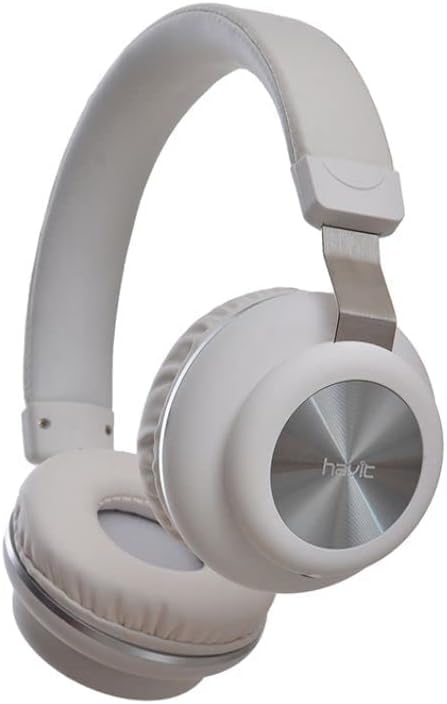
ചിത്രം: വശം view of the Havit H2263D headphones, showing the "havit" branding on the earcup and the metal decorative element.
പ്രധാന സവിശേഷതകൾ:
- Over-ear design for comfortable listening.
- Durable metal decoration.
- Universal 3.5mm audio jack compatibility.
- Integrated cable with inline controls.
5. സജ്ജീകരണം
Setting up your Havit H2263D headphones is straightforward:
- Identify the Audio Port: Locate the 3.5mm audio jack on your audio source device (e.g., smartphone, tablet, computer, gaming console).
- Connect the Headphones: Insert the 3.5mm plug of the headphone cable firmly into the audio jack of your device.
- ഫിറ്റ് ക്രമീകരിക്കുക: Place the headphones over your ears. Adjust the headband to ensure a comfortable and secure fit. The earcups should fully cover your ears for optimal sound isolation and comfort.
6. പ്രവർത്തിക്കുന്നു
Once connected, your headphones are ready for use.
ഓഡിയോ പ്ലേബാക്ക്:
- നിങ്ങളുടെ ബന്ധിപ്പിച്ച ഉപകരണത്തിൽ നിന്ന് ഓഡിയോ പ്ലേ ചെയ്യാൻ ആരംഭിക്കുക.
- Adjust the volume using the volume controls on your audio source device.
- The inline control on the cable may offer basic functions like play/pause or track skipping depending on your device's compatibility. Refer to your device's manual for specific inline control functionality.
മൈക്രോഫോൺ:
The Havit H2263D headphones include an integrated microphone for hands-free calls and voice commands. Ensure your device recognizes the headphone's microphone input.
7. പരിപാലനം
Proper maintenance will extend the life of your headphones:
- വൃത്തിയാക്കൽ: Use a soft, dry, lint-free cloth to wipe the earcups and headband. Do not use liquid cleaners or abrasive materials.
- സംഭരണം: ഉപയോഗത്തിലില്ലാത്തപ്പോൾ, ഹെഡ്ഫോണുകൾ വൃത്തിയുള്ളതും വരണ്ടതുമായ സ്ഥലത്ത് സൂക്ഷിക്കുക, നേരിട്ടുള്ള സൂര്യപ്രകാശവും ഉയർന്ന താപനിലയും ഏൽക്കുന്നതിൽ നിന്ന് അകറ്റി നിർത്തുക. കേബിൾ കുരുങ്ങുന്നത് ഒഴിവാക്കുക.
- കേബിൾ കെയർ: Do not pull on the cable to disconnect the headphones. Always grasp the plug. Avoid sharp bends or kinks in the cable.
8. പ്രശ്നപരിഹാരം
നിങ്ങളുടെ ഹെഡ്ഫോണുകളിൽ പ്രശ്നങ്ങൾ നേരിടുകയാണെങ്കിൽ, ഇനിപ്പറയുന്ന പൊതുവായ പ്രശ്നങ്ങളും പരിഹാരങ്ങളും പരിശോധിക്കുക:
| പ്രശ്നം | സാധ്യമായ കാരണം | പരിഹാരം |
|---|---|---|
| ശബ്ദമോ കുറഞ്ഞ വോളിയമോ ഇല്ല |
|
|
| ശബ്ദ വികലത അല്ലെങ്കിൽ പൊട്ടൽ |
|
|
| മൈക്രോഫോൺ പ്രവർത്തിക്കുന്നില്ല |
|
|
9 സ്പെസിഫിക്കേഷനുകൾ
| ഫീച്ചർ | വിശദാംശങ്ങൾ |
|---|---|
| മോഡൽ | H2263D |
| ബ്രാൻഡ് | Generic (Havit) |
| കണക്റ്റിവിറ്റി ടെക്നോളജി | വയർഡ് |
| ഹെഡ്ഫോണുകൾ ജാക്ക് | 3.5 mm ജാക്ക് |
| ഹെഡ്ഫോണുകൾ ഫോം ഫാക്ടർ | ഓവർ-ഇയർ |
| നിറം | വെള്ള |
| മെറ്റീരിയൽ | ലോഹം |
| ഉൽപ്പന്നത്തിൻ്റെ പ്രത്യേക ഉപയോഗങ്ങൾ | ഗെയിമിംഗ് ഹെഡ്സെറ്റ് |
| പാക്കേജ് അളവുകൾ | 20.8 x 18.2 x 9.3 സെ.മീ |
| ഇനത്തിൻ്റെ ഭാരം | 300 ഗ്രാം |
10. വാറൻ്റിയും പിന്തുണയും
This product comes with a standard manufacturer's warranty. For detailed warranty terms and conditions, please refer to the documentation provided at the time of purchase or contact your retailer. For technical support or service inquiries, please reach out to the point of purchase or the brand's official support channels.
വാറൻ്റി ക്ലെയിമുകൾക്കായി നിങ്ങളുടെ വാങ്ങിയതിൻ്റെ തെളിവ് സൂക്ഷിക്കുക.
Ask a question about this manual
Ask about setup, troubleshooting, compatibility, parts, safety, or missing instructions. Manuals+ will review the question and use this page’s manual context to help answer it.