
1. ആമുഖം
Thank you for choosing the LoopTone DS-R08-UW Multifunction Vintage Radio. This device combines classic aesthetics with modern functionality, offering AM/FM radio, Bluetooth connectivity, and playback from USB drives and SD cards. This manual provides essential information for safe and effective use of your new radio.
2 സുരക്ഷാ വിവരങ്ങൾ
- തീയോ വൈദ്യുതാഘാതമോ തടയാൻ യൂണിറ്റ് മഴയിലോ ഈർപ്പത്തിലോ തുറന്നുകാട്ടരുത്.
- റേഡിയേറ്ററുകൾ, ഹീറ്റ് രജിസ്റ്ററുകൾ, സ്റ്റൗകൾ അല്ലെങ്കിൽ മറ്റ് ഉപകരണങ്ങൾ (ഉൾപ്പെടെ) പോലുള്ള താപ സ്രോതസ്സുകൾക്ക് സമീപം യൂണിറ്റ് സ്ഥാപിക്കുന്നത് ഒഴിവാക്കുക. ampലൈഫയറുകൾ) ചൂട് ഉത്പാദിപ്പിക്കുന്നത്.
- നിർമ്മാതാവ് വ്യക്തമാക്കിയ അറ്റാച്ച്മെൻ്റുകൾ/ആക്സസറികൾ മാത്രം ഉപയോഗിക്കുക.
- മിന്നൽ കൊടുങ്കാറ്റുകളുടെ സമയത്തോ ദീർഘനേരം ഉപയോഗിക്കാത്ത സമയത്തോ ഈ ഉപകരണം അൺപ്ലഗ് ചെയ്യുക.
- ഈ ഉൽപ്പന്നം സ്വയം സേവിക്കാൻ ശ്രമിക്കരുത്. യോഗ്യതയുള്ള സേവന ഉദ്യോഗസ്ഥർക്ക് എല്ലാ സേവനങ്ങളും റഫർ ചെയ്യുക.
- ശരിയായ വായുസഞ്ചാരം ഉറപ്പാക്കുക, വായുസഞ്ചാര ദ്വാരങ്ങളൊന്നും തടയരുത്.
3. പാക്കേജ് ഉള്ളടക്കം
പാക്കേജിൽ ഇനിപ്പറയുന്ന ഇനങ്ങൾ ഉണ്ടോ എന്ന് പരിശോധിക്കുക:
- LoopTone DS-R08-UW Vintagഇ റേഡിയോ
- പവർ കോർഡ്
- ഉടമയുടെ മാനുവൽ (ഈ പ്രമാണം)
4. ഉൽപ്പന്നം കഴിഞ്ഞുview


നിയന്ത്രണങ്ങളും തുറമുഖങ്ങളും:
- ട്യൂണിംഗ് ഡയൽ: Used to select AM or FM radio frequencies.
- മോഡ് സെലക്ടർ: Rotary switch to select between Bluetooth (BT/USB), FM, and AM modes.
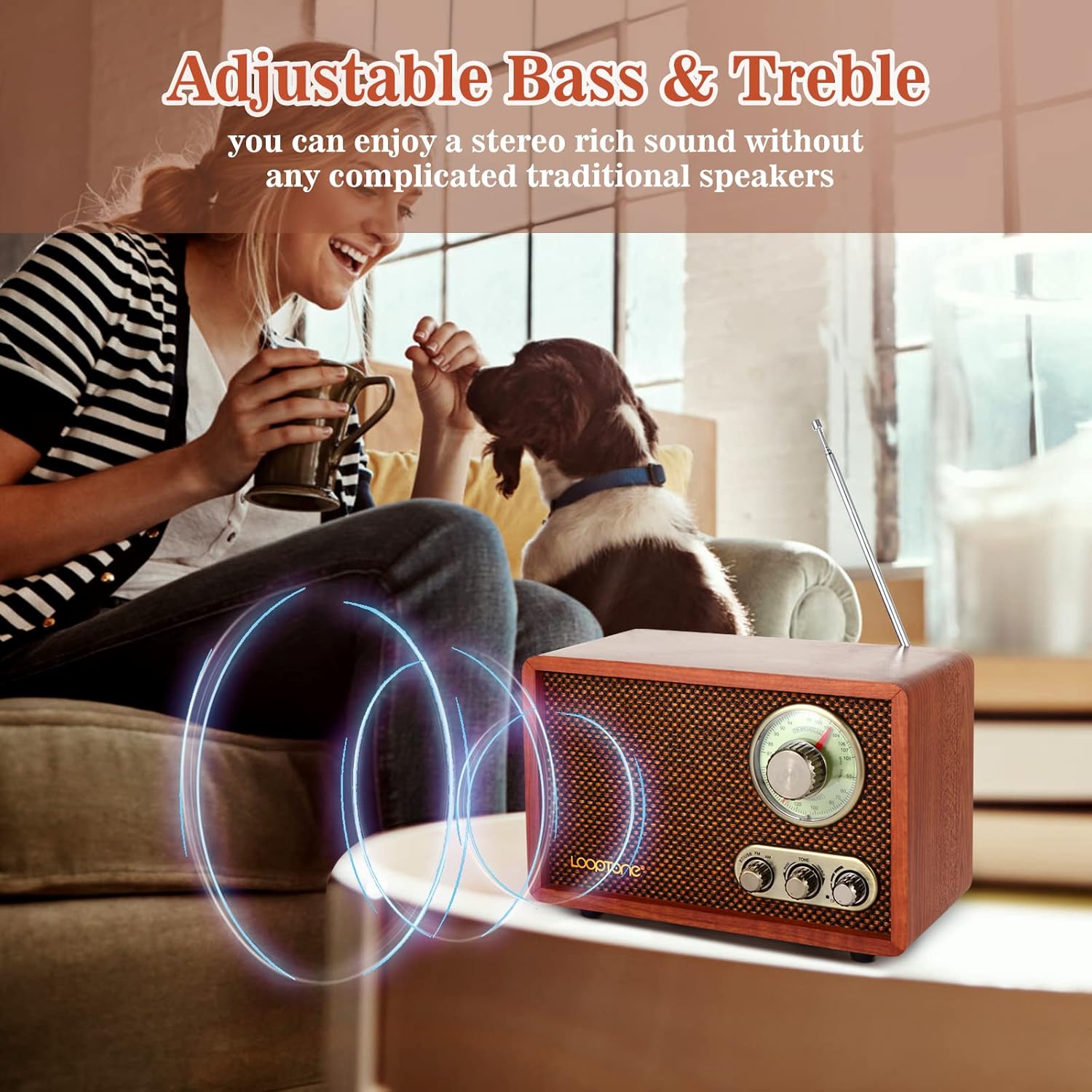
- ടോൺ നിയന്ത്രണം: Adjusts the bass and treble levels for desired audio output.
- വോളിയം/പവർ നോബ്: Turns the unit on/off and controls the audio volume.
- എഫ്എം ആന്റിന: Telescopic antenna for improved FM reception.
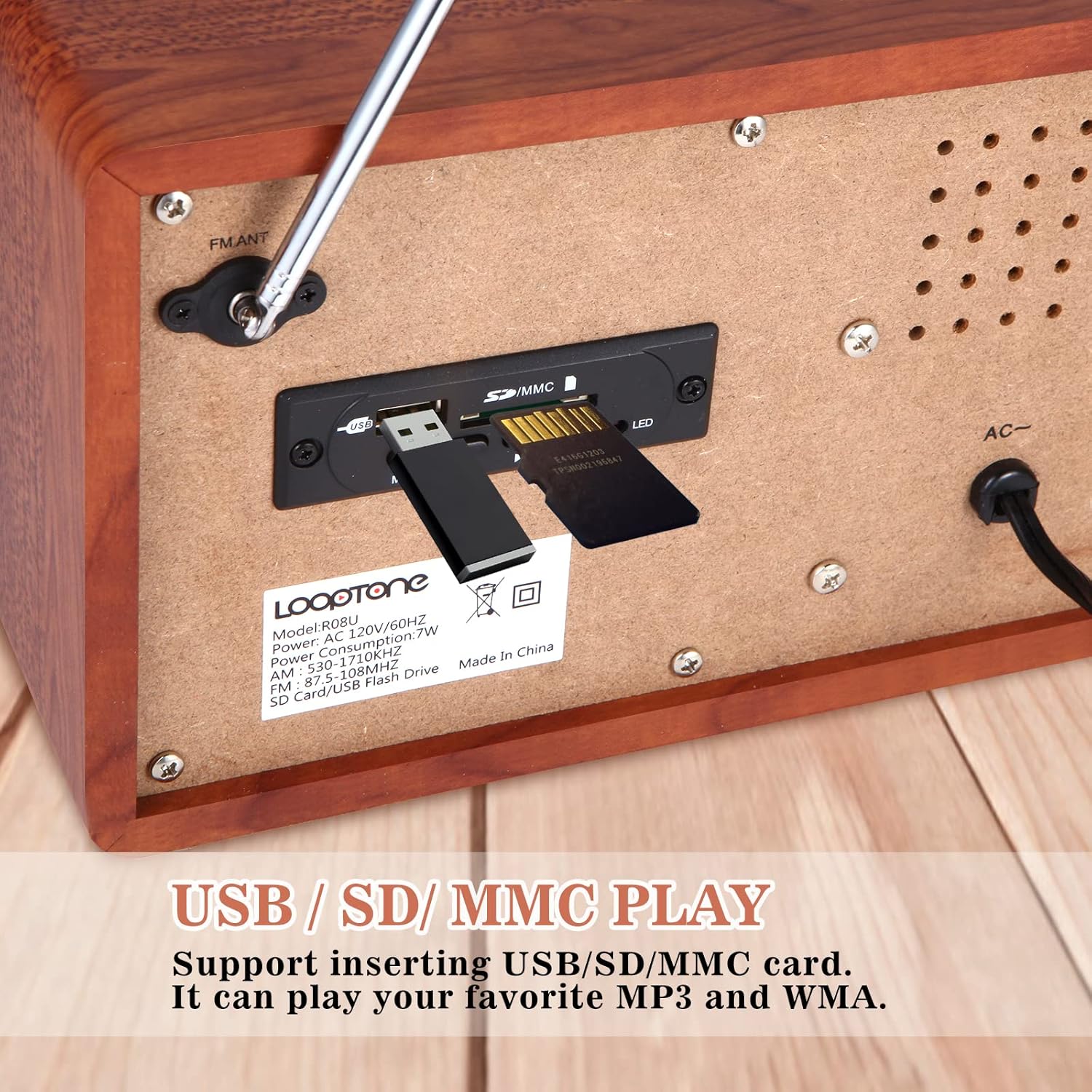
- USB പോർട്ട്: For playing MP3/WMA fileഒരു യുഎസ്ബി ഫ്ലാഷ് ഡ്രൈവിൽ നിന്ന്.
- SD/MMC കാർഡ് സ്ലോട്ട്: For playing MP3/WMA files from an SD or MMC memory card.
- എസി പവർ ഇൻപുട്ട്: Connects the radio to a standard wall outlet for power.
5. സജ്ജീകരണം
- പവർ കണക്ഷൻ: Connect the provided AC power cord to the AC power input on the back of the radio (Figure 3) and then plug it into a standard wall outlet.
- ആൻ്റിന സജ്ജീകരണം: For optimal FM reception, extend the telescopic FM antenna located on the back of the unit. For AM reception, the radio has a built-in AM antenna.
Video 1: An official LoopTone video demonstrating the radio's features and setup, including power connection and antenna extension.
6. പ്രവർത്തന നിർദ്ദേശങ്ങൾ
6.1. പവർ ഓൺ/ഓഫ്, വോളിയം നിയന്ത്രണം
Rotate the Volume/Power knob clockwise to turn the radio on. Continue rotating to increase the volume. Rotate counter-clockwise to decrease the volume and turn the radio off.
6.2. Radio Mode (AM/FM)
- Turn on the radio using the Volume/Power knob.
- Set the Mode Selector to 'FM' or 'AM' as desired.
- Rotate the Tuning Dial to search for radio stations. The frequency will be displayed on the dial.
- For FM reception, extend and adjust the telescopic antenna for the best signal.
6.3. ബ്ലൂടൂത്ത് മോഡ്
- റേഡിയോ ഓണാക്കുക.
- Set the Mode Selector to 'BT/USB'. The radio will enter Bluetooth pairing mode, indicated by a blue light.
- On your smart device (phone, tablet, etc.), enable Bluetooth and search for available devices.
- Select 'LoopTone' from the list to pair. Once paired, you will hear a confirmation sound.
- You can now play audio from your device through the radio.
6.4. യുഎസ്ബി/എസ്ഡി പ്ലേബാക്ക്
- റേഡിയോ ഓണാക്കുക.
- Insert a USB flash drive or an SD/MMC card containing MP3/WMA audio files into the respective port on the back of the radio (Figure 3).
- Set the Mode Selector to 'BT/USB'. The radio will automatically detect and begin playing the audio files.
6.5. ടോൺ നിയന്ത്രണം
Use the 'Tone' knob on the front panel to adjust the audio's bass and treble. Rotate it to the left for more bass or to the right for more treble, customizing the sound to your preference.
7. പരിപാലനം
- വൃത്തിയാക്കൽ: Use a soft, dry cloth to clean the exterior of the radio. Do not use liquid cleaners or aerosol sprays.
- സംഭരണം: ദീർഘനേരം ഉപയോഗിക്കാത്തപ്പോൾ, നേരിട്ടുള്ള സൂര്യപ്രകാശത്തിൽ നിന്നും കടുത്ത താപനിലയിൽ നിന്നും മാറി തണുത്തതും വരണ്ടതുമായ സ്ഥലത്ത് റേഡിയോ സൂക്ഷിക്കുക.
- ആന്റിന കെയർ: വളയുകയോ പൊട്ടുകയോ ചെയ്യാതിരിക്കാൻ ടെലിസ്കോപ്പിക് ആന്റിന സൌമ്യമായി കൈകാര്യം ചെയ്യുക.
8. പ്രശ്നപരിഹാരം
| പ്രശ്നം | സാധ്യമായ കാരണം | പരിഹാരം |
|---|---|---|
| ശക്തിയില്ല | Power cord not connected or outlet not working. | Ensure the power cord is securely plugged into the radio and a working wall outlet. |
| ശബ്ദമില്ല | Volume too low or incorrect mode selected. | Increase the volume. Verify the correct mode (AM, FM, BT/USB) is selected. |
| മോശം റേഡിയോ സ്വീകരണം | ആന്റിന നീട്ടിയിട്ടില്ല അല്ലെങ്കിൽ ദുർബലമായ സിഗ്നൽ. | Extend and adjust the FM antenna. Try relocating the radio to an area with better signal. |
| ബ്ലൂടൂത്ത് കണക്റ്റ് ചെയ്യുന്നില്ല | Radio not in pairing mode or device out of range. | Ensure the radio is in 'BT/USB' mode and the blue light is flashing. Keep your device within 10 meters of the radio. |
| USB/SD പ്ലേ ചെയ്യുന്നില്ല | തെറ്റാണ് file format or mode. | ഓഡിയോ ഉറപ്പാക്കുക files are in MP3 or WMA format. Verify the mode selector is set to 'BT/USB'. |
9 സ്പെസിഫിക്കേഷനുകൾ
- മോഡൽ നമ്പർ: DS-R08-UW
- ഉൽപ്പന്ന അളവുകൾ: 9.45"L x 4.72"W x 6.3"H (24 x 12 x 16 സെ.മീ)
- ഇനത്തിൻ്റെ ഭാരം: 3.63 പൗണ്ട് (1.65 കി.ഗ്രാം)
- ബ്രാൻഡ്: ലൂപ്ടോൺ
- നിറം: ബ്രൗൺ
- കണക്റ്റിവിറ്റി ടെക്നോളജി: ബ്ലൂടൂത്ത്
- പ്രത്യേക സവിശേഷത: Built-In AM Antenna
- ട്യൂണർ സാങ്കേതികവിദ്യ: FM/AM
- ഊർജ്ജ സ്രോതസ്സ്: കോർഡഡ് ഇലക്ട്രിക്
- പിന്തുണയ്ക്കുന്ന റേഡിയോ ബാൻഡുകൾ: AM/FM
10. വാറൻ്റിയും പിന്തുണയും
LoopTone products are designed and manufactured to the highest quality standards. For warranty information or technical support, please refer to the contact details provided with your purchase or visit the official LoopTone webസൈറ്റ്. വാറന്റി ക്ലെയിമുകൾക്കായി നിങ്ങളുടെ വാങ്ങലിന്റെ തെളിവ് സൂക്ഷിക്കുക.