
ആൻസെൽ HD3500
ANCEL HD3500 Pro ഡയഗ്നോസ്റ്റിക് സ്കാനർ ഉപയോക്തൃ മാനുവൽ
മോഡൽ: HD3500
1. ആമുഖം
This manual provides detailed instructions for the operation and maintenance of the ANCEL HD3500 Pro Diagnostic Scanner. This device is designed for comprehensive diagnostic functions on both light trucks and passenger cars, offering features such as code reading, live data streaming, service resets, and active tests.
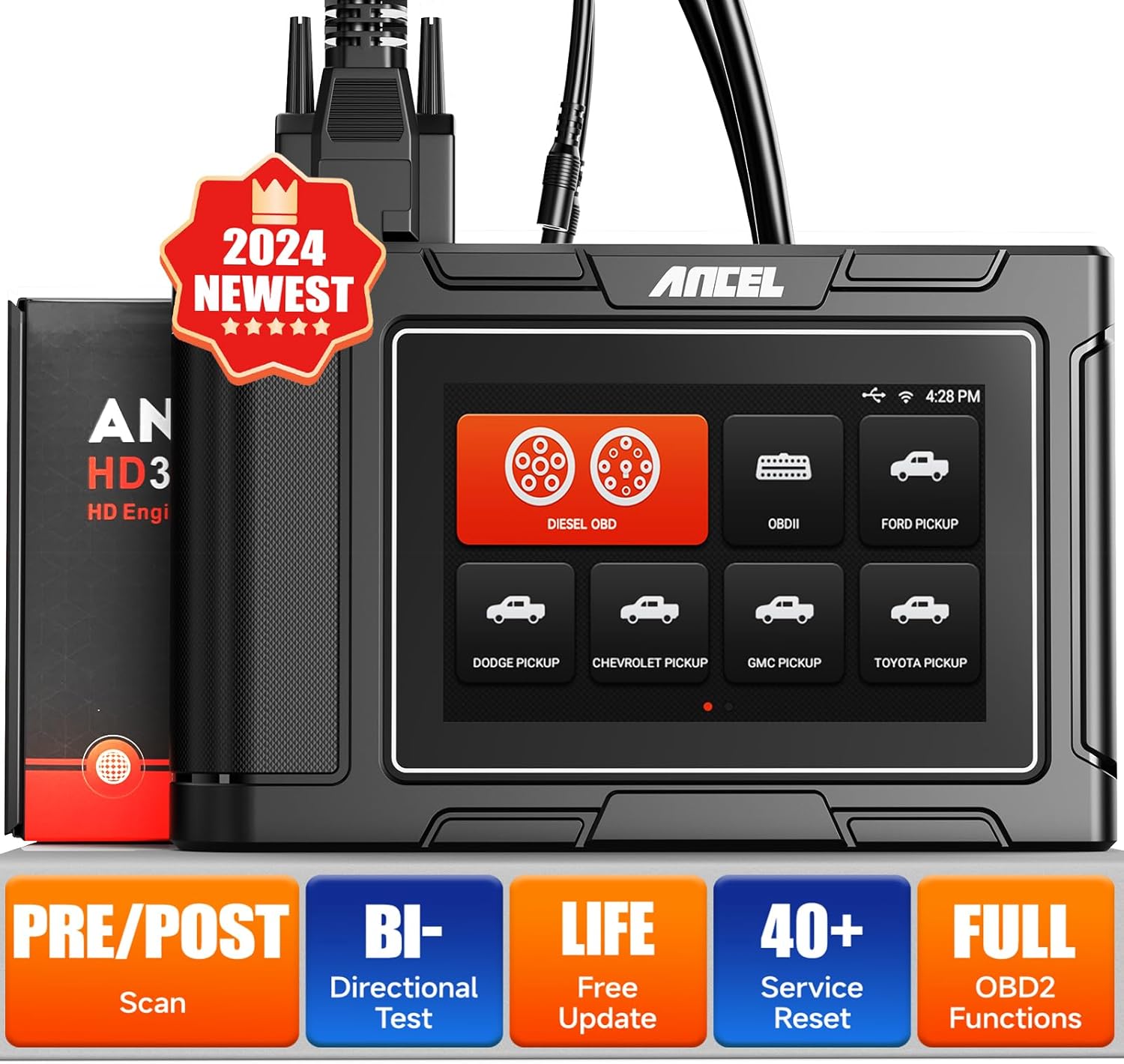
Figure 1: ANCEL HD3500 Pro Diagnostic Scanner
2. പാക്കേജ് ഉള്ളടക്കം
Upon opening the package, verify that all items listed below are present and in good condition. If any items are missing or damaged, please contact your vendor.
- ANCEL HD3500 Pro Main Unit
- OBD-II 16-pin Diagnostic Cable
- Various Heavy-Duty Diagnostic Adapters (e.g., 6-pin, 9-pin)
- USB Cable for PC connection (if applicable)
- ഉപയോക്തൃ മാനുവൽ
- പ്രൊട്ടക്റ്റീവ് കാരിയിംഗ് കേസ്

Figure 2: ANCEL HD3500 Pro Package Contents
3. സജ്ജീകരണം
3.1 Initial Power-On and Language Selection
- Connect the scanner to a vehicle's OBD-II port or an external power source. The device will power on automatically.
- Follow the on-screen prompts to select your preferred language (English or Spanish).
3.2 വൈഫൈ കണക്ഷൻ
To access online features such as software updates and report sharing, connect the device to a Wi-Fi network.
- പ്രധാന മെനുവിൽ നിന്ന്, 'ക്രമീകരണങ്ങൾ' എന്നതിലേക്ക് നാവിഗേറ്റ് ചെയ്യുക.
- Select 'Wi-Fi' and choose your desired network.
- Enter the password if prompted and confirm the connection.
3.3 സോഫ്റ്റ്വെയർ അപ്ഡേറ്റുകൾ
Regular software updates ensure optimal performance and expanded vehicle coverage. The ANCEL HD3500 Pro offers lifetime free updates.
- Ensure the device is connected to Wi-Fi.
- പ്രധാന മെനുവിൽ നിന്ന്, 'അപ്ഡേറ്റ്' തിരഞ്ഞെടുക്കുക.
- The system will check for available updates. Follow the on-screen instructions to download and install them.
3.4 ഉപകരണം സജീവമാക്കൽ
The device requires a one-time activation to unlock full functionality.
- Ensure the device is connected to Wi-Fi.
- From the main menu, select 'Activation'.
- Follow the on-screen instructions to complete the activation process using valid user information.
3.5 ഒരു വാഹനവുമായി ബന്ധിപ്പിക്കൽ
The ANCEL HD3500 Pro supports both 12V OBDII protocols for cars and 24V diesel OBD protocols for light trucks.
- Locate the vehicle's diagnostic link connector (DLC), typically under the dashboard on the driver's side.
- For 12V vehicles, use the standard OBD-II 16-pin cable. For 24V diesel trucks, select the appropriate adapter (e.g., 6-pin, 9-pin) and connect it to the main diagnostic cable.
- Connect the diagnostic cable to the ANCEL HD3500 Pro unit.
- വാഹനത്തിന്റെ ഇഗ്നിഷൻ 'ഓൺ' സ്ഥാനത്തേക്ക് തിരിക്കുക (എഞ്ചിൻ ഓഫ് ചെയ്യുക).
4. പ്രവർത്തന നിർദ്ദേശങ്ങൾ
4.1 പ്രധാന മെനു നാവിഗേഷൻ
The device features a 5-inch LCD touchscreen for intuitive navigation. Tap icons to select functions or use the physical buttons if available.
4.2 ഡയഗ്നോസ്റ്റിക് പ്രവർത്തനങ്ങൾ
The HD3500 Pro offers comprehensive diagnostic capabilities for various vehicle systems.
- കോഡുകൾ വായിക്കുക: Retrieves Diagnostic Trouble Codes (DTCs) from the vehicle's control modules.
- കോഡുകൾ മായ്ക്കുക: Erases DTCs from the vehicle's memory. Ensure the underlying issue is resolved before clearing codes.
- തത്സമയ ഡാറ്റ സ്ട്രീം: Displays real-time data parameters from the vehicle's sensors and modules in text or graph format.
- ECU വിവരങ്ങൾ: Retrieves vehicle information such as VIN, calibration IDs, and calibration verification numbers.
- പൂർണ്ണമായ സിസ്റ്റം രോഗനിർണയം: Accesses and diagnoses all available control modules, including Engine, Transmission, ABS, SRS, BMS, EPB, SAS, Fuel System, Light System, A/C System, and more.

Figure 3: Full System Diagnosis Overview

Figure 4: Compatible Pickup Truck Models
4.3 Special Functions and Service Resets
The HD3500 Pro supports various maintenance and service functions, which may vary by vehicle make and model.
- ഓയിൽ റീസെറ്റ്: Resets the engine oil life system.
- ഇപിബി (ഇലക്ട്രോണിക് പാർക്കിംഗ് ബ്രേക്ക്) റീസെറ്റ്: Deactivates and reactivates the brake control system for brake service.
- എബിഎസ് രക്തസ്രാവം: Performs brake bleeding procedures for ABS systems.
- Injector Reset: Resets injector learned values.
- SAS (സ്റ്റിയറിങ് ആംഗിൾ സെൻസർ) പുനഃസജ്ജമാക്കുക: സ്റ്റിയറിംഗ് ആംഗിൾ സെൻസർ കാലിബ്രേറ്റ് ചെയ്യുന്നു.
- TPMS (ടയർ പ്രഷർ മോണിറ്ററിംഗ് സിസ്റ്റം) റീസെറ്റ്: Resets tire pressure values.
- ബിഎംഎസ് (ബാറ്ററി മാനേജ്മെന്റ് സിസ്റ്റം) റീസെറ്റ്: പുതിയ ബാറ്ററി മാറ്റിസ്ഥാപിക്കൽ രജിസ്റ്റർ ചെയ്യുന്നു.
- ETS (Electronic Throttle System) Reset: Clears the adaptive values of the electronic throttle.
- AFS (Adaptive Front-lighting System) Reset: അഡാപ്റ്റീവ് ഹെഡ്ലൈറ്റ് സിസ്റ്റം ഇനീഷ്യലൈസ് ചെയ്യുന്നു.
- EGR (Exhaust Gas Recirculation) Reset: Resets EGR valve adaptations.
- DPF (Diesel Particulate Filter) Functions: Includes active/passive regeneration, DPF reset, DPF parameter reset, DPF Regeneration Suspension, DPF Replacement, DPF Pressure Sensor Learn/Reset, and DPF/Catalyst 2 Reset.

Figure 5: Special Functions and Service Resets
4.4 Active Test / Bidirectional Control
This function allows the user to send commands to the vehicle's ECUs to test specific components, verifying their functionality.
- Examples include testing A/C clutch engagement, window operation, and fuel injector activation.

Figure 6: Active Test Capabilities
4.5 Pre-scan & Post-scan Reports
The device can generate pre-scan and post-scan reports, which are useful for documenting vehicle conditions before and after repairs.
- Reports can be saved, printed, or shared via email (requires Wi-Fi).

Figure 7: Pre-scan and Post-scan Report Feature
4.6 Pin Detect Function
The Pin Detect function helps diagnose the connection status of the OBD interface and identify potential damage to the pins.
4.7 Screenshot and Report Management
The device allows for one-click screenshots of diagnostic results and offers tools for managing generated reports.
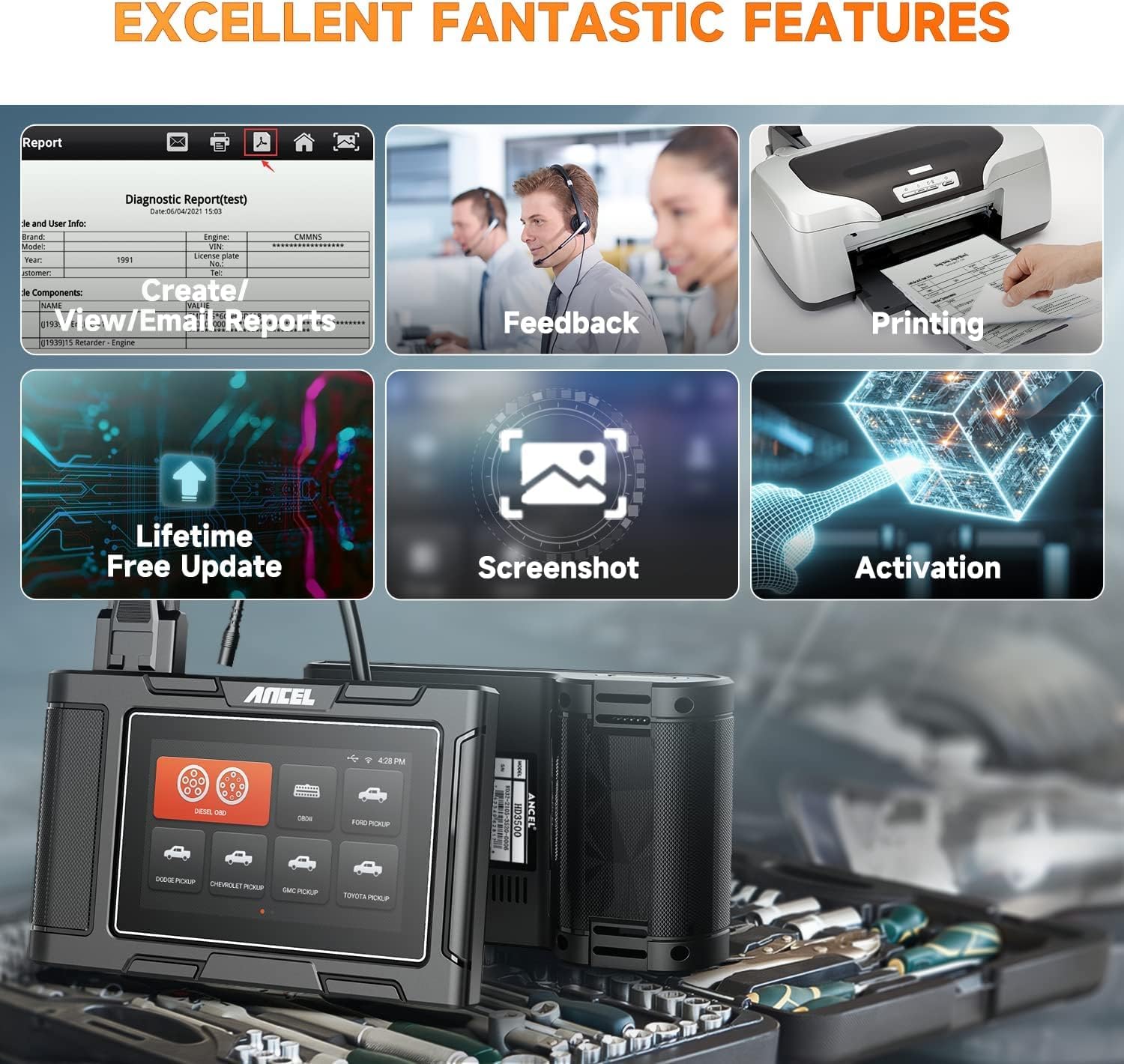
Figure 8: Report, Feedback, and Screenshot Features
5. പരിപാലനം
5.1 ഉപകരണം വൃത്തിയാക്കുന്നു
ഒരു സോഫ്റ്റ് ഉപയോഗിക്കുക, ഡിamp cloth to clean the device's exterior. Avoid abrasive cleaners or solvents that could damage the screen or casing.
5.2 സോഫ്റ്റ്വെയർ അപ്ഡേറ്റുകൾ
Regularly check for and install software updates to ensure the scanner has the latest vehicle coverage and features. This can be done via Wi-Fi as described in Section 3.3.
5.3 സംഭരണം
Store the device in its protective carrying case in a dry, cool environment, away from direct sunlight and extreme temperatures, when not in use.
6. പ്രശ്നപരിഹാരം
6.1 പൊതുവായ പ്രശ്നങ്ങൾ
- ഉപകരണം ഓണാക്കുന്നില്ല: Ensure the diagnostic cable is securely connected to the vehicle's DLC and the vehicle's ignition is in the 'ON' position. Check the vehicle's battery voltage.
- വാഹനവുമായുള്ള ആശയവിനിമയ പിശക്: Verify the diagnostic cable connections. Ensure the correct adapter is used for heavy-duty trucks. Use the 'Pin Detect' function to check the integrity of the OBD interface pins. Confirm the vehicle's ignition is on.
- Function not working as expected: Ensure the device software is up to date. Some functions are vehicle-specific; verify compatibility for your vehicle's make, model, and year.
- വൈഫൈ കണക്ഷൻ പ്രശ്നങ്ങൾ: Check network password and signal strength. Try restarting the device and the Wi-Fi router.
6.2 Using the Pin Detect Function
If you suspect a connection issue, use the 'Pin Detect' function to analyze the voltage and connection status of each pin on the OBD interface. This can help identify faulty connections or damaged pins.
6.3 പിന്തുണയുമായി ബന്ധപ്പെടുന്നു
If troubleshooting steps do not resolve the issue, utilize the device's 'Feedback' function to report problems or request remote assistance. You may also refer to the official ANCEL website for further support resources.
7 സ്പെസിഫിക്കേഷനുകൾ
| ഫീച്ചർ | സ്പെസിഫിക്കേഷൻ |
|---|---|
| ഓപ്പറേറ്റിംഗ് സിസ്റ്റം | ആൻഡ്രോയിഡ് 4.4 |
| പ്രദർശിപ്പിക്കുക | 5-ഇഞ്ച് എൽസിഡി |
| റാം | 1 ജിബി |
| ആന്തരിക സംഭരണം | 8GB (Flash) |
| ബാഹ്യ സംഭരണം | 16GB (TF card) |
| കണക്റ്റിവിറ്റി | 2.4GHz വൈഫൈ |
| പിന്തുണയ്ക്കുന്ന പ്രോട്ടോക്കോളുകൾ | J1587, J1939, J1708, J27145, SAE J1850 PWM, SAE J1850 VPW, ISO 14230-4, ISO 9141-2, ISO 15765-4, ISO 27145-4 |
| വാഹന വോള്യംtagഇ പിന്തുണ | 12V (OBDII cars), 24V (Diesel trucks) |
| അളവുകൾ | 5.28 x 5.94 x 10.98 ഇഞ്ച് |
| ഇനത്തിൻ്റെ ഭാരം | 3.03 പൗണ്ട് |
| പിന്തുണയ്ക്കുന്ന ഭാഷകൾ | ഇംഗ്ലീഷ്, സ്പാനിഷ് |
8. വാറൻ്റിയും പിന്തുണയും
8.1 വാറൻ്റി വിവരങ്ങൾ
For specific warranty terms and conditions, please refer to the warranty card included with your product or contact ANCEL customer service directly. Protection plans may be available for extended coverage.
8.2 ഉപഭോക്തൃ പിന്തുണ
If you require assistance or have questions regarding your ANCEL HD3500 Pro, please use the following resources:
- In-Device Feedback: Utilize the 'Feedback' function on the scanner for direct communication with technical support.
- ഔദ്യോഗിക ഉപയോക്തൃ മാനുവൽ (PDF): ഉപയോക്തൃ മാനുവലിന്റെ വിശദമായ PDF പതിപ്പ് ഡൗൺലോഡ് ചെയ്യാൻ ഇവിടെ ലഭ്യമാണ്. https://manuals.plus/m/f23bfdc72df9fd24f0528372c3e7cc45a2dbd22680d8bf27b14e753259febea9.
- നിർമ്മാതാവ് Webസൈറ്റ്: ഔദ്യോഗിക ANCEL സന്ദർശിക്കുക webപതിവുചോദ്യങ്ങൾ, സോഫ്റ്റ്വെയർ ഡൗൺലോഡുകൾ, ബന്ധപ്പെടാനുള്ള വിവരങ്ങൾ എന്നിവയ്ക്കുള്ള സൈറ്റ്.
Ask a question about this manual
Ask about setup, troubleshooting, compatibility, parts, safety, or missing instructions. Manuals+ will review the question and use this page’s manual context to help answer it.