
Technical Pro XSURROUND
Technical Pro XSURROUND 4.1 Bluetooth Soundbar System User Manual
Model: XSURROUND
ആമുഖം
This manual provides comprehensive instructions for the setup, operation, and maintenance of your Technical Pro XSURROUND 4.1 Bluetooth Soundbar System. This system is designed to deliver an immersive audio experience for your home entertainment, featuring a soundbar, wireless subwoofer, and rechargeable satellite speakers. Please read this manual thoroughly before using the product to ensure proper function and longevity.
ബോക്സിൽ എന്താണുള്ളത്
എല്ലാ ഘടകങ്ങളും ശ്രദ്ധാപൂർവ്വം അൺപാക്ക് ചെയ്ത് ഇനിപ്പറയുന്ന ഇനങ്ങൾ ഉണ്ടെന്ന് ഉറപ്പാക്കുക:
- ബ്ലൂടൂത്ത് സൗണ്ട്ബാർ
- Wireless Sub-Woofer
- Rechargeable Satellite Speakers (2 units)
- പവർ അഡാപ്റ്റർ(കൾ)
- റിമോട്ട് കൺട്രോൾ (ഉൾപ്പെടുത്തിയാൽ)
- ഉപയോക്തൃ മാനുവൽ (ഈ പ്രമാണം)

Image: All components of the Technical Pro XSURROUND 4.1 Bluetooth Soundbar System, including the soundbar, wireless subwoofer, and two satellite speakers.
സജ്ജമാക്കുക
1. സൗണ്ട്ബാർ അസംബ്ലി
The soundbar may arrive in multiple sections. Align the sections and gently push them together until they securely click into place. When fully assembled, the soundbar measures 45 inches.
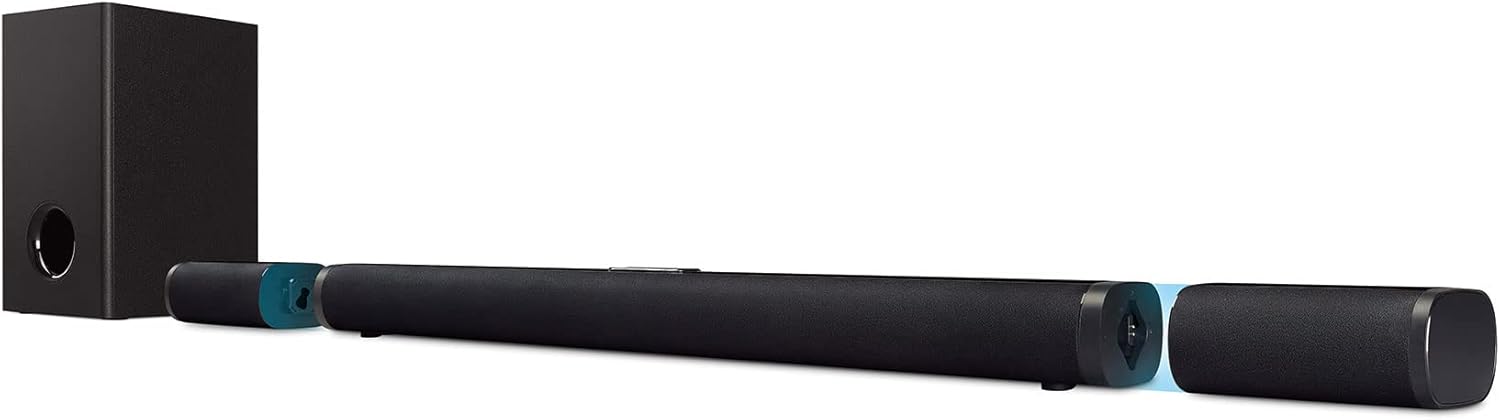
Image: The soundbar shown in its assembled state, with detachable end sections that house the satellite speakers.
2. പവർ കണക്ഷൻ
- Connect the power adapter to the soundbar's power input.
- ഒരു മതിൽ ഔട്ട്ലെറ്റിലേക്ക് പവർ അഡാപ്റ്റർ പ്ലഗ് ചെയ്യുക.
- Connect the subwoofer's power cord to a wall outlet.
3. Subwoofer and Satellite Speaker Placement
Place the wireless subwoofer in a suitable location near the soundbar. The satellite speakers are detachable and rechargeable. They can be placed as rear satellites for surround sound or attached to the soundbar. Ensure they are charged for optimal wireless performance.
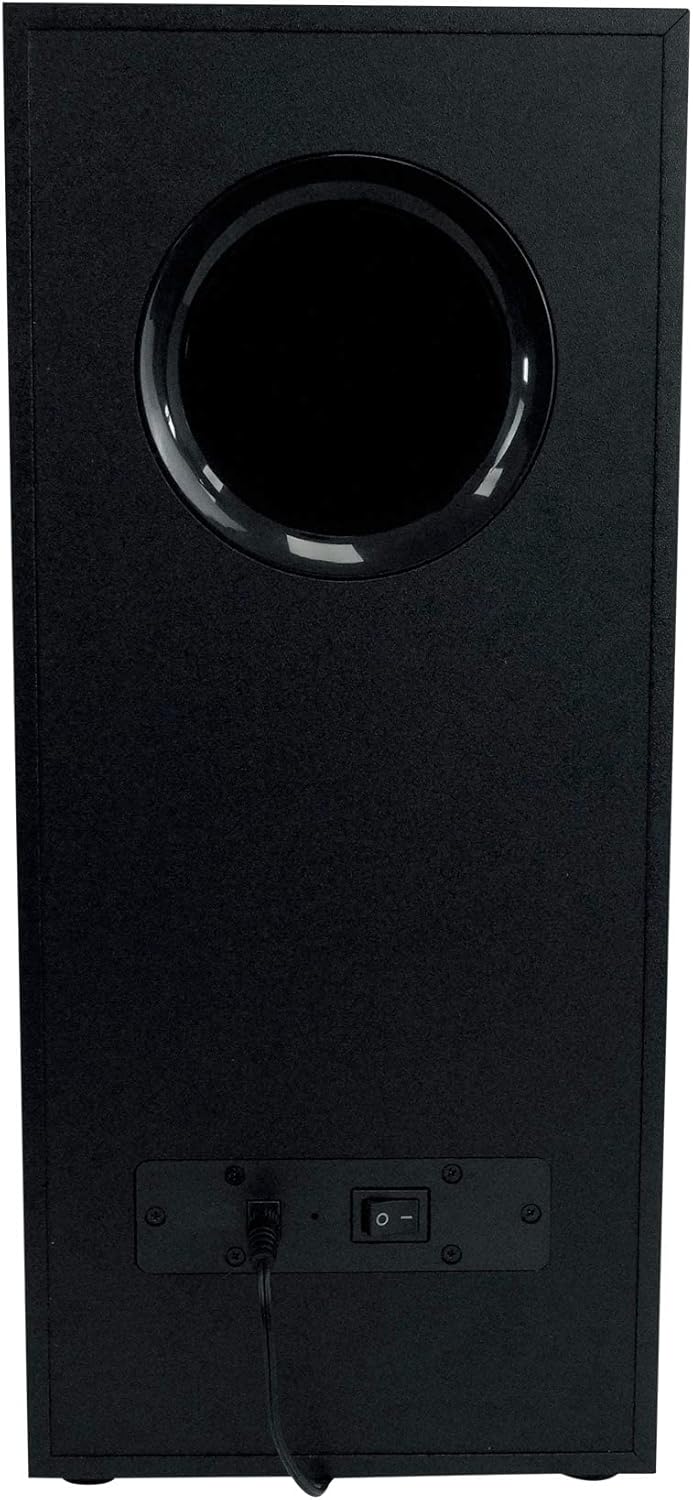
ചിത്രം: പിൻഭാഗം view of the wireless subwoofer, showing the power input and on/off switch.
4. ഓഡിയോ ഉറവിടങ്ങളുമായി ബന്ധിപ്പിക്കുന്നു
The system supports multiple input options:
- എച്ച്ഡിഎംഐ (ARC): For optimal audio quality and control, connect an HDMI cable from your TV's HDMI ARC port to the soundbar's HDMI ARC input.
- ഒപ്റ്റിക്കൽ: Connect an optical cable from your TV's optical output to the soundbar's optical input.
- Auxiliary (Aux): Use a 3.5mm audio cable to connect devices with an auxiliary output to the soundbar's Aux input.
- USB: ഓഡിയോ ഉള്ള ഒരു USB ഡ്രൈവ് ചേർക്കുക fileനേരിട്ടുള്ള പ്ലേബാക്കിനായി സൗണ്ട്ബാറിന്റെ യുഎസ്ബി പോർട്ടിലേക്ക് s.
- ബ്ലൂടൂത്ത്: Refer to the 'Operating' section for Bluetooth pairing instructions.
പ്രവർത്തിക്കുന്നു
1. പവർ ഓൺ/ഓഫ്
Press the power button on the soundbar's control panel or the remote control to turn the system on or off. The subwoofer will power on automatically when the soundbar is active.
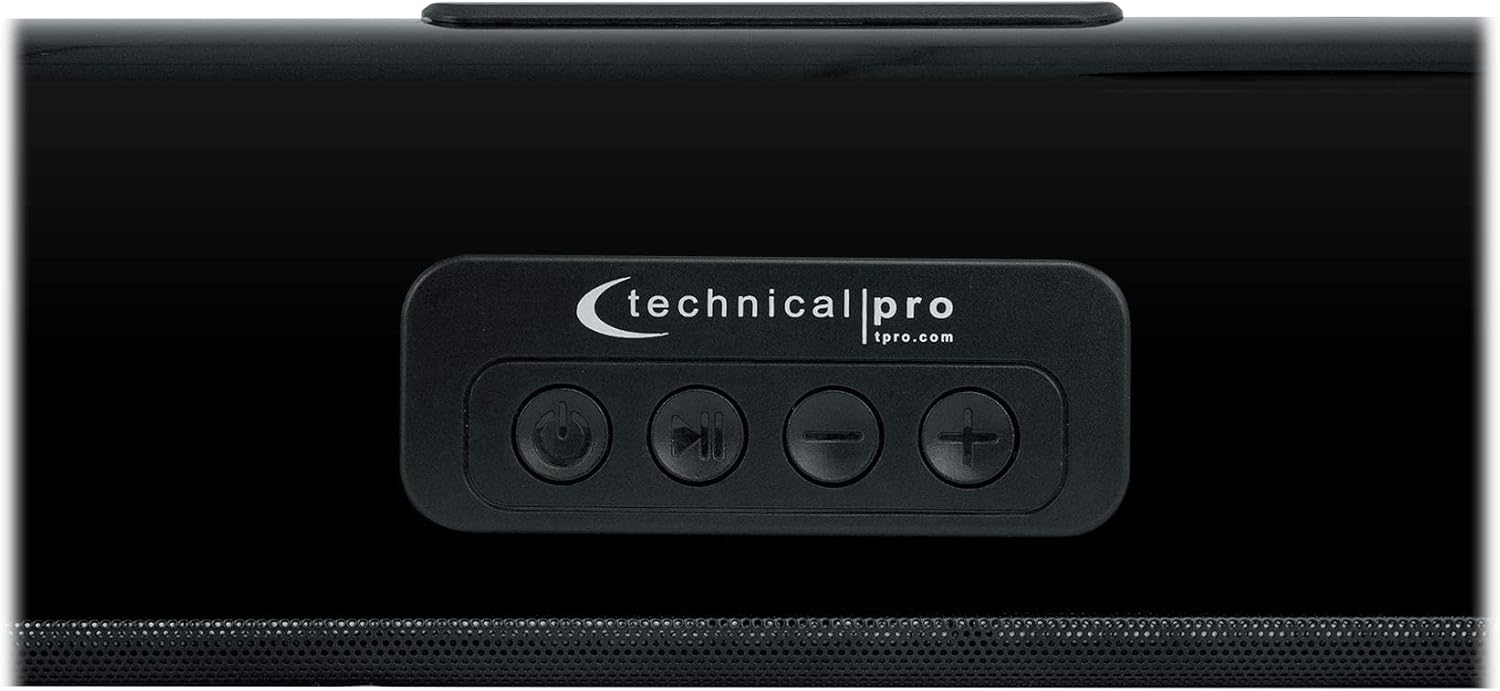
Image: Close-up of the soundbar's top-mounted control panel, showing power, play/pause, and volume buttons.
2. ഇൻപുട്ട് തിരഞ്ഞെടുക്കൽ
Press the 'Input' or 'Source' button on the soundbar's control panel or remote control to cycle through available audio inputs (HDMI ARC, Optical, Aux, Bluetooth, USB).
3. വോളിയം നിയന്ത്രണം
Adjust the volume using the '+' and '-' buttons on the soundbar or the remote control.
4. ബ്ലൂടൂത്ത് ജോടിയാക്കൽ
- Select 'Bluetooth' as the input source on the soundbar. The soundbar will enter pairing mode, indicated by a flashing LED.
- നിങ്ങളുടെ ബ്ലൂടൂത്ത് പ്രാപ്തമാക്കിയ ഉപകരണത്തിൽ (സ്മാർട്ട്ഫോൺ, ടാബ്ലെറ്റ്, കമ്പ്യൂട്ടർ), ബ്ലൂടൂത്ത് ക്രമീകരണങ്ങളിലേക്ക് പോയി ലഭ്യമായ ഉപകരണങ്ങൾക്കായി തിരയുക.
- Select 'XSURROUND' (or similar name) from the list of devices.
- Once paired, the LED indicator on the soundbar will become solid, and you can stream audio wirelessly. The Bluetooth range is approximately 60 feet.
5. Detachable Satellite Speakers
The satellite speakers are battery-powered and automatically connect wirelessly to the soundbar when detached. They will instantly play once reconnected to the soundbar or when powered on after detachment. Ensure they are charged regularly for continuous wireless use.
മെയിൻ്റനൻസ്
- വൃത്തിയാക്കൽ: സൗണ്ട്ബാർ, സബ് വൂഫർ, സാറ്റലൈറ്റ് സ്പീക്കറുകൾ എന്നിവയുടെ പ്രതലങ്ങൾ വൃത്തിയാക്കാൻ മൃദുവായതും ഉണങ്ങിയതുമായ തുണി ഉപയോഗിക്കുക. ലിക്വിഡ് ക്ലീനറുകളോ അബ്രസീവ് വസ്തുക്കളോ ഉപയോഗിക്കരുത്.
- വെൻ്റിലേഷൻ: Ensure proper ventilation around all components to prevent overheating. Do not block any vents.
- പരിസ്ഥിതി: Avoid exposing the system to extreme temperatures, humidity, direct sunlight, or dusty environments. The product is not waterproof.
- സ്പീക്കർ ഗ്രിൽസ്: The metal speaker grills protect against accidental damage. Avoid pressing on them or attempting to remove them.
ട്രബിൾഷൂട്ടിംഗ്
- ശക്തിയില്ല:
• Check if the power cords for the soundbar and subwoofer are securely plugged into both the device and a working wall outlet.
• Ensure the power switch on the subwoofer is in the 'ON' position. - ശബ്ദമില്ല:
• Verify that the correct input source is selected on the soundbar.
• Increase the volume on both the soundbar system and your connected audio source (TV, phone, etc.).
• Check all audio cables (HDMI, Optical, Aux) for secure connections.
• If using Bluetooth, ensure the device is properly paired and within range. - Subwoofer/Satellite Speakers Not Connecting:
• Ensure the subwoofer is powered on.
• For satellite speakers, ensure they are charged. They should automatically reconnect when detached from the soundbar.
• If issues persist, try restarting the soundbar and subwoofer. - വികലമായ ഓഡിയോ:
• Reduce the volume on both the soundbar and the audio source.
• Check for interference from other electronic devices.
• Ensure audio cables are not damaged.
സ്പെസിഫിക്കേഷനുകൾ
| ഫീച്ചർ | വിശദാംശങ്ങൾ |
|---|---|
| മോഡലിൻ്റെ പേര് | XSURROUND |
| സ്പീക്കർ തരം | Soundbar with Wireless Subwoofer and Rechargeable Satellites |
| സറൗണ്ട് സൗണ്ട് ചാനൽ കോൺഫിഗറേഷൻ | 4.1, 5.0 |
| പീക്ക് പവർ ഔട്ട്പുട്ട് | 6000 വാട്ട്സ് |
| ഫ്രീക്വൻസി പ്രതികരണം | 50Hz ~ 16KHz |
| കണക്റ്റിവിറ്റി ടെക്നോളജി | Bluetooth, HDMI (ARC), Auxiliary, Optical, USB |
| ബ്ലൂടൂത്ത് പതിപ്പ് | v5.0 with EDR |
| ബ്ലൂടൂത്ത് ശ്രേണി | 60 അടി |
| സബ്വൂഫർ കണക്റ്റിവിറ്റി | വയർലെസ് |
| സാറ്റലൈറ്റ് സ്പീക്കറുകൾ | Detachable, Battery-Powered, Wireless |
| Soundbar Length (assembled) | 45 ഇഞ്ച് |
| Satellite Speaker Height | 6.7 ഇഞ്ച് |
| ഉൽപ്പന്ന അളവുകൾ (L x W x H) | 33.9"D x 8.1"W x 16.3"H (Box dimensions: 33.31" L x 16.34" W x 7.87" H) |
| യൂണിറ്റ് ഭാരം | 14 lbs (Product: 17.4 pounds) |
| പവർ ഉറവിടം | Battery Powered (for satellites), AC Power (for soundbar/subwoofer) |
| നിയന്ത്രണ രീതി | Remote Control, On-unit buttons |
| നിറം | കറുപ്പ് |
വാറൻ്റി വിവരങ്ങൾ
This Technical Pro XSURROUND 4.1 Bluetooth Soundbar System comes with a limited warranty. Please refer to the warranty card included in your product packaging for specific terms, conditions, and duration of coverage. Retain your proof of purchase for any warranty claims.
പിന്തുണ
For technical assistance, troubleshooting beyond this manual, or warranty inquiries, please contact Technical Pro customer support. Visit the official Technical Pro webബന്ധപ്പെടാനുള്ള വിവരങ്ങൾക്കും അധിക ഉറവിടങ്ങൾക്കുമായി സൈറ്റ്.
സാങ്കേതിക പ്രോ Webസൈറ്റ്: www.tpro.com
Ask a question about this manual
Ask about setup, troubleshooting, compatibility, parts, safety, or missing instructions. Manuals+ will review the question and use this page’s manual context to help answer it.