
Minoston MT10W
മിനോസ്റ്റൺ വൈഫൈ ടൈമർ സ്വിച്ച് സ്മാർട്ട് കൗണ്ട്ഡൗൺ ടൈമർ സ്വിച്ച് യൂസർ മാനുവൽ
Model: MT10W
ബ്രാൻഡ്: മിനോസ്ടൺ
ആമുഖം
Thank you for choosing the Minoston MT10W WiFi Timer Switch. This smart countdown timer switch allows you to control lights, fans, and heaters with preset countdown times and remote access via a smartphone application. It integrates seamlessly with Amazon Alexa and Google Assistant for voice control. This manual provides detailed instructions for installation, operation, and maintenance to ensure optimal performance and safety.

ചിത്രം: മുൻഭാഗം view of the Minoston MT10W WiFi Timer Switch and its retail packaging, highlighting key features and certifications.
പ്രധാനപ്പെട്ട സുരക്ഷാ വിവരങ്ങൾ
- തീപിടുത്തം, വൈദ്യുതാഘാതം അല്ലെങ്കിൽ പരുക്ക്.
- ഈ ഉപകരണം ദേശീയ ഇലക്ട്രിക് കോഡും പ്രാദേശിക നിയന്ത്രണങ്ങളും അനുസരിച്ച് ഇൻസ്റ്റാളുചെയ്യാൻ ഉദ്ദേശിച്ചുള്ളതാണ്.
- Consult a qualified electrician if you are unsure about any part of these instructions.
- Always turn off power at the circuit breaker or fuse box before installation or servicing.
- NEUTRAL WIRE REQUIRED. Ensure your electrical box has a neutral wire.
- Do not use with dimmable fixtures or 3-way switches.
- പ്രവർത്തന താപനില: 32°F മുതൽ 104°F വരെ (0°C മുതൽ 40°C വരെ).
- ഇൻഡോർ ഉപയോഗത്തിന് മാത്രം.
പാക്കേജ് ഉള്ളടക്കം
- Minoston MT10W WiFi Timer Switch
- ഇൻസ്ട്രക്ഷൻ മാനുവൽ
- മൗണ്ടിംഗ് സ്ക്രൂകൾ
- വയർ പരിപ്പ്
സ്പെസിഫിക്കേഷനുകൾ
| മോഡൽ നമ്പർ | MT10W |
| ശക്തി | 120VAC, 60Hz |
| ഇൻകാൻഡസെന്റ് ലോഡ് | 960W (1200W Tungsten) |
| മോട്ടോർ ലോഡ് | 1 / 2 HP |
| റെസിസ്റ്റീവ് ലോഡ് | 1800W |
| Wi-Fi ഫ്രീക്വൻസി | 2.4GHz |
| പ്രവർത്തന താപനില | 32 ° F ~ 104 ° F (0 ° C ~ 40 ° C) |
| ഈർപ്പം | 95% RH, നോൺ-കണ്ടൻസിംഗ് |
| സർട്ടിഫിക്കേഷനുകൾ | ETL, FCC |
| അളവുകൾ | 4.5 x 3 x 10.49 സെ.മീ (1.77 x 1.18 x 4.13 ഇഞ്ച്) |

Image: Diagram showing the physical dimensions of the Minoston MT10W WiFi Timer Switch, including depth reduction for easier installation.
ഇൻസ്റ്റലേഷൻ ഗൈഡ്
വയറിംഗ് ഡയഗ്രം
The Minoston MT10W requires a neutral wire for proper operation. Please follow the diagram below carefully.
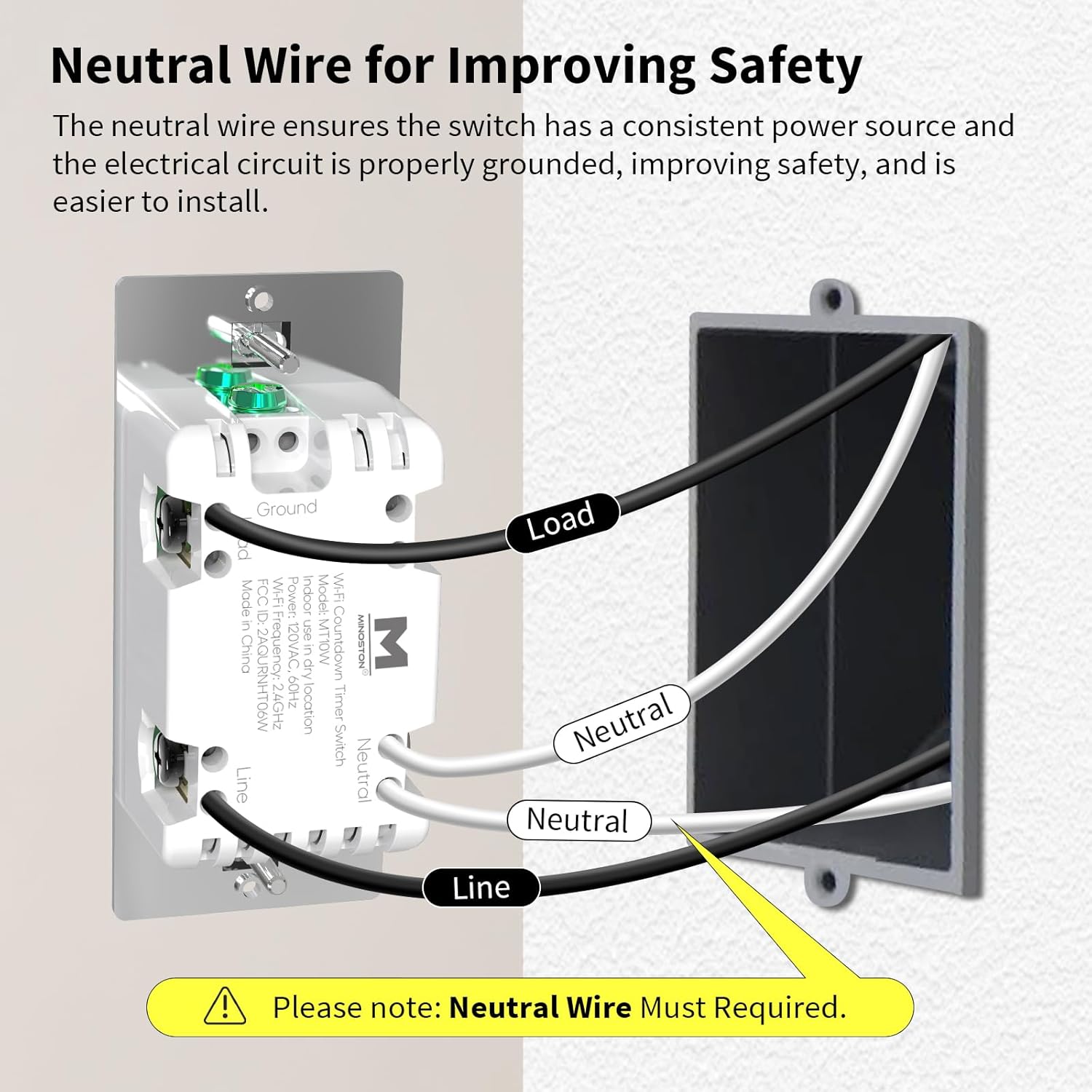
Image: Detailed wiring diagram for the Minoston MT10W WiFi Timer Switch, showing connections for Line, Load, Neutral, and Ground wires. A note emphasizes the requirement for a neutral wire.
ഇൻസ്റ്റലേഷൻ ഘട്ടങ്ങൾ
- പവർ ഓഫ് ചെയ്യുക: Before beginning, turn off the power to the switch location at the circuit breaker or fuse box.
- പഴയ സ്വിച്ച് നീക്കം ചെയ്യുക: നിലവിലുള്ള വാൾ പ്ലേറ്റ് ശ്രദ്ധാപൂർവ്വം നീക്കം ചെയ്ത് ഇലക്ട്രിക്കൽ ബോക്സിൽ നിന്ന് സ്വിച്ച് ചെയ്യുക.
- വയറുകൾ തിരിച്ചറിയുക: Identify the Line (hot), Load, Neutral, and Ground wires. A neutral wire is typically white. If you do not have a neutral wire, this switch is not compatible.
- വയറുകൾ ബന്ധിപ്പിക്കുക:
- Connect the Line wire from the wall box to the Line terminal on the MT10W switch.
- Connect the Load wire from the wall box to the Load terminal on the MT10W switch.
- Connect the Neutral wire from the wall box to the Neutral terminal on the MT10W switch.
- Connect the Ground wire from the wall box to the Ground terminal on the MT10W switch.
- Mount switch: വയേർഡ് സ്വിച്ച് ശ്രദ്ധാപൂർവ്വം ഇലക്ട്രിക്കൽ ബോക്സിലേക്ക് തിരുകുക. നൽകിയിരിക്കുന്ന സ്ക്രൂകൾ ഉപയോഗിച്ച് അത് ഉറപ്പിക്കുക.
- വാൾ പ്ലേറ്റ് ഇൻസ്റ്റാൾ ചെയ്യുക: പുതിയതോ നിലവിലുള്ളതോ ആയ വാൾ പ്ലേറ്റ് ഘടിപ്പിക്കുക.
- പവർ പുനഃസ്ഥാപിക്കുക: സർക്യൂട്ട് ബ്രേക്കറിൽ പവർ വീണ്ടും ഓണാക്കുക.
Wi-Fi and App Setup
The Minoston MT10W can be controlled via the Smart Life or Minoston APP. Ensure your Wi-Fi network is 2.4GHz.
- അപ്ലിക്കേഷൻ ഡൗൺലോഡുചെയ്യുക: Download the "Smart Life" or "Minoston" app from the App Store (iOS) or Google Play Store (Android).
- രജിസ്റ്റർ ചെയ്യുക/ലോഗിൻ ചെയ്യുക: ആപ്പ് തുറന്ന് പുതിയൊരു അക്കൗണ്ടിനായി രജിസ്റ്റർ ചെയ്യുക അല്ലെങ്കിൽ നിങ്ങൾക്ക് ഇതിനകം ഒരു അക്കൗണ്ട് ഉണ്ടെങ്കിൽ ലോഗിൻ ചെയ്യുക.
- ഉപകരണം ചേർക്കുക:
- Tap "+" or "Add Device" in the app.
- Select "Electrical" > "Switch (Wi-Fi)" or search for "MT10W".
- Follow the in-app instructions to put the switch into pairing mode. This usually involves holding the "30 Min" button for 5 seconds until the blue LED indicator flashes quickly.
- നിങ്ങളുടെ 2.4GHz വൈഫൈ നെറ്റ്വർക്ക് പേരും പാസ്വേഡും നൽകുക.
- Wait for the device to connect. Once connected, you can rename the switch.

Image: Screenshot of the mobile application interface demonstrating remote control of the Minoston MT10W WiFi Timer Switch.
Voice Control Setup (Alexa/Google Assistant)
- Ensure your Minoston MT10W switch is successfully added to the Smart Life/Minoston app.
- ആമസോൺ അലക്സ അല്ലെങ്കിൽ ഗൂഗിൾ ഹോം ആപ്പ് തുറക്കുക.
- Go to "Skills & Games" (Alexa) or "Works with Google" (Google Home).
- ഇതിനായി തിരയുക "Smart Life" (or "Minoston" if available) and enable the skill.
- Link your Smart Life/Minoston account with your Alexa/Google account.
- Discover devices. You can now control your switch using voice commands like "Alexa, turn on the timer for 30 minutes" or "Hey Google, turn off the fan."

Image: Illustration of a user interacting with an Amazon Echo device to control the Minoston MT10W WiFi Timer Switch via voice commands.
പ്രവർത്തന നിർദ്ദേശങ്ങൾ
ബട്ടൺ പ്രവർത്തനങ്ങൾ
The Minoston MT10W features an ON/OFF override button and six preset countdown buttons.

Image: Diagram illustrating the various buttons on the Minoston MT10W WiFi Timer Switch and their corresponding functions, including ON/OFF override, preset countdowns, and LED brightness adjustments.
- ON/OFF Override Button:
- Press to manually turn the connected device ON or OFF.
- Hold for 3 seconds to exit countdown mode. Press again to resume countdown mode.
- Preset Countdown Buttons (5 Min, 10 Min, 30 Min, 60 Min, 2 Hour, 4 Hour):
- Press any button to activate the corresponding countdown timer. The connected device will turn ON and automatically turn OFF after the selected duration.
- 5 Min Button (Hold for 3s): Turn off or resume the 6 LED indicators of the countdown.
- 10 Min Button (Hold for 3s): Dim the LED indicator (backlight) of the ON/OFF button.
- 2 Hour Button (Hold for 3s): Dim LED indicators of all 7 buttons to minimum brightness. All LED indicators flash on minimum brightness.
- 4 Hour Button (Hold for 3s): Brighten LED indicators of all 7 buttons to maximum brightness. All LED indicators flash on maximum brightness.
- 30 Min Button (Hold for 5s): Until blue LED indicator flashes quickly, Wi-Fi network configuration is displayed (for pairing mode).
LED ഇൻഡിക്കേറ്റർ ലൈറ്റ്
The amber LED indicator light provides soft illumination, making it easy to locate the switch in the dark.

Image: Close-up of the Minoston MT10W WiFi Timer Switch showing the amber LED indicator light, designed for visibility in low-light conditions.
എനർജി സേവിംഗ് സവിശേഷതകൾ
Utilizing the countdown timer helps save electricity by ensuring devices like fans, ceiling lights, and other appliances automatically turn off after a set period, preventing unnecessary energy consumption.

Image: A Minoston MT10W WiFi Timer Switch installed in a bathroom setting, illustrating its use for energy saving by automatically turning off lights or exhaust fans.
മെയിൻ്റനൻസ്
- Clean the switch surface with a soft, damp തുണി. കഠിനമായ രാസവസ്തുക്കളോ ഉരച്ചിലുകളുള്ള ക്ലീനറുകളോ ഉപയോഗിക്കരുത്.
- Ensure the switch is not exposed to excessive moisture or direct water spray.
- Regularly check for any loose wiring connections during routine electrical inspections (by a qualified electrician).
ട്രബിൾഷൂട്ടിംഗ്
| പ്രശ്നം | സാധ്യമായ കാരണം | പരിഹാരം |
|---|---|---|
| സ്വിച്ച് ഓണാക്കുന്നില്ല. | No power at the circuit breaker; incorrect wiring; neutral wire not connected. | Check circuit breaker. Verify wiring connections according to the diagram. Ensure neutral wire is connected. |
| Wi-Fi-ലേക്ക് കണക്റ്റ് ചെയ്യാൻ കഴിയില്ല. | Incorrect Wi-Fi password; not 2.4GHz network; switch not in pairing mode; too far from router. | Verify Wi-Fi password. Ensure you are connecting to a 2.4GHz network. Put switch into pairing mode (hold 30 Min button for 5s). Move router closer or use a Wi-Fi extender. |
| ശബ്ദ നിയന്ത്രണം പ്രവർത്തിക്കുന്നില്ല. | Skill not enabled; account not linked; incorrect device name. | Ensure "Smart Life" skill is enabled and accounts are linked in Alexa/Google Home app. Check device name in app and use that name for voice commands. |
| Countdown not working. | Switch is in override mode. | Hold the ON/OFF button for 3 seconds to exit override mode and resume countdown functionality. |
വാറൻ്റിയും പിന്തുണയും
Minoston products come with a standard manufacturer's warranty. For specific warranty details, please refer to the warranty card included with your product or visit the official Minoston webസൈറ്റ്.
For technical support, troubleshooting assistance, or to inquire about replacement parts, please contact Minoston Customer Service:
- Webസൈറ്റ്: www.minoston.com
- ഇമെയിൽ: support@minoston.com
Please have your model number (MT10W) and purchase date ready when contacting support.
Ask a question about this manual
Ask about setup, troubleshooting, compatibility, parts, safety, or missing instructions. Manuals+ will review the question and use this page’s manual context to help answer it.