
johgee SGW02
johgee Smart WiFi Water Timer User Manual
Model: SGW02
Brand: johgee
ആമുഖം
Thank you for choosing the johgee Smart WiFi Water Timer. This device allows you to automate your garden and lawn watering with precision and convenience. Featuring two independent outlets, a Wi-Fi hub for remote control, and compatibility with smart assistants like Alexa, this timer provides flexible scheduling options including cyclic, timed, and manual modes, along with a rain delay function.

ചിത്രം 1: The johgee Smart WiFi Water Timer system, including the 2-zone timer unit, the compact Wi-Fi hub, and a smartphone displaying the intuitive control application. This image provides an overview of the main components of the smart watering system.
പാക്കേജ് ഉള്ളടക്കം
നിങ്ങളുടെ പാക്കേജിൽ എല്ലാ ഘടകങ്ങളും ഉണ്ടെന്ന് ദയവായി പരിശോധിക്കുക:
- 1 x johgee Smart WiFi Water Timer (2-Zone)
- 1 x Wi-Fi Hub
- Connection Accessories (e.g., O-rings, adapters, quick connectors)
- ഉപയോക്തൃ മാനുവൽ (ഈ പ്രമാണം)
സജ്ജീകരണവും ഇൻസ്റ്റാളേഷനും
1. ഫിസിക്കൽ ഇൻസ്റ്റലേഷൻ
Follow these steps to physically install your water timer:
- Ensure your outdoor faucet is clean and free of debris.
- Attach the 360° rotating connector of the water timer to your outdoor faucet. Screw it on tightly to prevent leaks. Use the appropriate O-ring for your faucet type (3/4" for USA-type, 1/2" adapter for EU-type).
- Connect your garden hoses to the two independent outlets (ZONE1 and ZONE2) at the bottom of the timer. Ensure a secure connection.
- Insert 4 AA batteries (not included) into the water timer unit. Ensure correct polarity.
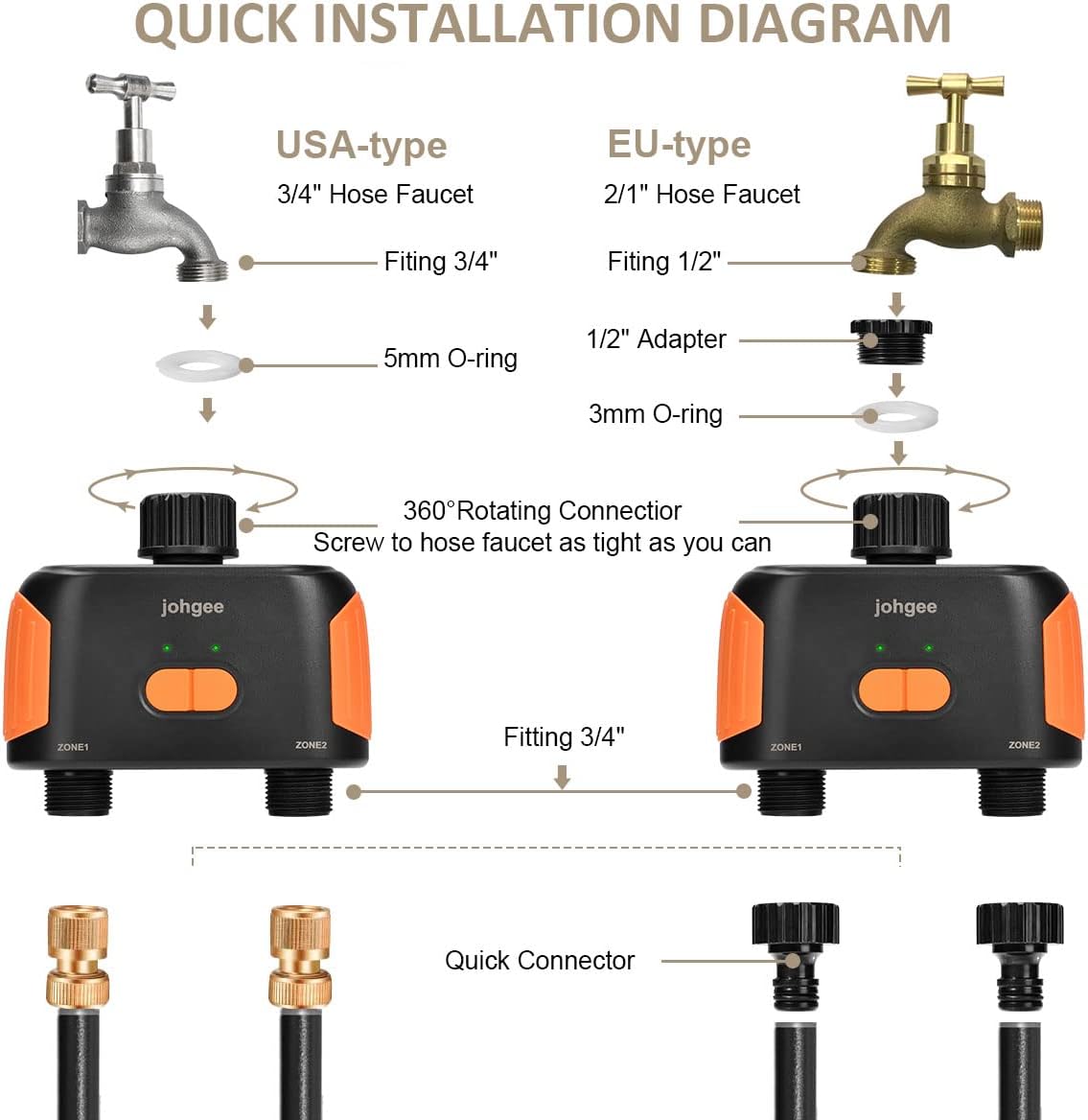
ചിത്രം 2: A detailed diagram illustrating the quick installation process for the johgee Smart WiFi Water Timer, showing connections for both USA-type (3/4" hose faucet) and EU-type (2/1" hose faucet) systems, along with the necessary O-rings and quick connectors.
2. Wi-Fi Hub and App Setup
The Wi-Fi Hub is essential for remote control and smart features. It connects the water timer to your home Wi-Fi network (2.4GHz only).
- Plug the Wi-Fi Hub into a standard indoor power outlet within 15 meters (49.2 feet) of the water timer. Ensure it is within range of your 2.4GHz Wi-Fi network.
- Download the 'Smart Life' app from your smartphone's app store (iOS or Android).
- നിങ്ങളുടെ സ്മാർട്ട് ലൈഫ് അക്കൗണ്ടിൽ രജിസ്റ്റർ ചെയ്യുക അല്ലെങ്കിൽ ലോഗിൻ ചെയ്യുക.
- In the app, add the Wi-Fi Hub by following the on-screen instructions. This typically involves putting the hub into pairing mode (refer to the hub's indicator light behavior) and entering your Wi-Fi password.
- Once the hub is connected, add the water timer as a device within the app. The app will guide you through pairing the timer with the hub. This may involve pressing and holding a button on the timer until its indicator lights flash.

ചിത്രം 3: This image illustrates the convenience of remote control, showing a woman using her smartphone to manage the johgee Smart WiFi Water Timer from anywhere, with the Wi-Fi hub plugged into a wall outlet, enabling smart life integration.

ചിത്രം 4: A visual representation detailing the optimal placement for the Wi-Fi Hub relative to the water timer, indicating a maximum effective distance of 15 meters (49.2 feet) for reliable wireless communication.
ഓപ്പറേഷൻ
The johgee Smart WiFi Water Timer offers various modes and features for comprehensive watering control.
1. ആപ്പ് നിയന്ത്രണവും ഷെഡ്യൂളിംഗും
Each of the two outlets can be programmed independently with up to 20 different watering plans, allowing for a total of 40 customizable schedules.

ചിത്രം 5: This image highlights the dual outlet design of the johgee Smart WiFi Water Timer, emphasizing its capacity to manage two separate watering zones with up to 40 individual and customizable watering plans through the mobile application.
Timed/Schedule Irrigation Mode
Set specific start and end times for watering, with options for daily, weekly, or custom schedules.

ചിത്രം 6: Screenshots from the johgee app demonstrating the Timed/Schedule Irrigation Mode, allowing users to set precise watering durations and intervals, along with various scheduling options like weekly, odd day, even day, or every few days.
Cyclic Irrigation Mode
Program recurring watering cycles within a set timeframe, ideal for frequent, short watering sessions.

ചിത്രം 7: This image illustrates the Cyclic Irrigation Mode within the johgee app, showing how to configure up to 20 separate irrigation programs with detailed start times, end times, irrigation durations, and interval times for precise watering cycles.
മാനുവൽ നനവ്
Initiate watering instantly for a specified duration directly from the app or by pressing the buttons on the timer unit.
2. Rain Delay System
The timer can automatically detect local weather conditions. You can also manually postpone watering for 1 to 7 days to conserve water during rainy periods or when the ground is already wet.

ചിത്രം 8: An image depicting the johgee Smart WiFi Water Timer connected to a faucet during rainfall, with a smartphone screen displaying the Rain Delay options, allowing users to postpone watering for up to 7 days.
3. സ്മാർട്ട് വോയ്സ് കൺട്രോൾ
Integrate your johgee water timer with Amazon Alexa or Google Assistant for convenient voice commands. You can control both watering zones using simple phrases.

ചിത്രം 9: This image showcases the smart integration of the johgee 2-Zone WiFi Water Timer with voice assistants like Alexa and Google, allowing users to control their irrigation system through simple voice commands for a more convenient watering experience.
4. Real-time Notifications
Receive instant notifications on your smartphone regarding watering status, weather updates, and other important alerts from the app.
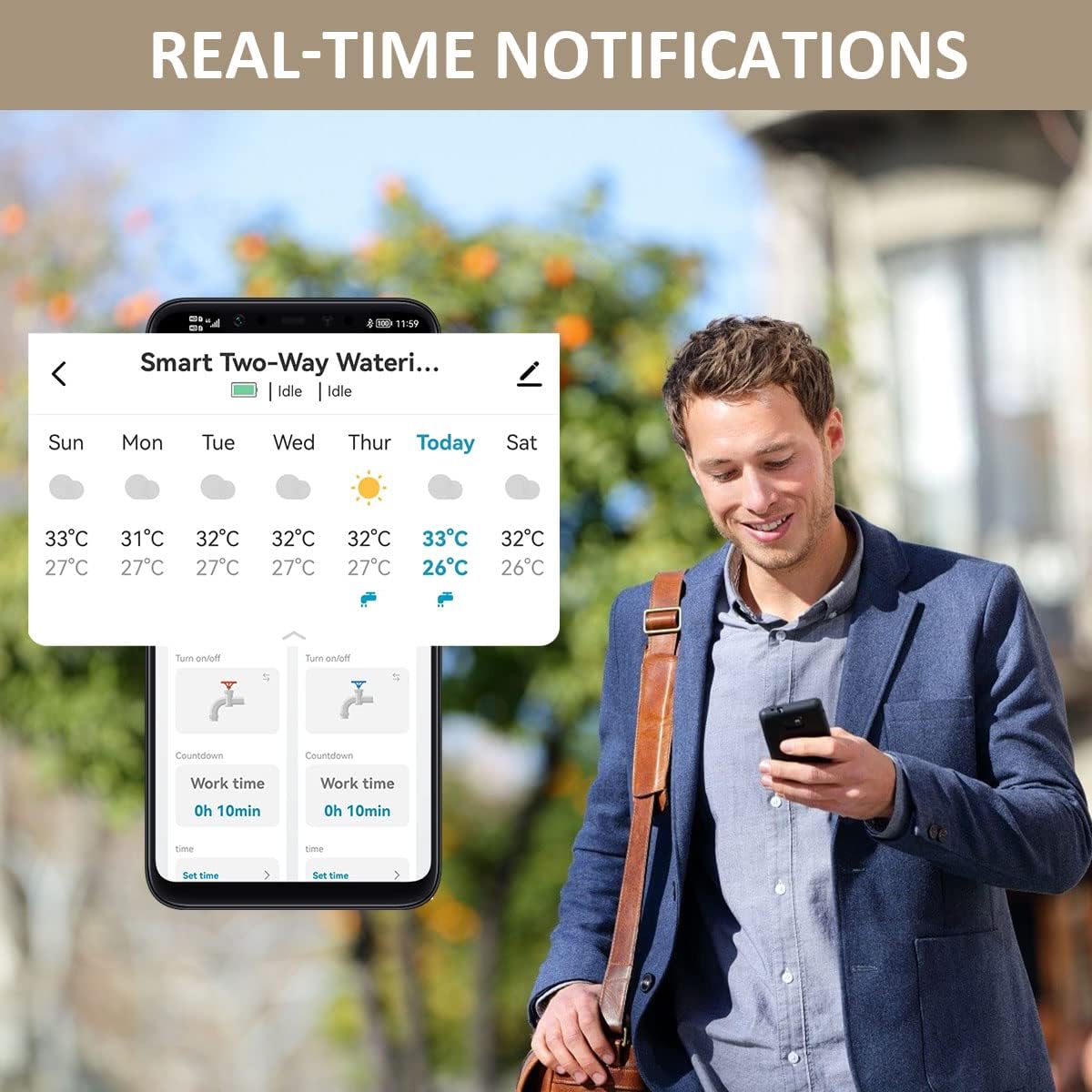
ചിത്രം 10: An image of a person viewing their smartphone, which displays real-time notifications and current weather conditions from the johgee water timer application, ensuring users are always informed about their irrigation system's status.
മെയിൻ്റനൻസ്
1. ബാറ്ററി മാറ്റിസ്ഥാപിക്കൽ
The water timer unit requires 4 AA batteries for operation. When the battery indicator in the app shows low power, replace all four batteries with new ones. Ensure correct polarity during installation.
2. വൃത്തിയാക്കൽ
Periodically inspect the timer and its connections for any debris or mineral buildup. Clean with a soft, damp തുണി. അബ്രാസീവ് ക്ലീനറുകൾ ഉപയോഗിക്കരുത് അല്ലെങ്കിൽ യൂണിറ്റ് വെള്ളത്തിൽ മുക്കരുത്.
3. ശൈത്യകാലവൽക്കരണം
Before the first frost, disconnect the water timer from the faucet and hoses. Remove the batteries. Store the timer and hub indoors in a dry, protected area to prevent damage from freezing temperatures.
ട്രബിൾഷൂട്ടിംഗ്
| പ്രശ്നം | സാധ്യമായ കാരണം | പരിഹാരം |
|---|---|---|
| Timer not connecting to Wi-Fi Hub. | Hub out of range; incorrect Wi-Fi password; hub not in pairing mode; 5GHz Wi-Fi network. | Move hub closer to timer; ensure hub is within 2.4GHz Wi-Fi range; re-enter Wi-Fi password; put hub/timer into pairing mode as per app instructions. |
| കണക്ഷനുകളിൽ നിന്ന് വെള്ളം ചോരുന്നു. | Loose connection; missing or damaged O-ring; cross-threaded connection. | Ensure all connections are tightened securely; check and replace O-rings if damaged; ensure threads are aligned correctly before tightening. |
| Timer not watering as scheduled. | Low batteries; schedule not saved; rain delay active; timer disconnected from hub. | Replace batteries; verify schedule settings in app are saved; check if rain delay is enabled; ensure timer is connected to hub and hub is online. |
| ശബ്ദ നിയന്ത്രണം പ്രവർത്തിക്കുന്നില്ല. | Not linked to Alexa/Google Assistant; incorrect device name; internet connectivity issues. | Ensure Smart Life skill/service is enabled and linked in your smart assistant app; use the exact device name configured in Smart Life; check internet connection. |
സ്പെസിഫിക്കേഷനുകൾ
| ഫീച്ചർ | വിശദാംശങ്ങൾ |
|---|---|
| മോഡൽ നമ്പർ | SGW02 |
| ബ്രാൻഡ് | ജോഗി |
| സോണുകളുടെ എണ്ണം | 2 |
| കണക്റ്റിവിറ്റി | വൈഫൈ (2.4GHz മാത്രം), ബ്ലൂടൂത്ത് |
| വോയ്സ് കൺട്രോൾ കോംപാറ്റിബിലിറ്റി | അലക്സ, ഗൂഗിൾ അസിസ്റ്റന്റ് |
| Power Source (Timer) | 4 x AA ബാറ്ററികൾ (ഉൾപ്പെടുത്തിയിട്ടില്ല) |
| Power Source (Hub) | എസി പവർ ഔട്ട്ലെറ്റ് |
| Max Distance (Hub to Timer) | 15 മീറ്റർ (49.2 അടി) |
| നനവ് രീതികൾ | Cyclic, Timed, Manual |
| മഴയുടെ കാലതാമസം | 1-7 ദിവസം |
| ഇനത്തിൻ്റെ ഭാരം | 1.23 പൗണ്ട് (558 ഗ്രാം) |
| പാക്കേജ് അളവുകൾ | 6.02 x 5.83 x 2.48 ഇഞ്ച് |
വാറൻ്റി വിവരങ്ങൾ
johgee products are manufactured to high quality standards. This product comes with a limited warranty against defects in materials and workmanship. Please retain your proof of purchase for warranty claims. For specific warranty terms and conditions, refer to the product packaging or contact customer support.
ഉപഭോക്തൃ പിന്തുണ
If you encounter any issues or have questions regarding your johgee Smart WiFi Water Timer, please contact our customer support team. For the most up-to-date contact information, please visit the official johgee website or refer to the contact details provided on your product packaging.
ഓൺലൈൻ ഉറവിടങ്ങൾ:
- സന്ദർശിക്കുക johgee Store on Amazon ഉൽപ്പന്ന വിവരങ്ങൾക്കും അപ്ഡേറ്റുകൾക്കും.
Ask a question about this manual
Ask about setup, troubleshooting, compatibility, parts, safety, or missing instructions. Manuals+ will review the question and use this page’s manual context to help answer it.