
Maxxima MEW-DM680
Maxxima Digital Dimmer Wall Light Switch User Manual
Model: MEW-DM680
1. ആമുഖം
ഉൽപ്പന്നം കഴിഞ്ഞുview
The Maxxima 3-Way/Single Pole Digital Dimmer Wall Light Switch is designed to provide versatile lighting control for your home or commercial space. It features a button-controlled dimmer with green LED indicator lights to display brightness levels. This switch is compatible with incandescent, halogen, and dimmable LED/CFL bulbs, offering a flexible solution for various lighting needs.
- ബഹുമുഖ അനുയോജ്യത: Supports both 3-way and single-pole wiring configurations.
- തെളിച്ച സൂചകങ്ങൾ: Green LED lights clearly show the current dimming level.
- ഉയർന്ന ശേഷി: Handles up to 600W for incandescent/halogen and 150W for dimmable LED/CFL.
- No Neutral Wire Required: Simplifies installation in many existing setups.
- കൃത്യമായ നിയന്ത്രണം: Independent on/off button and dedicated dimming buttons for fine-tuning light levels.
- ക്രമീകരിക്കാവുന്ന സംവേദനക്ഷമത: Trim buttons allow for fine-tuning compatibility with various LED lamps.
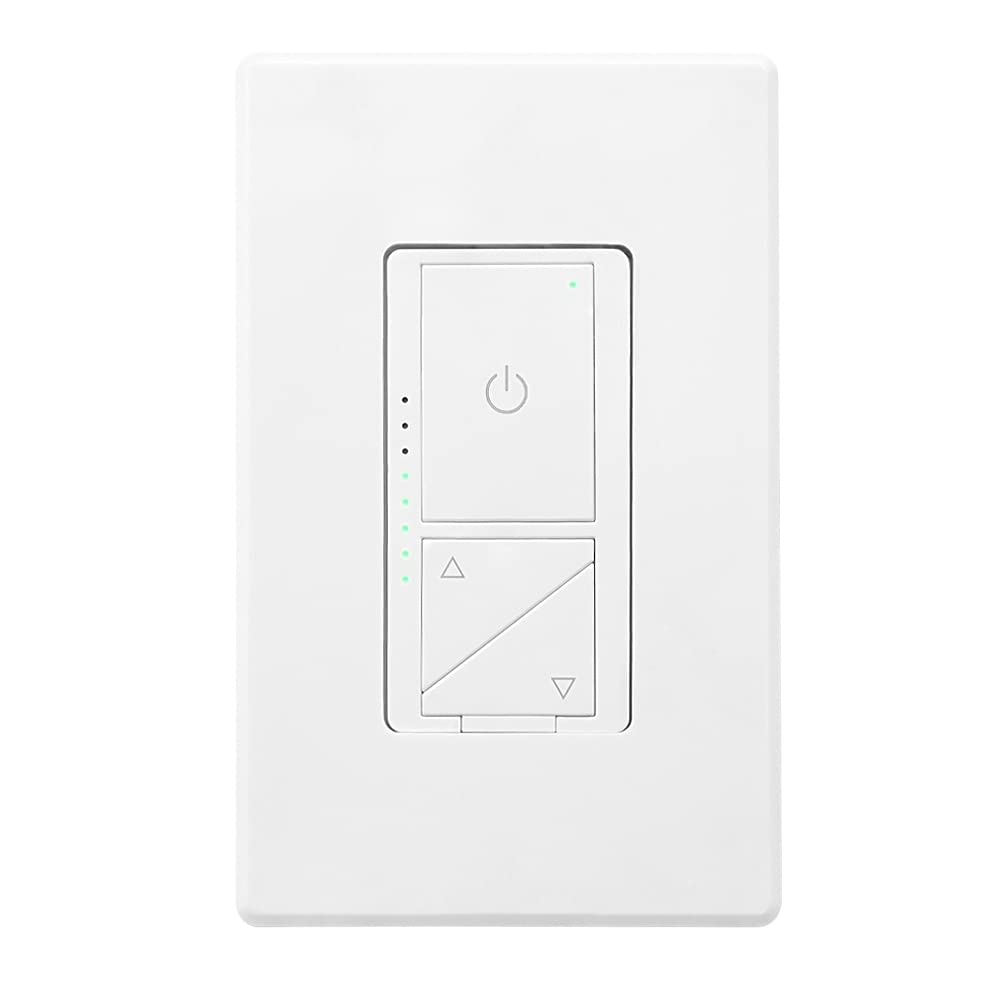
ചിത്രം 1: മുൻഭാഗം view of the Maxxima Digital Dimmer Wall Light Switch.
2. സജ്ജീകരണവും ഇൻസ്റ്റാളേഷനും
നിങ്ങൾ ആരംഭിക്കുന്നതിന് മുമ്പ്
മുന്നറിയിപ്പ്: To avoid fire, shock, or death, turn off power at the circuit breaker or fuse box and test that the power is off before wiring. Installation should be performed by a qualified electrician or a person with a thorough understanding of electrical wiring.
- Ensure the power is OFF at the circuit breaker before beginning installation.
- This dimmer is designed for use with 120VAC, 60Hz.
- Do NOT use with non-dimmable lighting or ceiling fans.
ആവശ്യമായ ഉപകരണങ്ങൾ
- സ്ക്രൂഡ്രൈവർ (ഫിലിപ്സും ഫ്ലാറ്റ്ഹെഡും)
- വയർ സ്ട്രിപ്പറുകൾ
- ഇലക്ട്രിക്കൽ ടേപ്പ്
- വാല്യംtagഇ ടെസ്റ്റർ
വയറിംഗ് ഡയഗ്രം
The Maxxima Digital Dimmer is compatible with both single-pole and 3-way wiring configurations. Refer to the detailed wiring instructions provided in the official installation manual for specific diagrams. The switch operates at 120VAC and does not require a neutral wire.

ചിത്രം 2: പിന്നിലേക്ക് view of the dimmer switch with wiring details.
ഇൻസ്റ്റലേഷൻ ഘട്ടങ്ങൾ
- പവർ ഓഫ് ചെയ്യുക: Locate the circuit breaker controlling the switch location and turn it OFF. Verify power is off using a voltagഇ ടെസ്റ്റർ.
- പഴയ സ്വിച്ച് നീക്കം ചെയ്യുക: നിലവിലുള്ള വാൾ പ്ലേറ്റ് ശ്രദ്ധാപൂർവ്വം നീക്കം ചെയ്ത് വാൾ ബോക്സിൽ നിന്ന് സ്വിച്ച് ചെയ്യുക. വയറുകൾ വിച്ഛേദിക്കുക.
- Wire the New Dimmer: Connect the wires from the wall box to the dimmer switch according to the wiring diagram in the full manual. Ensure all connections are secure.
- ഡിമ്മർ ഘടിപ്പിക്കുക: Gently push the wired dimmer into the wall box. Secure it with the provided screws.
- വാൾ പ്ലേറ്റ് ഘടിപ്പിക്കുക: Snap the screwless wall plate onto the dimmer for a clean finish.
- പവർ പുന ore സ്ഥാപിക്കുക: സർക്യൂട്ട് ബ്രേക്കറിൽ വീണ്ടും പവർ ഓൺ ചെയ്യുക.

Figure 3: Maxxima Digital Dimmer Switch installed on a wall.
3. ഓപ്പറേഷൻ
അടിസ്ഥാന നിയന്ത്രണങ്ങൾ
The Maxxima Digital Dimmer features intuitive controls for easy light management:
- ഓൺ/ഓഫ് ബട്ടൺ: The large button with the power symbol (⏻) at the top controls the main power to the lights. Press once to turn lights ON or OFF.
- Dimming Buttons: The two triangular buttons below the power button control the brightness. The top triangle increases brightness, and the bottom triangle decreases brightness.
Figure 4: Controls of the Maxxima Digital Dimmer Switch.
തെളിച്ചം ക്രമീകരിക്കൽ
തെളിച്ച നില ക്രമീകരിക്കുന്നതിന്:
- തുടർച്ചയായ മങ്ങൽ: Press and hold the up (▲) or down (▼) arrow button to smoothly increase or decrease the light intensity. Release the button when the desired brightness is reached.
- Preset Levels: Short-click the up (▲) or down (▼) arrow button to cycle through preset brightness levels.
- ഇൻഡിക്കേറ്റർ ലൈറ്റുകൾ: The green LED lights on the left side of the switch illuminate to indicate the current brightness level. More lights mean brighter illumination.
സെൻസിറ്റിവിറ്റി അഡ്ജസ്റ്റ്മെൻ്റ്
For optimal performance with various LED lamps, the dimmer includes sensitivity adjustment trim buttons located below the cover plate. These allow you to fine-tune the dimmer's response to prevent flickering or ensure proper dimming range.

Figure 5: Trim buttons for sensitivity adjustment located under the cover plate.
4. പരിപാലനം
The Maxxima Digital Dimmer Wall Light Switch requires minimal maintenance. Follow these guidelines to ensure its longevity and proper function:
- വൃത്തിയാക്കൽ: To clean the switch and wall plate, gently wipe with a soft, damp cloth. Do NOT use abrasive cleaners, solvents, or chemical sprays, as these can damage the finish or internal components.
- പരിശോധന: Periodically inspect the switch for any signs of damage, loose connections, or unusual operation. If any issues are observed, turn off power at the circuit breaker and consult a qualified electrician.
- ഉപയോക്തൃ-സേവനയോഗ്യമായ ഭാഗങ്ങൾ ഇല്ല: There are no user-serviceable parts inside the dimmer. Do not attempt to open or repair the unit yourself.
5. പ്രശ്നപരിഹാരം
If you experience issues with your Maxxima Digital Dimmer, refer to the table below for common problems and their solutions.
| പ്രശ്നം | സാധ്യമായ കാരണം | പരിഹാരം |
|---|---|---|
| ലൈറ്റുകൾ ഓണാക്കുന്നില്ല. | No power to the switch; Loose wiring connection; Burnt-out bulb. | Check circuit breaker; Verify wiring connections are secure; Replace bulb. |
| വിളക്കുകൾ മങ്ങുകയോ മിന്നിമറയുകയോ ചെയ്യുന്നില്ല. | Non-dimmable bulbs; Incompatible LED/CFL bulbs; Sensitivity not adjusted. | Ensure dimmable bulbs are used; Adjust sensitivity using trim buttons (refer to Section 3); Try different brand/type of dimmable LED/CFL. |
| ഡിമ്മർ സ്പർശനത്തിന് ചൂടുള്ളതാണ്. | Normal operation; Overload. | Slight warmth is normal. If excessively hot, turn off power and check total wattage of connected bulbs. Do not exceed maximum capacity. |
| LED indicator lights are not working. | ആന്തരിക തെറ്റ്. | Contact Maxxima customer support for assistance. |
If the problem persists after attempting these solutions, please contact Maxxima customer support or a qualified electrician.
6 സ്പെസിഫിക്കേഷനുകൾ
| സ്പെസിഫിക്കേഷൻ | വിശദാംശങ്ങൾ |
|---|---|
| മോഡൽ നമ്പർ | MEW-DM680 |
| ഉൽപ്പന്ന അളവുകൾ | 1.74” W x 4.14” L x 1.28” D (4 x 2 x 1 inches) |
| ഭാരം | 5.29 ഔൺസ് |
| ഇൻപുട്ട് വോളിയംtage | 120VAC, 60Hz |
| Max. Incandescent/Halogen Load | 600W |
| Max. Dimmable LED/CFL Load | 150W |
| വയറിംഗ് തരം | Single-Pole or 3-Way |
| ന്യൂട്രൽ വയർ ആവശ്യമാണ് | ഇല്ല |
| ഓപ്പറേഷൻ മോഡ് | മാനുവൽ |
| സർട്ടിഫിക്കേഷനുകൾ | ETL ലിസ്റ്റുചെയ്തിരിക്കുന്നു |
| ആക്സസറികൾ ഉൾപ്പെടുത്തിയിട്ടുണ്ട് | സ്ക്രൂയില്ലാത്ത വാൾ പ്ലേറ്റ് |
7. വാറൻ്റിയും പിന്തുണയും
വാറൻ്റി വിവരങ്ങൾ
The Maxxima Digital Dimmer Wall Light Switch (Model: MEW-DM680) comes with a 2 വർഷത്തെ വാറൻ്റി from the date of purchase. This warranty covers defects in materials and workmanship under normal use. It does not cover damage resulting from improper installation, misuse, abuse, or unauthorized modifications.
ഉപഭോക്തൃ പിന്തുണ
For technical assistance, troubleshooting, or warranty claims, please contact Maxxima customer support:
- Webസൈറ്റ്: ഔദ്യോഗിക മാക്സിമ സന്ദർശിക്കുക webപിന്തുണാ ഉറവിടങ്ങൾക്കും ബന്ധപ്പെടാനുള്ള വിവരങ്ങൾക്കുമുള്ള സൈറ്റ്.
- ഇമെയിൽ: Refer to your product packaging or the Maxxima webഉപഭോക്തൃ സേവന ഇമെയിലിനുള്ള സൈറ്റ്.
- ഫോൺ: Refer to your product packaging or the Maxxima webഉപഭോക്തൃ സേവന സൈറ്റ് ഫോൺ നമ്പർ.
You can also find the official Installation Manual (PDF) for this product ഇവിടെ.
Ask a question about this manual
Ask about setup, troubleshooting, compatibility, parts, safety, or missing instructions. Manuals+ will review the question and use this page’s manual context to help answer it.