
1. ആമുഖവും അവസാനവുംview
The Technical Pro TPRX4CH is a powerful 1600-watt, 4-channel Bluetooth receiver designed for home audio systems, home theaters, and karaoke setups. It offers versatile connectivity options including RCA, USB, SD Card, and AUX inputs, along with two microphone inputs. Featuring a fluorescent display and comprehensive playback controls, this receiver provides high-quality amplified audio for up to eight speakers.

Figure 1.1: Front Panel of the TPRX4CH Receiver
2 പ്രധാന സവിശേഷതകൾ
- 1600 Watts Peak Power: Delivers 120W RMS for high-quality amplified audio, suitable for home theater and karaoke.
- 4-ചാനൽ ഔട്ട്പുട്ട്: Supports up to 8 speakers simultaneously with dedicated volume control for each channel.
- ബ്ലൂടൂത്ത് കണക്റ്റിവിറ്റി: Wireless range of up to 30 feet, compatible with smartphones, tablets, and laptops.
- ഒന്നിലധികം ഇൻപുട്ടുകൾ: Includes RCA, USB, SD Card, and AUX inputs for diverse audio sources.
- ഇരട്ട മൈക്രോഫോൺ ഇൻപുട്ടുകൾ: Features 1/4" mic inputs with independent volume, echo, and delay controls, plus a Mic Priority switch.
- EQ നിയന്ത്രണങ്ങൾ: Rotary knobs for Treble, Bass, and Master Volume adjustments.
- Digital VFD Display: Built-in display with AM/FM radio tuner.
- ഫ്രണ്ട് കൺട്രോൾ പാനൽ: Intuitive buttons and rotary controls with blue LED illumination for high visibility.
- ഹെഡ്ഫോൺ ജാക്ക്: Dedicated headphone output with volume control.
- സംരക്ഷണ സവിശേഷതകൾ: Integrated over-current, short-circuit, and over-voltagഇ സംരക്ഷണം.

ചിത്രം 2.1: പ്രധാന സവിശേഷതകൾ കഴിഞ്ഞുview
3. പാക്കേജ് ഉള്ളടക്കം
താഴെ പറയുന്ന ഇനങ്ങൾക്കായി ബോക്സ് ചെക്ക് ചെയ്യുക:
- Technical Pro 1600W 4-Channel Bluetooth Receiver (TPRX4CH)
- റിമോട്ട് കൺട്രോൾ
- എഫ്എം ആൻ്റിന
4. സജ്ജീകരണവും കണക്ഷനുകളും
4.1 പിൻ പാനൽ ഓവർview

Figure 4.1: Rear Panel of the TPRX4CH Receiver
4.2 സ്പീക്കറുകൾ ബന്ധിപ്പിക്കുന്നു
The TPRX4CH receiver supports up to 8 speakers across 4 channels (A, B, C, D). Connect your speakers to the corresponding speaker terminals on the rear panel. Ensure correct polarity (positive to positive, negative to negative) for optimal sound quality. Each channel (A, B, C, D) has dedicated terminals for two speakers (e.g., Speaker A+ and Speaker A-).
4.3 ഓഡിയോ ഉറവിടങ്ങൾ ബന്ധിപ്പിക്കുന്നു
- RCA Inputs (DVD/LINE): Use RCA cables to connect external audio devices such as DVD players, CD players, or other line-level audio sources to the 'INPUT' section on the rear panel.
- USB/SD കാർഡ്: Insert a USB flash drive or SD card into the respective slots on the front panel for digital audio playback.
- AUX ഇൻപുട്ട്: Connect portable audio devices using a 3.5mm AUX cable to the 'AUX IN' jack on the front panel.
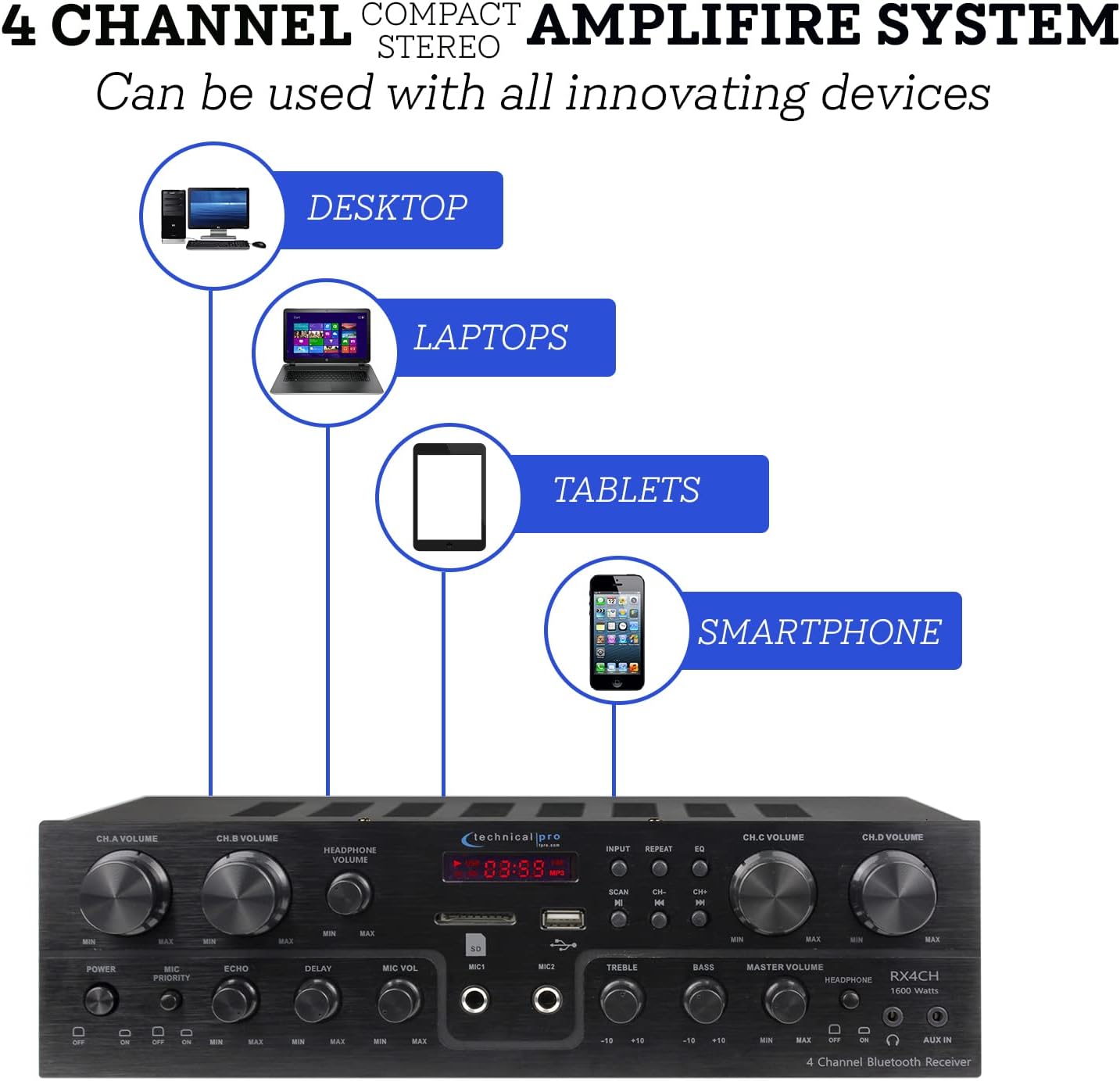
Figure 4.2: Device Connectivity Options
4.4 മൈക്രോഫോണുകൾ ബന്ധിപ്പിക്കുന്നു
Plug 1/4" microphone cables into the 'MIC1' or 'MIC2' jacks on the front panel.
4.5 പവർ കണക്ഷൻ
വോളിയം ഉറപ്പാക്കുകtage selector on the rear panel is set to the correct voltage for your region (110V/60Hz or 230V/50Hz). Connect the power cord to the AC inlet on the rear panel and then to a suitable power outlet.
5. പ്രവർത്തന നിർദ്ദേശങ്ങൾ
5.1 പവർ ഓൺ/ഓഫ്
Press the 'POWER' button on the front panel to turn the unit on or off. The fluorescent display will illuminate when the unit is powered on.
5.2 ഇൻപുട്ട് തിരഞ്ഞെടുക്കൽ
Use the 'INPUT' button on the front panel to cycle through available audio sources: Bluetooth, USB, SD, AUX, and RCA (DVD/LINE).
5.3 Volume and EQ Controls
- Channel Volume (CH.A, CH.B, CH.C, CH.D): Adjust the individual volume for each speaker channel using the dedicated rotary knobs.
- മാസ്റ്റർ വോളിയം: Control the overall output volume of the system using the 'MASTER VOLUME' knob.
- ട്രെബിൾ / ബാസ്: Adjust the high and low frequency response using the 'TREBLE' and 'BASS' knobs to fine-tune your sound.
- ഹെഡ്ഫോൺ വോളിയം: Adjust the volume for connected headphones using the 'HEADPHONE VOLUME' knob.
5.4 ബ്ലൂടൂത്ത് ജോടിയാക്കൽ
Select 'Bluetooth' as the input source. On your mobile device (smartphone, tablet, laptop), search for available Bluetooth devices and select 'Technical Pro' or similar from the list. Once paired, you can stream audio wirelessly to the receiver.
5.5 യുഎസ്ബി/എസ്ഡി കാർഡ് പ്ലേബാക്ക്
Insert a USB drive or SD card with audio files into the respective slot. The receiver will automatically switch to USB/SD mode. Use the 'PLAY/PAUSE', 'PREVIOUS', and 'NEXT' buttons to control playback.
5.6 Microphone Functions (Karaoke)
- മൈക്ക് വോളിയം: Adjust the volume of the connected microphones using the 'MIC VOL' knob.
- Echo/Delay: Use the 'ECHO' and 'DELAY' knobs to add effects to the microphone audio for a richer vocal performance.
- മൈക്ക് മുൻഗണന: Activate the 'MIC PRIORITY' switch to automatically lower the background music volume when a microphone is in use, ensuring vocals are clear and prominent.

Figure 5.1: Built-in Microphone Talk-Over Function
5.7 AM/FM റേഡിയോ
Extend the FM antenna connected to the rear panel for better reception. Select 'Tuner' or 'Radio' as the input source. Use the 'SCAN' button to automatically search for and save radio stations. Use the 'CH-' and 'CH+' buttons to navigate through saved stations.
6. പരിപാലനം
- വൃത്തിയാക്കൽ: Use a soft, dry cloth to clean the exterior of the receiver. Do not use liquid cleaners or aerosols.
- വെൻ്റിലേഷൻ: Ensure the receiver is placed in a well-ventilated area to prevent overheating. Do not block the ventilation openings.
- സംഭരണം: യൂണിറ്റ് ദീർഘനേരം സൂക്ഷിക്കുകയാണെങ്കിൽ, അത് വൈദ്യുതിയിൽ നിന്ന് വിച്ഛേദിച്ച് തണുത്തതും വരണ്ടതുമായ സ്ഥലത്ത് സൂക്ഷിക്കുക.
7. പ്രശ്നപരിഹാരം
| പ്രശ്നം | സാധ്യമായ കാരണം | പരിഹാരം |
|---|---|---|
| ശക്തിയില്ല | Power cord not connected; Power outlet faulty; Unit fuse blown | Check power cord connection; Try a different outlet; Contact service for fuse replacement |
| ശബ്ദ ഔട്ട്പുട്ട് ഇല്ല | Incorrect input selected; Speaker wires loose/incorrectly connected; Volume too low; Mute activated | Select correct input; Check speaker connections and polarity; Increase Master Volume; Deactivate mute if applicable |
| മുഴങ്ങുന്ന ശബ്ദം | Ground loop issue; Interference from other electronics; Faulty cable | Ensure proper grounding; Move unit away from other electronics; Try different audio cables |
| ബ്ലൂടൂത്ത് കണക്റ്റ് ചെയ്യുന്നില്ല | Device too far; Bluetooth not enabled on device; Receiver not in pairing mode | Move device closer to receiver; Enable Bluetooth on your device; Ensure receiver input is set to Bluetooth |
| USB/SD പ്ലേബാക്ക് പ്രശ്നങ്ങൾ | പിന്തുണയ്ക്കുന്നില്ല file ഫോർമാറ്റ്; കേടായി files; Drive/card not properly inserted | ഉറപ്പാക്കുക files are in supported format (e.g., MP3); Reformat drive/card; Reinsert drive/card firmly |
8 സ്പെസിഫിക്കേഷനുകൾ
| ഫീച്ചർ | സ്പെസിഫിക്കേഷൻ |
|---|---|
| മോഡൽ നമ്പർ | TPRX4CH |
| പീക്ക് പവർ ഔട്ട്പുട്ട് | 1600 വാട്ട്സ് |
| ആർഎംഎസ് പവർ putട്ട്പുട്ട് | 120 വാട്ട്സ് |
| ചാനലുകൾ | 4 Channel (supports 8 speakers) |
| കണക്റ്റിവിറ്റി ടെക്നോളജി | Bluetooth, RCA, USB 2.0, SD Card, AUX |
| ബ്ലൂടൂത്ത് ശ്രേണി | 30 അടി വരെ |
| മൈക്രോഫോൺ ഇൻപുട്ടുകൾ | 2 x 1/4" Jacks |
| ഓഡിയോ put ട്ട്പുട്ട് മോഡ് | സ്റ്റീരിയോ |
| പ്രത്യേക സവിശേഷതകൾ | Equalizer, Fluorescent Display, Mic Priority |
| ഉൽപ്പന്ന അളവുകൾ | 13 x 7.3 x 3.5 ഇഞ്ച് |
| ഇനത്തിൻ്റെ ഭാരം | 1.54 പൗണ്ട് |
| നിറം | കറുപ്പ് |
| നിർമ്മാതാവ് | സാങ്കേതിക പ്രോ |
| ആദ്യം ലഭ്യമായ തീയതി | ജൂൺ 16, 2022 |

ചിത്രം 8.1: ഉൽപ്പന്ന അളവുകൾ
9. വാറൻ്റിയും പിന്തുണയും
For warranty information and technical support, please refer to the documentation included with your purchase or visit the official Technical Pro website. You may also contact Technical Pro customer service directly for assistance with product setup, operation, or troubleshooting beyond the scope of this manual.
Technical Pro Store: Visit the Technical Pro Store on Amazon