
PowerDrive PWD2000P
PowerDrive 2000 Watt Power Inverter User Manual
Model: PWD2000P
ആമുഖം
This manual provides detailed instructions for the safe and efficient operation, installation, and maintenance of your PowerDrive 2000 Watt Power Inverter, Model PWD2000P. This device converts 12V DC power from your vehicle battery into 110V AC power, allowing you to operate various AC devices and charge electronic devices on the go. Please read this manual thoroughly before using the inverter.
പ്രധാനപ്പെട്ട സുരക്ഷാ വിവരങ്ങൾ
ഇൻവെർട്ടറിനോ ബന്ധിപ്പിച്ച ഉപകരണങ്ങൾക്കോ പരിക്കേൽക്കുകയോ കേടുപാടുകൾ സംഭവിക്കുകയോ ചെയ്യുന്നത് തടയാൻ ഇനിപ്പറയുന്ന സുരക്ഷാ മുൻകരുതലുകൾ എപ്പോഴും പാലിക്കുക:
- ഇൻവെർട്ടർ തുറക്കരുത് casing. ഉള്ളിൽ ഉപയോക്തൃ-സേവനയോഗ്യമായ ഭാഗങ്ങളൊന്നുമില്ല.
- ഇൻവെർട്ടറിന് ചുറ്റും ശരിയായ വായുസഞ്ചാരം ഉറപ്പാക്കുക. കൂളിംഗ് വെന്റുകൾ അടയ്ക്കരുത്.
- വെള്ളം, ഈർപ്പം, കത്തുന്ന വസ്തുക്കൾ എന്നിവയിൽ നിന്ന് ഇൻവെർട്ടർ അകറ്റി നിർത്തുക.
- ഇൻവെർട്ടർ 12V DC പവർ സ്രോതസ്സിലേക്ക് മാത്രം ബന്ധിപ്പിക്കുക.
- Do not exceed the inverter's rated power output (2000 Watts continuous, 4000 Watts surge).
- Always connect the inverter to the battery before plugging in AC devices.
- Disconnect the inverter from the battery when not in use.
- ഈ ഉൽപ്പന്നത്തിൽ കാൻസർ, ജനന വൈകല്യങ്ങൾ അല്ലെങ്കിൽ മറ്റ് പ്രത്യുൽപാദന തകരാറുകൾ എന്നിവയ്ക്ക് കാരണമാകുന്ന രാസവസ്തുക്കൾ കാലിഫോർണിയ സംസ്ഥാനത്തിന് അറിയാം. കൈകാര്യം ചെയ്ത ശേഷം കൈ കഴുകുക.
ഉൽപ്പന്ന ഘടകങ്ങൾ
The PowerDrive 2000 Watt Power Inverter comes with the following components:
- PowerDrive 2000 Watt Power Inverter unit
- 39-inch heavy-duty installation cables (red for positive, black for negative)
- നീക്കം ചെയ്യാവുന്ന LCD സ്ക്രീൻ
- മൗണ്ടിംഗ് ബ്രാക്കറ്റുകൾ

ചിത്രം 1: ഫ്രണ്ട് view of the PowerDrive 2000 Watt Power Inverter, showing the digital display, power button, Bluetooth indicator, four AC 120V outlets, one USB-C port, and one USB-A port. The unit features a durable yellow and black casinവെന്റിലേഷൻ ഗ്രില്ലുകളുള്ള ഗ്രാം.

ചിത്രം 2: കഴിഞ്ഞുview of the PowerDrive 2000 Watt Power Inverter with key dimensions (14.54" length, 9.8" width, 4.25" height) and included accessories. The image displays the inverter unit, red and black 39-inch battery cables, and a 12-foot remote LCD cable.
സജ്ജീകരണവും ഇൻസ്റ്റാളേഷനും
Proper installation is crucial for the inverter's performance and safety. Follow these steps carefully:
- ഒരു ലൊക്കേഷൻ തിരഞ്ഞെടുക്കുക: Select a dry, well-ventilated area for mounting the inverter. Ensure it is away from direct sunlight, heat sources, and any flammable materials. The mounting brackets can be used to secure the unit.
- ബാറ്ററി തയ്യാറാക്കുക: Ensure your vehicle's battery is a 12V DC system. Turn off the vehicle and any accessories.
- കേബിളുകൾ ബന്ധിപ്പിക്കുക:
- ബന്ധിപ്പിക്കുക ചുവപ്പ് (positive) cable to the പോസിറ്റീവ് (+) ഇൻവെർട്ടറിന്റെ ടെർമിനൽ.
- ബന്ധിപ്പിക്കുക കറുപ്പ് (negative) cable to the നെഗറ്റീവ് (-) ഇൻവെർട്ടറിന്റെ ടെർമിനൽ.
- മറ്റേ അറ്റം ബന്ധിപ്പിക്കുക ചുവപ്പ് ലേക്കുള്ള കേബിൾ പോസിറ്റീവ് (+) terminal of the vehicle battery.
- മറ്റേ അറ്റം ബന്ധിപ്പിക്കുക കറുപ്പ് ലേക്കുള്ള കേബിൾ നെഗറ്റീവ് (-) terminal of the vehicle battery.
പ്രധാനപ്പെട്ടത്: Always connect the inverter terminals first, then the battery terminals. Ensure connections are tight and secure.
- Connect Remote LCD (Optional): If desired, connect the removable LCD screen to the inverter using the provided cable. This allows for remote monitoring and control.
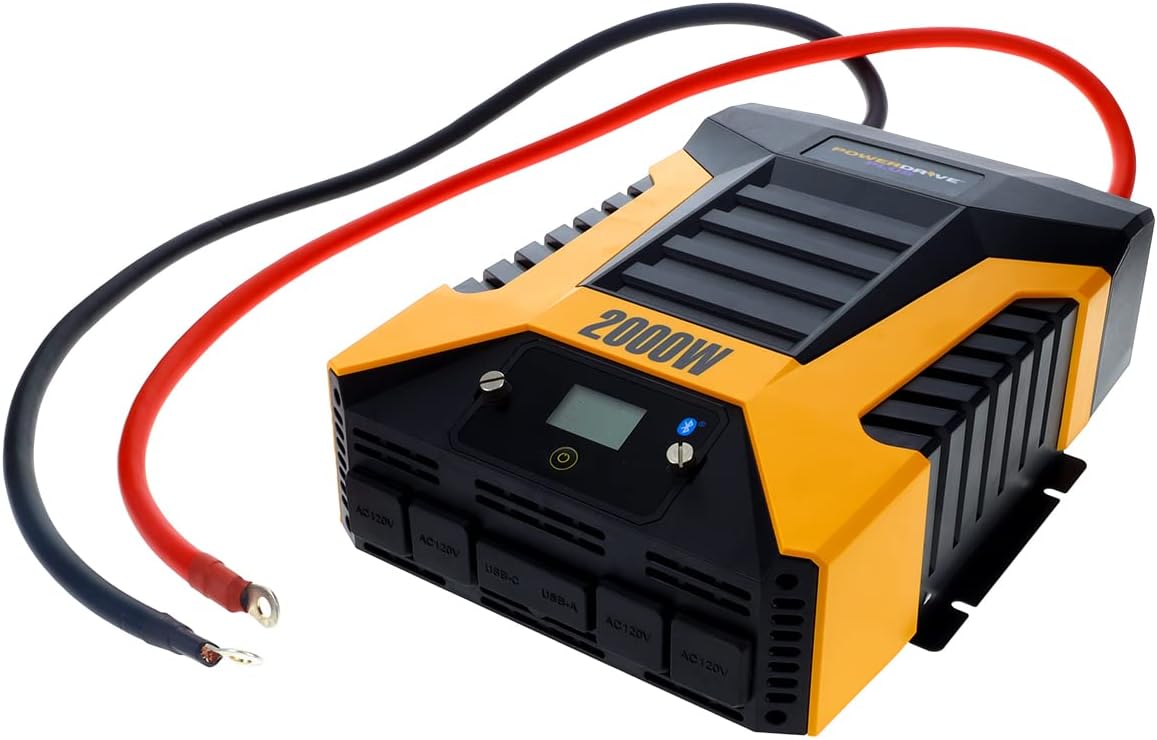
ചിത്രം 3: The PowerDrive 2000 Watt Power Inverter with the red positive and black negative battery cables securely connected to its terminals, ready for connection to a vehicle battery. This illustrates the correct cable attachment for power input.
പ്രവർത്തന നിർദ്ദേശങ്ങൾ
Once installed, the inverter is ready for operation:
- പവർ ചെയ്യുന്നത്: Press the power button on the inverter's front panel or on the remote LCD screen. The digital display will illuminate, showing battery voltagഇ, ഔട്ട്പുട്ട് വാട്ട്tage.
- ബന്ധിപ്പിക്കുന്ന ഉപകരണങ്ങൾ: Plug your AC devices into the four 3-prong AC outlets. For charging smartphones and tablets, use the standard USB 2.4 Amp port or the fast-charging USB-C 3.0 Amp തുറമുഖം.
- നിരീക്ഷണം: The digital display provides real-time information on battery voltage, output power (watts), and any error codes.
- ബ്ലൂടൂത്ത് വയർലെസ് ടെക്നോളജി:
- സൗജന്യമായി ഡൗൺലോഡ് ചെയ്യുക PowerDrive Plus app from your smartphone's app store (compatible with Android and iOS).
- Enable Bluetooth on your smartphone and pair it with the inverter.
- The app allows you to remotely monitor battery voltage, output power, and product temperature. You can also set up protections like undervoltage and overload, and power the inverter on/off from a distance.
- പവർ ഓഫ്: Press and hold the power button until the display turns off, or use the PowerDrive Plus app. Disconnect devices before turning off the inverter.

ചിത്രം 4: ക്ലോസ്-അപ്പ് ഫ്രണ്ട് view of the PowerDrive 2000 Watt Power Inverter, highlighting its four AC 120V outlets, one USB-C port, and one USB-A port. These ports provide versatile power options for various electronic devices and appliances.

ചിത്രം 5: A smartphone screen showing the PowerDrive Plus application interface. The app displays real-time data such as output power (842 watts), battery power percentage (88%), battery voltage (12.6 VDC), and output voltage (120 VAC), along with temperature readings and control options.
മെയിൻ്റനൻസ്
To ensure the longevity and optimal performance of your PowerDrive inverter, follow these maintenance guidelines:
- വൃത്തിയായി സൂക്ഷിക്കു: Regularly wipe the exterior of the inverter with a dry, soft cloth. Do not use liquid cleaners or solvents.
- വെൻ്റിലേഷൻ: Ensure the cooling fan vents are clear of dust and debris. The high-speed cooling fan automatically activates when needed and is designed for quiet operation.
- കേബിൾ കണക്ഷനുകൾ: Periodically check that all cable connections to the battery and inverter terminals are secure and free from corrosion.
- സംഭരണം: When not in use for extended periods, store the inverter in a cool, dry place, disconnected from the battery.

ചിത്രം 6: പിൻഭാഗം view of the PowerDrive 2000 Watt Power Inverter, showcasing its two high-speed cooling fans and the robust battery input terminals. Proper airflow through these fans is essential for maintaining optimal operating temperature.
ട്രബിൾഷൂട്ടിംഗ്
നിങ്ങളുടെ ഇൻവെർട്ടറിൽ പ്രശ്നങ്ങൾ നേരിടുകയാണെങ്കിൽ, ഇനിപ്പറയുന്ന പൊതുവായ പ്രശ്നങ്ങളും പരിഹാരങ്ങളും പരിശോധിക്കുക:
| പ്രശ്നം | സാധ്യമായ കാരണം | പരിഹാരം |
|---|---|---|
| പവർ ഔട്ട്പുട്ട് ഇല്ല / ഇൻവെർട്ടർ ഓണാകുന്നില്ല |
|
|
| ഇൻവെർട്ടർ ഇടയ്ക്കിടെ ഓഫാകുന്നു |
|
|
| Digital display shows error code | Specific error condition (e.g., over-voltagഇ, വോളിയത്തിന് താഴെtage, overload, short circuit) | Refer to the PowerDrive Plus app or contact customer support for specific error code interpretations and solutions. Address the underlying issue (e.g., reduce load, check battery). |
ഉൽപ്പന്ന സവിശേഷതകൾ
| ഫീച്ചർ | വിശദാംശങ്ങൾ |
|---|---|
| ബ്രാൻഡ് | പവർഡ്രൈവ് |
| മോഡൽ നമ്പർ | PWD2000P |
| തുടർച്ചയായ ശക്തി | 2000 വാട്ട്സ് |
| സർജ് പവർ | 4000 വാട്ട്സ് |
| ഇൻപുട്ട് വോളിയംtage | 12V DC |
| Putട്ട്പുട്ട് വോളിയംtage | 110V എസി |
| എസി lets ട്ട്ലെറ്റുകൾ | Four 3-prong outlets |
| USB പോർട്ടുകൾ | ഒരു USB 2.4 Amp, One USB-C 3.0 Amp |
| കണക്റ്റിവിറ്റി | Bluetooth Wireless Technology (PowerDrive Plus App compatible) |
| പ്രദർശിപ്പിക്കുക | Digital display (removable LCD screen) |
| തണുപ്പിക്കൽ | ഉയർന്ന വേഗതയുള്ള കൂളിംഗ് ഫാൻ |
| ഇനത്തിൻ്റെ ഭാരം | 9 പൗണ്ട് |
| ഉൽപ്പന്ന അളവുകൾ | 5.7 x 17 x 12 ഇഞ്ച് |
വാറൻ്റിയും പിന്തുണയും
For warranty information, technical support, or service inquiries, please contact PowerDrive customer service. Keep your purchase receipt as proof of purchase.
For additional resources and frequently asked questions, visit the official PowerDrive website or refer to the PowerDrive Plus app.
Ask a question about this manual
Ask about setup, troubleshooting, compatibility, parts, safety, or missing instructions. Manuals+ will review the question and use this page’s manual context to help answer it.