
1. ആമുഖം
വാങ്ങിയതിന് നന്ദി.asing the TOPTRO Projector TR81. This projector is designed to provide a high-quality visual experience with its Full HD 1080P native resolution, 4K support, and advanced features like Bluetooth 5.0 and 4D keystone correction. This manual provides essential information for setting up, operating, maintaining, and troubleshooting your projector to ensure optimal performance and longevity.
2. സുരക്ഷാ നിർദ്ദേശങ്ങൾ
- വെന്റിലേഷൻ ദ്വാരങ്ങൾ അടയ്ക്കരുത്. ശരിയായ വായുസഞ്ചാരത്തിനായി പ്രൊജക്ടറിന് ചുറ്റും മതിയായ ഇടം ഉറപ്പാക്കുക.
- l ചെയ്യുമ്പോൾ പ്രൊജക്ടർ ലെൻസിലേക്ക് നേരിട്ട് നോക്കരുത്amp തിളക്കമുള്ള വെളിച്ചം കണ്ണിന് കേടുപാടുകൾ വരുത്തുമെന്നതിനാൽ ഓണാണ്.
- പ്രൊജക്ടറിനൊപ്പം നൽകിയിരിക്കുന്ന പവർ അഡാപ്റ്റർ മാത്രം ഉപയോഗിക്കുക.
- Avoid placing the projector in direct sunlight, near heat sources, or in environments with high humidity or dust.
- പ്രൊജക്ടർ സ്വയം വേർപെടുത്താനോ നന്നാക്കാനോ ശ്രമിക്കരുത്. എല്ലാ സേവനങ്ങളും യോഗ്യതയുള്ള ഉദ്യോഗസ്ഥർക്ക് റഫർ ചെയ്യുക.
- പ്രൊജക്ടർ വെള്ളത്തിൽ നിന്നോ മറ്റ് ദ്രാവകങ്ങളിൽ നിന്നോ അകറ്റി നിർത്തുക.
3. പാക്കേജ് ഉള്ളടക്കം
താഴെ പറയുന്ന ഇനങ്ങൾക്കായി ബോക്സ് ചെക്ക് ചെയ്യുക:
- TOPTRO Projector TR81
- പവർ കേബിൾ
- HDMI കേബിൾ
- എവി കേബിൾ
- റിമോട്ട് കൺട്രോൾ
- ഉപയോക്തൃ മാനുവൽ
4. ഉൽപ്പന്നം കഴിഞ്ഞുview
The TOPTRO TR81 projector features a sleek design with intuitive controls and multiple connectivity options. Below is an overview അതിന്റെ പ്രധാന ഘടകങ്ങളുടെ.
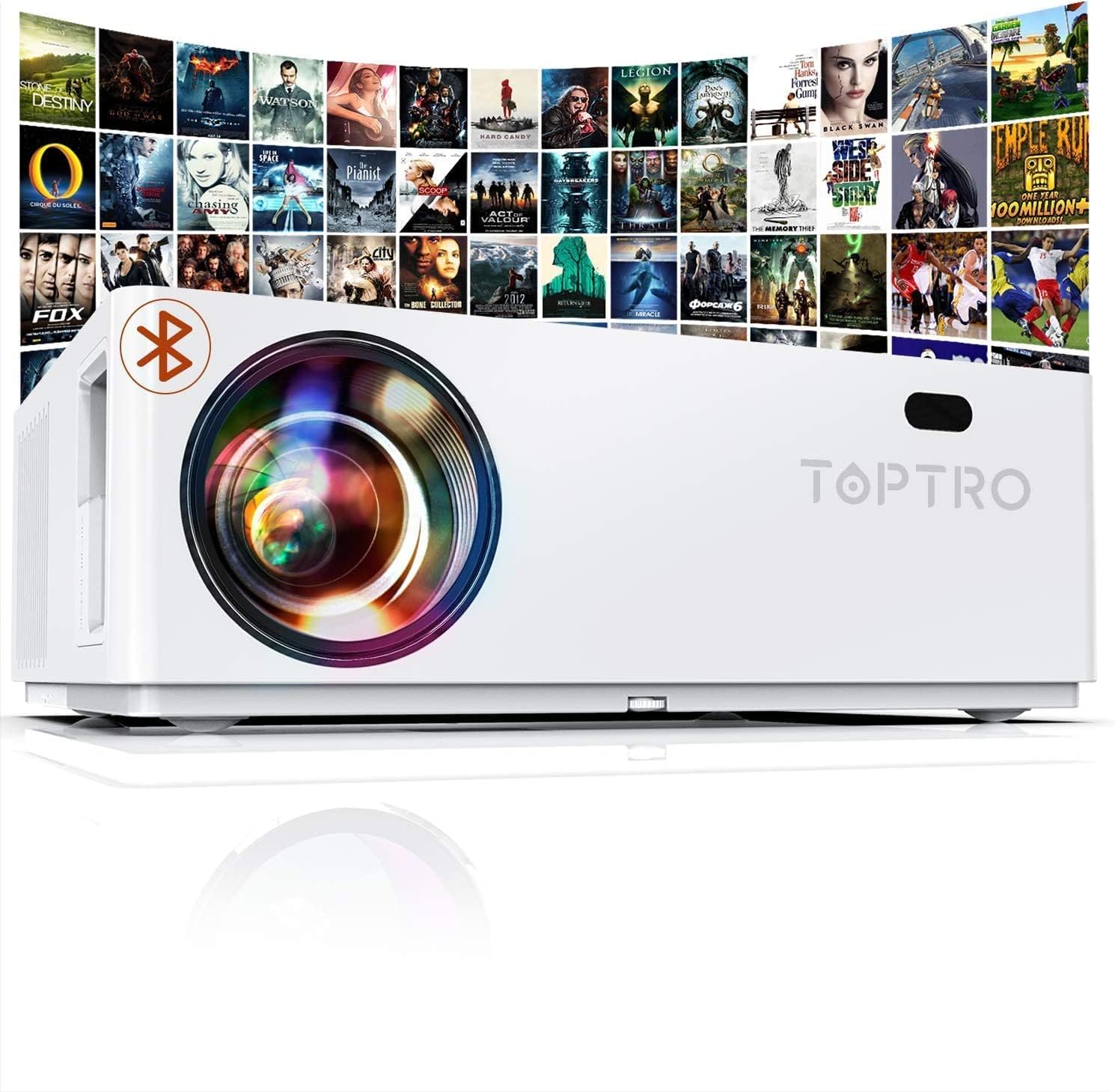
ഫ്രണ്ട് view of the TOPTRO Projector TR81, showcasing the lens and overall design.
4.1. ഘടകങ്ങളും നിയന്ത്രണങ്ങളും
- ലെൻസ്: ചിത്രം സ്ക്രീനിലേക്ക് പ്രൊജക്റ്റ് ചെയ്യുന്നു.
- ഫോക്കസ് റിംഗ്: പ്രൊജക്റ്റ് ചെയ്ത ചിത്രത്തിന്റെ വ്യക്തത ക്രമീകരിക്കുന്നു.
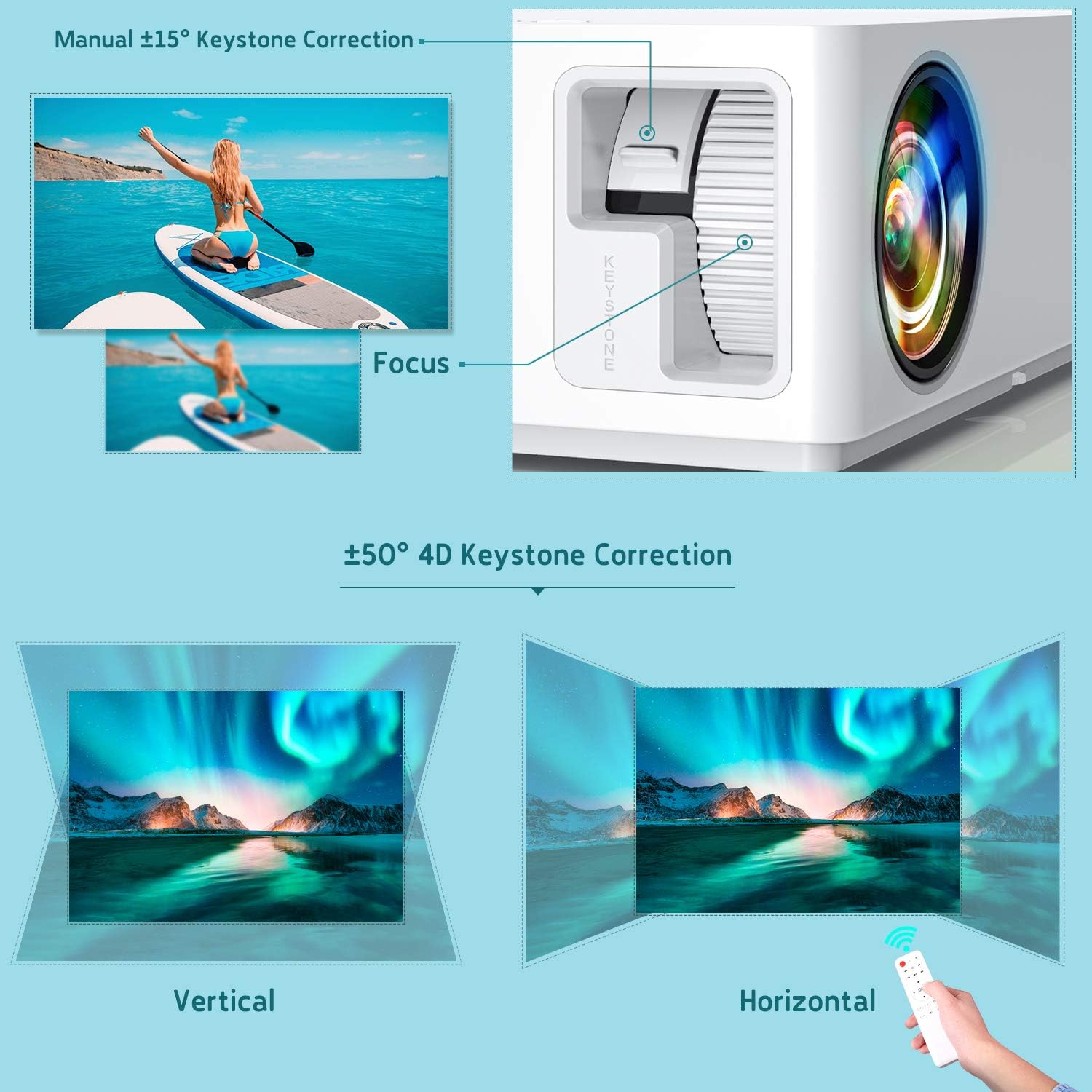
- Keystone Correction Dial: Manually corrects vertical image distortion.
- നിയന്ത്രണ പാനൽ: Buttons for power, menu navigation, and source selection.
- വെന്റിലേഷൻ ഓപ്പണിംഗുകൾ: താപ വിസർജ്ജനത്തിനായി.
- ഇൻപുട്ട് പോർട്ടുകൾ: HDMI, VGA, AV, USB, 3.5mm Audio Jack.
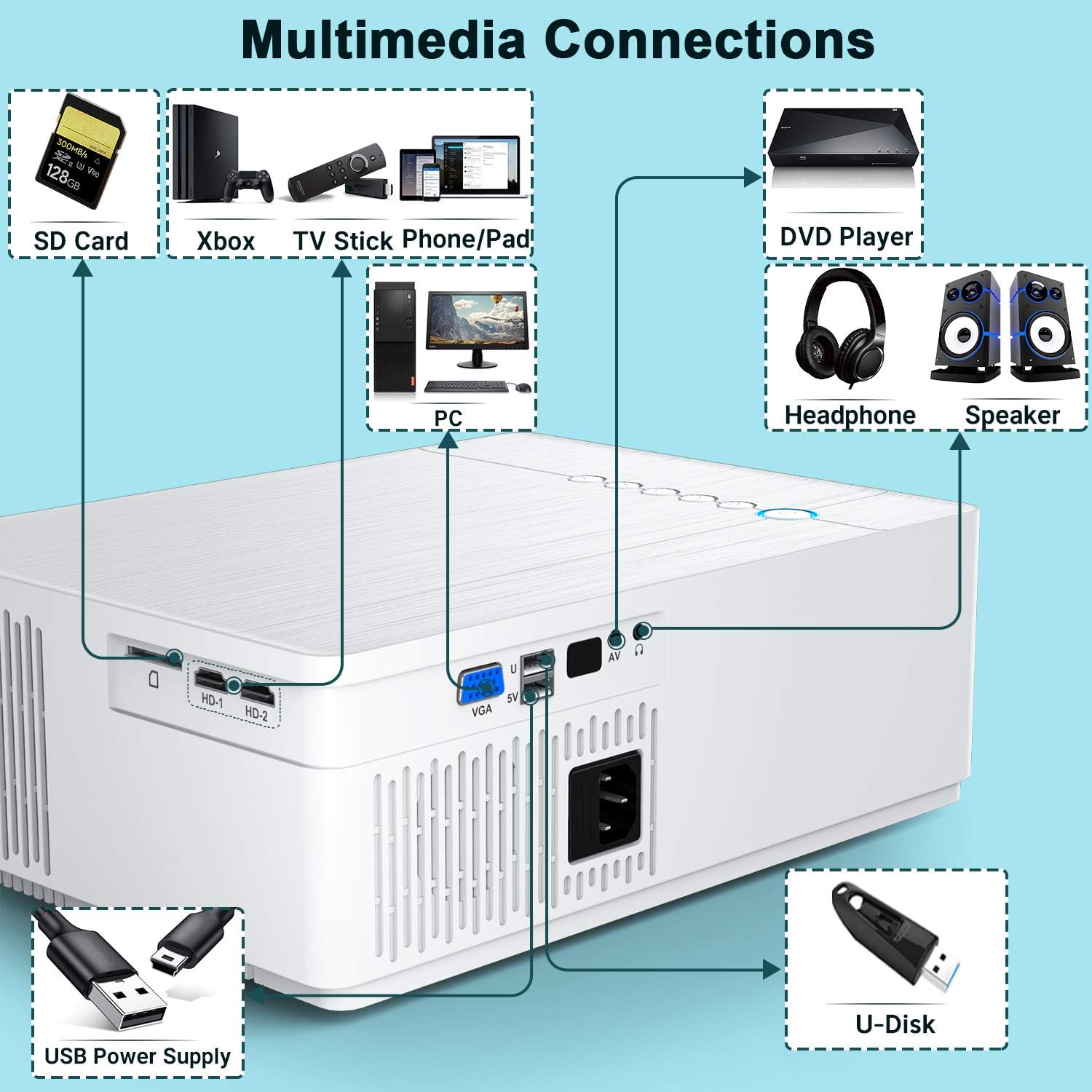
വിശദമായി view of the multimedia connection ports on the TOPTRO Projector TR81, including HDMI, VGA, AV, USB, and audio out.
5. സജ്ജീകരണം
5.1. പ്ലേസ്മെന്റ്
Place the projector on a stable, flat surface or mount it to the ceiling. Ensure the projector is positioned directly in front of the projection surface (screen or wall) for the best image quality. The projector can produce ultra-high definition images up to 350 inches, suitable for a 30ft viewing റേഞ്ച്.

Illustration of the TOPTRO Projector TR81 projecting a large 350-inch image, demonstrating its capability for giant projection sizes.
5.2. പവർ കണക്ഷൻ
- പ്രൊജക്ടറിന്റെ പവർ ഇൻപുട്ടിലേക്ക് പവർ കേബിൾ ബന്ധിപ്പിക്കുക.
- പവർ കേബിളിൻ്റെ മറ്റേ അറ്റം പവർ ഔട്ട്ലെറ്റിലേക്ക് പ്ലഗ് ചെയ്യുക.
- പ്രൊജക്ടറിലോ റിമോട്ട് കൺട്രോളിലോ ഉള്ള പവർ ബട്ടൺ അമർത്തി അത് ഓണാക്കുക.
5.3. ഫോക്കസും കീസ്റ്റോൺ ക്രമീകരണവും
After powering on, adjust the image clarity and shape:
- ഫോക്കസ്: ചിത്രം വ്യക്തവും വ്യക്തവുമായി കാണപ്പെടുന്നതുവരെ ലെൻസിന് ചുറ്റും ഫോക്കസ് റിംഗ് തിരിക്കുക.
- കീസ്റ്റോൺ തിരുത്തൽ: The projector features 4D ±50° keystone correction. Use the keystone dial or the remote control to adjust the image shape until it forms a perfect rectangle. This is particularly useful for ceiling-mounted setups. The X/Y ZOOM function allows direct reduction of the projection size.

Diagram illustrating the manual focus and ±50° 4D keystone correction capabilities of the TOPTRO Projector TR81, showing how to achieve a rectangular image from various angles.
6. പ്രവർത്തന നിർദ്ദേശങ്ങൾ
6.1. അടിസ്ഥാന പ്രവർത്തനം
- പവർ ഓൺ/ഓഫ്: പ്രൊജക്ടറിലോ വിദൂര നിയന്ത്രണത്തിലോ ഉള്ള പവർ ബട്ടൺ അമർത്തുക.
- ഉറവിട തിരഞ്ഞെടുപ്പ്: Use the 'Source' button on the remote or projector to select the desired input (HDMI1, HDMI2, VGA, AV, USB).
- മെനു നാവിഗേഷൻ: Use the arrow keys and 'OK' button on the remote to navigate through the on-screen menu.
6.2. ക്രമീകരണങ്ങൾ ക്രമീകരിക്കുന്നു
Access the projector's menu to adjust various display and audio settings:
- ചിത്ര മോഡ്: Select from preset modes (e.g., Standard, Dynamic, Movie) or customize brightness, contrast, color, and sharpness. The projector offers 9000 lumens brightness and a 10000:1 ultra-high contrast ratio for vivid images.
- വീക്ഷണ അനുപാതം: Choose between 16:9, 4:3, or Auto.
- ശബ്ദ മോഡ്: Adjust audio settings or connect external speakers via Bluetooth.
Comparison image showing the difference in brightness between the TOPTRO TR81 (7000LM) and another projector (5000LM), highlighting the superior brightness and clarity of the TR81.
7. കണക്റ്റിവിറ്റി
The TOPTRO TR81 projector offers a wide range of connectivity options for various devices.
7.1. വയർ കണക്ഷനുകൾ
The projector features HDMI, VGA, AV, and USB ports. These can be used to connect devices such as:
- Laptops/PCs
- ഡിവിഡി പ്ലെയറുകൾ
- Gaming Consoles (PS4, Xbox)
- ടിവി ബോക്സുകൾ
- USB drives for media playback
Diagram illustrating various multimedia connections available on the TOPTRO Projector TR81, including SD Card, Xbox, TV Stick, Phone/Pad, PC, DVD Player, Headphones, Speaker, USB Power Supply, and U-Disk.
7.2. Wireless Connections (Bluetooth)
The built-in Bluetooth 5.0 chip allows you to connect the projector to external Bluetooth speakers or headphones for enhanced audio without distortion.
- പ്രൊജക്ടറിന്റെ സെറ്റിംഗ്സ് മെനുവിലേക്ക് പോകുക.
- Select 'Bluetooth' and turn it on.
- Put your Bluetooth device (speaker/headphones) into pairing mode.
- Select your device from the list on the projector's screen to connect.

Image demonstrating the TOPTRO Projector TR81's Bluetooth 5.0 support, showing it wirelessly connected to an external speaker for an enhanced audio experience.
7.3. Streaming Devices
Easily connect streaming devices like Fire TV Stick or Chromecast to enjoy your favorite content from various platforms.
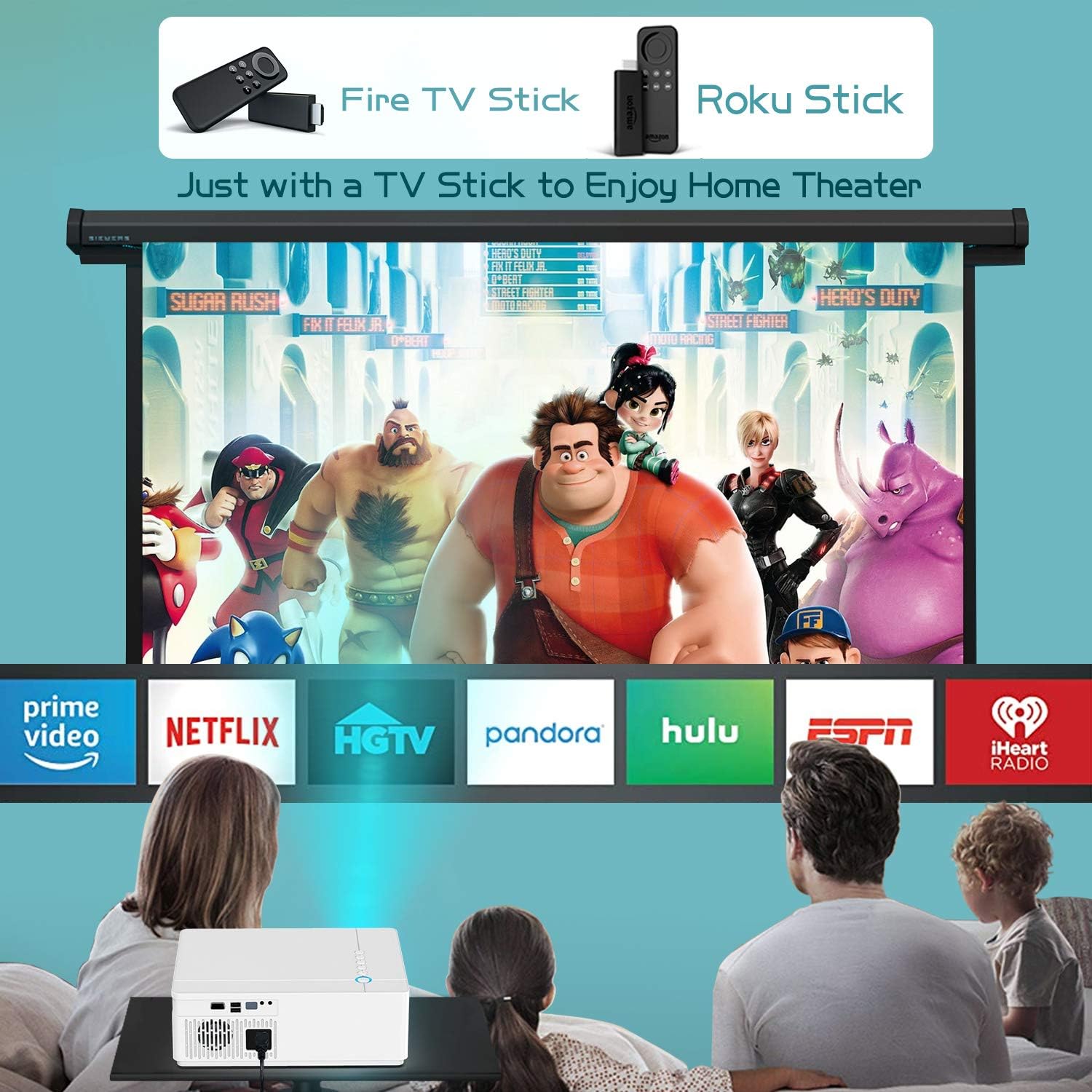
Image showing the TOPTRO Projector TR81 connected to a Fire TV Stick and Roku Stick, enabling access to various streaming services for a home theater experience.
8. പരിപാലനം
Proper maintenance ensures the longevity and performance of your TOPTRO Projector TR81.
- ലെൻസ് ക്ലീനിംഗ്: Use a soft, lint-free cloth specifically designed for optical lenses to gently wipe the projector lens. Do not use abrasive cleaners.
- വെന്റ് ക്ലീനിംഗ്: Regularly clean the ventilation openings to prevent dust buildup, which can affect cooling and performance. Use a soft brush or compressed air.
- Lamp ജീവിതം: The projector utilizes the latest patented technology, providing an impressive lamp life of 150,000 hours. No regular lamp replacement is typically needed under normal usage.
- സംഭരണം: When not in use for extended periods, store the projector in a cool, dry place, protected from dust.
9. പ്രശ്നപരിഹാരം
നിങ്ങളുടെ പ്രൊജക്ടറിൽ പ്രശ്നങ്ങൾ നേരിടുകയാണെങ്കിൽ, ഇനിപ്പറയുന്ന പൊതുവായ പ്രശ്നങ്ങളും പരിഹാരങ്ങളും പരിശോധിക്കുക:
| പ്രശ്നം | സാധ്യമായ കാരണം | പരിഹാരം |
|---|---|---|
| സ്ക്രീനിൽ ചിത്രമൊന്നുമില്ല | Power cable loose; Incorrect input source; Device not connected properly. | Check power connection; Select correct input source; Reconnect HDMI/VGA cable. |
| മങ്ങിയ ചിത്രം | Out of focus; Incorrect keystone adjustment. | Adjust focus ring; Use 4D keystone correction. |
| ശബ്ദമില്ല | Volume too low; Muted; External audio device not connected/paired. | Increase volume; Unmute; Check Bluetooth connection or 3.5mm audio cable. |
| റിമോട്ട് കൺട്രോൾ പ്രവർത്തിക്കുന്നില്ല | ബാറ്ററികൾ കുറവാണ്/ഡെഡ് ആണ്; റിമോട്ടിനും പ്രൊജക്ടറിനും ഇടയിലുള്ള തടസ്സം. | Replace batteries; Remove obstructions; Point remote directly at projector's IR receiver. |
| അമിത ചൂടാക്കൽ | തടഞ്ഞ വെന്റിലേഷൻ. | Ensure clear space around vents; Clean vents if dusty. |
10 സ്പെസിഫിക്കേഷനുകൾ
Key technical specifications for the TOPTRO Projector TR81:
| ഫീച്ചർ | സ്പെസിഫിക്കേഷൻ |
|---|---|
| ബ്രാൻഡ് | ടോപ്ട്രോ |
| മോഡൽ നമ്പർ | TR81 |
| നേറ്റീവ് റെസല്യൂഷൻ | 1920 x 1080P Full HD |
| പിന്തുണയുള്ള റെസല്യൂഷൻ | 4K വരെ |
| തെളിച്ചം | 9000 ല്യൂമെൻസ് |
| കോൺട്രാസ്റ്റ് റേഷ്യോ | 10000:1 |
| കീസ്റ്റോൺ തിരുത്തൽ | 4D ±50° |
| കണക്റ്റിവിറ്റി ടെക്നോളജി | USB, HDMI, VGA, AV, 3.5mm Audio Jack, Bluetooth 5.0 |
| Lamp ജീവിതം | 150,000 മണിക്കൂർ |
| ഉൽപ്പന്ന അളവുകൾ | 23 x 10.9 x 30.9 സെ.മീ |
| ഇനത്തിൻ്റെ ഭാരം | 2.7 കി.ഗ്രാം |
| വാട്ട്tage | 10 വാട്ട്സ് |
11. വാറൻ്റിയും പിന്തുണയും
TOPTRO projectors come with a lifetime warranty and lifetime professional technical support. If you encounter any problems with the product or require assistance, please contact TOPTRO customer service through the official channels or the retailer where you purchased the product. Please have your model number (TR81) and purchase details ready when contacting support.