
1. ആമുഖം
Thank you for choosing the LAMAX Sounder2 Max Portable Stereo Speaker. This manual provides essential information to help you set up, operate, and maintain your device. Please read these instructions carefully before use and retain them for future reference.
The LAMAX Sounder2 Max delivers powerful 50W stereo sound with a robust design, offering up to 20 hours of playback on a single charge. Its IP67 rating ensures water and dust resistance, making it suitable for various environments.

Image 1.1: The LAMAX Sounder2 Max speaker, highlighting its 360-degree sound capability.
2 സുരക്ഷാ വിവരങ്ങൾ
സുരക്ഷിതവും ശരിയായതുമായ പ്രവർത്തനം ഉറപ്പാക്കാൻ, ദയവായി ഇനിപ്പറയുന്ന മാർഗ്ഗനിർദ്ദേശങ്ങൾ പാലിക്കുക:
- തീവ്രമായ താപനിലയിലോ നേരിട്ടുള്ള സൂര്യപ്രകാശത്തിലോ സ്പീക്കറിനെ ദീർഘനേരം തുറന്നുകാട്ടരുത്.
- സ്പീക്കറെ ശക്തമായ ആഘാതങ്ങൾക്ക് വിധേയമാക്കുകയോ താഴെയിടുകയോ ചെയ്യുന്നത് ഒഴിവാക്കുക.
- സ്പീക്കർ സ്വയം ഡിസ്അസംബ്ലിംഗ് ചെയ്യാനോ നന്നാക്കാനോ പരിഷ്ക്കരിക്കാനോ ശ്രമിക്കരുത്. അംഗീകൃത സേവന ഉദ്യോഗസ്ഥരെ ബന്ധപ്പെടുക.
- മെഡിക്കൽ ഉപകരണങ്ങളുടെ പ്രവർത്തനത്തെ തടസ്സപ്പെടുത്തിയേക്കാവുന്നതിനാൽ സ്പീക്കർ അവയിൽ നിന്ന് അകറ്റി നിർത്തുക.
- പ്രാദേശിക നിയന്ത്രണങ്ങൾ അനുസരിച്ച് ബാറ്ററിയും സ്പീക്കറും നശിപ്പിക്കുക. ബാറ്ററികൾ തീയിൽ നിക്ഷേപിക്കരുത്.
- Ensure all ports are securely closed when exposing the speaker to water to maintain its IP67 rating.
3. ഉൽപ്പന്നം കഴിഞ്ഞുview നിയന്ത്രണങ്ങളും
Familiarize yourself with the various parts and controls of your LAMAX Sounder2 Max speaker.
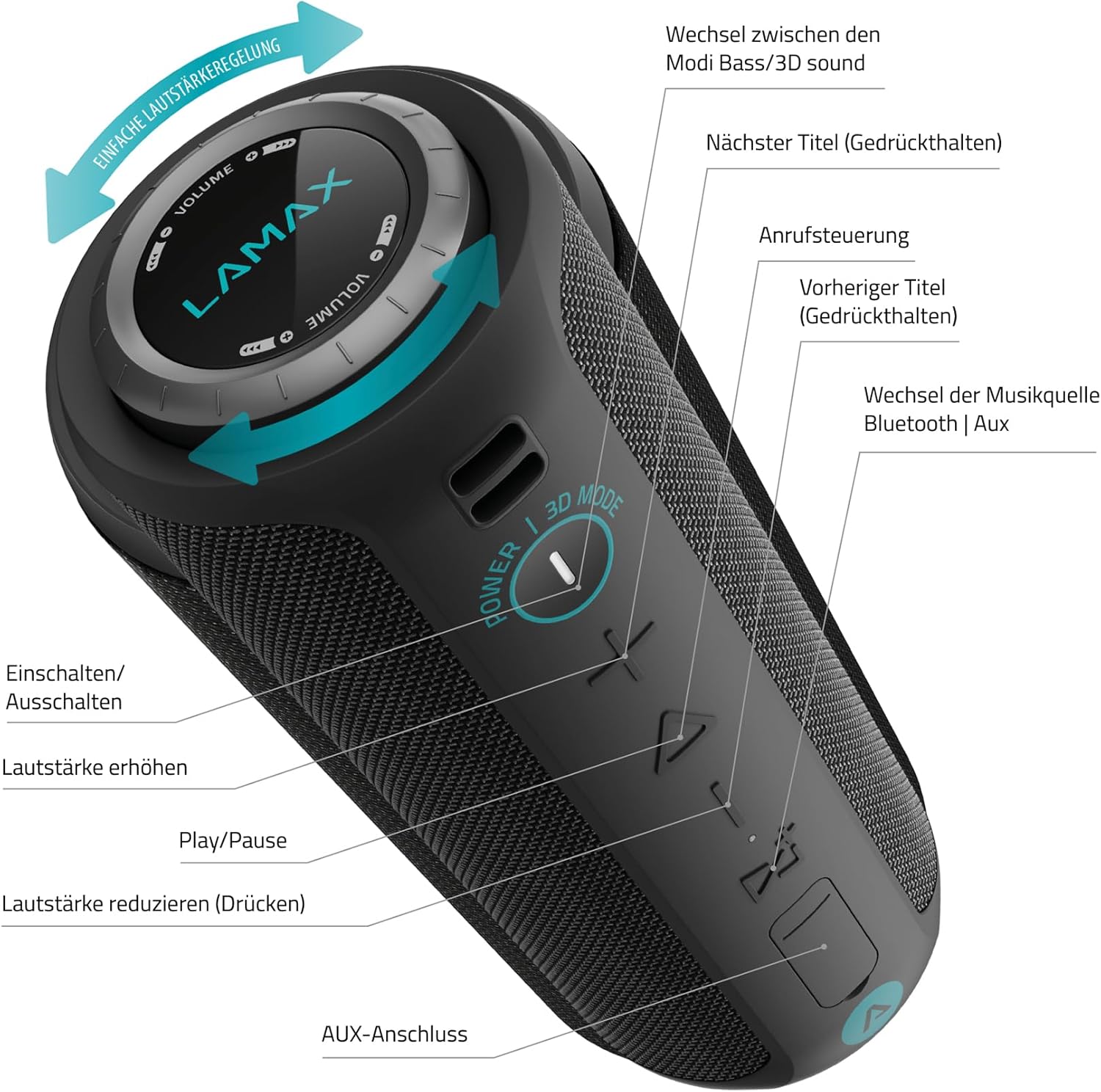
Image 3.1: Detailed diagram of the speaker's control panel.
- പവർ ബട്ടൺ: Press and hold to Power On/Off. Press to switch between Bass/3D sound modes.
- വോളിയം അപ്പ് ബട്ടൺ (+): വോളിയം കൂട്ടാൻ അമർത്തുക.
- Play/Pause Button (Triangle): Press to Play/Pause music. Press to answer/end calls.
- വോളിയം ഡൗൺ ബട്ടൺ (-): വോളിയം കുറയ്ക്കാൻ അമർത്തുക.
- Source Button (M): Press to switch between Bluetooth and AUX music sources.
- Next Track Button (Right Arrow): Press and hold for the next track.
- Previous Track Button (Left Arrow): Press and hold for the previous track.
- Rotating Volume Ring: Rotate clockwise to increase volume, counter-clockwise to decrease volume.
- ഓക്സ് പോർട്ട്: വയർഡ് ഓഡിയോ കണക്ഷന്.
- ചാർജിംഗ് പോർട്ട് (USB-C): സ്പീക്കർ ചാർജ് ചെയ്തതിന്.
- മൈക്രോ എസ്ഡി കാർഡ് സ്ലോട്ട്: For playing music directly from a Micro SD card (if applicable, not explicitly mentioned in specs but common).

Image 3.2: Demonstrating the rotating volume ring for easy adjustment.
4. സജ്ജീകരണം
4.1 സ്പീക്കർ ചാർജ് ചെയ്യുന്നു
Before first use, fully charge the speaker. Connect the provided USB-C cable to the speaker's charging port and the other end to a USB power adapter (not included) or a computer's USB port. The LED indicator will show charging status and turn off when fully charged.
4.2 പവർ ഓൺ/ഓഫ്
- പവർ ഓണാക്കാൻ: കേൾക്കാവുന്ന ഒരു പ്രോംപ്റ്റ് കേൾക്കുകയും LED ഇൻഡിക്കേറ്റർ പ്രകാശിക്കുകയും ചെയ്യുന്നതുവരെ ഏകദേശം 3 സെക്കൻഡ് പവർ ബട്ടൺ അമർത്തിപ്പിടിക്കുക.
- പവർ ഓഫ് ചെയ്യാൻ: കേൾക്കാവുന്ന ഒരു പ്രോംപ്റ്റ് കേൾക്കുന്നതുവരെയും LED ഇൻഡിക്കേറ്റർ ഓഫാകുന്നതുവരെയും പവർ ബട്ടൺ ഏകദേശം 3 സെക്കൻഡ് അമർത്തിപ്പിടിക്കുക.
4.3 ബ്ലൂടൂത്ത് ജോടിയാക്കൽ
- സ്പീക്കർ ഓണാണെന്നും ബ്ലൂടൂത്ത് ജോടിയാക്കൽ മോഡിലാണെന്നും ഉറപ്പാക്കുക (LED ഇൻഡിക്കേറ്റർ മിന്നിമറയും).
- നിങ്ങളുടെ മൊബൈൽ ഉപകരണത്തിൽ, ബ്ലൂടൂത്ത് പ്രവർത്തനക്ഷമമാക്കി ലഭ്യമായ ഉപകരണങ്ങൾക്കായി തിരയുക.
- Select "LAMAX Sounder2 Max" from the list of devices.
- ജോടിയാക്കിക്കഴിഞ്ഞാൽ, നിങ്ങൾ ഒരു സ്ഥിരീകരണ ശബ്ദം കേൾക്കും, LED ഇൻഡിക്കേറ്റർ ഉറച്ചതായി തുടരും.
4.4 ഓക്സിലറി (AUX) കണക്ഷൻ
To connect a device via AUX cable:
- 3.5mm ഓഡിയോ കേബിളിന്റെ ഒരു അറ്റം (ഉൾപ്പെടുത്തിയിട്ടില്ല) സ്പീക്കറിലെ AUX പോർട്ടുമായി ബന്ധിപ്പിക്കുക.
- മറ്റേ അറ്റം നിങ്ങളുടെ ഉപകരണത്തിന്റെ ഓഡിയോ ഔട്ട്പുട്ടിലേക്ക് ബന്ധിപ്പിക്കുക.
- The speaker will automatically switch to AUX mode, or you may need to press the Source (M) button to select AUX input.
5. പ്രവർത്തന നിർദ്ദേശങ്ങൾ
5.1 മ്യൂസിക് പ്ലേബാക്ക്
- പ്ലേ/താൽക്കാലികമായി നിർത്തുക: Press the Play/Pause button (Triangle).
- വോളിയം ക്രമീകരണം: Rotate the volume ring or press the '+' / '-' buttons.
- അടുത്ത ട്രാക്ക്: Press and hold the Next Track button (Right Arrow).
- മുമ്പത്തെ ട്രാക്ക്: Press and hold the Previous Track button (Left Arrow).
5.2 കോൾ മാനേജ്മെന്റ്
When connected via Bluetooth, you can manage phone calls:
- മറുപടി കോൾ: Press the Play/Pause button (Triangle).
- കോൾ അവസാനിപ്പിക്കുക: Press the Play/Pause button (Triangle) during a call.
- കോൾ നിരസിക്കുക: Press and hold the Play/Pause button (Triangle).
5.3 സൗണ്ട് മോഡുകൾ
The speaker features different sound modes for an enhanced listening experience:
- സ്വിച്ച് മോഡ്: Press the Power button (not hold) to cycle between Bass mode and 3D sound mode.
5.4 ട്രൂ വയർലെസ് സ്റ്റീരിയോ (TWS) ജോടിയാക്കൽ
If you have two LAMAX Sounder2 Max speakers, you can pair them for a true wireless stereo experience:
- രണ്ട് സ്പീക്കറുകളും ഓണാക്കിയിട്ടുണ്ടെന്നും ഏതെങ്കിലും ബ്ലൂടൂത്ത് ഉപകരണവുമായി ബന്ധിപ്പിച്ചിട്ടില്ലെന്നും ഉറപ്പാക്കുക.
- On one speaker (this will be the primary speaker), press and hold the Play/Pause button for approximately 3 seconds until you hear a TWS pairing prompt.
- രണ്ട് സ്പീക്കറുകളും പരസ്പരം സ്വയമേവ തിരഞ്ഞ് കണക്റ്റ് ചെയ്യും. കണക്റ്റ് ചെയ്തുകഴിഞ്ഞാൽ, നിങ്ങൾക്ക് ഒരു സ്ഥിരീകരണ ശബ്ദം കേൾക്കാൻ കഴിയും.
- Now, connect your mobile device to the primary speaker via Bluetooth as described in section 4.3. Both speakers will play audio in stereo.
6. പരിപാലനം
6.1 വൃത്തിയാക്കൽ
മൃദുവായ സ്പീക്കർ തുടയ്ക്കുക, ഡിamp തുണി. അബ്രാസീവ് ക്ലീനറുകൾ, ആൽക്കഹോൾ, അല്ലെങ്കിൽ കെമിക്കൽ ലായകങ്ങൾ എന്നിവ ഉപയോഗിക്കരുത്, കാരണം ഇവ ഉപരിതലത്തിന് കേടുവരുത്തും.
6.2 സംഭരണം
When not in use for extended periods, store the speaker in a cool, dry place. It is recommended to charge the battery at least once every three months to maintain battery health.
6.3 ജല പ്രതിരോധം (IP67)
The LAMAX Sounder2 Max is rated IP67, meaning it is dust-tight and protected against immersion in water up to 1 meter for up to 30 minutes. To maintain this rating, ensure the charging port and AUX port covers are securely closed before exposing the speaker to water or dust.
7. പ്രശ്നപരിഹാരം
| പ്രശ്നം | സാധ്യമായ കാരണം | പരിഹാരം |
|---|---|---|
| സ്പീക്കർ പവർ ഓൺ ചെയ്യുന്നില്ല. | ബാറ്ററി തീർന്നു. | USB-C കേബിൾ ഉപയോഗിച്ച് സ്പീക്കർ ചാർജ് ചെയ്യുക. |
| ബ്ലൂടൂത്ത് വഴി ജോടിയാക്കാൻ കഴിയില്ല. | സ്പീക്കർ ജോടിയാക്കൽ മോഡിലല്ല അല്ലെങ്കിൽ ഉപകരണത്തിൽ നിന്ന് വളരെ അകലെയാണ്. | Ensure speaker is in pairing mode (flashing LED). Move speaker closer to your device (within 18m). Restart both devices. |
| ശബ്ദമില്ല. | Volume is too low or muted; incorrect source selected. | Increase volume on both speaker and connected device. Press the Source (M) button to select the correct input (Bluetooth/AUX). |
| ശബ്ദ വികൃതത. | വോളിയം വളരെ കൂടുതലാണ്; ബാറ്ററി കുറവാണ്; തടസ്സം. | Reduce volume. Charge the speaker. Move away from other electronic devices. |
| TWS ജോടിയാക്കൽ പരാജയപ്പെടുന്നു. | സ്പീക്കറുകൾ വളരെ അകലെയാണ് അല്ലെങ്കിൽ ഇതിനകം തന്നെ മറ്റൊരു ഉപകരണവുമായി ബന്ധിപ്പിച്ചിരിക്കുന്നു. | Ensure both speakers are within close proximity and not connected to any other Bluetooth device. Try re-initiating TWS pairing. |
8 സ്പെസിഫിക്കേഷനുകൾ
- മോഡലിൻ്റെ പേര്: സൗണ്ടർ 2 മാക്സ്
- ഇനം മോഡൽ നമ്പർ: LMXSO2MAX
- ബ്രാൻഡ്: ലാമാക്സ്
- ഉൽപ്പന്ന തരം: പോർട്ടബിൾ സ്റ്റീരിയോ സ്പീക്കർ
- നിറം: കറുപ്പ്
- Rated RMS Power: 50 W
- പരമാവധി സ്പീക്കർ ഔട്ട്പുട്ട് പവർ: 50 വാട്ട്സ്
- ഫ്രീക്വൻസി ശ്രേണി: 80 - 20000 ഹെർട്സ്
- ഡ്രൈവർ വ്യാസം: 5.2 cm (2 speakers)
- കണക്റ്റിവിറ്റി ടെക്നോളജി: Wired and Wireless (Bluetooth, Auxiliary, USB)
- ബ്ലൂടൂത്ത് പതിപ്പ്: 5.0
- ബ്ലൂടൂത്ത് ശ്രേണി: 18 മീ
- ഊർജ്ജ സ്രോതസ്സ്: Battery Powered (Integrated Lithium-ion battery)
- ബാറ്ററി ശേഷി: 8000 mAh
- ബാറ്ററി ലൈഫ്: 20 മണിക്കൂർ വരെ
- ചാർജിംഗ് സമയം: 3 മണിക്കൂർ
- International Protection (IP) Code: IP67 (Waterproof and Dust-tight)
- പ്രത്യേക സവിശേഷതകൾ: High-res audio, Integrated microphone, Portable
- ഓഡിയോ putട്ട്പുട്ട് മോഡ്: സ്റ്റീരിയോ
- മൗണ്ടിംഗ് തരം: ടേബിൾടോപ്പ്
- ഉൽപ്പന്ന അളവുകൾ (L x W x H): 10 x 12 x 15 സെ.മീ (3.94 x 4.72 x 5.91 ഇഞ്ച്)
- ഇനത്തിൻ്റെ ഭാരം: 1.2 കിലോഗ്രാം (2.65 പൗണ്ട്)

Image 8.1: Key features of the LAMAX Sounder2 Max speaker.
9. വാറണ്ടിയും പിന്തുണയും
LAMAX products are covered by a standard manufacturer's warranty. For detailed warranty terms and conditions, please refer to the official LAMAX webസൈറ്റ് അല്ലെങ്കിൽ നിങ്ങളുടെ പ്രാദേശിക വിതരണക്കാരനെ ബന്ധപ്പെടുക.
For technical support, troubleshooting assistance, or service inquiries, please visit the official LAMAX support page or contact their customer service department. Keep your purchase receipt as proof of purchase for warranty claims.