
ആമുഖം
This manual provides comprehensive instructions for the Allimity BN59-01199F replacement remote control. It is designed to be compatible with various Samsung LED LCD Smart TVs, offering a direct replacement for several original Samsung remote models. This guide covers initial setup, basic operation, maintenance, and troubleshooting to ensure optimal performance.
സജ്ജമാക്കുക
ബാറ്ററി ഇൻസ്റ്റാളേഷൻ
The Allimity BN59-01199F remote control requires two (2) AAA alkaline batteries for operation. No programming is required; simply insert the batteries, and the remote will be ready to use with your compatible Samsung TV.
- റിമോട്ട് കൺട്രോളിന്റെ പിൻഭാഗത്ത് ബാറ്ററി കമ്പാർട്ട്മെന്റ് കണ്ടെത്തുക.
- ബാറ്ററി കമ്പാർട്ട്മെന്റ് കവർ താഴേക്ക് സ്ലൈഡ് ചെയ്യുക അല്ലെങ്കിൽ ലാച്ച് അമർത്തി ലിഫ്റ്റ് ഉപയോഗിച്ച് തുറക്കുക.
- Insert two (2) new AAA alkaline batteries, ensuring the positive (+) and negative (-) terminals match the diagrams inside the compartment.
- ബാറ്ററി കമ്പാർട്ട്മെന്റ് കവർ മാറ്റി, സുരക്ഷിതമായി ക്ലിക്ക് ചെയ്യുന്നതുവരെ അത് തിരികെ സ്ഥലത്തേക്ക് സ്ലൈഡ് ചെയ്യുക.
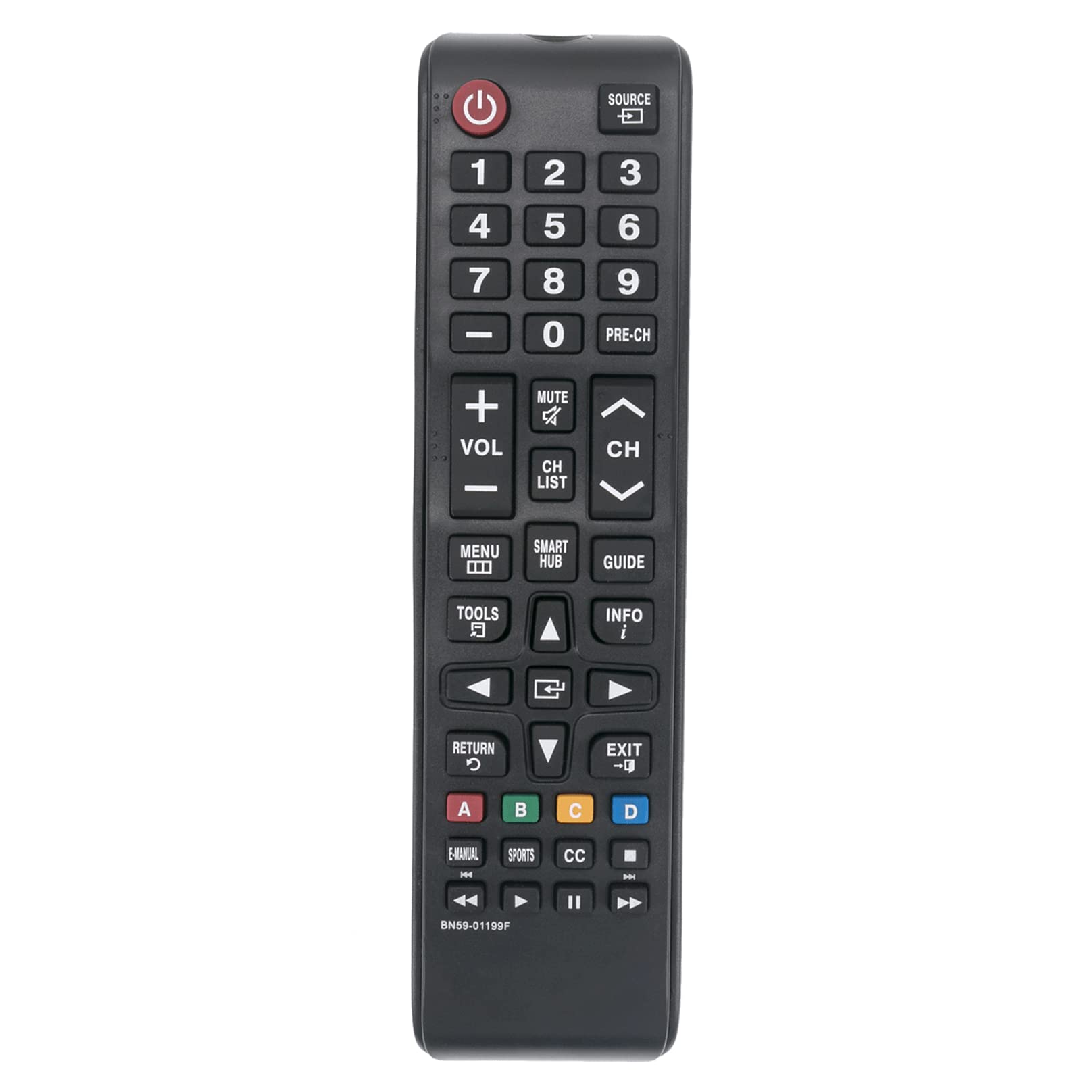
ചിത്രം 1: മുൻഭാഗം view of the Allimity BN59-01199F remote control. The battery compartment is located on the back.
പ്രവർത്തന നിർദ്ദേശങ്ങൾ
This remote control is designed for intuitive use with compatible Samsung LED LCD Smart TVs. Below are the functions of the primary buttons.

Figure 2: Detailed layout of the Allimity BN59-01199F remote control buttons.
ബട്ടൺ പ്രവർത്തനങ്ങൾ
- പവർ (⏻): ടിവി ഓണാക്കുകയോ ഓഫാക്കുകയോ ചെയ്യുന്നു.
- ഉറവിടം: ഇൻപുട്ട് ഉറവിടം തിരഞ്ഞെടുക്കുന്നു (ഉദാ. HDMI 1, AV, TV).
- നമ്പർ ബട്ടണുകൾ (0-9): Directly selects TV channels or enters numerical input.
- PRE-CH: മുമ്പത്തെ ചാനലിലേക്ക് മടങ്ങുന്നു.
- വോളിയം (+/-): Adjusts the TV volume up or down.
- നിശബ്ദമാക്കുക: ടിവി ശബ്ദം നിശബ്ദമാക്കുകയോ അൺമ്യൂട്ട് ചെയ്യുകയോ ചെയ്യുന്നു.
- Channel (CH ▲/▼): Changes TV channels up or down.
- CH ലിസ്റ്റ്: ചാനൽ ലിസ്റ്റ് പ്രദർശിപ്പിക്കുന്നു.
- മെനു: ടിവിയുടെ പ്രധാന മെനു തുറക്കുന്നു.
- സ്മാർട്ട് ഹബ്: Accesses the Samsung Smart Hub for apps and streaming services.
- ഗൈഡ്: ഇലക്ട്രോണിക് പ്രോഗ്രാം ഗൈഡ് പ്രദർശിപ്പിക്കുന്നു.
- ടൂളുകൾ: Accesses quick settings or context-sensitive options.
- വിവരം: നിലവിലെ പ്രോഗ്രാമിനെക്കുറിച്ചോ ഇൻപുട്ടിനെക്കുറിച്ചോ ഉള്ള വിവരങ്ങൾ പ്രദർശിപ്പിക്കുന്നു.
- ദിശാസൂചന പാഡ് (▲◀ ◀ വർഗ്ഗീകരണം▼▶) & Enter: മെനുകൾ നാവിഗേറ്റ് ചെയ്യുകയും തിരഞ്ഞെടുപ്പുകൾ സ്ഥിരീകരിക്കുകയും ചെയ്യുന്നു.
- തിരികെ (↺ ↺ по): മുമ്പത്തെ സ്ക്രീനിലേക്കോ മെനുവിലേക്കോ മടങ്ങുന്നു.
- പുറത്ത്: നിലവിലുള്ള മെനുവിൽ നിന്നോ ആപ്ലിക്കേഷനിൽ നിന്നോ പുറത്തുകടക്കുന്നു.
- കളർ ബട്ടണുകൾ (എ, ബി, സി, ഡി): ടിവി മെനു അല്ലെങ്കിൽ ആപ്ലിക്കേഷൻ അനുസരിച്ച് പ്രവർത്തനങ്ങൾ വ്യത്യാസപ്പെടുന്നു.
- ഇ-മാനുവൽ: Accesses the TV's electronic manual.
- സ്പോർട്സ്: Dedicated button for sports mode or content.
- CC: അടച്ച അടിക്കുറിപ്പുകൾ സജീവമാക്കുന്നു അല്ലെങ്കിൽ നിർജ്ജീവമാക്കുന്നു.
- Media Control Buttons (⏮ ⏮ по видео 🇮🇳, ▶, ⏸ ⏸ മിനിമലിസ്റ്റ്, ⏭कालिक समाल�): Control media playback (rewind, play, pause, fast forward).
മെയിൻ്റനൻസ്
വൃത്തിയാക്കൽ
To maintain the remote control's appearance and functionality, clean it regularly. Use a soft, dry cloth to wipe the surface. For stubborn dirt, slightly dampen the cloth with water or a mild, non-abrasive cleaner. Avoid using harsh chemicals, solvents, or abrasive materials, as these can damage the remote's finish or internal components.
ബാറ്ററി മാറ്റിസ്ഥാപിക്കൽ
Replace batteries when the remote control's response becomes sluggish or stops working. Always replace both batteries at the same time with new AAA alkaline batteries. Do not mix old and new batteries, or different types of batteries, as this can lead to leakage or malfunction. Dispose of used batteries according to local regulations.
സംഭരണം
If the remote control will not be used for an extended period, remove the batteries to prevent potential leakage and damage. Store the remote in a cool, dry place away from direct sunlight and extreme temperatures.
ട്രബിൾഷൂട്ടിംഗ്
If you encounter issues with your remote control, refer to the table below for common problems and their solutions.
| പ്രശ്നം | സാധ്യമായ കാരണം | പരിഹാരം |
|---|---|---|
| റിമോട്ട് കൺട്രോൾ പ്രവർത്തിക്കുന്നില്ല. | ഡെഡ് അല്ലെങ്കിൽ തെറ്റായി ചേർത്ത ബാറ്ററികൾ. | ബാറ്ററികൾ പുതിയ AAA ആൽക്കലൈൻ ബാറ്ററികൾ ഉപയോഗിച്ച് മാറ്റിസ്ഥാപിക്കുക, ശരിയായ പോളാരിറ്റി ഉറപ്പാക്കുക. |
| റിമോട്ട് കൺട്രോൾ പരിധി കുറച്ചു. | Weak batteries or obstruction between remote and TV. | Replace batteries. Ensure there are no objects blocking the line of sight between the remote's IR emitter and the TV's IR receiver. |
| Specific buttons are not responding. | Dirt or debris under the button, or internal malfunction. | Clean the remote surface. If the issue persists, the remote may require replacement. |
| ചില പ്രവർത്തനങ്ങൾക്ക് റിമോട്ട് പ്രവർത്തിക്കും, പക്ഷേ മറ്റുള്ളവയ്ക്ക് അങ്ങനെയല്ല. | Compatibility issue with a specific TV model or function. | Verify your TV model is listed as compatible. Some advanced Smart TV functions might require the original Smart Remote. |
സ്പെസിഫിക്കേഷനുകൾ
- ബ്രാൻഡ്: ALLIMITY
- മോഡലിൻ്റെ പേര്: BN59-01199F
- കണക്റ്റിവിറ്റി ടെക്നോളജി: ഇൻഫ്രാറെഡ് (IR)
- പവർ ഉറവിടം: 2 x 1.5V AAA Alkaline Batteries (not included)
- പരമാവധി പരിധി: Approximately 30 Feet (9 meters)
- അനുയോജ്യമായ ഉപകരണങ്ങൾ: Samsung LED LCD HDTV Smart TVs (various models, refer to product description for full list)
- പ്രത്യേക ഫീച്ചർ: No Programming Required
- ഇനത്തിൻ്റെ ഭാരം: Approximately 2 Ounces (56 grams)
- അളവുകൾ (L x W x H): 5" x 1" x 0.5" (12.7 cm x 2.54 cm x 1.27 cm)
വാറൻ്റിയും പിന്തുണയും
This Allimity remote control is designed for reliability and performance. For specific warranty details, please refer to the purchase documentation or contact your retailer. If you experience any issues that cannot be resolved using the troubleshooting guide, please contact the seller or manufacturer for assistance. Provide your product model number (BN59-01199F) and details of the issue for efficient support.
Note: The manufacturer reserves the right to make changes to product specifications without prior notice.