
1. ആമുഖം
Thank you for choosing the AUNA Sound Maître Kitchen Radio. This device is designed to provide high-quality audio entertainment in your kitchen environment. It features DAB+ and FM radio tuners for a wide range of stations, Bluetooth connectivity for wireless audio streaming, a clear TFT color display, and integrated LED lighting. This manual provides essential information for safe operation, setup, and maintenance of your device.
2. സുരക്ഷാ നിർദ്ദേശങ്ങൾ
- ഉപകരണം ഉപയോഗിക്കുന്നതിന് മുമ്പ് എല്ലാ നിർദ്ദേശങ്ങളും ശ്രദ്ധാപൂർവ്വം വായിക്കുക.
- ഭാവി റഫറൻസിനായി ഈ മാനുവൽ സൂക്ഷിക്കുക.
- Do not expose the device to dripping or splashing water. Do not place objects filled with liquids, such as vases, on the device.
- ശരിയായ വായുസഞ്ചാരം ഉറപ്പാക്കുക. വായുസഞ്ചാര ദ്വാരങ്ങളൊന്നും തടയരുത്.
- Place the device on a stable, flat surface. Avoid placing it near heat sources or in direct sunlight.
- ഉപകരണം നൽകിയ പവർ അഡാപ്റ്റർ മാത്രം ഉപയോഗിക്കുക.
- ഇടിമിന്നലുള്ള സമയത്തോ ദീർഘനേരം ഉപയോഗിക്കാത്ത സമയത്തോ ഉപകരണം അൺപ്ലഗ് ചെയ്യുക.
- ഉപകരണം സ്വയം നന്നാക്കാൻ ശ്രമിക്കരുത്. എല്ലാ സേവനങ്ങളും യോഗ്യതയുള്ള ഉദ്യോഗസ്ഥരെ ഏൽപ്പിക്കുക.
- ഉപകരണം കുട്ടികളിൽ നിന്ന് അകറ്റി നിർത്തുക.
3. പാക്കേജ് ഉള്ളടക്കം
എല്ലാ ഇനങ്ങളും നിലവിലുണ്ടോ എന്നും നല്ല നിലയിലാണെന്നും ദയവായി പരിശോധിക്കുക:
- 1 x AUNA Sound Maître Kitchen Radio
- 1 x പവർ സപ്ലൈ യൂണിറ്റ്
- 1 x Multi-language Operating Instructions (digital version provided here)
4. ഉൽപ്പന്നം കഴിഞ്ഞുview
Familiarize yourself with the main components and controls of your AUNA Sound Maître Kitchen Radio.

ചിത്രം 4.1: മുൻഭാഗം view of the AUNA Sound Maître Kitchen Radio, showing the TFT display, volume knob, navigation buttons, and preset buttons.

ചിത്രം 4.2: വിശദമായി view of the TFT color display, showing radio station information and time.
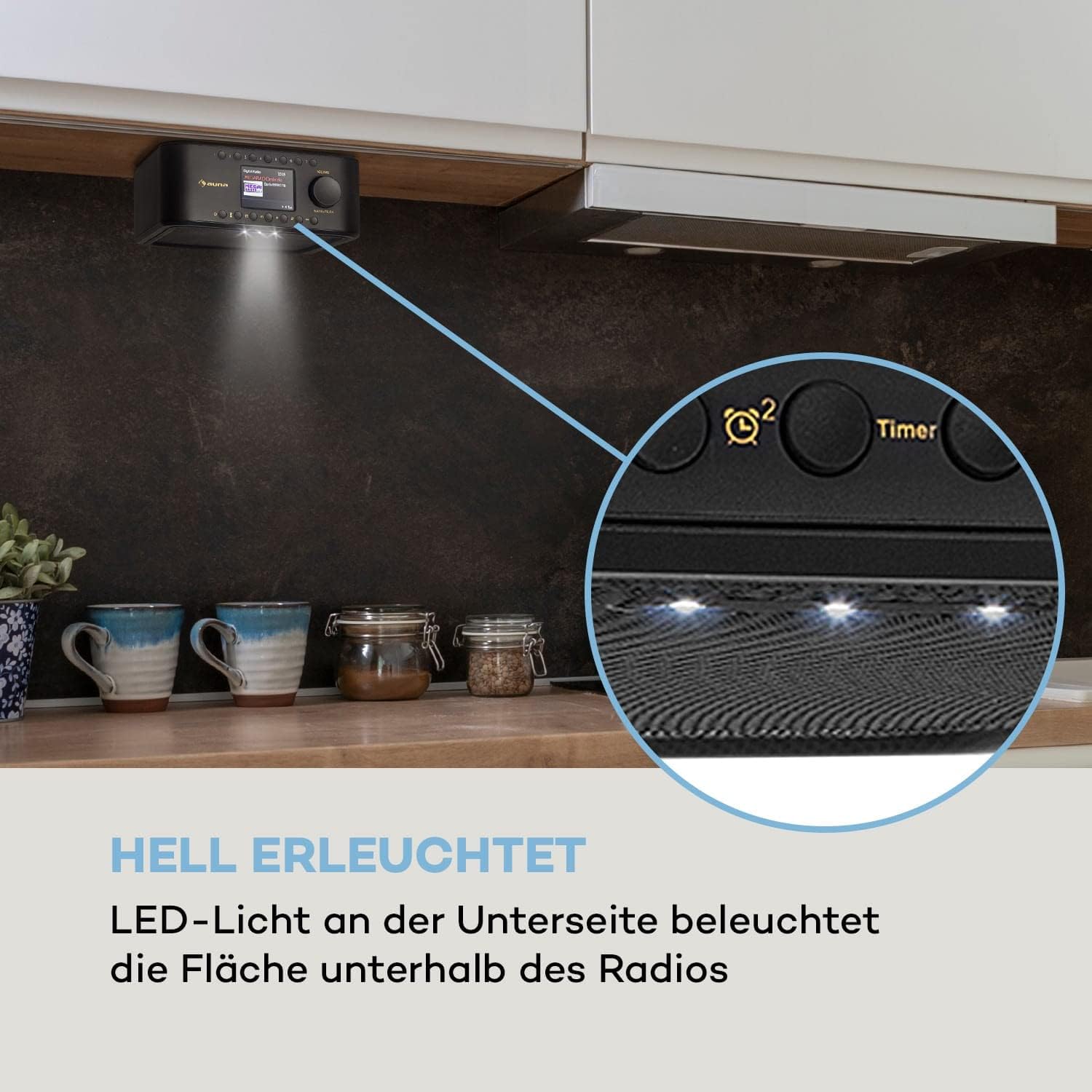
ചിത്രം 4.3: View of the radio's underside, highlighting the integrated LED lights for illuminating the area below.
നിയന്ത്രണങ്ങളും കണക്ഷനുകളും:
- പവർ ബട്ടൺ: ഉപകരണം ഓൺ/ഓഫ് ചെയ്യുന്നു.
- മോഡ് ബട്ടൺ: Switches between DAB+, FM, Bluetooth, and AUX modes.
- പ്രീസെറ്റ് ബട്ടണുകൾ (1-7): Quick access to your favorite radio stations.
- വോളിയം നോബ്: Adjusts the audio output level. Press to confirm selections.
- നാവിഗേഷൻ ബട്ടണുകൾ: For menu navigation and station tuning.
- ടൈമർ ബട്ടൺ: Activates and sets the kitchen timer.
- LED ലൈറ്റ് ബട്ടൺ: Controls the integrated LED illumination.
- AUX ഇൻപുട്ട് (3.5mm): ബാഹ്യ ഓഡിയോ ഉപകരണങ്ങൾ ബന്ധിപ്പിക്കുന്നതിന്.
- ഹെഡ്ഫോൺ ജാക്ക് (3.5 മിമി): സ്വകാര്യ ശ്രവണത്തിനായി.
5. സജ്ജീകരണം
5.1 പവർ കണക്ഷൻ
- Connect the supplied power adapter to the DC IN port on the back of the radio.
- Plug the power adapter into a standard wall outlet (100-240 V ~ | 50/60 Hz).
- The radio will power on or enter standby mode.
5.2 Under-Cabinet Mounting
The AUNA Sound Maître is designed for under-cabinet installation to save counter space.
- Identify a suitable location under a kitchen cabinet or shelf. Ensure there is enough space for the radio (approx. 20 x 8 x 21.5 cm WxHxD) and access to controls.
- Detach the mounting plate from the top of the radio.
- Hold the mounting plate against the underside of the cabinet in the desired position. Mark the four screw holes.
- ആവശ്യമെങ്കിൽ പൈലറ്റ് ദ്വാരങ്ങൾ തുരത്തുക.
- Secure the mounting plate to the cabinet using appropriate screws (not included). Ensure the screws have a flat, wide head to fit securely into the plate's recesses.
- Slide the radio onto the mounted plate until it clicks securely into place.
5.3 ആൻ്റിന
For optimal DAB+ and FM reception, ensure the integrated antenna is positioned correctly. Extend it fully if possible and adjust its direction to improve signal strength.
6. പ്രവർത്തന നിർദ്ദേശങ്ങൾ
6.1 പവർ ഓൺ/ഓഫ്
അമർത്തുക ശക്തി button to turn the radio on or off (standby mode).
6.2 മോഡ് തിരഞ്ഞെടുക്കൽ
അമർത്തുക മോഡ് button repeatedly to cycle through available modes: DAB+, FM, Bluetooth, AUX.
6.3 DAB+ റേഡിയോ
- Select DAB+ mode using the മോഡ് ബട്ടൺ.
- The radio will automatically scan for available DAB+ stations upon first use. If not, initiate a scan through the menu.
- ഉപയോഗിക്കുക നാവിഗേഷൻ ലഭ്യമായ സ്റ്റേഷനുകളുടെ പട്ടികയിലൂടെ ബ്രൗസ് ചെയ്യാൻ ബട്ടണുകൾ.
- അമർത്തുക വോളിയം/ശരി ഒരു സ്റ്റേഷൻ തിരഞ്ഞെടുക്കാൻ നോബ് ഉപയോഗിക്കുക.
- To save a station as a preset, press and hold one of the പ്രീസെറ്റ് (1-7) buttons until the display confirms. You can store up to 198 stations in memory.
6.4 എഫ്എം റേഡിയോ
- ഉപയോഗിച്ച് FM മോഡ് തിരഞ്ഞെടുക്കുക മോഡ് ബട്ടൺ.
- ഉപയോഗിക്കുക നാവിഗേഷൻ buttons to manually tune to a frequency or press and hold them to auto-scan for the next available station.
- To save a station as a preset, press and hold one of the പ്രീസെറ്റ് (1-7) buttons until the display confirms.
6.5 ബ്ലൂടൂത്ത് ജോടിയാക്കൽ
- ഉപയോഗിച്ച് ബ്ലൂടൂത്ത് മോഡ് തിരഞ്ഞെടുക്കുക മോഡ് button. The display will show 'Pairing' or similar.
- Activate Bluetooth on your smartphone or tablet and search for available devices.
- Select 'AUNA Sound Maître' from the list of devices.
- Once paired, you can stream audio wirelessly from your device to the radio.
6.6 AUX ഇൻപുട്ട്
- ഒരു ബാഹ്യ ഓഡിയോ ഉപകരണം (ഉദാ. MP3 പ്ലെയർ) ഇതിലേക്ക് ബന്ധിപ്പിക്കുക AUX ഇൻപുട്ട് ഒരു 3.5mm ഓഡിയോ കേബിൾ ഉപയോഗിക്കുന്നു.
- ഉപയോഗിച്ച് AUX മോഡ് തിരഞ്ഞെടുക്കുക മോഡ് ബട്ടൺ.
- Audio from the external device will now play through the radio's speakers.
6.7 വോളിയം നിയന്ത്രണം
തിരിക്കുക വോളിയം/ശരി knob to adjust the listening volume.
6.8 അടുക്കള ടൈമർ
- അമർത്തുക ടൈമർ ബട്ടൺ.
- ഉപയോഗിക്കുക നാവിഗേഷൻ ബട്ടണുകളും വോളിയം/ശരി knob to set the desired countdown time.
- The timer will sound an alert when the time expires.
6.9 LED പ്രകാശം
അമർത്തുക LED ലൈറ്റ് button to turn the integrated LED lights on or off, providing illumination for your workspace.
7. പരിപാലനം
7.1 വൃത്തിയാക്കൽ
- വൃത്തിയാക്കുന്നതിന് മുമ്പ് എല്ലായ്പ്പോഴും പവർ ഔട്ട്ലെറ്റിൽ നിന്ന് ഉപകരണം അൺപ്ലഗ് ചെയ്യുക.
- പുറംഭാഗങ്ങൾ തുടയ്ക്കാൻ മൃദുവായതും ഉണങ്ങിയതുമായ തുണി ഉപയോഗിക്കുക.
- അബ്രാസീവ് ക്ലീനറുകൾ, മെഴുക് അല്ലെങ്കിൽ ലായകങ്ങൾ എന്നിവ ഉപയോഗിക്കരുത്, കാരണം അവ ഫിനിഷിന് കേടുവരുത്തും.
- ഏതെങ്കിലും ദ്വാരങ്ങളിൽ ഈർപ്പം കയറുന്നത് ഒഴിവാക്കുക.
7.2 പൊതു പരിചരണം
- ദീർഘനേരം ഉപയോഗിക്കാത്തപ്പോൾ റേഡിയോ തണുത്തതും വരണ്ടതുമായ സ്ഥലത്ത് സൂക്ഷിക്കുക.
- Protect the display from scratches.
8. പ്രശ്നപരിഹാരം
If you encounter issues with your AUNA Sound Maître Kitchen Radio, please refer to the following common problems and solutions:
| പ്രശ്നം | സാധ്യമായ കാരണം | പരിഹാരം |
|---|---|---|
| ശക്തിയില്ല | പവർ അഡാപ്റ്റർ ബന്ധിപ്പിച്ചിട്ടില്ല; പവർ ഔട്ട്ലെറ്റ് തകരാറിലാണ് | പവർ അഡാപ്റ്റർ സുരക്ഷിതമായി ബന്ധിപ്പിച്ചിട്ടുണ്ടെന്നും പ്രവർത്തിക്കുന്ന ഒരു ഔട്ട്ലെറ്റിൽ പ്ലഗ് ചെയ്തിട്ടുണ്ടെന്നും ഉറപ്പാക്കുക. |
| മോശം റേഡിയോ റിസപ്ഷൻ (DAB+/FM) | Weak signal; Antenna not extended/positioned correctly | Extend and adjust the antenna. Try repositioning the radio. Perform a new station scan. |
| ബ്ലൂടൂത്ത് ജോടിയാക്കുന്നില്ല | Radio not in pairing mode; Device too far; Bluetooth off on external device | Ensure radio is in Bluetooth mode. Move devices closer. Check Bluetooth settings on your external device. |
| No sound from AUX | Cable not connected; Incorrect mode selected; External device volume low | Check AUX cable connection. Ensure AUX mode is selected. Increase volume on both radio and external device. |
| ഡിസ്പ്ലേ പ്രവർത്തിക്കുന്നില്ല | Device off; Display settings | Ensure device is powered on. Check display brightness settings in the menu. |
ഈ പരിഹാരങ്ങൾ പരീക്ഷിച്ചതിന് ശേഷവും പ്രശ്നം നിലനിൽക്കുകയാണെങ്കിൽ, ദയവായി ഉപഭോക്തൃ പിന്തുണയുമായി ബന്ധപ്പെടുക.
9 സ്പെസിഫിക്കേഷനുകൾ
- മോഡൽ: AUNA Sound Maître
- കണക്ഷനുകൾ: 1 x AUX Input (3.5mm), 1 x Headphone Jack (3.5mm)
- RMS പവർ: 2 x 1 വാട്ട്
- റേഡിയോ ട്യൂണറുകൾ: DAB+, FM
- പ്രീസെറ്റുകൾ: 7 quick dial buttons, up to 198 memory locations
- ഡിസ്പ്ലേ: TFT കളർ ഡിസ്പ്ലേ
- ഫീച്ചറുകൾ: Kitchen Timer, LED Illumination, Bluetooth Connectivity
- വൈദ്യുതി വിതരണം: 100-240 V ~ | 50/60 ഹെർട്സ്
- അളവുകൾ (WxHxD): ഏകദേശം. 20 x 8 x 21.5 സെ
- പവർ കേബിൾ നീളം: ഏകദേശം 150 സെ.മീ
- ഭാരം: ഏകദേശം 800 ഗ്രാം (0.8 കി.ഗ്രാം)
10. വാറൻ്റിയും പിന്തുണയും
Your AUNA Sound Maître Kitchen Radio comes with a manufacturer's warranty. Please refer to the warranty card included with your purchase for specific terms and conditions. For technical support, troubleshooting beyond this manual, or warranty claims, please contact your retailer or the AUNA customer service department.