
1. ആമുഖം
Thank you for choosing the Calex Smart Ceiling Lamp. This 30cm smart ceiling light is designed for indoor use in spaces such as bedrooms and living rooms, offering versatile lighting options including 16 million colors and tunable white light. It can be controlled via the Calex Smart App and is compatible with popular voice assistants.

Figure 1: Calex Smart Ceiling Lamp (മോഡൽ 5301000200)
2 സുരക്ഷാ വിവരങ്ങൾ
- ഈ ഉൽപ്പന്നം ഉദ്ദേശിച്ചുള്ളതാണ് ഇൻഡോർ ഉപയോഗം മാത്രം. Do not install in wet or damp സ്ഥാനങ്ങൾ.
- Ensure the power supply is disconnected before installation, maintenance, or cleaning to prevent electric shock.
- ഇൻസ്റ്റാളേഷൻ ഒരു യോഗ്യതയുള്ള ഇലക്ട്രീഷ്യൻ അല്ലെങ്കിൽ പ്രാദേശിക ഇലക്ട്രിക്കൽ കോഡുകൾക്കനുസൃതമായി നടത്തണം.
- എൽ പ്രവർത്തിപ്പിക്കുകamp only within the specified voltage range of 230 Volts AC.
- l ഡിസ്അസംബ്ലിംഗ് ചെയ്യാനോ പരിഷ്ക്കരിക്കാനോ ശ്രമിക്കരുത്amp. ഉള്ളിൽ ഉപയോക്തൃ-സേവനയോഗ്യമായ ഭാഗങ്ങളൊന്നുമില്ല.
- എൽ സൂക്ഷിക്കുകamp താപ സ്രോതസ്സുകളിൽ നിന്നും നേരിട്ടുള്ള സൂര്യപ്രകാശത്തിൽ നിന്നും അകലെ.
3. പാക്കേജ് ഉള്ളടക്കം
പാക്കേജിൽ എല്ലാ ഘടകങ്ങളും ഉണ്ടെന്ന് ഉറപ്പാക്കുക:
- 1x Calex Smart Ceiling Lamp (മോഡൽ 5301000200)
4. സജ്ജീകരണവും ഇൻസ്റ്റാളേഷനും
The Calex Smart Ceiling Lamp requires ceiling mounting and assembly. Follow these steps carefully:
- തയ്യാറാക്കൽ: Turn off the main power supply at the circuit breaker before starting installation.
- മൗണ്ടിംഗ്: എൽ സുരക്ഷിതമായി അറ്റാച്ചുചെയ്യുകamp's mounting bracket to the ceiling using appropriate screws and anchors (not included, typically supplied by installer). Ensure the mounting surface can support the lamp's weight (934 grams).
- വയറിംഗ്: Connect the electrical wires from the ceiling to the lamp's terminals. Ensure correct polarity (Live, Neutral, Earth) as indicated in the lamp's wiring diagram.
- അസംബ്ലി: എൽ അറ്റാച്ചുചെയ്യുകamp body to the mounting bracket, ensuring it is firmly secured.
- പവർ ഓൺ: Restore power at the circuit breaker. The lamp should turn on or enter pairing mode.
5 എൽ പ്രവർത്തിപ്പിക്കുന്നത്amp
The Calex Smart Ceiling Lamp is primarily controlled via the Calex Smart App. It offers a wide range of lighting options:
- വർണ്ണ തിരഞ്ഞെടുപ്പ്: Choose from 16 million colors to set the perfect mood.
- ട്യൂണബിൾ വൈറ്റ്: വെളുത്ത വെളിച്ചം ഊഷ്മള ടോണുകളിൽ നിന്ന് തണുത്ത ടോണുകളിലേക്ക് ക്രമീകരിക്കുക.
- മങ്ങിയത്: തെളിച്ചം 0% മുതൽ 100% വരെ ക്രമീകരിക്കുക.
- സീനുകളും ഷെഡ്യൂളുകളും: Create custom lighting scenes and set timers for automated operation.
6. Calex Smart App Control
To unlock the full potential of your Calex Smart Ceiling Lamp, download and install the Calex Smart App on your smartphone or tablet. The app allows you to control your lamp from anywhere with an internet connection.
- ആപ്പ് ഡൗൺലോഡ് ചെയ്യുക: ഇതിനായി തിരയുക "Calex Smart" in your device's app store (iOS or Android).
- അക്കൗണ്ട് സൃഷ്ടിക്കുക: ആപ്പ് തുറന്ന് നിർദ്ദേശങ്ങൾ പാലിക്കുക, പുതിയൊരു ഉപയോക്തൃ അക്കൗണ്ട് സൃഷ്ടിക്കുക അല്ലെങ്കിൽ നിങ്ങൾക്ക് ഇതിനകം ഒരു അക്കൗണ്ട് ഉണ്ടെങ്കിൽ ലോഗിൻ ചെയ്യുക.
- ഉപകരണം ചേർക്കുക: In the app, select "Add Device" or the "+" icon. Choose "Lighting" and then "Ceiling Lamp" or a similar option.
- ജോടിയാക്കൽ: നിങ്ങളുടെ എൽ ഉറപ്പാക്കുകamp is powered on and in pairing mode (it may flash). Follow the in-app instructions to connect the lamp to your 2.4 GHz Wi-Fi network.
- നിയന്ത്രണം: ജോടിയാക്കിയുകഴിഞ്ഞാൽ, നിങ്ങൾക്ക് l നിയന്ത്രിക്കാൻ കഴിയുംamp's color, brightness, and set schedules directly from the app.
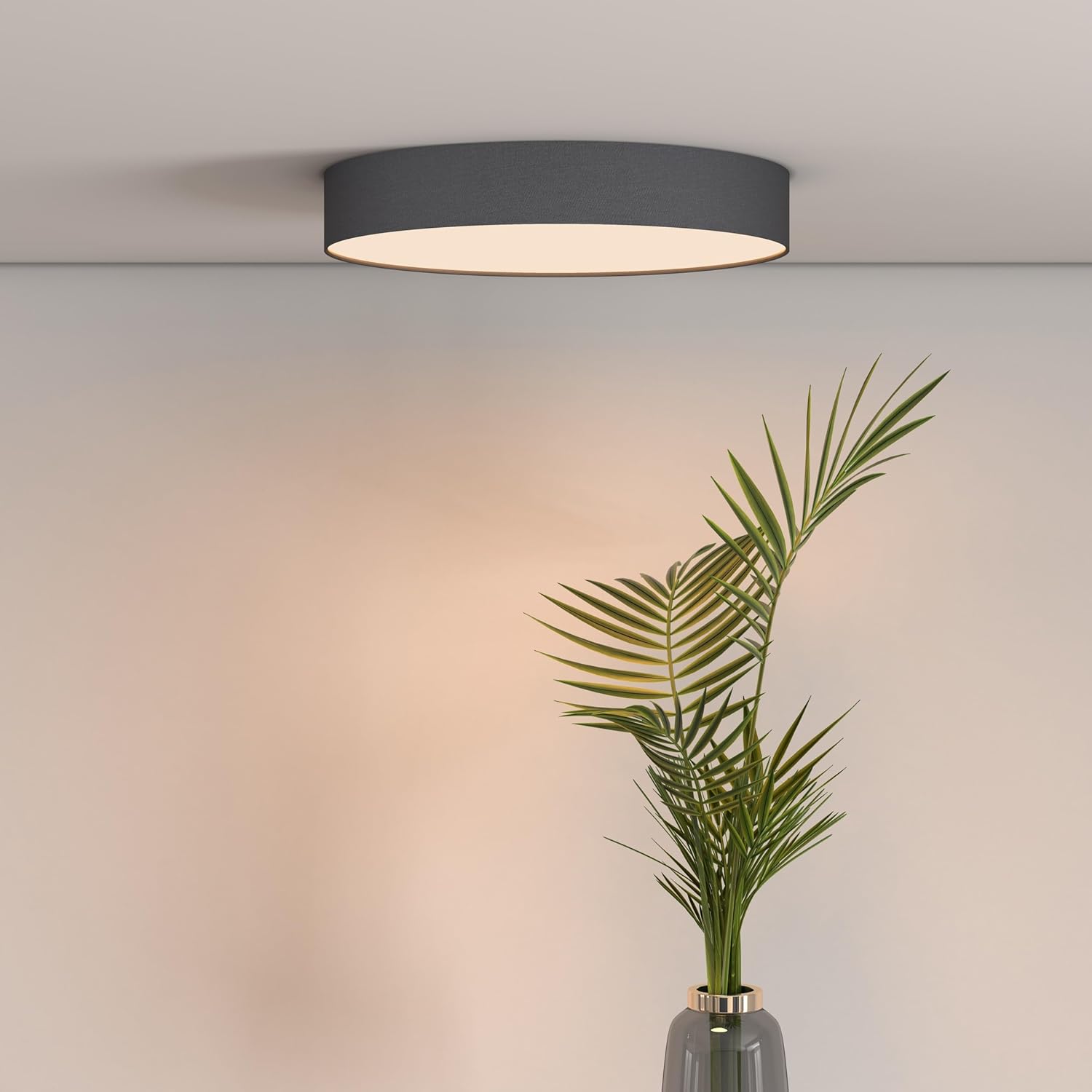
Figure 2: Calex Smart App Interface
7. ശബ്ദ നിയന്ത്രണം
The Calex Smart Ceiling Lamp is compatible with leading voice assistants, allowing for hands-free control:
- ആമസോൺ അലക്സ: Link your Calex Smart account to Alexa through the Alexa app.
- ഗൂഗിൾ ഹോം അസിസ്റ്റന്റ്: Link your Calex Smart account to Google Home through the Google Home app.
- സിരി: Use Siri Shortcuts to control your lamp (setup via the Calex Smart App).
Once linked, you can use commands such as: "Alexa, turn on the ceiling lamp," "Hey Google, set the ceiling lamp to blue," or "Siri, dim the ceiling lamp 50% വരെ."
8. പരിപാലനം
To ensure the longevity and optimal performance of your Calex Smart Ceiling Lamp, ഈ ലളിതമായ പരിപാലന മാർഗ്ഗനിർദ്ദേശങ്ങൾ പാലിക്കുക:
- വൃത്തിയാക്കൽ: വൃത്തിയാക്കുന്നതിന് മുമ്പ് വൈദ്യുതി വിച്ഛേദിക്കുക. മൃദുവായതോ, ഉണങ്ങിയതോ, അല്ലെങ്കിൽ ചെറുതായി ഡി-കട്ട് ചെയ്തതോ ഉപയോഗിക്കുക.amp l ന്റെ ഉപരിതലം തുടയ്ക്കാനുള്ള തുണിamp. Do not use abrasive cleaners, solvents, or harsh chemicals, as these can damage the finish.
- പരിശോധന: ആനുകാലികമായി എൽ പരിശോധിക്കുകamp for any signs of damage or loose connections. If any issues are found, disconnect power and consult a qualified technician.
- ഉപയോക്തൃ-സേവനയോഗ്യമായ ഭാഗങ്ങൾ ഇല്ല: The LED light source is integrated and not replaceable by the user. Do not attempt to open the lamp.
9. പ്രശ്നപരിഹാരം
If you encounter issues with your Calex Smart Ceiling Lamp, ഇനിപ്പറയുന്ന പൊതുവായ പരിഹാരങ്ങൾ കാണുക:
- Lamp ഓണാക്കുന്നില്ല:
- മെയിൻ പവർ സപ്ലൈ ഓണാണോ എന്ന് പരിശോധിക്കുക.
- എൽ ഉറപ്പാക്കുകamp is correctly wired and securely connected to the power source.
- Verify that the light switch (if applicable) is in the ON position.
- Lamp does not connect to Wi-Fi/App:
- Ensure your Wi-Fi network is 2.4 GHz. The lamp does not support 5 GHz Wi-Fi.
- Check your Wi-Fi signal strength at the lampന്റെ സ്ഥാനം.
- നിങ്ങളുടെ വൈഫൈ റൂട്ടർ പുനരാരംഭിക്കുക.
- എൽ പുനഃസജ്ജമാക്കുകamp to pairing mode (usually by cycling power ON/OFF several times). Refer to the Calex Smart App for specific reset instructions.
- Ensure your smartphone is connected to the same 2.4 GHz Wi-Fi network during the pairing process.
- ശബ്ദ നിയന്ത്രണം പ്രവർത്തിക്കുന്നില്ല:
- Verify that your Calex Smart account is correctly linked to your voice assistant app (Alexa, Google Home).
- നിങ്ങളുടെ ഇൻ്റർനെറ്റ് കണക്ഷൻ പരിശോധിക്കുക.
- എൽ ഉറപ്പാക്കുകamp is online and controllable via the Calex Smart App.
10 സ്പെസിഫിക്കേഷനുകൾ
| ഫീച്ചർ | സ്പെസിഫിക്കേഷൻ |
|---|---|
| ബ്രാൻഡ് | കലക്സ് |
| മോഡൽ നമ്പർ | 5301000200 |
| GTIN | 08712879151081 |
| നിറം | Black (exterior) |
| അളവുകൾ | 30cm diameter (approx.) |
| ഭാരം | 934 ഗ്രാം |
| പവർ ഉറവിടം | AC |
| വാല്യംtage | 230 വോൾട്ട് |
| വാട്ട്tage | 16 വാട്ട് |
| തെളിച്ചം | 1500 ല്യൂമെൻ |
| പ്രകാശ സ്രോതസ്സ് | സംയോജിത എൽഇഡി |
| ഇളം നിറം | RGBW (16 million colors + Tunable White) |
| മങ്ങിയത് | അതെ |
| കണക്റ്റിവിറ്റി | വൈഫൈ (2.4 GHz) |
| നിയന്ത്രണ രീതി | Calex Smart App, Voice Control (Alexa, Google Home, Siri) |
| ഇൻസ്റ്റലേഷൻ തരം | സീലിംഗ് മൗണ്ട് |
| ഇൻഡോർ/ഔട്ട്ഡോർ ഉപയോഗം | ഇൻഡോർ മാത്രം |
| എനർജി എഫിഷ്യൻസി ക്ലാസ് | F |

Figure 3: Energy Label for Model 5301000200
വിശദമായ ഉൽപ്പന്ന വിവരങ്ങൾക്ക്, EPREL ഡാറ്റാബേസ് കാണുക: https://eprel.ec.europa.eu/qr/711744
11. വാറൻ്റിയും പിന്തുണയും
Calex products are manufactured to high-quality standards and come with a manufacturer's warranty. For specific warranty terms and conditions, please refer to the documentation provided with your purchase or visit the official Calex webസൈറ്റ്.
For technical support, troubleshooting assistance, or warranty claims, please contact Calex customer service through their official webസൈറ്റ് അല്ലെങ്കിൽ നിങ്ങളുടെ ഉൽപ്പന്ന പാക്കേജിംഗിൽ നൽകിയിരിക്കുന്ന ബന്ധപ്പെടാനുള്ള വിവരങ്ങൾ.