
1. ആമുഖം
Thank you for choosing the Qubo B-209 Senior Mobile Phone. This manual provides essential information for setting up, operating, and maintaining your device. Please read it carefully to ensure proper use and to maximize the phone's features.
പാക്കേജ് ഉള്ളടക്കം
- Qubo B-209 Mobile Phone
- റീചാർജ് ചെയ്യാവുന്ന ലി-അയൺ ബാറ്ററി
- ചാർജിംഗ് ഡോക്ക്
- USB കേബിൾ
- പവർ അഡാപ്റ്റർ
- ഉപയോക്തൃ മാനുവൽ (ഈ പ്രമാണം)
2. ഉൽപ്പന്നം കഴിഞ്ഞുview
The Qubo B-209 is designed for ease of use, featuring large buttons, a clear display, and essential functions for communication. Its key features include a dedicated SOS button for emergencies, a convenient charging dock, and a built-in flashlight.
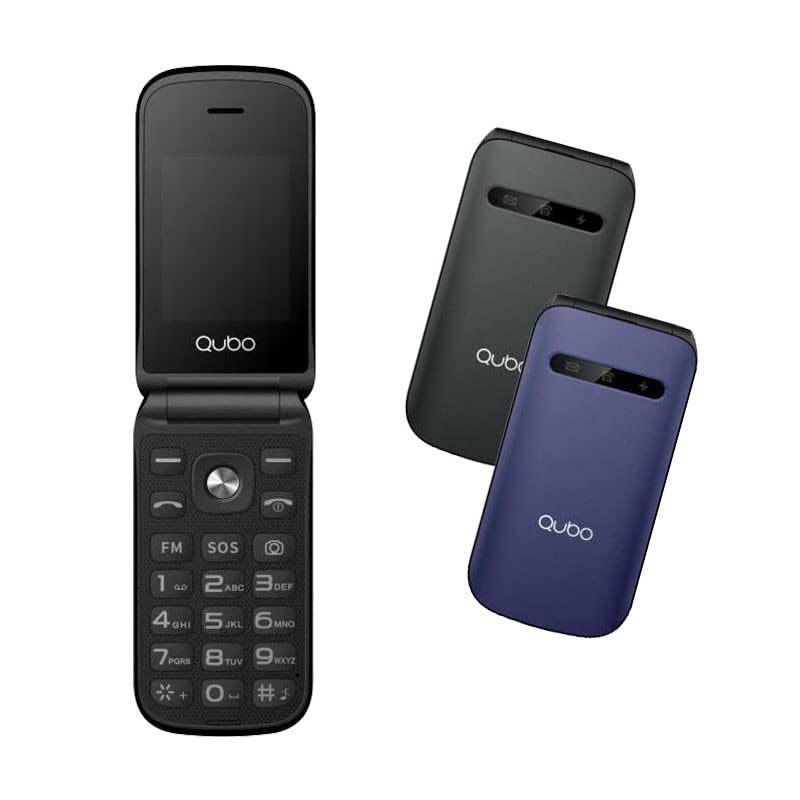
ചിത്രം 1: Qubo B-209 Senior Mobile Phone with its charging dock. The phone features a blue casing, a large keypad, and a color display.
പ്രധാന സവിശേഷതകൾ
- 2.4-inch QVGA TFT LCD Display: വ്യക്തവും എളുപ്പത്തിൽ വായിക്കാവുന്നതുമായ സ്ക്രീൻ.
- വലിയ കീപാഡ്: Ergonomic buttons for comfortable dialing and texting.
- SOS ബട്ടൺ: Dedicated emergency button for quick contact with pre-set numbers.
- ചാർജിംഗ് ഡോക്ക്: Convenient desktop charger for easy power replenishment.
- ഡ്യുവൽ സിം പിന്തുണ: Use two SIM cards simultaneously.
- എഫ്എം റേഡിയോ: Listen to your favorite radio stations.
- ഫ്ലാഷ്ലൈറ്റ്: Built-in LED light for convenience.
- 0.3 MP Camera: Basic camera functionality.
- ബ്ലൂടൂത്ത് 3.0: For wireless connectivity with compatible devices.
3. സജ്ജീകരണം
3.1 ബാറ്ററി ഇൻസ്റ്റാളേഷൻ
- ഫോണിന്റെ പിൻ കവർ പതുക്കെ നീക്കം ചെയ്യുക.
- ബാറ്ററി കമ്പാർട്ട്മെന്റ് കണ്ടെത്തുക.
- Insert the provided Li-Ion battery, ensuring the gold contacts align with the phone's terminals.
- സുരക്ഷിതമായി സ്ഥലത്ത് ക്ലിക്ക് ചെയ്യുന്നതുവരെ പിൻ കവർ മാറ്റിസ്ഥാപിക്കുക.
3.2 SIM Card(s) Installation
- With the back cover and battery removed, locate the SIM card slots. The Qubo B-209 supports Dual SIM.
- Carefully insert your SIM card(s) into the designated slot(s) with the gold contacts facing down and the cut corner aligned as shown in the diagram (refer to phone's internal markings).
- സിം കാർഡ്(കൾ) പൂർണ്ണമായും ഇട്ടിട്ടുണ്ടെന്ന് ഉറപ്പാക്കുക.
- ബാറ്ററിയും ബാക്ക് കവറും വീണ്ടും ഇൻസ്റ്റാൾ ചെയ്യുക.
3.3 ഫോൺ ചാർജ് ചെയ്യുന്നു
ആദ്യ ഉപയോഗത്തിന് മുമ്പ്, ഫോണിന്റെ ബാറ്ററി പൂർണ്ണമായും ചാർജ് ചെയ്യുക.
- ചാർജിംഗ് ഡോക്ക് ഉപയോഗിച്ച്:
- Connect the USB cable to the power adapter, then plug the adapter into a wall outlet.
- Connect the other end of the USB cable to the charging dock.
- Place the phone into the charging dock, ensuring the charging contacts on the phone align with those on the dock. The phone will indicate charging status on its screen.
- നേരിട്ടുള്ള യുഎസ്ബി ചാർജിംഗ്:
- Connect the USB cable to the power adapter, then plug the adapter into a wall outlet.
- Connect the micro USB end of the cable directly to the micro USB port on the side or bottom of the phone.
A full charge typically takes approximately 2-3 hours. The battery indicator on the screen will show the charging progress.
4. പ്രവർത്തന നിർദ്ദേശങ്ങൾ
4.1 പവർ ഓൺ/ഓഫ്
- പവർ ഓണാക്കാൻ: അമർത്തിപ്പിടിക്കുക പവർ/എൻഡ് കോൾ button (usually red) until the screen lights up.
- പവർ ഓഫ് ചെയ്യാൻ: അമർത്തിപ്പിടിക്കുക പവർ/എൻഡ് കോൾ button until the power-off options appear, then select "Power off" or confirm.
4.2 കോളുകൾ ചെയ്യലും സ്വീകരിക്കലും
- ഒരു കോൾ ചെയ്യാൻ:
- കീപാഡ് ഉപയോഗിച്ച് ഫോൺ നമ്പർ നൽകുക.
- അമർത്തുക വിളിക്കൂ button (usually green) to initiate the call.
- ഒരു കോളിന് ഉത്തരം നൽകാൻ: ഫോൺ റിംഗ് ചെയ്യുമ്പോൾ, അമർത്തുക വിളിക്കൂ ബട്ടൺ.
- ഒരു കോൾ അവസാനിപ്പിക്കാൻ: അമർത്തുക പവർ/എൻഡ് കോൾ ബട്ടൺ.
4.3 Sending and Receiving Messages (SMS)
- പ്രധാന സ്ക്രീനിൽ നിന്ന് "സന്ദേശങ്ങൾ" മെനുവിലേക്ക് നാവിഗേറ്റ് ചെയ്യുക.
- "സന്ദേശം എഴുതുക" അല്ലെങ്കിൽ "പുതിയ SMS" തിരഞ്ഞെടുക്കുക.
- സ്വീകർത്താവിന്റെ ഫോൺ നമ്പർ നൽകുക അല്ലെങ്കിൽ കോൺടാക്റ്റുകളിൽ നിന്ന് തിരഞ്ഞെടുക്കുക.
- കീപാഡ് ഉപയോഗിച്ച് നിങ്ങളുടെ സന്ദേശം ടൈപ്പ് ചെയ്യുക.
- Press "Send" to transmit the message.
4.4 SOS അടിയന്തര ബട്ടൺ
The SOS button is located on the back of the phone. It allows you to quickly contact pre-set emergency numbers.
- SOS നമ്പറുകൾ സജ്ജീകരിക്കുന്നു:
- Go to "Settings" > "SOS Settings" or "Emergency Settings".
- Add up to 5 emergency contact numbers. These numbers will be called in sequence when the SOS button is activated.
- You can also enable an SOS message to be sent to these contacts.
- Using the SOS Function:
- അടിയന്തര സാഹചര്യത്തിൽ, അമർത്തിപ്പിടിക്കുക SOS ബട്ടൺ കുറച്ച് നിമിഷങ്ങൾ.
- The phone will automatically call the pre-set emergency numbers one by one until an answer is received.
- If enabled, an emergency SMS message will also be sent.
പ്രധാനപ്പെട്ടത്: Ensure your SOS contacts are aware they are listed as emergency contacts and that their numbers are up-to-date.
4.5 എഫ്എം റേഡിയോ
- പ്രധാന മെനുവിൽ നിന്ന് "FM റേഡിയോ" ആപ്ലിക്കേഷനിലേക്ക് നാവിഗേറ്റ് ചെയ്യുക.
- സ്റ്റേഷനുകൾക്കായി സ്കാൻ ചെയ്യുന്നതിനോ ഒരു ഫ്രീക്വൻസിയിലേക്ക് സ്വമേധയാ ട്യൂൺ ചെയ്യുന്നതിനോ നാവിഗേഷൻ കീകൾ ഉപയോഗിക്കുക.
- Adjust the volume using the side volume buttons (if available) or menu options.
4.6 ഫ്ലാഷ്ലൈറ്റ്
The flashlight can be activated quickly.
- Locate the dedicated flashlight button on the side of the phone (if present) or access it via the menu.
- Press the button once to turn the flashlight on, and again to turn it off.
4.7 ക്യാമറ
- Access the "Camera" application from the main menu.
- സ്ക്രീൻ ഉപയോഗിച്ച് നിങ്ങളുടെ ഷോട്ട് ഫ്രെയിം ചെയ്യുക a ആയി viewഫൈൻഡർ.
- Press the designated "Capture" or "OK" button to take a photo.
- Photos are saved to the phone's internal memory or an inserted T-Flash card.
5. പരിപാലനം
5.1 വൃത്തിയാക്കൽ
- Use a soft, dry, lint-free cloth to clean the phone's screen and body.
- Avoid using liquid cleaners, aerosols, or harsh chemicals, as these can damage the phone.
- ചാർജിംഗ് പോർട്ടിലേക്കോ മറ്റ് ദ്വാരങ്ങളിലേക്കോ ഈർപ്പം പ്രവേശിക്കുന്നില്ലെന്ന് ഉറപ്പാക്കുക.
5.2 ബാറ്ററി കെയർ
- Do not expose the battery to extreme temperatures (hot or cold).
- Avoid fully discharging the battery frequently. Charge it regularly.
- If the phone will not be used for an extended period, charge the battery to about 50% and store it in a cool, dry place.
5.3 സംഭരണം
- Store the phone in a dry environment, away from direct sunlight and excessive humidity.
- Keep the phone out of reach of children and pets.
6. പ്രശ്നപരിഹാരം
| പ്രശ്നം | സാധ്യമായ കാരണം | പരിഹാരം |
|---|---|---|
| ഫോൺ ഓണാക്കുന്നില്ല. | ബാറ്ററി തീർന്നു അല്ലെങ്കിൽ ശരിയായി ഇൻസ്റ്റാൾ ചെയ്തിട്ടില്ല. | ബാറ്ററി ശരിയായി ഇൻസ്റ്റാൾ ചെയ്തിട്ടുണ്ടെന്നും പൂർണ്ണമായും ചാർജ്ജ് ചെയ്തിട്ടുണ്ടെന്നും ഉറപ്പാക്കുക. |
| കോളുകൾ വിളിക്കാനോ സ്വീകരിക്കാനോ കഴിയില്ല. | No network signal; SIM card not installed or activated; incorrect network settings. | Check signal strength. Ensure SIM card is properly inserted and activated. Contact your network provider if issues persist. |
| ഫോൺ ചാർജ് ചെയ്യുന്നില്ല. | Charging cable/adapter faulty; charging port/dock dirty or damaged; battery issue. | Check connections. Try a different outlet or charging method (dock vs. direct USB). Clean charging contacts. |
| SOS ബട്ടൺ പ്രവർത്തിക്കുന്നില്ല. | SOS numbers not set up; no network signal. | Verify SOS numbers are correctly configured in settings. Ensure the phone has network coverage. |
| ഡിസ്പ്ലേ ശൂന്യമാണ് അല്ലെങ്കിൽ നിശ്ചലമാണ്. | സോഫ്റ്റ്വെയർ തകരാർ; ബാറ്ററി കുറവ്. | Restart the phone by holding the Power/End Call button. Charge the battery. |
7 സ്പെസിഫിക്കേഷനുകൾ
| ഫീച്ചർ | വിശദാംശങ്ങൾ |
|---|---|
| മോഡൽ നമ്പർ | ബി-209 |
| പ്രദർശിപ്പിക്കുക | 2.4-inch QVGA TFT LCD |
| ചിപ്സെറ്റ് | M76261DA, ARM7 CPU, 260MHz |
| മെമ്മറി (റാം/റോം) | 32MB RAM, 32MB ROM |
| കണക്റ്റിവിറ്റി | 2G GSM 850/900/1800 (GSM/GPRS), Bluetooth 3.0 |
| ബാറ്ററി | 800 mAh ലി-അയൺ |
| ക്യാമറ | 0.3 എംപി (പിൻവശം) |
| സിം പിന്തുണ | ഡ്യുവൽ സിം |
| ബാഹ്യ സംഭരണം | T-Flash (up to 32MB) |
| ഫീച്ചറുകൾ | FM Radio, Flashlight, SOS Button, External Indicator (Messages, Calls, Charge) |
| കണക്ഷനുകൾ | മൈക്രോ യുഎസ്ബി, 3.5 എംഎം ജാക്ക് |
| അളവുകൾ (പാക്കേജ്) | 15.3 x 8.1 x 6.9 സെ.മീ; 230 ഗ്രാം |
| ഓപ്പറേറ്റിംഗ് സിസ്റ്റം | സിംബിയൻ 9.1 |
8. വാറൻ്റിയും പിന്തുണയും
8.1 നിർമ്മാതാവിന്റെ വാറന്റി
The Qubo B-209 Senior Mobile Phone comes with a മൂന്ന് വർഷത്തെ നിർമ്മാതാവിന്റെ വാറന്റി വാങ്ങിയ തീയതി മുതൽ. സാധാരണ ഉപയോഗത്തിലുള്ള മെറ്റീരിയലുകളിലെയും നിർമ്മാണത്തിലെയും വൈകല്യങ്ങൾ ഈ വാറന്റി ഉൾക്കൊള്ളുന്നു. ദുരുപയോഗം, അപകടങ്ങൾ, അനധികൃത പരിഷ്കാരങ്ങൾ, അല്ലെങ്കിൽ സാധാരണ തേയ്മാനം എന്നിവ മൂലമുണ്ടാകുന്ന നാശനഷ്ടങ്ങൾക്ക് ഇത് പരിരക്ഷ നൽകുന്നില്ല. വാറന്റി ക്ലെയിമുകൾക്കായി നിങ്ങളുടെ വാങ്ങലിന്റെ തെളിവ് സൂക്ഷിക്കുക.
8.2 ഉപഭോക്തൃ പിന്തുണ
For technical assistance, troubleshooting beyond this manual, or warranty inquiries, please contact Qubo customer support. Refer to the packaging or the official Qubo webഏറ്റവും കാലികമായ ബന്ധപ്പെടാനുള്ള വിവരങ്ങൾക്കായി സൈറ്റ്.