
ആമുഖം
വാങ്ങിയതിന് നന്ദി.asing the Polarlander 9602G 1 Din Car Stereo. This manual provides detailed instructions for the installation, operation, and maintenance of your new multimedia player. Please read this manual thoroughly before use to ensure proper functionality and to prevent damage.
The Polarlander 9602G features a 7-inch retractable HD touchscreen, GPS navigation, Bluetooth connectivity, FM radio, USB/TF/AUX input, Mirror Link for Android/iOS devices, steering wheel control compatibility, and support for DVR and rear view ക്യാമറകൾ.
സജ്ജീകരണവും ഇൻസ്റ്റാളേഷനും
1. പാക്കേജ് ഉള്ളടക്കം
ഇൻസ്റ്റാൾ ചെയ്യുന്നതിനുമുമ്പ്, എല്ലാ ഘടകങ്ങളും ലഭ്യമാണെന്ന് ദയവായി പരിശോധിക്കുക:
- Main Unit (Car Stereo)
- ഉപയോക്തൃ മാനുവൽ
- Installation Keys (2)
- പവർ കോർഡ് (3)
- റിമോട്ട് കൺട്രോൾ
- ജിപിഎസ് ആൻ്റിന
- പിൻഭാഗം View ക്യാമറ
- ഡി.വി.ആർ
2. Wiring Diagram Overview
The unit requires a 12V DC power supply. Ensure all connections are secure and correctly matched to your vehicle's wiring harness. Incorrect wiring can cause damage to the unit or vehicle electrical system.
- ശക്തി: Connect the yellow wire to the constant 12V supply, the red wire to the accessory 12V supply (switched with ignition), and the black wire to ground.
- സ്പീക്കറുകൾ: Connect the speaker wires to your vehicle's speakers. Ensure correct polarity for optimal sound.
- ജിപിഎസ് ആന്റിന: Connect the GPS antenna to the dedicated port on the rear of the unit and mount it in a location with a clear view ആകാശത്തിൻ്റെ.
- പിൻഭാഗം View ക്യാമറ: ഓട്ടോമാറ്റിക് ആക്ടിവേഷനായി ക്യാമറയുടെ വീഡിയോ ഔട്ട്പുട്ട് 'CAM IN' പോർട്ടിലേക്കും അതിന്റെ പവർ റിവേഴ്സ് ലൈറ്റ് സർക്യൂട്ടിലേക്കും ബന്ധിപ്പിക്കുക.
- ഡിവിആർ: Connect the DVR to the designated USB port or input.
- സ്റ്റിയറിംഗ് വീൽ നിയന്ത്രണം: Connect the steering wheel control wires to your vehicle's steering wheel control interface, if applicable.
3. ഫിസിക്കൽ ഇൻസ്റ്റലേഷൻ
Install the 1 Din unit into your vehicle's dashboard opening. Secure it using the provided installation keys or mounting hardware. Ensure the retractable screen mechanism has sufficient clearance to operate freely.

Image: Unit dimensions for installation reference. The unit measures approximately 18.8cm (width) x 5cm (height) x 16.5cm (depth) with the screen retracted, and the screen extends to 7 inches.
പ്രവർത്തന നിർദ്ദേശങ്ങൾ
1. അടിസ്ഥാന നിയന്ത്രണങ്ങൾ
- പവർ ഓൺ/ഓഫ്: യൂണിറ്റ് ഓണാക്കാനോ ഓഫാക്കാനോ പവർ ബട്ടൺ അമർത്തുക.
- വോളിയം: Use the rotary knob or touchscreen controls to adjust the volume.
- Screen Retraction: The 7-inch screen is retractable. Use the dedicated button or touchscreen option to extend or retract the display.
- ടച്ച് സ്ക്രീൻ: സ്ക്രീനിൽ സ്പർശിച്ചുകൊണ്ട് മെനുകൾ നാവിഗേറ്റ് ചെയ്യുക, പ്രവർത്തനങ്ങൾ നിയന്ത്രിക്കുക.
2. ജിപിഎസ് നാവിഗേഷൻ
The unit comes with built-in GPS functionality. Access the navigation application from the main menu. Ensure the GPS antenna is properly installed for accurate positioning.

Image: The car stereo displaying GPS navigation, showing a map with route guidance and traffic information.
3. ബ്ലൂടൂത്ത് കണക്റ്റിവിറ്റി
ഹാൻഡ്സ്-ഫ്രീ കോളിംഗിനും ഓഡിയോ സ്ട്രീമിംഗിനും നിങ്ങളുടെ മൊബൈൽ ഫോൺ ബ്ലൂടൂത്ത് വഴി ജോടിയാക്കുക.
- കാർ സ്റ്റീരിയോയിലെ ബ്ലൂടൂത്ത് മെനുവിലേക്ക് പോകുക.
- നിങ്ങളുടെ മൊബൈൽ ഫോണിൽ ബ്ലൂടൂത്ത് പ്രവർത്തനക്ഷമമാക്കി ലഭ്യമായ ഉപകരണങ്ങൾക്കായി തിരയുക.
- Select 'Topway(3A30)' or similar device name from your phone's list.
- Enter the PIN '0000' if prompted.
- ഒരിക്കൽ പെയർ ചെയ്താൽ, നിങ്ങൾക്ക് വയർലെസ് ആയി കോളുകൾ വിളിക്കാനും സ്വീകരിക്കാനും സംഗീതം പ്ലേ ചെയ്യാനും കഴിയും.
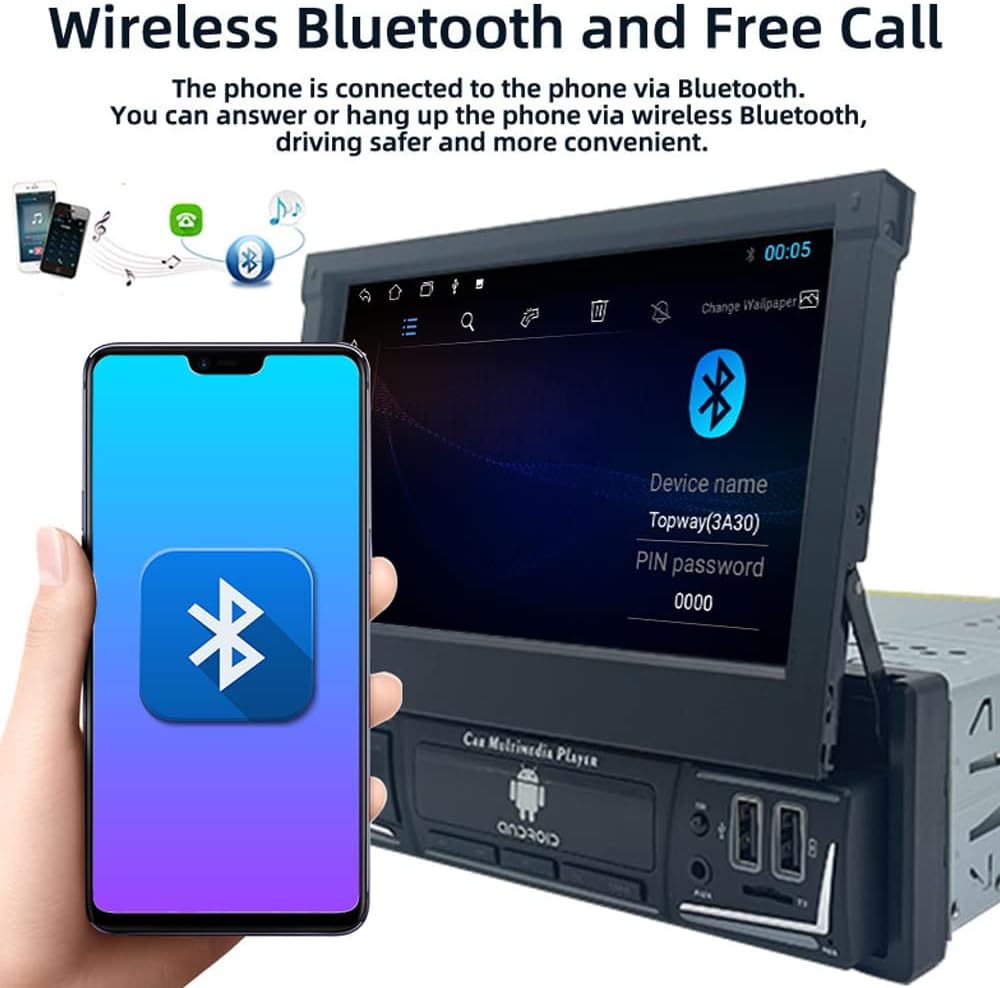
Image: The car stereo displaying the Bluetooth pairing screen, indicating a device name and PIN for connection.
4. എഫ്എം റേഡിയോ
Access the FM radio function to listen to your favorite stations.
- ഓട്ടോ സ്കാൻ: Use the 'AS' button to automatically search and store available stations.
- സ്വമേധയാലുള്ള ട്യൂണിംഗ്: Use the arrow buttons to manually tune to frequencies.
- പ്രീസെറ്റുകൾ: Store up to 18 FM stations across three bands (FM1, FM2, FM3).

Image: The car stereo displaying the FM radio interface, showing the current frequency and preset options.
5. Media Playback (USB/SD/AUX)
The unit supports various media sources for audio and video playback.
- USB: Insert a USB flash drive into the USB port. The unit will automatically detect and play compatible media files.
- TF കാർഡ്: Insert a TF (microSD) card into the TF card slot.
- ഓക്സ്-ഇൻ: Connect external audio devices using a 3.5mm audio cable to the AUX-in port.

Image: The car stereo displaying music playback, with icons representing USB, SD card, and AUX input options.
6. മിറർ ലിങ്ക് ഫംഗ്ഷൻ
Mirror Link allows you to display your smartphone's screen on the car stereo's display and control it from the stereo.
- Connect your Android or iOS phone to the unit via a USB cable.
- Follow the on-screen prompts to enable Mirror Link.
- For Android, you may need to enable USB debugging in developer options.

Image: The car stereo screen mirroring a smartphone, demonstrating the Mirror Link feature.
7. സ്റ്റിയറിംഗ് വീൽ നിയന്ത്രണം
If your vehicle supports steering wheel controls, you can configure them to operate the car stereo.
- യൂണിറ്റിന്റെ മെനുവിലെ 'സ്റ്റിയറിങ് വീൽ കൺട്രോൾ' ക്രമീകരണങ്ങൾ ആക്സസ് ചെയ്യുക.
- Follow the on-screen instructions to program each button on your steering wheel to a corresponding function on the stereo.

Image: The car stereo displaying its main menu with app icons, illustrating the use of steering wheel controls to navigate functions.
8. Backlight Button Colors
Customize the backlight color of the physical buttons on the unit.
- Navigate to the 'Settings' menu and find 'Button Backlight' or similar option.
- Choose from 7 available colors or set it to cycle automatically.

Image: The car stereo unit showcasing its buttons illuminated in various colors, demonstrating the 7-color backlight feature.
9. പിൻഭാഗം View Camera and DVR
യൂണിറ്റ് ഒരു പിൻഭാഗത്തെ പിന്തുണയ്ക്കുന്നു view camera and DVR for enhanced safety and recording.
- പിൻഭാഗം View ക്യാമറ: When the vehicle is shifted into reverse, the screen will automatically display the rear view ക്യാമറ ഫീഡ്.
- ഡിവിആർ: If a DVR is connected, access its functions through the dedicated app on the stereo's interface to record and manage footage.
മെയിൻ്റനൻസ്
- സ്ക്രീൻ വൃത്തിയാക്കൽ: ടച്ച്സ്ക്രീൻ മൃദുവായി തുടയ്ക്കാൻ മൃദുവായ, ലിന്റ് രഹിത തുണി ഉപയോഗിക്കുക. ഉരച്ചിലുകൾ ഉള്ള ക്ലീനറുകളോ ലായകങ്ങളോ ഉപയോഗിക്കുന്നത് ഒഴിവാക്കുക.
- സോഫ്റ്റ്വെയർ അപ്ഡേറ്റുകൾ: നിർമ്മാതാവിന്റെ webഒപ്റ്റിമൽ പ്രകടനവും പുതിയ സവിശേഷതകളിലേക്കുള്ള ആക്സസും ഉറപ്പാക്കാൻ ലഭ്യമായ ഏതെങ്കിലും സോഫ്റ്റ്വെയർ അല്ലെങ്കിൽ ഫേംവെയർ അപ്ഡേറ്റുകൾക്കായുള്ള സൈറ്റ്.
- പൊതു പരിചരണം: യൂണിറ്റിന് തീവ്രമായ താപനില, ദീർഘനേരം നേരിട്ടുള്ള സൂര്യപ്രകാശം, അല്ലെങ്കിൽ അമിതമായ ഈർപ്പം എന്നിവ ഏൽക്കുന്നത് ഒഴിവാക്കുക.
ട്രബിൾഷൂട്ടിംഗ്
നിങ്ങൾക്ക് പ്രശ്നങ്ങൾ നേരിടുകയാണെങ്കിൽ, ഇനിപ്പറയുന്ന പൊതുവായ പ്രശ്നങ്ങളും പരിഹാരങ്ങളും പരിശോധിക്കുക:
- ശക്തിയില്ല:
- Check all power connections (yellow, red, black wires) for proper contact and voltage.
- Verify the vehicle's fuse for the stereo is intact.
- ശബ്ദമില്ല:
- സ്പീക്കർ വയറുകൾ ശരിയായി ബന്ധിപ്പിച്ചിട്ടുണ്ടെന്നും ഷോർട്ട് സർക്യൂട്ട് ചെയ്തിട്ടില്ലെന്നും ഉറപ്പാക്കുക.
- വോളിയം ലെവലുകളും മ്യൂട്ട് ക്രമീകരണങ്ങളും പരിശോധിക്കുക.
- Verify audio source selection.
- ബ്ലൂടൂത്ത് കണക്റ്റുചെയ്യുന്നില്ല:
- സ്റ്റീരിയോയിലും ഫോണിലും ബ്ലൂടൂത്ത് പ്രവർത്തനക്ഷമമാക്കിയിട്ടുണ്ടെന്ന് ഉറപ്പാക്കുക.
- മുമ്പത്തെ ജോടിയാക്കലുകൾ ഇല്ലാതാക്കി വീണ്ടും ജോടിയാക്കാൻ ശ്രമിക്കുക.
- രണ്ട് ഉപകരണങ്ങളും പുനരാരംഭിക്കുക.
- GPS Not Working / Inaccurate:
- ജിപിഎസ് ആന്റിന ശരിയായി ബന്ധിപ്പിച്ചിട്ടുണ്ടെന്നും വ്യക്തമായ ഒരു ലൈൻ ഉണ്ടെന്നും ഉറപ്പാക്കുക. view ആകാശത്തിൻ്റെ.
- യൂണിറ്റിന്റെ മെനുവിൽ GPS ക്രമീകരണങ്ങൾ പരിശോധിക്കുക.
- സ്ക്രീൻ പ്രതികരിക്കുന്നില്ല:
- Perform a soft reset by pressing the reset button (if available) or turning the unit off and on.
- സ്ക്രീൻ വൃത്തിയുള്ളതും അവശിഷ്ടങ്ങൾ ഇല്ലാത്തതുമാണെന്ന് ഉറപ്പാക്കുക.
If problems persist, consult a qualified technician or contact customer support.
സ്പെസിഫിക്കേഷനുകൾ
| മോഡൽ നമ്പർ | 9602G |
| സ്ക്രീൻ വലിപ്പം | 7 Inch Retractable HD Touch Screen |
| വൈദ്യുതി വിതരണം | 12V DC |
| കണക്റ്റിവിറ്റി | Bluetooth, Wi-Fi, USB, Auxiliary |
| കൺട്രോളർ തരം | Android, iOS (via Mirror Link) |
| പ്രത്യേക സവിശേഷതകൾ | Touchscreen, GPS Navigation, FM Radio, Mirror Link, Steering Wheel Control, DVR & Rear View ക്യാമറ പിന്തുണ |
| റേഡിയോ ആവൃത്തി | FM 87.5MHz - 108MHz |
| ഓഡിയോ put ട്ട്പുട്ട് മോഡ് | സ്റ്റീരിയോ |
| പിന്തുണയ്ക്കുന്ന ഫോർമാറ്റുകൾ | MPEG, WAV, WMA (and others via MP5 player) |
| അളവുകൾ (ഏകദേശം) | 18.8cm x 5cm x 16.5cm (unit body) |
വാറൻ്റി വിവരങ്ങൾ
This product is covered by a manufacturer's warranty against defects in materials and workmanship. The specific terms and duration of the warranty may vary. Please retain your proof of purchase for warranty claims. For detailed warranty information, refer to the documentation included with your purchase or contact the seller.
ഉപഭോക്തൃ പിന്തുണ
If you require further assistance, have questions not covered in this manual, or need technical support, please contact the seller or manufacturer directly. Provide your product model number (9602G) and purchase details when seeking support.
പൊതുവായ അന്വേഷണങ്ങൾക്ക്, നിങ്ങൾക്ക് സന്ദർശിക്കാവുന്നതാണ് Polarlander brand page on Amazon.