
ErGear EGESD5B-4
ErGear Electric Standing Desk User Manual
Model: EGESD5B-4
Brand: ErGear
1. ഉൽപ്പന്നം കഴിഞ്ഞുview
The ErGear Electric Standing Desk is designed to provide a versatile and ergonomic workspace, allowing users to easily switch between sitting and standing positions. It features a robust steel frame and an efficient electric lifting system for smooth height adjustments.

Image: The ErGear Electric Standing Desk in a home office setting, showcasing its spacious desktop and integrated keyboard tray.
പ്രധാന സവിശേഷതകൾ:
- മികച്ച സ്ഥിരത: Constructed with a sturdy solid steel frame and aerospace-grade lifting column connectors, ensuring stability even at full height.
- സുഗമമായ ഉയര ക്രമീകരണം: Electric height adjustment from 28.35" to 46.46" with memory settings for preferred heights.
- Uprated Motor: Powerful lifting performance (Max 176 lb load) with reliable long-term operation.
- Spacious Keyboard Tray: നൽകുന്നു ample space for a large keyboard and mouse, supporting up to 22 lbs.
- More Ergonomic: The keyboard tray positions your keyboard 4.3'' lower than the desktop for optimal typing posture.
2. സജ്ജീകരണവും അസംബ്ലിയും
Before assembly, ensure all components are present and undamaged. Refer to the detailed Installation Manual (PDF) for step-by-step instructions. A link to the digital manual is provided below.
പ്രധാനപ്പെട്ട സുരക്ഷാ വിവരങ്ങൾ: Always follow assembly instructions carefully. Do not exceed the maximum weight limit of 176 pounds. Be cautious when adjusting the desk's height to prevent injury.
The desk includes all necessary basic assembly tools and spare parts. Key components include the Standing Desk frame, Keyboard Tray, and two Storage Hooks.
For a visual guide to the assembly process, please refer to the official installation manual:
3. പ്രവർത്തന നിർദ്ദേശങ്ങൾ
ഉയരം ക്രമീകരിക്കൽ
The ErGear Electric Standing Desk allows for smooth and quiet height adjustments. Use the control panel located on the underside of the desktop to raise or lower the desk.

Image: Demonstrating the wide height range of the desk, from sitting to standing positions.
മെമ്മറി പ്രീസെറ്റുകൾ:
The control panel features three customizable memory height settings. To save a preferred height:
- മുകളിലേക്കും താഴേക്കുമുള്ള അമ്പടയാളങ്ങൾ ഉപയോഗിച്ച് നിങ്ങൾക്ക് ആവശ്യമുള്ള ഉയരത്തിലേക്ക് ഡെസ്ക് ക്രമീകരിക്കുക.
- Press the 'M' button, then press one of the numbered preset buttons (1, 2, or 3) within a few seconds. The display will confirm the setting.
- To recall a saved height, simply press the corresponding numbered button.

Image: The desk's control panel, showing the digital height display and memory preset buttons.
കീബോർഡ് ട്രേ ഉപയോഗം
The integrated keyboard tray slides out smoothly, providing an ergonomic typing position. It can be retracted when not in use to save space.
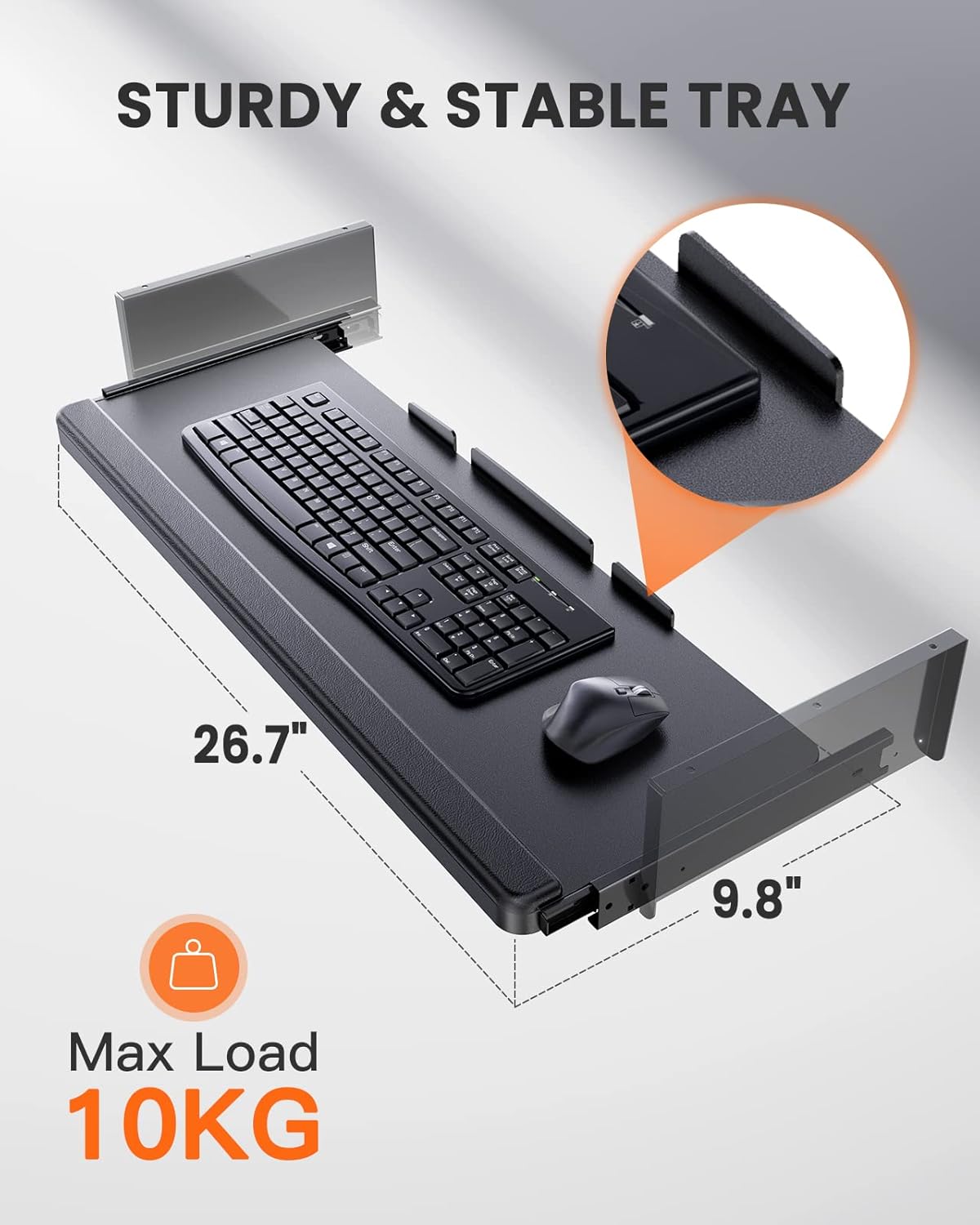
ചിത്രം: വിശദമായ ഒരു ചിത്രം view of the spacious and sturdy keyboard tray, designed to hold a full-size keyboard and mouse.
ഉൽപ്പന്ന വീഡിയോ:
Video: Official ErGear video demonstrating the electric standing desk's smooth height adjustment, spacious keyboard tray, and overall stability during use.
4. പരിപാലനം
To ensure the longevity and optimal performance of your ErGear Electric Standing Desk, regular maintenance is recommended:
- വൃത്തിയാക്കൽ: ഡെസ്ക്ടോപ്പും ഫ്രെയിമും ഒരു സോഫ്റ്റ്, ഡി ക്ലീനർ ഉപയോഗിച്ച് തുടയ്ക്കുക.amp തുണി. ഫിനിഷിന് കേടുവരുത്തുന്ന കഠിനമായ രാസവസ്തുക്കളോ ഉരച്ചിലുകളുള്ള ക്ലീനറുകളോ ഒഴിവാക്കുക.
- കണക്ഷനുകൾ പരിശോധിക്കുക: എല്ലാ സ്ക്രൂകളും ബോൾട്ടുകളും ഇറുകിയതാണെന്ന് ഉറപ്പാക്കാൻ ഇടയ്ക്കിടെ പരിശോധിക്കുക. ആവശ്യമെങ്കിൽ വീണ്ടും മുറുക്കുക.
- കേബിൾ മാനേജുമെന്റ്: Ensure power cables and other cords are properly managed to prevent entanglement during height adjustments.
- ഭാരം വിതരണം: Distribute weight evenly across the desktop to prevent strain on the lifting mechanism.
5. പ്രശ്നപരിഹാരം
If you encounter any issues with your ErGear Electric Standing Desk, please refer to the following common troubleshooting tips:
- ഡെസ്ക് നീങ്ങുന്നില്ല: Check if the power cord is securely plugged into both the desk and a working power outlet. Ensure no objects are obstructing the desk's movement.
- അസമമായ ചലനം: If the desk moves unevenly, ensure the weight on the desktop is balanced. Refer to the manual for calibration or reset procedures if available.
- പിശക് കോഡുകൾ: If the control panel displays an error code, consult the detailed Installation Manual (PDF) for specific instructions related to that code.
- Wobbling at Full Height: A slight wobble may occur at maximum height, which is typical for standing desks. Ensure the desk is on a flat, stable surface and all connections are tight.
If the problem persists after attempting these steps, please contact ErGear customer support for further assistance.
6 സ്പെസിഫിക്കേഷനുകൾ
Detailed specifications for the ErGear Electric Standing Desk (Model: EGESD5B-4):
| ഫീച്ചർ | വിശദാംശങ്ങൾ |
|---|---|
| ബ്രാൻഡ് | എർഗിയർ |
| മോഡൽ നമ്പർ | EGESD5B-4 |
| ഉൽപ്പന്ന അളവുകൾ | 24"D x 48"W x 28.5"H |
| നിറം | കറുപ്പ് |
| കുറഞ്ഞ ഉയരം | 28.35 ഇഞ്ച് |
| പരമാവധി ഉയരം | 46.46 Inches (Note: Max height in spec is 50.98, but feature bullet says 46.46. Using feature bullet for consistency with operation) |
| പരമാവധി ഭാരം ശുപാർശ | 176 പൗണ്ട് |
| അടിസ്ഥാന മെറ്റീരിയൽ | അലോയ് സ്റ്റീൽ |
| മികച്ച മെറ്റീരിയൽ തരം | മരം |
| Keyboard Tray Max Load | 22 പൗണ്ട് (10 കി.ഗ്രാം) |
| ഉൾപ്പെടുത്തിയ ഘടകങ്ങൾ | Assembly Instructions, Basic Assembly Tools, Keyboard Tray, Standing Desk, Storage Hooks (2pcs) |
| ആവശ്യമായ അസംബ്ലി | അതെ |

Image: Desk dimensions diagram, illustrating the overall size and height adjustability.
7. വാറൻ്റിയും പിന്തുണയും
വാറൻ്റി വിവരങ്ങൾ:
The ErGear Electric Standing Desk comes with a limited manufacturer's warranty. For specific details regarding coverage and duration, please refer to the warranty information provided with your purchase or contact ErGear customer support.
Returns and Protection Plans:
This product is eligible for 30-day easy returns. Additionally, extended protection plans may be available for purchase to provide additional coverage beyond the standard manufacturer's warranty.
- 2 വർഷത്തെ സംരക്ഷണ പദ്ധതി: വാങ്ങാൻ ലഭ്യമാണ്.
- 3 വർഷത്തെ സംരക്ഷണ പദ്ധതി: വാങ്ങാൻ ലഭ്യമാണ്.
- പൂർണ്ണ സംരക്ഷണം: യോഗ്യമായ മുൻകാല, ഭാവി വാങ്ങലുകൾ ഉൾക്കൊള്ളുന്ന ഒരു പ്രതിമാസ പ്ലാൻ.
For inquiries regarding product support, warranty claims, or technical assistance, please contact ErGear customer service through the retailer where the product was purchased or visit the official ErGear webസൈറ്റ്.
Ask a question about this manual
Ask about setup, troubleshooting, compatibility, parts, safety, or missing instructions. Manuals+ will review the question and use this page’s manual context to help answer it.