
1. ആമുഖം
This manual provides instructions for the WIWU Detachable Wireless Keyboard Case with Trackpad, designed to enhance your iPad experience by transforming it into a versatile workstation. This accessory combines a protective case with a detachable keyboard and a precision trackpad, offering multiple modes for typing, viewing, sketching, and reading.

The WIWU keyboard case offers a laptop-like experience for your iPad.
2 അനുയോജ്യത
This keyboard case is compatible with the following Apple iPad models:
- Apple iPad Pro 11-inch (1st generation)
- Apple iPad Pro 11-inch (2nd generation)
- Apple iPad Pro 11-inch (3rd generation)
- Apple iPad Pro 11-inch (4th generation)
- Apple iPad Air (4th generation)
- Apple iPad Air (5th generation)
- Apple iPad (10th generation)
3. പാക്കേജ് ഉള്ളടക്കം
പാക്കേജിൽ ഉൾപ്പെടുന്നു:
- WIWU iPad Pro 11 Inch Keyboard Case
- USB-C ചാർജിംഗ് കേബിൾ
- ഉപയോക്തൃ മാനുവൽ
4. ഉൽപ്പന്ന സവിശേഷതകൾ
- Detachable Wireless Keyboard: Easily attach or detach the keyboard from the case for flexible use.
- ഇന്റഗ്രേറ്റഡ് ട്രാക്ക്പാഡ്: Supports multi-touch gestures for precise navigation.
- 7-Color Adjustable Backlight: Customize your typing experience with various backlight colors and brightness levels.
- Full Protection Case: Durable design provides comprehensive protection for your iPad.
- Built-in Apple Pencil Holder: Securely store and charge your Apple Pencil.
- ക്രമീകരിക്കാവുന്ന കിക്ക്സ്റ്റാൻഡ്: ഒന്നിലധികം ഓഫറുകൾ viewing angles (90°-135°) for comfort.
- ദീർഘകാല ബാറ്ററി: Up to 150 days standby time and 90 days of typing on a single charge.
- കാന്തിക ആഗിരണം: Strong magnets ensure secure attachment of the iPad and keyboard.
- Auto-sleep Mode: Conserves battery life by automatically putting the iPad to sleep when closed.

Key features of the WIWU keyboard case.

The keyboard features 7-color adjustable backlighting.
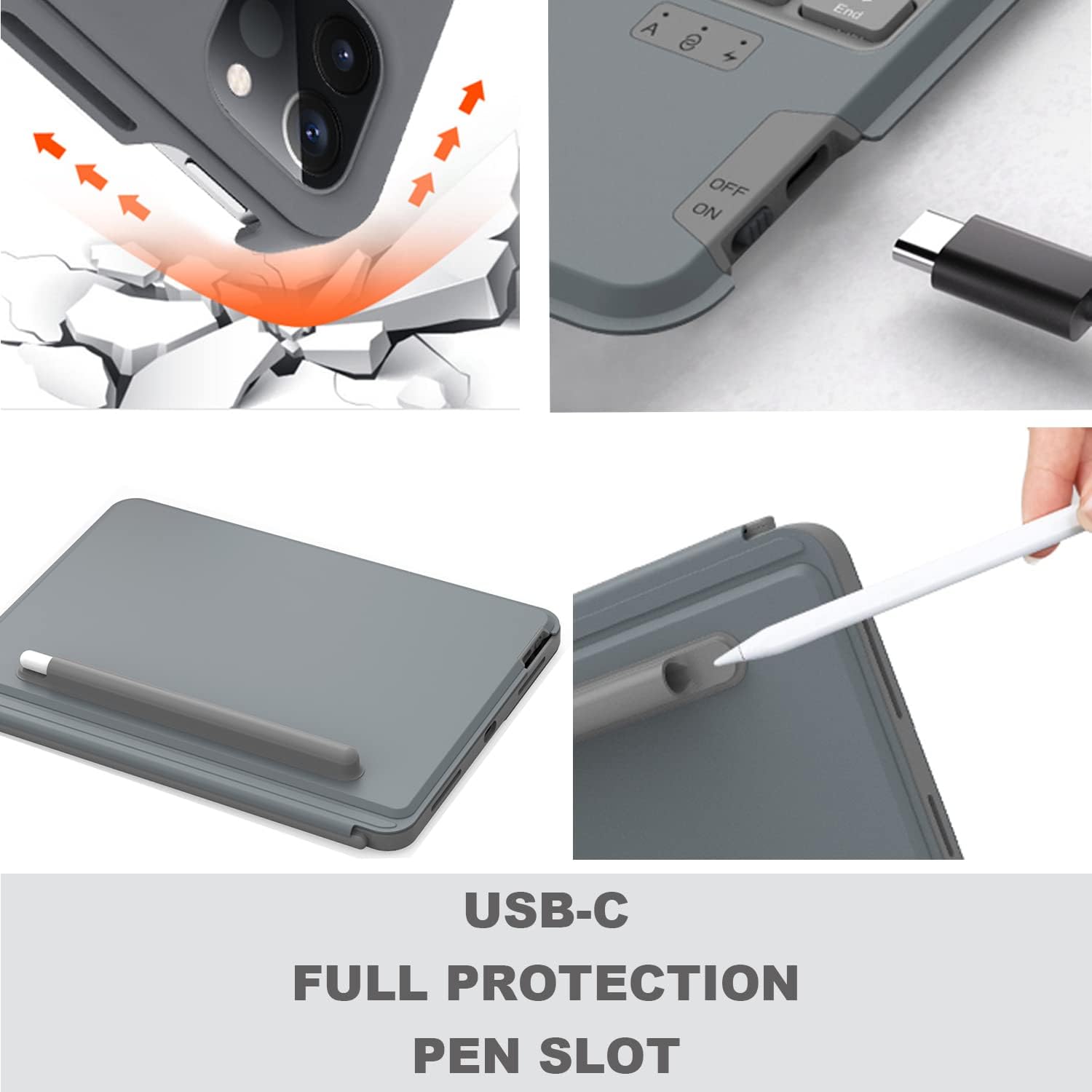
Details on USB-C charging, full protection, and the pen slot.

The keyboard offers extended battery life for prolonged use.
5. സജ്ജീകരണ നിർദ്ദേശങ്ങൾ
5.1 കീബോർഡ് ചാർജ് ചെയ്യുന്നു
Before first use, fully charge the keyboard using the provided USB-C cable. Connect the USB-C end to the keyboard's charging port and the other end to a USB power adapter (not included).
5.2 നിങ്ങളുടെ ഐപാഡ് ചേർക്കൽ
- Carefully align your iPad with the protective case.
- Gently press the iPad into the case, ensuring all edges are securely fitted.
- Ensure the camera protection cover pieces are correctly placed if applicable for your iPad model.

The keyboard magnetically attaches to the iPad case.
5.3 ബ്ലൂടൂത്ത് ജോടിയാക്കൽ
- വശത്ത് സ്ഥിതിചെയ്യുന്ന പവർ സ്വിച്ച് ഉപയോഗിച്ച് കീബോർഡ് ഓണാക്കുക.
- അമർത്തുക Fn + Del keys simultaneously on the keyboard to enter Bluetooth pairing mode. The Bluetooth indicator light will flash.
- നിങ്ങളുടെ iPad-ൽ, പോകുക ക്രമീകരണങ്ങൾ > ബ്ലൂടൂത്ത് ബ്ലൂടൂത്ത് ഓണാക്കുക.
- Select "WIWU Keyboard" (or similar name) from the list of available devices.
- Once connected, the Bluetooth indicator light on the keyboard will stop flashing.
6. പ്രവർത്തന നിർദ്ദേശങ്ങൾ
6.1 കീബോർഡ് ഉപയോഗം
The keyboard functions like a standard QWERTY keyboard. Use it for typing documents, emails, and navigating your iPad.
6.2 Trackpad Gestures
The integrated trackpad supports various multi-touch gestures for efficient navigation:
- നിയന്ത്രണ കേന്ദ്രം തുറക്കുക: Use one finger to move the pointer to select the status icons at the top right, then click. Alternatively, swipe up with one finger from the bottom right corner.
- View Slide Over: സ്ക്രീനിന്റെ വലത് അറ്റത്ത് പോയിന്റർ സ്വൈപ്പുചെയ്യാൻ ഒരു വിരൽ ഉപയോഗിക്കുക. സ്ലൈഡ് ഓവർ മറയ്ക്കാൻ, വീണ്ടും വലത്തേക്ക് സ്വൈപ്പുചെയ്യുക.
- ഇടത്തോട്ടോ വലത്തോട്ടോ സ്ക്രോൾ ചെയ്യുക: രണ്ട് വിരലുകൾ ഇടത്തോട്ടോ വലത്തോട്ടോ സ്വൈപ്പുചെയ്യുക.

Common trackpad gestures for iPad navigation.
6.3 ബാക്ക്ലൈറ്റ് ക്രമീകരിക്കൽ
To adjust the keyboard backlight color and brightness:
- അമർത്തുക ലൈറ്റ് ബൾബ് ഐക്കൺ കീ തെളിച്ച നിലകളിലൂടെ സഞ്ചരിക്കാൻ.
- അമർത്തുക Fn + PgUp or Fn + PgDn to change backlight colors.
6.4 ക്രമീകരിക്കുന്നു Viewing കോണുകൾ
The case features an adjustable kickstand that allows you to set your iPad at various angles between 90° and 135° for optimal viewഡൗൺലോഡ് ചെയ്യുന്നതിലും ടൈപ്പ് ചെയ്യുന്നതിലും സുഖം.

The kickstand provides flexible viewകോണുകൾ.
6.5 Multiple Usage Modes
The detachable design and adjustable kickstand allow for various modes:
- ടൈപ്പിംഗ് മോഡ്: iPad attached to the keyboard, propped up for typing.
- Viewing മോഡ്: Keyboard detached, iPad propped up for watching videos or video calls.
- Sketching/Reading Mode: Keyboard detached, iPad laid flat or held for drawing or reading.

The case supports multiple modes for different activities.

The case allows for both vertical and landscape orientations.
Official video demonstrating the WIWU Detachable Wireless Keyboard Case features and usage.
7. പരിപാലനം
- വൃത്തിയാക്കൽ: ഒരു സോഫ്റ്റ് ഉപയോഗിക്കുക, ഡിamp cloth to clean the case and keyboard. Avoid harsh chemicals.
- ബാറ്ററി കെയർ: ബാറ്ററി ലൈഫ് വർദ്ധിപ്പിക്കാൻ, കീബോർഡ് ഇടയ്ക്കിടെ പൂർണ്ണമായും ഡിസ്ചാർജ് ചെയ്യുന്നത് ഒഴിവാക്കുക. പതിവായി ചാർജ് ചെയ്യുക.
- സംഭരണം: ദീർഘനേരം ഉപയോഗിക്കാത്തപ്പോൾ, കീബോർഡ് കേസ് തണുത്തതും വരണ്ടതുമായ സ്ഥലത്ത് സൂക്ഷിക്കുക.
8. പ്രശ്നപരിഹാരം
- കീബോർഡ് ബ്ലൂടൂത്ത് വഴി ബന്ധിപ്പിക്കുന്നില്ല:
- കീബോർഡ് ചാർജ് ചെയ്തിട്ടുണ്ടെന്നും പവർ ഓൺ ചെയ്തിട്ടുണ്ടെന്നും ഉറപ്പാക്കുക.
- Verify Bluetooth is enabled on your iPad.
- Try re-pairing the keyboard by pressing Fn + Del.
- നിങ്ങളുടെ ഐപാഡും കീബോർഡും പുനരാരംഭിക്കുക.
- Trackpad not responding or erratic cursor:
- Ensure the keyboard is fully charged. Low battery can affect trackpad performance.
- ബ്ലൂടൂത്ത് കണക്ഷൻ വിച്ഛേദിച്ച് വീണ്ടും ബന്ധിപ്പിക്കുക.
- ഏതെങ്കിലും അവശിഷ്ടങ്ങൾ നീക്കം ചെയ്യാൻ ട്രാക്ക്പാഡ് ഉപരിതലം വൃത്തിയാക്കുക.
- Check iPad settings for trackpad sensitivity.
- പ്രതികരിക്കാത്ത കീകൾ:
- Ensure the keyboard is connected and charged.
- Test individual keys. If only some keys are affected, contact support.
9 സ്പെസിഫിക്കേഷനുകൾ
| ഫീച്ചർ | വിശദാംശങ്ങൾ |
|---|---|
| ബ്രാൻഡ് | WIWU |
| മോഡൽ നമ്പർ | 6936686404181 |
| കണക്റ്റിവിറ്റി ടെക്നോളജി | ബ്ലൂടൂത്ത്, യുഎസ്ബി (ചാർജ് ചെയ്യുന്നതിന്) |
| കീബോർഡ് വിവരണം | എർഗണോമിക് |
| പവർ ഉറവിടം | ബാറ്ററി പവർ |
| സ്വിച്ച് തരം | കത്രിക-സ്വിച്ച് |
| കീബോർഡ് ലേഔട്ട് | QWERTY |
| കീകളുടെ എണ്ണം | 78 |
| ഇനത്തിൻ്റെ ഭാരം | 400 ഗ്രാം |
10. വാറൻ്റിയും പിന്തുണയും
For any product inquiries, technical assistance, or warranty information, please contact WIWU customer support. WIWU offers 7x24-hour online support to assist you with any issues or questions you may have regarding your keyboard case.
Please refer to your purchase documentation or the official WIWU webനിർദ്ദിഷ്ട വാറന്റി നിബന്ധനകൾക്കും ബന്ധപ്പെടാനുള്ള വിശദാംശങ്ങൾക്കും സൈറ്റ്.


