
Andoer e417fe28-cba1-49bd-8acb-ddcd73b41592
Andoer 4K Digital Video Camera User Manual
Model: e417fe28-cba1-49bd-8acb-ddcd73b41592
1. ആമുഖം
This user manual provides detailed instructions for operating your Andoer 4K Digital Video Camera. Please read this manual thoroughly before using the camera to ensure proper operation and to maximize its performance. Keep this manual for future reference.
1.1 പാക്കേജ് ഉള്ളടക്കം
പാക്കേജ് തുറക്കുമ്പോൾ, താഴെ പട്ടികപ്പെടുത്തിയിരിക്കുന്ന എല്ലാ ഇനങ്ങളും നിലവിലുണ്ടെന്നും നല്ല നിലയിലാണെന്നും ദയവായി പരിശോധിക്കുക:
- 1 x Andoer 4K Digital Video Camera
- 2 x NP-40 Li-ion Battery (one pre-installed)
- 1 x USB കേബിൾ
- 1 x വീഡിയോ കേബിൾ
- 1 x റിമോട്ട് കൺട്രോൾ
- 1 x Camera Bag
- 1 x യൂസർ മാനുവൽ (ഇംഗ്ലീഷ്)

Image: The Andoer 4K Digital Video Camera, remote control, and two NP-40 Li-ion batteries, illustrating the main components included in the package.
2. ഉൽപ്പന്ന സവിശേഷതകൾ
The Andoer 4K Digital Video Camera is equipped with a range of features designed to enhance your video recording and photography experience:
- 4K Ultra HD Video Recording: Capture stunning videos at 4K/30fps and 2.7K/30fps resolutions.
- 56MP Still Image Capture: Produce high-resolution photos up to 56 megapixels (interpolation).
- 3.0 Inch IPS Touchscreen: A rotatable 270° touchscreen for intuitive control and versatile viewകോണുകൾ.
- 18X ഡിജിറ്റൽ സൂം: Bring distant subjects closer without compromising image quality.
- ഐആർ നൈറ്റ് വിഷൻ: Record clear and natural footage in low-light or dark environments.
- വൈഫൈ കണക്റ്റിവിറ്റി: Easily connect to your smartphone or tablet via the DV-CAM APP for remote control, live view, ഒപ്പം file കൈമാറ്റം.
- Face Detection & Anti-Shake: Enhance focus and stability for clearer shots.
- ബാഹ്യ മൈക്രോഫോൺ പിന്തുണ: Hot shoe mount for connecting an external microphone for improved audio quality.
- Standard Tripod Mount: 1/4 inch thread for mounting on a tripod or other accessories.

Image: An infographic highlighting the camera's main features including 4K 56MP resolution, 18X Digital Zoom, Face Detection, Night Vision, Dual Outputs, Digital Anti-shake, IPS Touchscreen, WiFi Connection, and Built-in Microphone.
3. ആരംഭിക്കുന്നു
3.1 ബാറ്ററി ഇൻസ്റ്റാളേഷനും ചാർജിംഗും
The camera uses NP-40 Li-ion batteries. One battery is typically pre-installed. Ensure batteries are fully charged before first use.
- ക്യാമറയുടെ അടിയിൽ സ്ഥിതിചെയ്യുന്ന ബാറ്ററി കമ്പാർട്ട്മെന്റ് കവർ തുറക്കുക.
- Insert the NP-40 battery, ensuring the correct polarity.
- ബാറ്ററി കമ്പാർട്ട്മെൻ്റ് കവർ സുരക്ഷിതമായി അടയ്ക്കുക.
- To charge, connect the camera to a power source using the provided USB cable. The charging indicator light will illuminate.
- ഇൻഡിക്കേറ്റർ ലൈറ്റ് ഓഫാകുമ്പോൾ ചാർജിംഗ് പൂർത്തിയാകും.
3.2 SD കാർഡ് ഇൻസ്റ്റലേഷൻ
The camera supports SD/SDHC cards up to 128GB (Class 6 or above recommended, not included).
- Locate the SD card slot, usually on the side or bottom of the camera.
- മെറ്റൽ കോൺടാക്റ്റുകൾ ശരിയായ ദിശയിലേക്ക് അഭിമുഖീകരിക്കുന്ന തരത്തിൽ SD കാർഡ് തിരുകുക (സ്ലോട്ടിനടുത്തുള്ള ഡയഗ്രം കാണുക). അത് സ്ഥലത്ത് ക്ലിക്ക് ആകുന്നതുവരെ അമർത്തുക.
- നീക്കം ചെയ്യാൻ, കാർഡ് വീണ്ടും പുറത്തേക്ക് വരുന്നത് വരെ സൌമ്യമായി അകത്തേക്ക് തള്ളുക.
4. അടിസ്ഥാന പ്രവർത്തനം
4.1 പവർ ഓൺ/ഓഫ്
- പവർ ഓൺ: Open the LCD screen or press the Power button.
- പവർ ഓഫ്: Close the LCD screen or press and hold the Power button.
4.2 വീഡിയോ റെക്കോർഡിംഗ്
- ക്യാമറ ഓണാക്കുക.
- Ensure the camera is in video recording mode (indicated by an icon on the screen). If not, use the Mode button to switch.
- Press the Record button (usually a red circle) to start recording.
- റെക്കോർഡിംഗ് നിർത്താൻ വീണ്ടും റെക്കോർഡ് ബട്ടൺ അമർത്തുക.
4.3 ഫോട്ടോ എടുക്കൽ
- ക്യാമറ ഓണാക്കുക.
- ക്യാമറ ഫോട്ടോ മോഡിൽ ആണെന്ന് ഉറപ്പാക്കുക.
- എൽസിഡി സ്ക്രീൻ ഉപയോഗിച്ച് നിങ്ങളുടെ ഷോട്ട് ഫ്രെയിം ചെയ്യുക.
- Press the Photo button (often a camera icon or shutter button) to take a picture.
4.4 സൂം പ്രവർത്തനം
The camera features 18X digital zoom.
- Use the T (Telephoto) button to zoom in.
- Use the W (Wide) button to zoom out.

Image: A visual demonstration of the 18X digital zoom capability, showing how the camera can magnify distant subjects.
4.5 പ്ലേബാക്ക്
- In standby mode, press the Playback button (often an arrow icon) to enter playback mode.
- Use the navigation buttons to browse through your recorded videos and photos.
- Press the OK button to play a video or view പൂർണ്ണ സ്ക്രീനിൽ ഒരു ഫോട്ടോ.
- പ്ലേബാക്ക് മോഡിൽ നിന്ന് പുറത്തുകടക്കാൻ പ്ലേബാക്ക് ബട്ടൺ വീണ്ടും അമർത്തുക.
5. വിപുലമായ പ്രവർത്തനങ്ങൾ
5.1 വൈഫൈ കണക്ഷൻ
The camera supports WiFi connectivity for remote control and file transfer via the DV-CAM APP.
- Download and install the "DV-CAM" APP on your smartphone or tablet from your device's app store.
- On the camera, navigate to the WiFi settings and enable WiFi. The camera's WiFi network name (SSID) and password will be displayed.
- On your smartphone/tablet, go to WiFi settings and connect to the camera's WiFi network using the provided password.
- Open the DV-CAM APP. You can now view തത്സമയംtage, control recording, take photos, and download files directly to your mobile device.

Image: A visual representation of the camera's WiFi function, showing a smartphone connected to the camera to view തത്സമയംtage or transfer files.
5.2 ഐആർ നൈറ്റ് വിഷൻ
The IR Night Vision feature allows you to record in low-light conditions.
- To activate IR Night Vision, locate the IR button or setting in the camera menu.
- When activated, the camera will use infrared light to illuminate the scene, capturing clear black and white footage in darkness.

Image: A side-by-side comparison demonstrating the effectiveness of IR Night Vision, showing a scene in normal light versus the same scene captured in darkness using infrared.
5.3 3.0 Inch IPS Touchscreen
The 3.0-inch IPS touchscreen offers intuitive control and can be rotated 270 degrees for various shooting angles, including self-recording.
- Tap the screen to access menu options or focus.
- Swipe to navigate through playback or menu pages.
- Rotate the screen to face forward for vlogging or self-portraits.
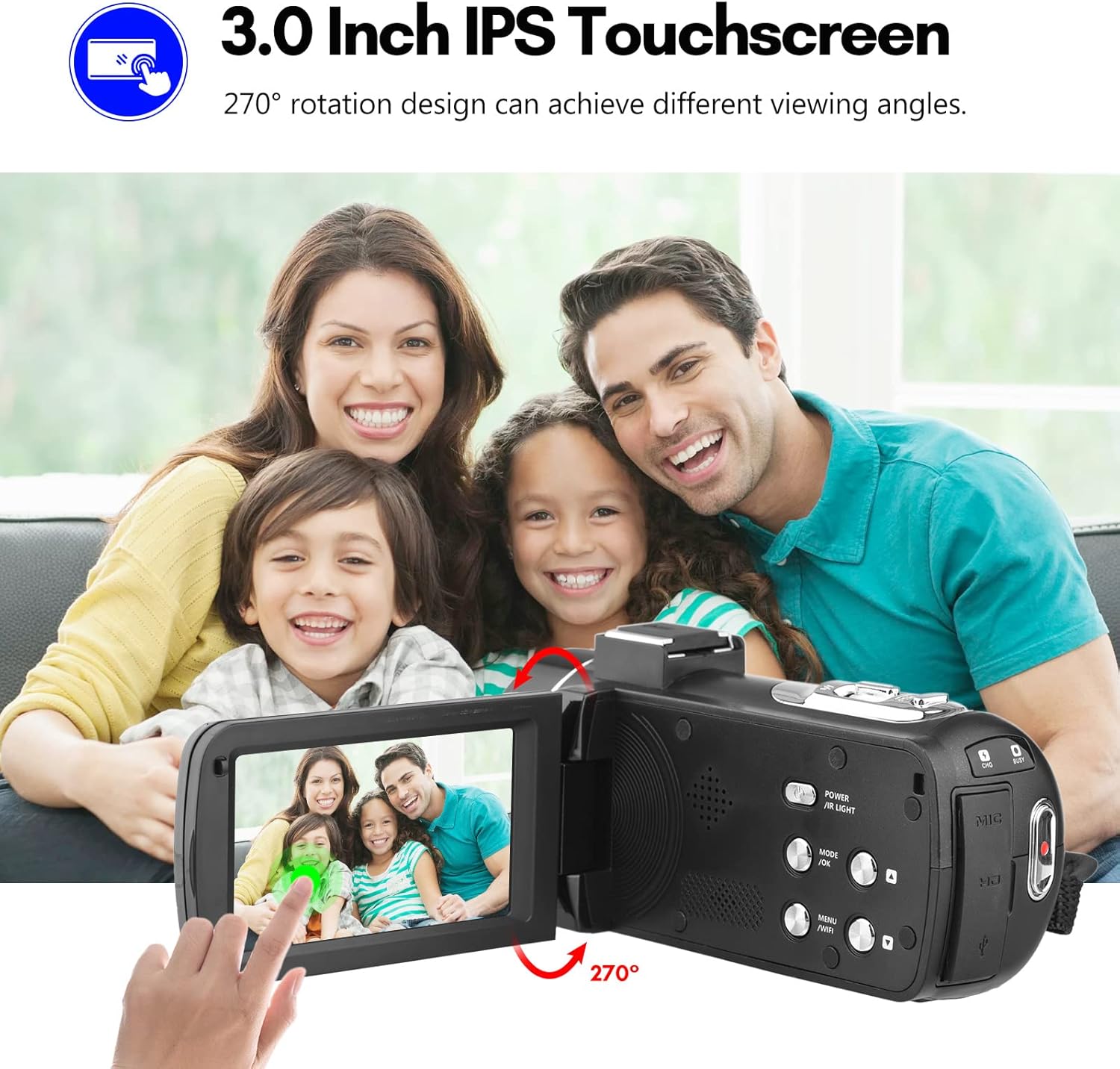
Image: The Andoer camera with its 3.0-inch IPS touchscreen rotated, demonstrating its 270-degree rotation capability for flexible viewing and self-recording.
5.4 മെനു ക്രമീകരണങ്ങൾ
Access the camera's menu to adjust various settings such as video resolution, photo resolution, white balance, exposure, self-timer, and auto power off.
- ക്രമീകരണ മെനുവിൽ പ്രവേശിക്കാൻ മെനു ബട്ടൺ അമർത്തുക.
- Use the navigation buttons or touchscreen to select options.
- തിരഞ്ഞെടുക്കലുകൾ സ്ഥിരീകരിക്കുന്നതിന് ശരി അമർത്തുക.
- പുറത്തുകടക്കാൻ മെനു വീണ്ടും അമർത്തുക.
6. കണക്റ്റിവിറ്റി
The camera offers multiple connectivity options for viewing and transferring your media.
6.1 Connecting to a TV (HD Multimedia Interface)
- ക്യാമറ ഓഫാക്കിയിട്ടുണ്ടെന്ന് ഉറപ്പാക്കുക.
- Connect one end of the HD multimedia interface cable (not explicitly listed in package contents, but mentioned in description) to the camera's HD port and the other end to an HD input on your TV.
- Turn on the TV and select the correct HD input source.
- Turn on the camera. The camera's display will be mirrored on the TV screen, allowing you to view ഫോട്ടോകളും വീഡിയോകളും.
6.2 ഒരു കമ്പ്യൂട്ടറിലേക്ക് (USB) കണക്റ്റുചെയ്യുന്നു
- ക്യാമറ ഓഫാക്കിയിട്ടുണ്ടെന്ന് ഉറപ്പാക്കുക.
- നൽകിയിരിക്കുന്ന USB കേബിൾ ഉപയോഗിച്ച് നിങ്ങളുടെ കമ്പ്യൂട്ടറിലേക്ക് ക്യാമറ ബന്ധിപ്പിക്കുക.
- Turn on the camera. It will typically enter "Mass Storage" or "PC Camera" mode. Select "Mass Storage" to access files.
- The camera will appear as a removable disk drive on your computer, allowing you to transfer files.

Image: An illustration detailing how to connect the Andoer camera to a television via HD multimedia interface and to a computer via USB for viewing and transferring media.
7. പരിപാലനം
7.1 ക്യാമറ വൃത്തിയാക്കൽ
- ക്യാമറ ബോഡി വൃത്തിയാക്കാൻ മൃദുവായതും ഉണങ്ങിയതുമായ തുണി ഉപയോഗിക്കുക.
- For the lens, use a specialized lens cleaning cloth and lens cleaning solution. Avoid touching the lens with your fingers.
- Do not use strong detergents or solvents, as they may damage the camera's finish.
7.2 സംഭരണം
- When not in use for extended periods, remove the battery from the camera.
- ക്യാമറ തണുത്തതും വരണ്ടതുമായ സ്ഥലത്ത് സൂക്ഷിക്കുക, നേരിട്ടുള്ള സൂര്യപ്രകാശവും ഉയർന്ന താപനിലയും ഏൽക്കാത്ത സ്ഥലത്ത് സൂക്ഷിക്കുക.
- Use the provided camera bag to protect it from dust and scratches.
8. പ്രശ്നപരിഹാരം
| പ്രശ്നം | സാധ്യമായ കാരണം | പരിഹാരം |
|---|---|---|
| ക്യാമറ പവർ ഓൺ ചെയ്യുന്നില്ല. | ബാറ്ററി തീർന്നു അല്ലെങ്കിൽ തെറ്റായി ചേർത്തിരിക്കുന്നു. | ബാറ്ററി ചാർജ് ചെയ്യുക അല്ലെങ്കിൽ ശരിയായി വീണ്ടും ചേർക്കുക. |
| വീഡിയോ റെക്കോർഡ് ചെയ്യാൻ/ഫോട്ടോ എടുക്കാൻ കഴിയില്ല. | SD കാർഡ് നിറഞ്ഞിരിക്കുന്നു, ലോക്ക് ചെയ്തിരിക്കുന്നു, അല്ലെങ്കിൽ ചേർത്തിട്ടില്ല. | ഇല്ലാതാക്കുക files, unlock the SD card, or insert an SD card. |
| മോശം ഇമേജ്/വീഡിയോ നിലവാരം. | ലെൻസ് വൃത്തികേടാണ്; ആവശ്യത്തിന് വെളിച്ചമില്ല; തെറ്റായ ക്രമീകരണങ്ങൾ. | Clean the lens; use IR Night Vision in low light; adjust resolution/exposure settings. |
| വൈഫൈ കണക്ഷൻ പ്രശ്നങ്ങൾ. | Incorrect password; APP not installed; distance too far. | Verify password; install DV-CAM APP; move closer to camera. |
9 സ്പെസിഫിക്കേഷനുകൾ
| ഫീച്ചർ | വിശദാംശങ്ങൾ |
|---|---|
| ഇമേജ് സെൻസർ | CMOS |
| ഐഎസ്ഒ | ഓട്ടോ, 100, 200, 400, 800, 1600 |
| സംഭരണം | SD/SDHC Card, max. 128GB (Class 6 or above) |
| ലെൻസ് | Fixed, f/2.6, f=7.0mm |
| ഫോക്കസ് ഡിസ്റ്റൻസ് | അനന്തതയിലേക്ക് 0.5 മീ |
| സ്ക്രീൻ | 3.0 Inch IPS Touchscreen (270° rotation) |
| Photo Format & Resolution | JPG, 56M/ 48M/ 30M/ 24M/ 20M/ 16M/ 12M/ 8M/ 5M |
| Video Format & Resolution | MP4, 4K/30fps, 2.7K/30fps, 1080P/60fps, 1080P/30fps, 720P/60fps, 720P/30fps |
| ഡിജിറ്റൽ സൂം | 18X |
| ഐആർ ലൈറ്റ് | <1.0 മി |
| വൈറ്റ് ബാലൻസ് | Auto/ Daylight/ Cloudy/ Tungsten/ Fluorescent |
| സമ്പർക്കം | E 3.0EV |
| സ്വയം ടൈമർ | OFF/2s/ 5s/ 10s |
| യാന്ത്രിക പവർ ഓഫാണ് | OFF/ 1min/3min/ 5min/ 10min |
| മൈക്രോഫോൺ | Built-in, supports external microphone |
| വൈദ്യുതി വിതരണം | 1 x NP-40 Li-ion Battery |
| റിമോട്ട് കൺട്രോൾ ബാറ്ററി | 2 x AAA ബാറ്ററികൾ (ഉൾപ്പെടുത്തിയിട്ടില്ല) |
| ക്യാമറ വലുപ്പം | 12.6 x 5.8 x 5.9cm / 5 x 2.3 x 2.3in |
| ക്യാമറ ഭാരം | 318g / 11.2oz |
10. വാറൻ്റിയും പിന്തുണയും
For warranty information and technical support, please refer to the official Andoer webസൈറ്റിൽ ബന്ധപ്പെടുക അല്ലെങ്കിൽ അവരുടെ ഉപഭോക്തൃ സേവനവുമായി ബന്ധപ്പെടുക. വാങ്ങിയതിന്റെ തെളിവായി നിങ്ങളുടെ വാങ്ങൽ രസീത് സൂക്ഷിക്കുക.
You can visit the official Andoer store on Amazon for more information: Andoer Store
11 സുരക്ഷാ വിവരങ്ങൾ
ഉൽപ്പന്നത്തിന് പരിക്കേൽക്കുകയോ കേടുപാടുകൾ സംഭവിക്കുകയോ ചെയ്യാതിരിക്കാൻ ഇനിപ്പറയുന്ന സുരക്ഷാ മുൻകരുതലുകൾ പാലിക്കുക:
- ഉയർന്ന താപനിലയിലോ, നേരിട്ടുള്ള സൂര്യപ്രകാശത്തിലോ, ഉയർന്ന ആർദ്രതയിലോ ക്യാമറയെ തുറന്നുകാട്ടരുത്.
- ക്യാമറ വെള്ളത്തിൽ നിന്നും മറ്റ് ദ്രാവകങ്ങളിൽ നിന്നും അകറ്റി നിർത്തുക.
- ക്യാമറ വേർപെടുത്താനോ പരിഷ്കരിക്കാനോ ശ്രമിക്കരുത്. അംഗീകൃത സർവീസ് ഉദ്യോഗസ്ഥർ മാത്രമേ അറ്റകുറ്റപ്പണികൾ നടത്താവൂ.
- Keep plastic bags and packaging materials away from babies and children to avoid suffocation hazards.

Image: A multi-language warning label emphasizing the importance of keeping plastic bags away from children to prevent suffocation.
Ask a question about this manual
Ask about setup, troubleshooting, compatibility, parts, safety, or missing instructions. Manuals+ will review the question and use this page’s manual context to help answer it.