
ആമുഖം
വാങ്ങിയതിന് നന്ദി.asing the RCA 32V-type FHD Tunerless Smart TV, model RCA-32D1. This television is designed for seamless access to online streaming content without the need for traditional terrestrial broadcast tuners. It features a Full HD display, built-in Wi-Fi, Chromecast functionality, and voice control for an enhanced viewing experience. This manual provides essential information for setting up, operating, maintaining, and troubleshooting your new TV.

ചിത്രം 1: മുൻഭാഗം view of the RCA 32V-type FHD Tunerless Smart TV.
സുരക്ഷാ വിവരങ്ങൾ
ഉൽപ്പന്നം ഉപയോഗിക്കുന്നതിന് മുമ്പ് ദയവായി എല്ലാ സുരക്ഷാ നിർദ്ദേശങ്ങളും ശ്രദ്ധാപൂർവ്വം വായിക്കുക. ഭാവി റഫറൻസിനായി ഈ മാനുവൽ സൂക്ഷിക്കുക.
- തീയോ വൈദ്യുതാഘാതമോ ഒഴിവാക്കാൻ ടിവി മഴയിലോ ഈർപ്പത്തിലോ തുറന്നുകാട്ടരുത്.
- ശരിയായ വായുസഞ്ചാരം ഉറപ്പാക്കുക. വായുസഞ്ചാര ദ്വാരങ്ങൾ തടയരുത്.
- ടിവിയോടൊപ്പം നൽകിയിരിക്കുന്ന പവർ കോർഡ് മാത്രം ഉപയോഗിക്കുക.
- ടിവി തുറക്കരുത് casing. എല്ലാ സേവനങ്ങളും യോഗ്യതയുള്ള ഉദ്യോഗസ്ഥർക്ക് റഫർ ചെയ്യുക.
- ബാറ്ററികൾ കുട്ടികൾക്ക് ലഭ്യമാകാതെ സൂക്ഷിക്കുക. ഉപയോഗിച്ച ബാറ്ററികൾ ഉത്തരവാദിത്തത്തോടെ നിർമാർജനം ചെയ്യുക.
- ടിവി അസ്ഥിരമായ പ്രതലങ്ങളിൽ വയ്ക്കുന്നത് ഒഴിവാക്കുക.
പാക്കേജ് ഉള്ളടക്കം
പാക്കേജിൽ എല്ലാ ഇനങ്ങളും ഉണ്ടെന്ന് ഉറപ്പാക്കുക:
- RCA 32V-type FHD Tunerless Smart TV Unit
- റിമോട്ട് കൺട്രോൾ
- AAA ബാറ്ററികൾ (x2)
- ടിവി സ്റ്റാൻഡ് (ബേസും സ്ക്രൂകളും)
- പവർ കേബിൾ
- ഉപയോക്തൃ മാനുവൽ (ഈ പ്രമാണം)
സജ്ജമാക്കുക
1. ഭൗതിക സജ്ജീകരണം
Attach the TV stand or mount the TV to a wall. For wall mounting, ensure you use a VESA-compatible bracket (40 x 40mm) and appropriate screws (M6 10mm x 2 for upper two points, screws for lower two points are included with the TV). Always ensure the TV is securely mounted to prevent accidents.

Figure 2: TV dimensions and connection terminal layout.
2. കണക്ഷനുകൾ
Connect the power cable to the TV and then to a power outlet. This TV requires only a power connection and Wi-Fi for internet streaming.

Figure 3: Power and Wi-Fi connectivity for the tunerless TV.
For external devices, use the available ports:
- HDMI പോർട്ടുകൾ (x3): Connect game consoles, Blu-ray players, or other HDMI-compatible devices.
- USB 2.0 പോർട്ടുകൾ (x2): മീഡിയ പ്ലേബാക്കിനായി USB സംഭരണ ഉപകരണങ്ങൾ ബന്ധിപ്പിക്കുക.
- LAN പോർട്ട്: For wired internet connection (optional, Wi-Fi is also available).
- ഓഡിയോ ഔട്ട്പുട്ട്: ബാഹ്യ ഓഡിയോ സിസ്റ്റങ്ങൾ ബന്ധിപ്പിക്കുന്നതിന്.

Figure 4: Connecting external devices via HDMI ports.
3. പ്രാരംഭ പവർ ഓൺ
After connecting the power, press the power button on the remote control. Follow the on-screen instructions to complete the initial setup, including connecting to your Wi-Fi network and logging into your Google account to access smart TV features.
പ്രവർത്തിക്കുന്നു
1. റിമോട്ട് കൺട്രോൾ
The included remote control allows for easy navigation and features voice control capabilities. Dedicated buttons provide quick access to popular streaming services.
- ശബ്ദ നിയന്ത്രണം: Press the voice assistant button and speak commands like "Play cat videos on YouTube" or "Increase volume."
- സമർപ്പിത ആപ്പ് ബട്ടണുകൾ: Quickly launch NETFLIX, YouTube, and Prime Video with a single press.
- നാവിഗേഷൻ: മെനുകൾ നാവിഗേറ്റ് ചെയ്ത് ഓപ്ഷനുകൾ തിരഞ്ഞെടുക്കാൻ ഡയറക്ഷണൽ പാഡും ശരി ബട്ടണും ഉപയോഗിക്കുക.
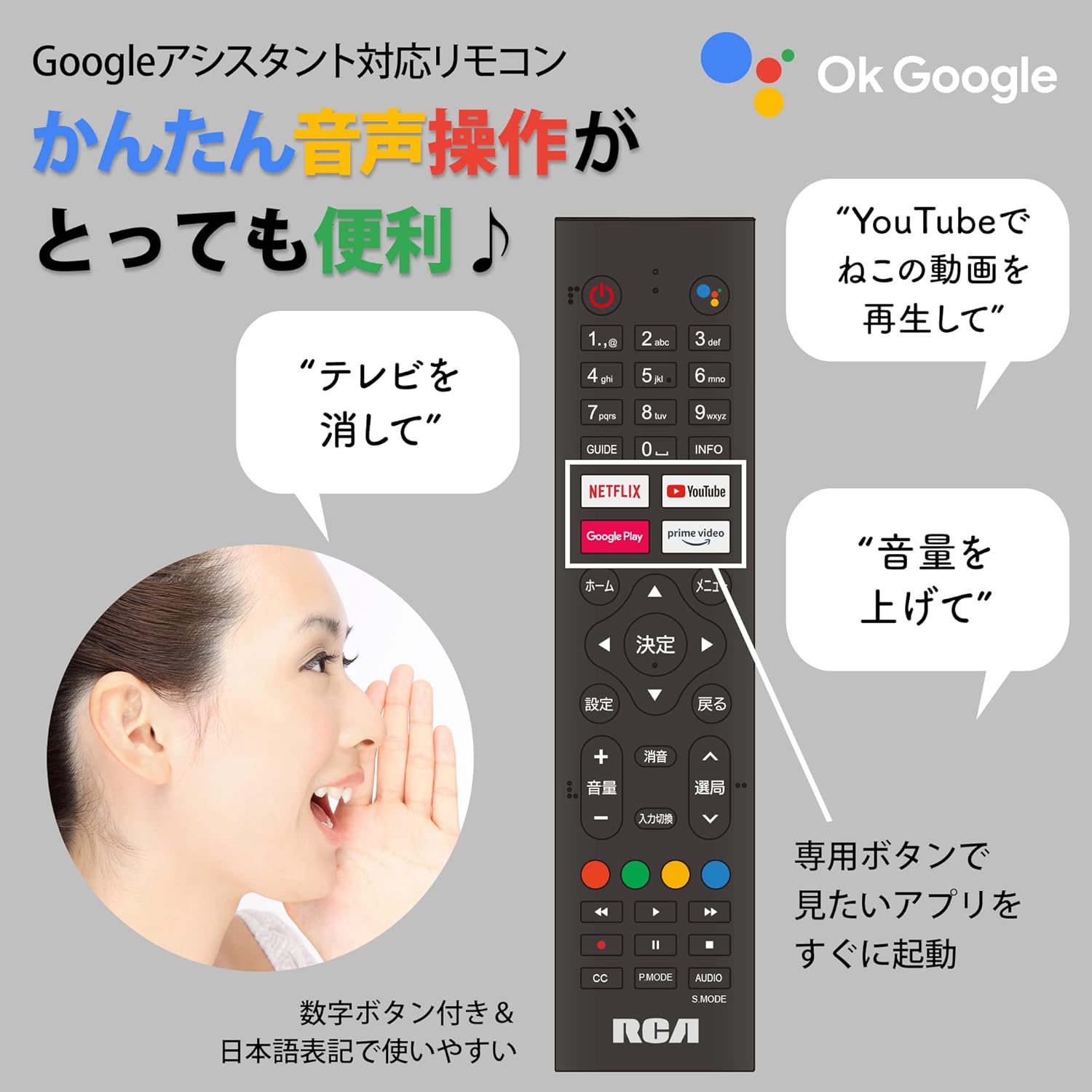
Figure 5: Remote control with voice command functionality and dedicated app buttons.
2. സ്മാർട്ട് ടിവി സവിശേഷതകൾ
This tunerless TV provides access to a wide range of online video distribution services and features:
- സ്ട്രീമിംഗ് സേവനങ്ങൾ: Enjoy content from NETFLIX, YouTube, Prime Video, Tver, U-NEXT, AbemaTV, and more.
- Chromecast ബിൽറ്റ്-ഇൻ: Cast content directly from your smartphone or tablet to the TV screen.
- Android OS: Access a variety of apps from the Google Play Store.

Figure 6: Using Chromecast to cast content from a smartphone to the TV.
Video 1: Demonstration of the Google TV interface and voice control for content discovery.
3. അടിസ്ഥാന പ്രവർത്തനങ്ങൾ
- പവർ ഓൺ/ഓഫ്: റിമോട്ട് കൺട്രോളിലെ പവർ ബട്ടൺ അമർത്തുക.
- വോളിയം നിയന്ത്രണം: റിമോട്ടിലെ വോളിയം അപ്പ്/ഡൗൺ ബട്ടണുകൾ ഉപയോഗിക്കുക.
- ഇൻപുട്ട് തിരഞ്ഞെടുക്കൽ: Press the Input button to switch between HDMI and other connected sources.
മെയിൻ്റനൻസ്
1. വൃത്തിയാക്കൽ
ടിവി സ്ക്രീൻ വൃത്തിയാക്കാൻ, മൃദുവായ, ലിന്റ് രഹിത തുണി ഉപയോഗിച്ച് സൌമ്യമായി തുടയ്ക്കുക. കഠിനമായ പാടുകൾക്ക്, ചെറുതായി dampen the cloth with water or a screen-cleaning solution. Do not spray liquid directly onto the screen. Clean the TV casinമൃദുവായതും ഉണങ്ങിയതുമായ തുണി ഉപയോഗിച്ച് ഗ്രാം.
2. സംഭരണം
If storing the TV for an extended period, disconnect it from the power outlet and store it in a cool, dry place away from direct sunlight and extreme temperatures.
ട്രബിൾഷൂട്ടിംഗ്
നിങ്ങളുടെ ടിവിയിൽ പ്രശ്നങ്ങൾ നേരിടുകയാണെങ്കിൽ, ഇനിപ്പറയുന്ന പൊതുവായ പ്രശ്നങ്ങളും പരിഹാരങ്ങളും പരിശോധിക്കുക:
| പ്രശ്നം | പരിഹാരം |
|---|---|
| ശക്തിയില്ല | പവർ കേബിൾ ടിവിയിലേക്കും പവർ ഔട്ട്ലെറ്റിലേക്കും സുരക്ഷിതമായി ബന്ധിപ്പിച്ചിട്ടുണ്ടെന്ന് ഉറപ്പാക്കുക. മറ്റൊരു ഔട്ട്ലെറ്റ് പരീക്ഷിക്കുക. |
| No picture/Sound but no picture | ഇൻപുട്ട് ഉറവിടം പരിശോധിക്കുക. ബാഹ്യ ഉപകരണങ്ങൾ ഓണാക്കിയിട്ടുണ്ടെന്നും ശരിയായി ബന്ധിപ്പിച്ചിട്ടുണ്ടെന്നും ഉറപ്പാക്കുക. |
| റിമോട്ട് കൺട്രോൾ പ്രവർത്തിക്കുന്നില്ല | ബാറ്ററികൾ മാറ്റിസ്ഥാപിക്കുക. റിമോട്ടിനും ടിവിയുടെ ഐആർ സെൻസറിനും ഇടയിൽ തടസ്സങ്ങളൊന്നുമില്ലെന്ന് ഉറപ്പാക്കുക. |
| Wi-Fi-യിലേക്ക് കണക്റ്റുചെയ്യാൻ കഴിയില്ല | Check your router and internet connection. Re-enter the Wi-Fi password. Move the TV closer to the router. |
| App is slow or freezes | Restart the TV. Clear the app's cache in the TV settings. Ensure your internet connection is stable. |
പ്രശ്നം നിലനിൽക്കുകയാണെങ്കിൽ, ദയവായി ഉപഭോക്തൃ പിന്തുണയുമായി ബന്ധപ്പെടുക.
സ്പെസിഫിക്കേഷനുകൾ
The following are the technical specifications for the RCA-32D1 Tunerless Smart TV:
| ഫീച്ചർ | വിശദാംശങ്ങൾ |
|---|---|
| മോഡൽ നമ്പർ | RCA-32D1 |
| സ്ക്രീൻ വലിപ്പം | 31.5 inches (32V-type) |
| ഡിസ്പ്ലേ ടെക്നോളജി | LCD, VA Panel, LED Backlight |
| റെസലൂഷൻ | ഫുൾ HD (1920 x 1080) |
| പുതുക്കിയ നിരക്ക് | 60 Hz |
| കോൺട്രാസ്റ്റ് റേഷ്യോ | 3000:1 |
| ഓപ്പറേറ്റിംഗ് സിസ്റ്റം | ആൻഡ്രോയിഡ് |
| കണക്റ്റിവിറ്റി | Wi-Fi, HDMI (x3), USB 2.0 (x2), LAN, Audio Output |
| പ്രത്യേക സവിശേഷതകൾ | Chromecast Built-in, Voice Control |
| പിന്തുണയ്ക്കുന്ന സ്ട്രീമിംഗ് സേവനങ്ങൾ | Netflix, YouTube, Prime Video, Tver, U-NEXT, AbemaTV |
| ഉൽപ്പന്ന അളവുകൾ (D x W x H) | 16.1 x 73.1 x 47 സെ.മീ |
| ഇനത്തിൻ്റെ ഭാരം | 4.9 കി.ഗ്രാം |
| VESA മൗണ്ട് സ്റ്റാൻഡേർഡ് | 40 x 40 മിമി |
| ബാറ്ററികൾ ഉൾപ്പെടുത്തിയിട്ടുണ്ട് | 2 AAA ബാറ്ററികൾ |

Figure 7: High-definition VA panel for vivid image quality.
വാറൻ്റിയും പിന്തുണയും
This product is covered by the manufacturer's warranty. Please refer to the warranty card included in your package for specific terms and conditions.
ഉപഭോക്തൃ പിന്തുണ
For technical assistance or inquiries, please contact the KEIYO Support Center:
- ഫോൺ: 050-8880-2812
- സ്വീകരണ സമയം: Weekdays 10:00-12:00, 13:00-17:00 (Excluding summer holidays, year-end/New Year holidays, Golden Week, and public holidays).


