
1. ആമുഖം
Thank you for choosing the Awei T29 True Wireless Bluetooth Earbuds. This manual provides essential information for setting up, operating, maintaining, and troubleshooting your earbuds to ensure optimal performance and longevity. Please read this guide thoroughly before using the product.
2. ഉൽപ്പന്നം കഴിഞ്ഞുview
The Awei T29 earbuds offer a seamless audio experience with advanced features. Key highlights include:
- Bluetooth Version 5.1: സ്ഥിരതയുള്ളതും കാര്യക്ഷമവുമായ വയർലെസ് കണക്റ്റിവിറ്റിക്ക്.
- IPX6 ജല പ്രതിരോധം: Provides protection against strong jets of water, making them suitable for sports and outdoor activities.
- Integrated 300mAh Charging Case: Extends listening time and offers convenient portability.
- Battery Protection IC: Ensures safe and reliable charging.
- ടച്ച് നിയന്ത്രണം: Intuitive control for music, calls, and voice assistant.
- Lightweight and Sweatproof Design: Comfortable for extended wear during various activities.
2.1 പാക്കേജ് ഉള്ളടക്കം
- Awei T29 True Wireless Earbuds (Left and Right)
- ചാർജിംഗ് കേസ്
- യുഎസ്ബി ചാർജിംഗ് കേബിൾ
- ഉപയോക്തൃ മാനുവൽ
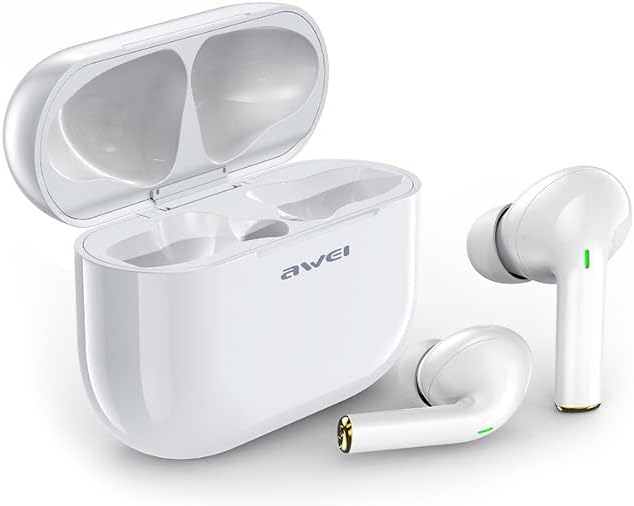
Image 1: Awei T29 True Wireless Earbuds with the charging case open, showing both earbuds.
3 സുരക്ഷാ വിവരങ്ങൾ
- ഉൽപ്പന്നം വേർപെടുത്തുകയോ പരിഷ്കരിക്കുകയോ ചെയ്യരുത്.
- ഉയർന്ന താപനിലയിൽ നിന്നും ഈർപ്പത്തിൽ നിന്നും അകന്നു നിൽക്കുക.
- ഇയർബഡുകൾ താഴെയിടുകയോ ശക്തമായ ആഘാതങ്ങൾക്ക് വിധേയമാക്കുകയോ ചെയ്യുന്നത് ഒഴിവാക്കുക.
- Clean with a soft, dry cloth only. Do not use harsh chemicals.
- പ്രാദേശിക നിയന്ത്രണങ്ങൾ അനുസരിച്ച് ബാറ്ററികൾ നീക്കം ചെയ്യുക.
4. സജ്ജീകരണം
4.1 ഇയർബഡുകളും കേസും ചാർജ് ചെയ്യുന്നു
ആദ്യ ഉപയോഗത്തിന് മുമ്പ്, ചാർജിംഗ് കെയ്സും ഇയർബഡുകളും പൂർണ്ണമായും ചാർജ് ചെയ്യുക.
- Connect the USB charging cable to the charging port on the case and a 5V DC power source.
- The indicator light on the case will show charging status. A full charge for the case typically takes about 2 hours.
- Place the earbuds into the charging case. They will automatically begin charging. Earbud charging time is approximately 1.5 hours.
- Ensure the earbuds are properly seated in the case for charging to occur.

Image 2: Awei T29 True Wireless Earbuds securely placed inside the closed charging case.

ചിത്രം 3: മുകളിൽ view of the Awei T29 charging case, illustrating its compact design.
4.2 ഒരു ബ്ലൂടൂത്ത് ഉപകരണവുമായി ജോടിയാക്കൽ
നിങ്ങളുടെ സ്മാർട്ട്ഫോണിലേക്കോ മറ്റ് ബ്ലൂടൂത്ത് പ്രവർത്തനക്ഷമമാക്കിയ ഉപകരണത്തിലേക്കോ ഇയർബഡുകൾ ബന്ധിപ്പിക്കാൻ ഈ ഘട്ടങ്ങൾ പാലിക്കുക:
- പവർ ഓൺ: Open the charging case. The earbuds will automatically power on and enter pairing mode. You may see indicator lights flashing on the earbuds.
- ബ്ലൂടൂത്ത് സജീവമാക്കുക: On your device (e.g., smartphone), go to the Bluetooth settings and ensure Bluetooth is turned on.
- ഉപകരണം തിരഞ്ഞെടുക്കുക: Look for "Awei T29" in the list of available Bluetooth devices and select it to connect.
- സ്ഥിരീകരണം: Once connected, the earbud indicator lights will typically stop flashing or change to a steady light, and you may hear an audible confirmation.
- യാന്ത്രിക പുനഃസംയോജനം: പ്രാരംഭ ജോടിയാക്കലിന് ശേഷം, ഇയർബഡുകൾ കേസിൽ നിന്ന് പുറത്തെടുക്കുമ്പോൾ, അവസാന ജോടിയാക്കിയ ഉപകരണത്തിലേക്ക് യാന്ത്രികമായി കണക്റ്റുചെയ്യും, ഉപകരണത്തിൽ ബ്ലൂടൂത്ത് പ്രവർത്തനക്ഷമമാക്കിയിട്ടുണ്ടെങ്കിൽ.

Image 4: Awei T29 True Wireless Earbuds removed from their charging case, ready for pairing or use.
5. പ്രവർത്തന നിർദ്ദേശങ്ങൾ
The Awei T29 earbuds feature intuitive touch controls for various functions.
5.1 പവർ ഓൺ/ഓഫ്
- പവർ ഓൺ: Open the charging case, or long-press the touch area on both earbuds for 3 seconds.
- പവർ ഓഫ്: Place the earbuds back into the charging case and close the lid, or long-press the touch area on both earbuds for 5 seconds.
5.2 മ്യൂസിക് പ്ലേബാക്ക്
- പ്ലേ/താൽക്കാലികമായി നിർത്തുക: ഇയർബഡുകളിൽ ഏതെങ്കിലുമൊന്നിൽ ഒറ്റ ടാപ്പ് ചെയ്യുക.
- അടുത്ത ട്രാക്ക്: വലത് ഇയർബഡിൽ രണ്ടുതവണ ടാപ്പ് ചെയ്യുക.
- മുമ്പത്തെ ട്രാക്ക്: ഇടത് ഇയർബഡിൽ രണ്ടുതവണ ടാപ്പ് ചെയ്യുക.
- വോളിയം കൂട്ടുക: വലത് ഇയർബഡിൽ മൂന്ന് തവണ ടാപ്പ് ചെയ്യുക.
- വോളിയം താഴേക്ക്: ഇടത് ഇയർബഡിൽ മൂന്ന് തവണ ടാപ്പ് ചെയ്യുക.
5.3 കോൾ മാനേജ്മെന്റ്
- ഉത്തരം/അവസാന കോൾ: ഇയർബഡുകളിൽ ഏതെങ്കിലുമൊന്നിൽ ഒറ്റ ടാപ്പ് ചെയ്യുക.
- കോൾ നിരസിക്കുക: ഇയർബഡുകളിൽ ഏതെങ്കിലുമൊന്നിൽ 2 സെക്കൻഡ് ദീർഘനേരം അമർത്തിപ്പിടിക്കുക.
5.4 വോയ്സ് അസിസ്റ്റന്റ്
- വോയ്സ് അസിസ്റ്റന്റിനെ സജീവമാക്കുക: (കോൾ ചെയ്യാത്തപ്പോൾ) ഇയർബഡുകളിൽ ഏതെങ്കിലുമൊന്നിൽ 2 സെക്കൻഡ് ദീർഘനേരം അമർത്തിപ്പിടിക്കുക.
6. പരിപാലനം
Proper maintenance ensures the longevity and performance of your Awei T29 earbuds.
- വൃത്തിയാക്കൽ: Regularly clean the earbuds and charging case with a soft, dry, lint-free cloth. Do not use abrasive cleaners, solvents, or aerosols.
- ജല പ്രതിരോധം: The earbuds are IPX6 water-resistant, meaning they can withstand strong water jets. However, they are not designed for swimming or submersion. Ensure the charging port is dry before charging.
- സംഭരണം: When not in use, store the earbuds in their charging case to protect them and keep them charged. Store in a cool, dry place away from direct sunlight.
- ബാറ്ററി കെയർ: ബാറ്ററി ലൈഫ് നിലനിർത്താൻ, ഇയർബഡുകൾ പൂർണ്ണമായും ഡിസ്ചാർജ് ചെയ്യുന്നതും കേസ് ഇടയ്ക്കിടെ ചാർജ് ചെയ്യുന്നതും ഒഴിവാക്കുക. തുടർച്ചയായ ഉപയോഗത്തിലല്ലെങ്കിൽ പോലും അവ പതിവായി ചാർജ് ചെയ്യുക.
7. പ്രശ്നപരിഹാരം
നിങ്ങളുടെ ഇയർബഡുകളിൽ പ്രശ്നങ്ങൾ നേരിടുകയാണെങ്കിൽ, ഇനിപ്പറയുന്ന പരിഹാരങ്ങൾ പരീക്ഷിക്കുക:
| പ്രശ്നം | സാധ്യമായ പരിഹാരം |
|---|---|
| ഇയർബഡുകൾ ഉപകരണവുമായി ജോടിയാക്കുന്നില്ല |
|
| ഇയർബഡുകളിൽ നിന്ന് ശബ്ദമില്ല |
|
| ഒരു ഇയർബഡ് പ്രവർത്തിക്കുന്നില്ല |
|
| ചാർജിംഗ് കേസ് ചാർജുചെയ്യുന്നില്ല |
|
7.1 ഇയർബഡുകൾ റീസെറ്റ് ചെയ്യുന്നു
If you experience persistent connection issues, a factory reset may help:
- Delete "Awei T29" from your device's Bluetooth paired list.
- രണ്ട് ഇയർബഡുകളും ചാർജിംഗ് കെയ്സിലേക്ക് തിരികെ വയ്ക്കുക.
- With the lid open, press and hold the reset button (if available, or the touch area on both earbuds simultaneously) for approximately 10-15 seconds until the indicator lights flash rapidly, then release.
- Close the case, then open it again to re-enter pairing mode.
- Repeat the pairing process from Section 4.2.
8 സ്പെസിഫിക്കേഷനുകൾ
| ഫീച്ചർ | വിശദാംശങ്ങൾ |
|---|---|
| മോഡലിൻ്റെ പേര് | T29 |
| മോഡൽ നമ്പർ | AWE000057 |
| ബ്ലൂടൂത്ത് പതിപ്പ് | 5.1 |
| വയർലെസ് ടെക്നോളജി | ബ്ലൂടൂത്ത് |
| ട്രാൻസ്മിഷൻ ദൂരം | 10 മീറ്റർ വരെ (33 അടി) |
| ഇയർബഡ് ബാറ്ററി ശേഷി | 45mAh x 2 |
| ചാർജിംഗ് കെയ്സ് ബാറ്ററി കപ്പാസിറ്റി | 300mAh |
| ചാർജ് ചെയ്യുന്നു വോളിയംtage | DC 5V |
| ഇയർബഡ് ചാർജിംഗ് സമയം | ഏകദേശം 1.5 മണിക്കൂർ |
| കേസ് ചാർജിംഗ് സമയം | ഏകദേശം 2 മണിക്കൂർ |
| സംഗീത പ്ലേബാക്ക് സമയം | ഏകദേശം 3.5 മണിക്കൂർ |
| കോൾ സമയം | ഏകദേശം 4 മണിക്കൂർ |
| വാട്ടർ റെസിസ്റ്റൻസ് റേറ്റിംഗ് | IPX6 |
| പ്രതിരോധം | 32 ഓം |
| മെറ്റീരിയലുകൾ | പ്ലാസ്റ്റിക് (ABS) |
| നിയന്ത്രണ തരം | ടച്ച് നിയന്ത്രണം |
| ഡ്രൈവർ തരം | ചലനാത്മകം |
| പ്രത്യേക സവിശേഷതകൾ | Lightweight, Sweatproof |
| അനുയോജ്യമായ ഉപകരണങ്ങൾ | സ്മാർട്ട്ഫോണുകൾ, ടാബ്ലെറ്റുകൾ, ലാപ്ടോപ്പുകൾ, ഡെസ്ക്ടോപ്പ് കമ്പ്യൂട്ടറുകൾ, സ്മാർട്ട് സ്പീക്കറുകൾ |
| ഭാരം | 190 grams (total package weight) |
9. വാറൻ്റിയും പിന്തുണയും
9.1 ഉൽപ്പന്ന വാറന്റി
The Awei T29 True Wireless Bluetooth Earbuds come with a 6 മാസ വാറൻ്റി വാങ്ങിയ തീയതി മുതൽ. സാധാരണ ഉപയോഗത്തിലുള്ള നിർമ്മാണ വൈകല്യങ്ങളും തകരാറുകളും ഈ വാറന്റി ഉൾക്കൊള്ളുന്നു. ദുരുപയോഗം, അപകടങ്ങൾ, അനധികൃത പരിഷ്കാരങ്ങൾ, അല്ലെങ്കിൽ സാധാരണ തേയ്മാനം എന്നിവ മൂലമുണ്ടാകുന്ന നാശനഷ്ടങ്ങൾക്ക് ഇത് പരിരക്ഷ നൽകുന്നില്ല.
9.2 ഉപഭോക്തൃ പിന്തുണ
For technical support, warranty claims, or any questions regarding your Awei T29 earbuds, please contact your retailer or visit the official Awei webബന്ധപ്പെടാനുള്ള വിവരങ്ങൾക്കുള്ള സൈറ്റ്.