

1. ആമുഖം
ലോക്കൽ സ്റ്റോറേജ് നൽകുന്നതിലൂടെയും, വൈഫൈ കവറേജ് വികസിപ്പിക്കുന്നതിലൂടെയും, വിവിധ നൂറിയോ ഉപകരണങ്ങൾ ഒരു ഏകീകൃത നെറ്റ്വർക്കിലേക്ക് സംയോജിപ്പിക്കുന്നതിലൂടെയും നിങ്ങളുടെ വീടിന്റെ സുരക്ഷാ സംവിധാനം മെച്ചപ്പെടുത്തുന്നതിനാണ് നൂറിയോ ഹബ് രൂപകൽപ്പന ചെയ്തിരിക്കുന്നത്. നിങ്ങളുടെ നൂറിയോ ഹബ് സജ്ജീകരിക്കുന്നതിനും പ്രവർത്തിപ്പിക്കുന്നതിനും പരിപാലിക്കുന്നതിനും ആവശ്യമായ വിവരങ്ങൾ ഈ മാനുവൽ നൽകുന്നു.

ചിത്രം: ആധുനിക സ്വീകരണമുറിയിലെ ഒരു കോഫി ടേബിളിൽ സ്ഥാപിച്ചിരിക്കുന്ന നൂരിയോ ഹബ്, അതിന്റെ വിവേകപൂർണ്ണമായ രൂപകൽപ്പന ചിത്രീകരിക്കുന്നു.
2. ബോക്സിൽ എന്താണുള്ളത്?
സജ്ജീകരണവുമായി മുന്നോട്ടുപോകുന്നതിനുമുമ്പ് എല്ലാ ഇനങ്ങളും ഉണ്ടെന്ന് ഉറപ്പാക്കുക:
- നൂരിയോ സ്മാർട്ട് ഹബ്
- 3.28 അടി ചാർജിംഗ് കേബിൾ
- ചാർജിംഗ് പ്ലഗ്
- ഉപയോക്തൃ മാനുവൽ
- 4.92 അടി വൈഫൈ കേബിൾ
3. ഉൽപ്പന്നം കഴിഞ്ഞുview & സവിശേഷതകൾ
നിങ്ങളുടെ സുരക്ഷാ സംവിധാനം മെച്ചപ്പെടുത്തുന്നതിന് നൂരിയോ ഹബ് നിരവധി പ്രധാന സവിശേഷതകൾ വാഗ്ദാനം ചെയ്യുന്നു:
- മെച്ചപ്പെടുത്തിയ സുരക്ഷാ സംവിധാനം: ക്യാമറ മോഡലുകൾ (B200, B210, B211, B310, B311), ഡോർബെല്ലുകൾ (D110) എന്നിവയുൾപ്പെടെയുള്ള നൂരിയോ ഉപകരണങ്ങളുമായി പൊരുത്തപ്പെടുന്നു. കുറിപ്പ്: B200SE, CL200, CS201, T-സീരീസുമായി പൊരുത്തപ്പെടുന്നില്ല. വിപുലമായ സംരക്ഷണത്തിനായി നിങ്ങളുടെ ക്യാമറകളും ഡോർബെല്ലുകളും നന്നായി ഏകോപിപ്പിച്ച സുരക്ഷാ നെറ്റ്വർക്കിലേക്ക് സംയോജിപ്പിക്കുക. 4 ക്യാമറകൾ വരെയുള്ള കണക്ഷനെ പിന്തുണയ്ക്കുന്നു.
- മറഞ്ഞിരിക്കുന്ന ചെലവുകളൊന്നുമില്ല & വലിയ ശേഷി: നൂരിയോ ഹബ് 32 ജിബി ഇൻബിൽറ്റ് സ്റ്റോറേജ് വാഗ്ദാനം ചെയ്യുന്നു, ഇത് എല്ലാ നിർണായക ഫയലുകളും സംരക്ഷിക്കാൻ നിങ്ങളെ അനുവദിക്കുന്നു.tage അധിക ക്ലൗഡ് സംഭരണ ഫീസുകളൊന്നുമില്ലാതെ, നൽകുന്നു ampനിങ്ങളുടെ എല്ലാ സുരക്ഷാ ആവശ്യങ്ങൾക്കും പ്രതിമാസ ചെലവില്ലാതെ le സ്ഥലം.
- സ്വകാര്യത ആദ്യം: നിങ്ങളുടെ വീടിന്റെ സുഖസൗകര്യങ്ങളിൽ റെക്കോർഡ് ചെയ്ത ഡാറ്റ സുരക്ഷിതമായി സൂക്ഷിക്കാൻ ഹബ് നിങ്ങളെ അനുവദിക്കുന്നു. മൂന്നാം കക്ഷി ആക്സസ് ഇല്ല, കൂടുതൽ മനസ്സമാധാനം ഉറപ്പാക്കുന്നു.
- വികസിപ്പിച്ച വൈഫൈ കവറേജ്: ഞങ്ങളുടെ ഹബ് നിങ്ങളുടെ വൈഫൈ കവറേജ് വർദ്ധിപ്പിക്കുകയും നിങ്ങളുടെ നൂരിയോ സുരക്ഷാ ക്യാമറകൾക്ക് സ്ഥിരമായ കണക്ഷൻ നൽകുകയും ബാറ്ററി ഉപഭോഗം കുറയ്ക്കുകയും ചെയ്യുന്നു.
അനുയോജ്യത

ചിത്രം: B200/B210/B211 ക്യാമറകൾ, B310 ക്യാമറകൾ, D110 ഡോർബെല്ലുകൾ എന്നിവയുമായുള്ള നൂരിയോ ഹബിന്റെ അനുയോജ്യത കാണിക്കുന്ന ഡയഗ്രം.
പൊരുത്തക്കേട്
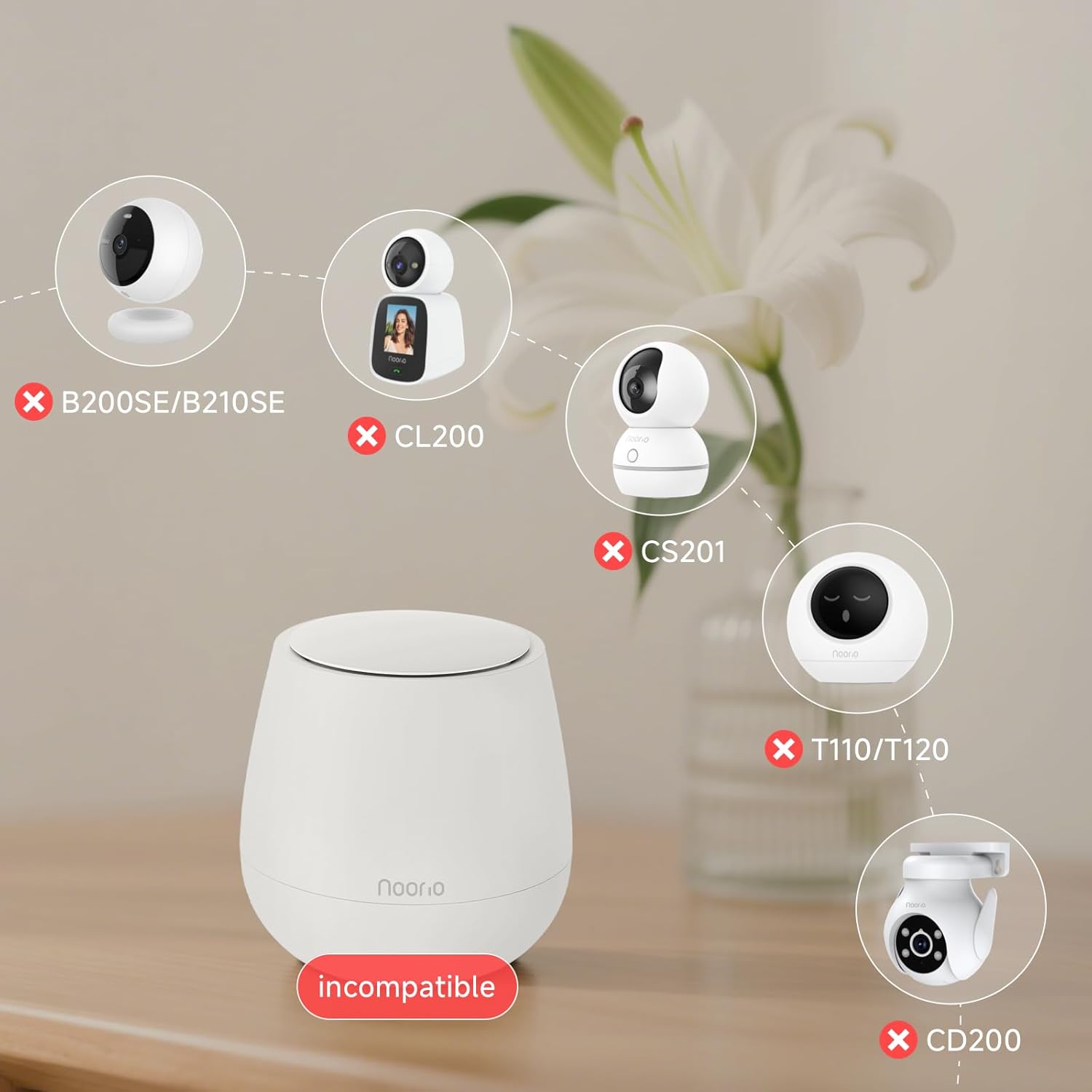
ചിത്രം: B200SE/B210SE, CL200, CS201, T110/T120, CD200 എന്നീ ഉപകരണങ്ങളുമായി നൂരിയോ ഹബ് പൊരുത്തപ്പെടാത്തതിന്റെ ഡയഗ്രം.
4. സജ്ജീകരണ ഗൈഡ്
നിങ്ങളുടെ നൂരിയോ ഹബ് സജ്ജീകരിക്കുന്നതിനും ഉപകരണങ്ങൾ ബന്ധിപ്പിക്കുന്നതിനും ഈ ഘട്ടങ്ങൾ പാലിക്കുക:
- പവർ ഓൺ: നൂരിയോ ഹബ് ഒരു പവർ ഔട്ട്ലെറ്റിലേക്ക് പ്ലഗ് ചെയ്യുക.
- റൂട്ടറുമായി ബന്ധിപ്പിക്കുക: ഒരു ഇതർനെറ്റ് കേബിൾ ഉപയോഗിച്ച് ഹബ്ബിനെ നിങ്ങളുടെ റൂട്ടറുമായി ബന്ധിപ്പിക്കുക.
- അപ്ലിക്കേഷൻ ഡൗൺലോഡുചെയ്യുക: നിങ്ങളുടെ ഉപകരണത്തിന്റെ ആപ്പ് സ്റ്റോറിൽ നിന്ന് നൂരിയോ ആപ്പ് ഡൗൺലോഡ് ചെയ്യുക.
- അക്കൗണ്ടിലേക്ക് ഹബ് ചേർക്കുക: നിങ്ങളുടെ അക്കൗണ്ടിലേക്ക് ഹബ് ചേർക്കാൻ ആപ്പ് തുറന്ന് സ്ക്രീനിലെ നിർദ്ദേശങ്ങൾ പാലിക്കുക.
- ക്യാമറകൾ ചേർക്കുക: ഹബ് കണക്റ്റ് ചെയ്തുകഴിഞ്ഞാൽ, ആപ്പിലേക്ക് നിങ്ങളുടെ ക്യാമറകൾ ചേർക്കുക. ക്യാമറ സജ്ജീകരണ പ്രക്രിയയിൽ, വൈഫൈ നെറ്റ്വർക്കായി ഹബ് തിരഞ്ഞെടുക്കുക. ഇത് ഹബിനെ നിങ്ങളുടെ ക്യാമറകൾ സുഗമമായി കണക്റ്റ് ചെയ്യാനും നിയന്ത്രിക്കാനും പ്രാപ്തമാക്കും.
5. പ്രവർത്തന നിർദ്ദേശങ്ങൾ
ലോക്കൽ സ്റ്റോറേജ് മാനേജ്മെന്റ്
നൂരിയോ ഹബ്ബിൽ 32 ജിബി ബിൽറ്റ്-ഇൻ ലോക്കൽ സ്റ്റോറേജ് ഉണ്ട്, ഇത് പ്രതിമാസ ക്ലൗഡ് സ്റ്റോറേജ് ഫീസുകളുടെ ആവശ്യകത ഇല്ലാതാക്കുന്നു. എല്ലാം റെക്കോർഡുചെയ്തു footage നേരിട്ട് ഹബ്ബിൽ സംഭരിക്കപ്പെടുന്നു, ഇത് നിങ്ങളുടെ ഡാറ്റ നിങ്ങളുടെ വീടിനുള്ളിൽ സ്വകാര്യമായും സുരക്ഷിതമായും തുടരുന്നുവെന്ന് ഉറപ്പാക്കുന്നു.

ചിത്രം: ഹബ്ബിന്റെ പ്രാദേശിക സംഭരണ ശേഷി സൂചിപ്പിക്കുന്ന '32GB' ഉള്ള ഒരു മൈക്രോചിപ്പ്.
വികസിപ്പിച്ച വൈഫൈ കവറേജ്
നിങ്ങളുടെ നൂരിയോ സുരക്ഷാ ക്യാമറകൾക്ക് കൂടുതൽ സ്ഥിരതയുള്ളതും വിശ്വസനീയവുമായ കണക്ഷൻ നൽകിക്കൊണ്ട്, ഹബ് ഒരു വൈഫൈ എക്സ്റ്റെൻഡറായി പ്രവർത്തിക്കുന്നു. ശക്തമായ സിഗ്നൽ ഉറപ്പാക്കുന്നതിലൂടെ നിങ്ങളുടെ ക്യാമറകളിലെ ബാറ്ററി ഉപഭോഗം കുറയ്ക്കാൻ ഇത് സഹായിക്കുന്നു.
ചിത്രം: ഓവർഹെഡ് view നൂരിയോ ഹബ്ബിൽ നിന്ന് പുറപ്പെടുന്ന വൃത്താകൃതിയിലുള്ള തരംഗങ്ങളുള്ള ഒരു സ്വീകരണമുറിയുടെ ചിത്രം, വികസിപ്പിച്ച വൈഫൈ കവറേജ് ചിത്രീകരിക്കുന്നു.
സ്വകാര്യതാ സവിശേഷതകൾ
നിങ്ങളുടെ ഡാറ്റ പ്രാദേശികമായി സംരക്ഷിക്കപ്പെടുകയും സംഭരിക്കുകയും ചെയ്യുന്നു, ഇത് നിങ്ങളുടെ റെക്കോർഡ് ചെയ്ത വിവരങ്ങളിലേക്ക് മൂന്നാം കക്ഷി ആക്സസ് ഉറപ്പാക്കുന്നില്ല. ഈ ഡിസൈൻ നിങ്ങളുടെ സ്വകാര്യതയ്ക്കും മനസ്സമാധാനത്തിനും മുൻഗണന നൽകുന്നു.

ചിത്രം: ഹബ്ബിന് മുകളിൽ ഒരു ലോക്ക് ഐക്കൺ ഉള്ള, സ്വകാര്യതാ സംരക്ഷണത്തെയും പ്രാദേശിക സംഭരണത്തെയും പ്രതിനിധീകരിക്കുന്ന ഐക്കണുകൾ.
6. പരിപാലനം
നിങ്ങളുടെ നൂറിയോ ഹബ്ബിന്റെയും കണക്റ്റുചെയ്ത ഉപകരണങ്ങളുടെയും മികച്ച പ്രകടനം ഉറപ്പാക്കാൻ, ഇനിപ്പറയുന്ന അറ്റകുറ്റപ്പണി നുറുങ്ങുകൾ പരിഗണിക്കുക:
- വൈദ്യുതി വിതരണം: ഹബ് ഒരു സ്ഥിരതയുള്ള പവർ സ്രോതസ്സുമായി ബന്ധിപ്പിച്ചിട്ടുണ്ടെന്ന് ഉറപ്പാക്കുക.
- നെറ്റ്വർക്ക് കണക്ഷൻ: നിങ്ങളുടെ റൂട്ടറിലേക്കുള്ള ഇതർനെറ്റ് കേബിൾ കണക്ഷൻ സുരക്ഷിതമാണെന്ന് ഉറപ്പാക്കുക.
- ഉപകരണം ചാർജിംഗ്: ബാറ്ററിയിൽ പ്രവർത്തിക്കുന്ന നൂരിയോ ഉപകരണങ്ങൾക്ക്, ആപ്പ് വഴി ബാറ്ററി ലെവലുകൾ നിരീക്ഷിച്ച് ആവശ്യാനുസരണം റീചാർജ് ചെയ്യുക. മാനുവൽ റീചാർജിംഗ് കുറയ്ക്കുന്നതിന് അനുയോജ്യമായ സോളാർ പാനലുകൾ (പ്രത്യേകം വിൽക്കുന്നത്) ഉപയോഗിക്കുന്നത് പരിഗണിക്കുക.
- സോഫ്റ്റ്വെയർ അപ്ഡേറ്റുകൾ: ഏറ്റവും പുതിയ സവിശേഷതകളും സുരക്ഷാ മെച്ചപ്പെടുത്തലുകളും നിങ്ങൾക്ക് ലഭിക്കുന്നുണ്ടെന്ന് ഉറപ്പാക്കാൻ, ഹബ്ബിനും കണക്റ്റുചെയ്ത ഉപകരണങ്ങൾക്കുമുള്ള ഫേംവെയർ അപ്ഡേറ്റുകൾക്കായി നൂരിയോ ആപ്പ് പതിവായി പരിശോധിക്കുക.
7. പ്രശ്നപരിഹാരം
നിങ്ങളുടെ നൂരിയോ ഹബിൽ പ്രശ്നങ്ങൾ നേരിടുകയാണെങ്കിൽ, ഇനിപ്പറയുന്ന പൊതുവായ ട്രബിൾഷൂട്ടിംഗ് ഘട്ടങ്ങൾ പരീക്ഷിക്കുക:
- ബന്ധമില്ല: ഹബ് ഓഫ്ലൈനാണെങ്കിൽ, പവർ സപ്ലൈയും ഇതർനെറ്റ് കേബിൾ കണക്ഷനും പരിശോധിക്കുക. ഹബ്ബും നിങ്ങളുടെ റൂട്ടറും പുനരാരംഭിക്കുക.
- ഉപകരണം ജോടിയാക്കൽ പ്രശ്നങ്ങൾ: നിങ്ങളുടെ ഉപകരണങ്ങൾ ഹബ്ബുമായി പൊരുത്തപ്പെടുന്നുണ്ടെന്ന് ഉറപ്പാക്കുക (അനുയോജ്യതാ വിഭാഗം കാണുക). ഉപകരണം പുനഃസജ്ജമാക്കി ആപ്പ് വഴി വീണ്ടും ജോടിയാക്കാൻ ശ്രമിക്കുക.
- മോശം വൈഫൈ സിഗ്നൽ: ഹബ് കൂടുതൽ കേന്ദ്രീകൃതമായ ഒരു സ്ഥലത്തേക്ക് മാറ്റുക അല്ലെങ്കിൽ ദുർബലമായ സിഗ്നലുകൾ അനുഭവപ്പെടുന്ന ഉപകരണങ്ങൾക്ക് അടുത്തേക്ക് മാറ്റുക.
- സംഭരണം നിറഞ്ഞു: സംഭരണം നിറഞ്ഞിട്ടുണ്ടെങ്കിൽ, വീണ്ടുംview പഴയ foo ഇല്ലാതാക്കുകtagസ്ഥലം ശൂന്യമാക്കാൻ ആപ്പിൽ നിന്ന് ഇ.
സ്ഥിരമായ പ്രശ്നങ്ങൾക്ക്, ദയവായി ഉപഭോക്തൃ പിന്തുണയുമായി ബന്ധപ്പെടുക.
8 സ്പെസിഫിക്കേഷനുകൾ
| ഉൽപ്പന്ന അളവുകൾ | 4.09 x 4.09 x 4.09 ഇഞ്ച് |
| ഇനത്തിൻ്റെ ഭാരം | 1.25 പൗണ്ട് |
| ഇനം മോഡൽ നമ്പർ | സ്മാർട്ട് ഹബ് |
| ബ്രാൻഡ് | നൂരിയോ |
| നിറം | വെള്ള |
| ഹാർഡ്വെയർ ഇന്റർഫേസ് | USB |
| പ്രത്യേക ഫീച്ചർ | അധികാരപ്പെടുത്തിയത് |
| അനുയോജ്യമായ ഉപകരണങ്ങൾ | ഡിജിറ്റൽ ക്യാമറകൾ |
9. വാറണ്ടിയും പിന്തുണയും
സാങ്കേതിക സഹായം, വാറന്റി വിവരങ്ങൾ അല്ലെങ്കിൽ മറ്റ് അന്വേഷണങ്ങൾക്ക്, ദയവായി നൂരിയോ കസ്റ്റമർ സർവീസുമായി ബന്ധപ്പെടുക:
- ഫോൺ: 800-642-5905 (9 AM - 6 PM ET, ബിസിനസ് ദിവസം)
- ഇമെയിൽ: support@nooriolife.com
യഥാർത്ഥ നൂരിയോ ഉൽപ്പന്നങ്ങൾക്കായുള്ള ട്രാൻസ്പരൻസി ആപ്പ് ഉപയോഗിച്ച് പാക്കേജിംഗിലെ തനതായ ട്രാൻസ്പരൻസി കോഡ് സ്കാൻ ചെയ്തുകൊണ്ട് നിങ്ങൾക്ക് ഉൽപ്പന്ന ആധികാരികത പരിശോധിക്കാനും കഴിയും.

ചിത്രം: ഉൽപ്പന്ന പാക്കേജിംഗിലെ സുതാര്യത കോഡ് സ്കാൻ ചെയ്യുന്ന സ്മാർട്ട്ഫോൺ.


