
1005003178286970
P9 Car HUD Head Up Display User Manual
മോഡൽ: 1005003178286970
1. ആമുഖം
The P9 Car HUD (Head Up Display) is an intelligent digital meter designed to project essential driving information directly onto your car's windshield, allowing you to monitor vehicle data without diverting your eyes from the road. This device connects to your car's OBD2 or EUOBD port to display real-time data such as speed, RPM, water temperature, voltage, fuel consumption, and more. It features automatic backlight adjustment, easy installation, and multiple display modes to enhance your driving experience.

The P9 HUD displaying vehicle speed and RPM during operation.
2 സുരക്ഷാ വിവരങ്ങൾ
- Always prioritize road safety. Do not attempt to adjust settings or operate the device in a way that distracts you from driving.
- Ensure the HUD is securely placed and does not obstruct your view of the road or any critical vehicle controls.
- Keep the device away from extreme temperatures, direct sunlight for prolonged periods, and moisture.
- ഉപകരണം ഡിസ്അസംബ്ലിംഗ് ചെയ്യുകയോ പരിഷ്കരിക്കുകയോ ചെയ്യരുത്. എല്ലാ സേവനങ്ങളും യോഗ്യതയുള്ള ഉദ്യോഗസ്ഥരെ ഏൽപ്പിക്കുക.
3. പാക്കേജ് ഉള്ളടക്കം
അൺബോക്സിംഗ് ചെയ്യുമ്പോൾ എല്ലാ ഇനങ്ങളും ഉണ്ടെന്ന് ഉറപ്പാക്കാൻ പാക്കേജ് ഉള്ളടക്കങ്ങൾ പരിശോധിക്കുക:
- 1 x P9 Head Up Display Unit
- 1 x OBD Cable
- 1 x Non-slip Mat
- 1 x ഇംഗ്ലീഷ് ഉപയോക്തൃ മാനുവൽ

All components included in the P9 Car HUD package.
4. ഉൽപ്പന്നം കഴിഞ്ഞുview
The P9 HUD is designed for ease of use and clear data presentation. Key features include:
- യാന്ത്രിക ബാക്ക്ലൈറ്റ്: Adjusts display brightness based on ambient light conditions.
- No Reflection Film Needed: Designed to project clearly without additional film on the windshield.
- പ്ലഗ് ആൻഡ് പ്ലേ: Simple connection to the OBD2 port for immediate use.
- Multi-functions Display: Shows various data points simultaneously.

Key features and benefits of the P9 HUD.
പ്രദർശന ഘടകങ്ങൾ

Breakdown of the information displayed on the P9 HUD screen.
- Unit Symbol: Indicates units for various measurements (e.g., L/100KM, V, ℃, M, KM, RPM).
- RPM Icon Display: Visual representation of engine revolutions per minute.
- വേഗത: Current vehicle speed.
- യൂണിറ്റ് ഓഫ് സ്പീഡ്: Displays either MPH (miles per hour) or KM/H (kilometers per hour).
5 അനുയോജ്യത
The P9 HUD is designed for vehicles equipped with an OBD II or EU OBD connector. Before installation, please verify your car's compatibility:
- Locate the OBD II connector, typically found under the dashboard on the driver's side.
- Check for a sticker or nameplate under the hood stating "OBD II compliant" or "OBD II Certified."
Note: Some vehicles may have special interfaces that are not compatible with this product.
6. സജ്ജീകരണം
Follow these steps to set up your P9 Car HUD:
- പ്ലേസ്മെൻ്റ്: Choose a suitable location on your dashboard where the HUD will not obstruct your view of the road or interfere with airbags. The non-slip mat can be used to secure the device.
- Connect OBD Cable: Plug one end of the provided OBD cable into the P9 HUD unit.
- കാറുമായി ബന്ധിപ്പിക്കുക: Locate your car's OBD II port and firmly plug the other end of the OBD cable into it.
- പവർ ഓൺ: Start your car's engine. The HUD should power on automatically and begin displaying data.
- സ്ഥാനം ക്രമീകരിക്കുക: Adjust the angle and position of the HUD unit to ensure the projected display is clear and visible on your windshield.
7. പ്രവർത്തന നിർദ്ദേശങ്ങൾ
The P9 HUD provides various data displays and smart functions:
പ്രദർശിപ്പിച്ച ഡാറ്റ:
- കാറിന്റെ വേഗത
- ജലത്തിൻ്റെ താപനില
- എണ്ണ താപനില
- വാല്യംtage
- ഇന്ധന ഉപഭോഗം
- RPM (മിനിറ്റിൽ വിപ്ലവങ്ങൾ)
- സിംഗിൾ മൈലേജ്
- Total Cumulative Mileage
- ഡ്രൈവിംഗ് സമയം
- സിസ്റ്റം സമയം
- കഴിക്കുന്ന മർദ്ദം
- Air-Fuel Ratio
- Pressure (if car engine has turbo function)
- Speed Up Test
- ബ്രേക്ക് ടെസ്റ്റ്
- Engine Faulty Number (read data stream)
അലാറം പ്രവർത്തനങ്ങൾ:
- അമിത വേഗതയുള്ള അലാറം
- High Water Temperature Alarm
- കുറഞ്ഞ വോളിയംtagഇ അലാറം
- Engine Fault Alarm
സ്മാർട്ട് ഫംഗ്ഷനുകൾ:
- തെറ്റ് കോഡ് മായ്ക്കുക
- Switching between Kilometers and Miles
- സെൽഷ്യസിനും ഫാരൻഹീറ്റിനും ഇടയിൽ മാറുന്നു
ഡിസ്പ്ലേ മോഡുകൾ മാറുന്നു:
The P9 HUD allows you to easily switch between different display combinations to suit your preference. Refer to the physical buttons on the device and the included user manual for specific navigation instructions.

Examples of various multi-function display modes available on the P9 HUD.
8. ഡിസ്പ്ലേ സവിശേഷതകൾ
The P9 HUD is designed to provide clear visibility in various lighting conditions:
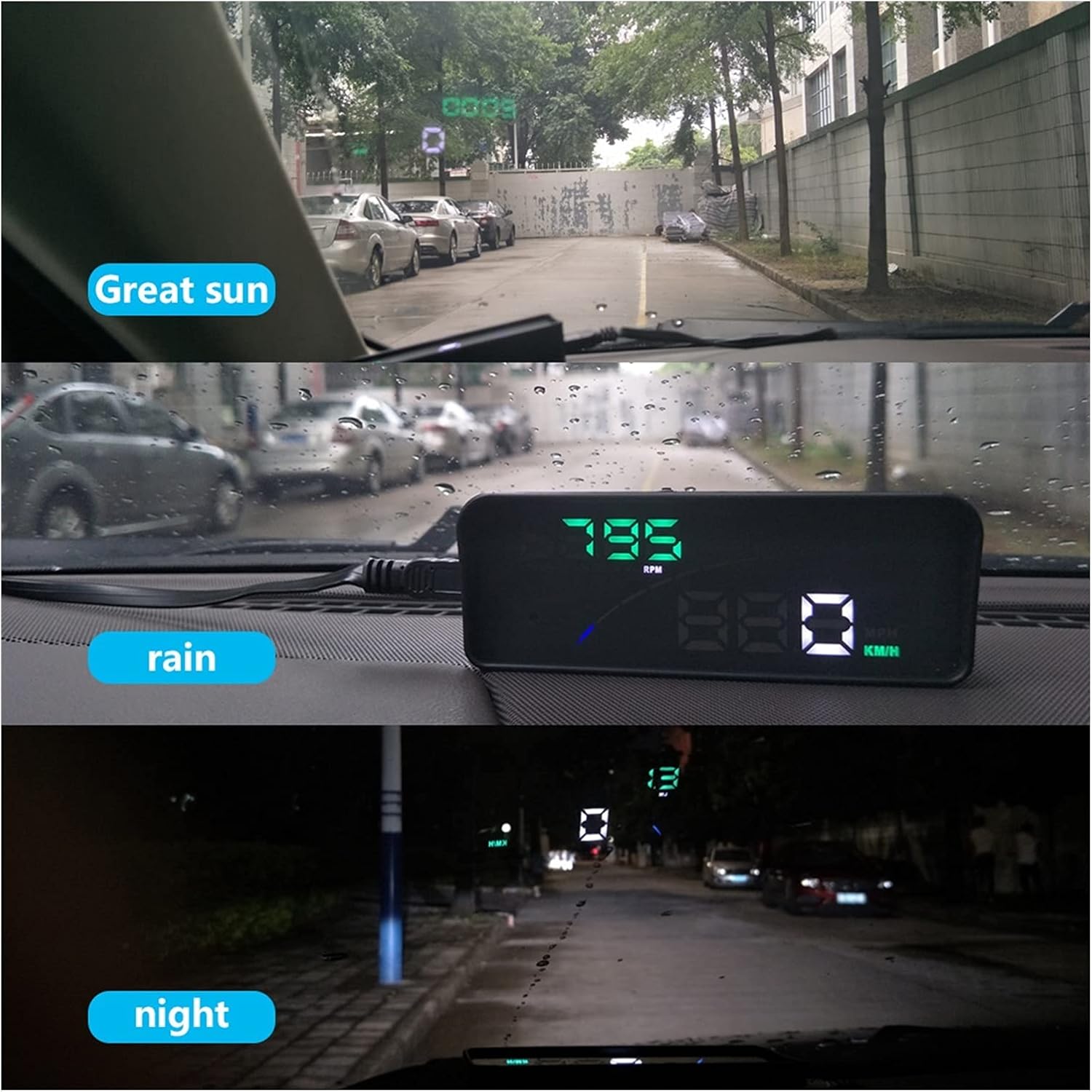
The P9 HUD maintains clear visibility in bright sunlight, rain, and at night.
- Great Sun: The display remains bright and legible even under strong sunlight.
- മഴ: Performance is maintained during rainy conditions, ensuring data is still clear.
- രാത്രി: The automatic backlight adjusts to provide a comfortable and non-distracting display in low-light environments.
9. പരിപാലനം
To ensure the longevity and optimal performance of your P9 Car HUD, follow these simple maintenance guidelines:
- വൃത്തിയാക്കൽ: Use a soft, dry cloth to wipe the display and casing. Avoid using abrasive cleaners or solvents that could damage the surface.
- സംഭരണം: If storing the device for an extended period, disconnect it from the OBD port and store it in a cool, dry place away from direct sunlight.
- കേബിൾ കെയർ: Do not bend or crimp the OBD cable excessively. Ensure it is not pinched by car doors or seats.
10. പ്രശ്നപരിഹാരം
If you encounter issues with your P9 Car HUD, refer to the following common problems and solutions:
| പ്രശ്നം | സാധ്യമായ കാരണം | പരിഹാരം |
|---|---|---|
| No display/No power | OBD cable not connected properly; Car's OBD port issue; Device fault. | Ensure OBD cable is firmly connected to both the HUD and the car's OBD port. Check if the car's OBD port is functional (e.g., by connecting another OBD device). Try restarting the car. |
| Inaccurate speed/data | Incorrect unit setting (KM/H vs MPH); Calibration needed; Vehicle compatibility issue. | Check and adjust the unit settings (KM/H or MPH) on the HUD. Refer to the user manual for calibration steps if available. Confirm your vehicle is fully OBD2/EUOBD compliant. |
| Alarms constantly trigger | Alarm thresholds set too low; Actual vehicle condition. | Adjust the alarm thresholds (e.g., overspeed, high water temperature) to appropriate levels via the device settings. If alarms persist, check your vehicle's actual condition (e.g., engine temperature, voltagഒപ്പം). |
| Engine fault light on HUD | Actual engine fault detected by OBD system. | Use the HUD's "Clear fault code" function. If the fault light reappears, consult a mechanic to diagnose the underlying engine issue. |
11 സ്പെസിഫിക്കേഷനുകൾ
| ഫീച്ചർ | വിശദാംശങ്ങൾ |
|---|---|
| മോഡൽ നമ്പർ | 1005003178286970 |
| ബ്രാൻഡ് | ജനറിക് |
| ഇനത്തിൻ്റെ ഭാരം | 2.2 പൗണ്ട് (ഏകദേശം 1000 ഗ്രാം) |
| മാതൃരാജ്യം | ചൈന |
| കണക്റ്റിവിറ്റി | OBD2 / EUOBD |
| ഡിസ്പ്ലേ തരം | Digital Projector Display |
| നിർമ്മാതാവ് | Lifyn2 |
12. വാറൻ്റിയും പിന്തുണയും
For warranty information or technical support, please refer to the contact details provided by your retailer or the manufacturer. Keep your purchase receipt as proof of purchase for any warranty claims.
Ask a question about this manual
Ask about setup, troubleshooting, compatibility, parts, safety, or missing instructions. Manuals+ will review the question and use this page’s manual context to help answer it.