
1. ആമുഖം
The plplaaoo MPPT Wind Solar Hybrid Charge Controller, paired with its dump load resistor, is designed for efficient power management in off-grid hybrid wind-solar systems. This controller optimizes charging efficiency, particularly at low wind speeds, making it suitable for applications such as mixed-air solar street lighting and home setups. It ensures stable power flow and safe operation by protecting against overloads through its integrated load equalizer and stabilizer. The system supports both MPPT and PWM modes for energy capture optimization, offering higher efficiency than standard PWM models. It is compatible with 12V/24V systems and a 400W fan, providing flexibility and reliable performance across various hybrid configurations. The dump load resistor safely handles excess energy, preventing overcharging and maintaining voltagഇ സ്ഥിരത.
2. ഉൽപ്പന്നം കഴിഞ്ഞുview
2.1. ഘടകങ്ങൾ
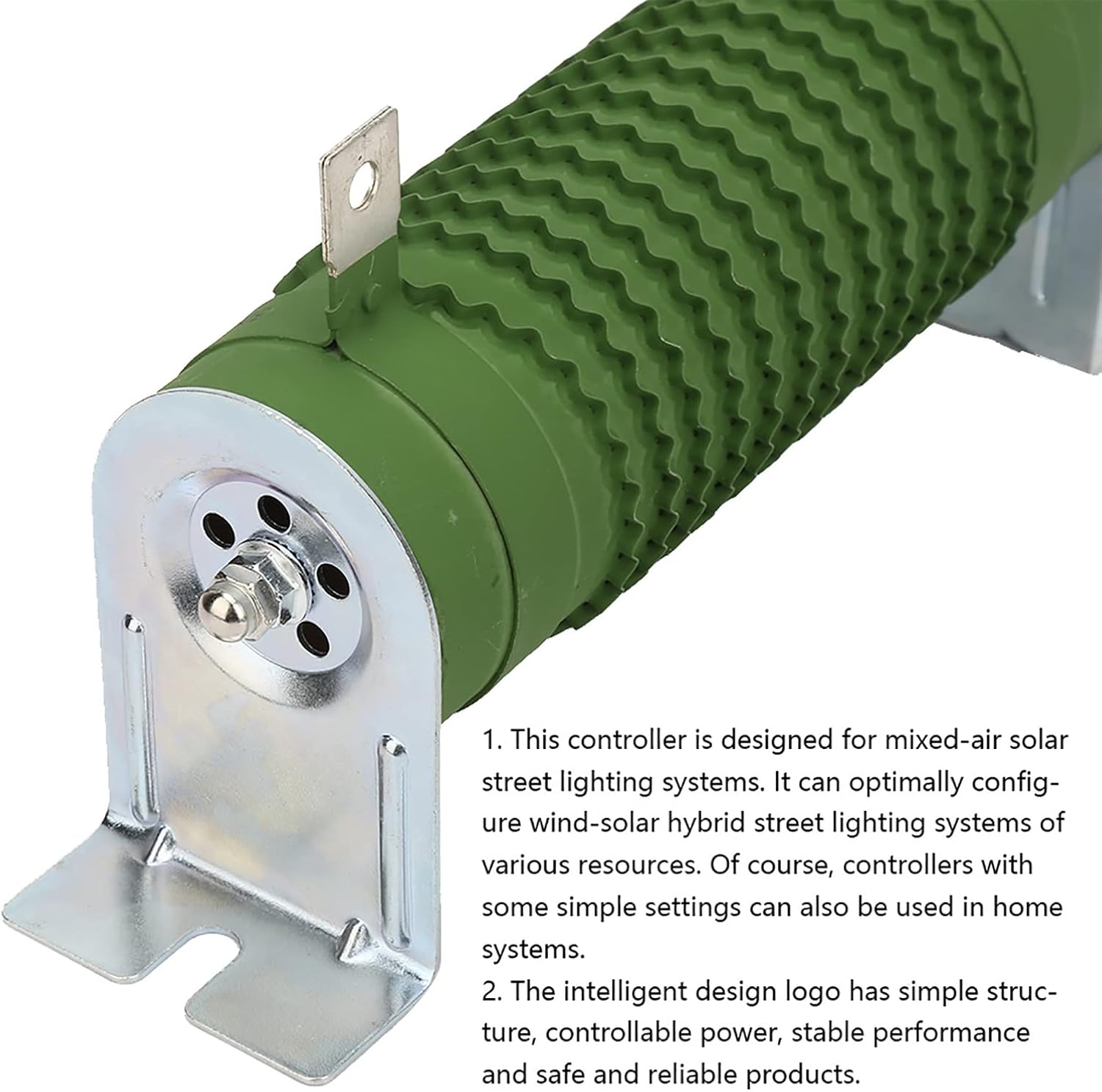
Figure 1: Dump Load Resistor. This resistor is crucial for managing excess energy in hybrid charging systems, preventing overcharging and stabilizing voltage.

Figure 2: Dump Load Resistor (Full View). ഒരു സമ്പൂർണ്ണ view of the dump load resistor, showing its robust construction and mounting points.

Figure 3: Resistor Type Comparison. Illustrates the visual differences between new and old versions of the dump load resistor. Functionality remains consistent.

Figure 4: MPPT Efficiency Detail. This image highlights the textured surface of the resistor, emphasizing its role in systems utilizing MPPT wind charging for superior efficiency.
2.2. Operational Overview
Video 1: MPPT Wind Solar Hybrid Controller Features. This video demonstrates the key features of the MPPT Wind Solar Hybrid Controller, including its compatibility with various battery types (Lithium, GEL, Lead-acid), full charge and discharge protection, and the large LCD screen for parameter monitoring. It also highlights the robust design for heat dissipation and various protection mechanisms like solar reverse charging, battery open circuit, anti-reverse connection, overcurrent, overvoltage auto-brake, and overload protection. The video shows the controller's ability to automatically match 12V/24V or 24V/48V sealed battery voltages and its intelligent disconnection of solar charging.
3. സജ്ജീകരണ നിർദ്ദേശങ്ങൾ
Proper installation is crucial for the safe and efficient operation of your plplaaoo MPPT Wind Solar Hybrid Charge Controller and Dump Load Resistor. Please follow these guidelines carefully:
- ലൊക്കേഷൻ തിരഞ്ഞെടുക്കൽ: Install the controller in a well-ventilated area, away from direct sunlight, rain, dust, and corrosive chemical substances. Ensure the location is dry and protected.
- മൗണ്ടിംഗ്: Securely mount the controller and the dump load resistor to a stable surface using appropriate fasteners. Ensure adequate space around the units for heat dissipation.
- വയറിംഗ് ക്രമം:
- ആദ്യം ബാറ്ററി ബന്ധിപ്പിക്കുക: Always connect the battery to the controller's battery terminals first. Ensure correct polarity (+ to + and - to -). The controller will automatically detect the battery voltagഇ (12V അല്ലെങ്കിൽ 24V).
- Connect Wind Turbine: Connect the wind turbine output to the designated wind input terminals on the controller.
- സോളാർ പാനലുകൾ ബന്ധിപ്പിക്കുക: Connect the solar panel array to the solar input terminals. Ensure the solar voltage is within the controller's acceptable range for the battery voltage.
- Connect Dump Load Resistor: Connect the dump load resistor to the dedicated dump load terminals on the controller. This resistor is essential for dissipating excess energy from the wind turbine.
- ഡിസി ലോഡ് ബന്ധിപ്പിക്കുക (ഓപ്ഷണൽ): If using a DC load directly from the controller, connect it to the load output terminals.
- സർജ് സംരക്ഷണം: A DC/AC air switch and surge protection device should be installed at both input and output terminals for enhanced safety.
- കണക്ഷനുകൾ പരിശോധിക്കുക: Double-check all wiring for correct polarity, secure connections, and proper insulation before powering on the system.
4. പ്രവർത്തന നിർദ്ദേശങ്ങൾ
The controller features a large LCD screen and control buttons for monitoring and adjusting system parameters.
4.1. എൽസിഡി ഡിസ്പ്ലേ
The LCD displays real-time information including:
- Wind power (Pw) and Solar power (Ps) generation.
- Battery charge status and voltage (BAT).
- Load output status and current (LOAD).
- സിസ്റ്റം വോളിയംtage (SYS) and auto-detection status (AUTO).
- Temperature (TEMP).
4.2 നിയന്ത്രണ ബട്ടണുകൾ
- നൽകുക: Used to confirm selections or enter settings menus.
- യു.പി.: Navigates upwards through menu options or increases parameter values.
- ഡ: ൺ: Navigates downwards through menu options or decreases parameter values.
- ഇഎസ്സി: നിലവിലുള്ള മെനുവിൽ നിന്ന് പുറത്തുകടക്കുന്നു അല്ലെങ്കിൽ ഒരു പ്രവർത്തനം റദ്ദാക്കുന്നു.
4.3. ബാറ്ററി തരം തിരഞ്ഞെടുക്കൽ
The controller is compatible with various battery types. To select the correct battery type:
- അമർത്തുക പ്രവേശിക്കുക button to access the settings menu.
- ഉപയോഗിക്കുക UP or താഴേക്ക് buttons to navigate to the battery type setting.
- അമർത്തുക പ്രവേശിക്കുക തിരഞ്ഞെടുക്കാൻ, തുടർന്ന് ഉപയോഗിക്കുക UP or താഴേക്ക് to choose from options like:
1. Sealed (Lead-acid, GEL)
2. Lithium (Ternary Lithium, LiFePO4) - അമർത്തുക പ്രവേശിക്കുക to confirm your selection, then ഇഎസ്സി മെനുവിൽ നിന്ന് പുറത്തുകടക്കാൻ.
5. പരിപാലനം
Regular maintenance ensures the longevity and optimal performance of your hybrid charge controller system.
- വിഷ്വൽ പരിശോധന: Periodically inspect all wiring, connections, and components for any signs of damage, corrosion, or loose connections.
- വൃത്തിയാക്കൽ: Keep the controller and dump load resistor clean and free from dust and debris. Use a dry, soft cloth for cleaning. Do not use liquids or abrasive cleaners.
- വെൻ്റിലേഷൻ: Ensure that the installation area remains well-ventilated to prevent overheating. Clear any obstructions around the controller's heat sinks.
- ബാറ്ററി പരിശോധന: Regularly check the battery terminals for corrosion and ensure they are clean and tight. Follow the battery manufacturer's maintenance guidelines.
- ഫേംവെയർ അപ്ഡേറ്റുകൾ: നിർമ്മാതാവ് പരിശോധിക്കുക website for any available firmware updates for your controller model.
6. പ്രശ്നപരിഹാരം
If you encounter issues with your hybrid charge controller, refer to the following common troubleshooting steps:
- No Power Display:
- Check battery connections and ensure the battery has sufficient charge.
- Verify all wiring is correctly connected and secure.
- Low Charging Efficiency:
- Ensure solar panels and wind turbine are clean and unobstructed.
- Check for proper orientation of solar panels towards the sun and optimal wind exposure for the turbine.
- Verify battery type settings on the controller match your battery.
- അമിത ചാർജിംഗ്/കുറവ് ചാർജിംഗ്:
- കൺട്രോളർ ക്രമീകരണങ്ങളിൽ ശരിയായ ബാറ്ററി തരം തിരഞ്ഞെടുത്തിട്ടുണ്ടെന്ന് ഉറപ്പാക്കുക.
- ബാറ്ററി വോളിയം പരിശോധിക്കുകtage and ensure it is within the controller's operating range.
- Ensure the dump load resistor is correctly connected and functioning to dissipate excess energy.
- എൽസിഡിയിൽ പിശക് കോഡുകൾ:
- Refer to the specific error code in the full product manual (if available) or contact customer support for interpretation and resolution.
- സിസ്റ്റം പ്രതികരിക്കുന്നില്ല:
- Disconnect all power sources (solar, wind, battery) for a few minutes, then reconnect the battery first, followed by wind and solar.
ഈ ഘട്ടങ്ങൾ പരീക്ഷിച്ചതിനു ശേഷവും പ്രശ്നങ്ങൾ നിലനിൽക്കുകയാണെങ്കിൽ, ദയവായി ഉപഭോക്തൃ പിന്തുണയുമായി ബന്ധപ്പെടുക.
7 സ്പെസിഫിക്കേഷനുകൾ
| ഫീച്ചർ | സ്പെസിഫിക്കേഷൻ |
|---|---|
| ബ്രാൻഡ് | plplaaoo |
| നിർമ്മാതാവ് | plplaaoo |
| വാല്യംtage | 12V/24V (Auto-sensing) |
| Max Wind Turbine Power | 400W |
| ഇനത്തിൻ്റെ ഭാരം | 1.74 പൗണ്ട് (0.79 കിലോഗ്രാം) |
| ഡിസ്പ്ലേ തരം | ഡിജിറ്റൽ എൽസിഡി |
| ബാറ്ററി അനുയോജ്യത | Sealed (Lead-acid, GEL), Lithium (Ternary Lithium, LiFePO4) |
| സംരക്ഷണ സവിശേഷതകൾ | Solar Reversed Charging, Battery Open Circuit, Anti-Reverse Connection, Overcurrent, Overvoltage Auto-Brake, Overload |
| ഉൾപ്പെടുത്തിയ ഘടകങ്ങൾ | Controller, Dump Load Resistor |
8. വാറൻ്റി വിവരങ്ങൾ
This plplaaoo MPPT Wind Solar Hybrid Charge Controller and Dump Load Resistor comes with a standard manufacturer's warranty. Please refer to the product packaging or the official plplaaoo website for specific warranty terms and conditions, including coverage duration and claim procedures. Keep your purchase receipt as proof of purchase.
9. ഉപഭോക്തൃ പിന്തുണ
For technical assistance, troubleshooting, or warranty inquiries, please contact plplaaoo customer support. You can typically find contact information on the product packaging, the official plplaaoo website, or through your point of purchase. When contacting support, please have your product model number and purchase date available.