
1. ആമുഖം
Thank you for choosing the YENKEE YMS 3030BK RGB Gaming Mouse Ultra Light Shotgun. This manual provides detailed instructions for setting up, operating, and maintaining your new gaming mouse. Please read this manual carefully before use to ensure optimal performance and longevity of your device.
The YENKEE YMS 3030BK RGB Gaming Mouse features an ergonomic design for comfortable use. Its unique ultra-light perforated construction promotes airflow, helping to keep your palm cool during extended use. Equipped with an accurate IC 6651 sensor, it offers precise tracking with a resolution of up to 6400 DPI, and includes customizable RGB backlighting.
2. പാക്കേജ് ഉള്ളടക്കം
പാക്കേജിൽ ഇനിപ്പറയുന്ന ഇനങ്ങൾ ഉണ്ടോ എന്ന് പരിശോധിക്കുക:
- 1 x YENKEE YMS 3030BK RGB Gaming Mouse Ultra Light Shotgun
- ഉപയോക്തൃ മാനുവൽ (ഈ പ്രമാണം)
3. ഉൽപ്പന്നം കഴിഞ്ഞുview
3.1 പ്രധാന സവിശേഷതകൾ
- Unique ultra-light perforated construction for improved airflow
- Ergonomic design for comfortable grip and to prevent palm sweat
- Customizable RGB backlight
- Accurate IC 6651 sensor with up to 6400 DPI resolution
- Wired USB connectivity
3.2 മൗസ് ഘടകങ്ങൾ
The YMS 3030BK mouse typically includes the following components:
- ഇടത് ക്ലിക്ക് ബട്ടൺ
- ബട്ടൺ റൈറ്റ് ക്ലിക്ക് ചെയ്യുക
- സ്ക്രോൾ വീൽ / മിഡിൽ ക്ലിക്ക് ബട്ടൺ
- DPI Adjustment Button (usually located behind the scroll wheel)
- Forward/Backward Side Buttons (typically on the left side)
- Optical Sensor (on the underside)
- USB കേബിൾ
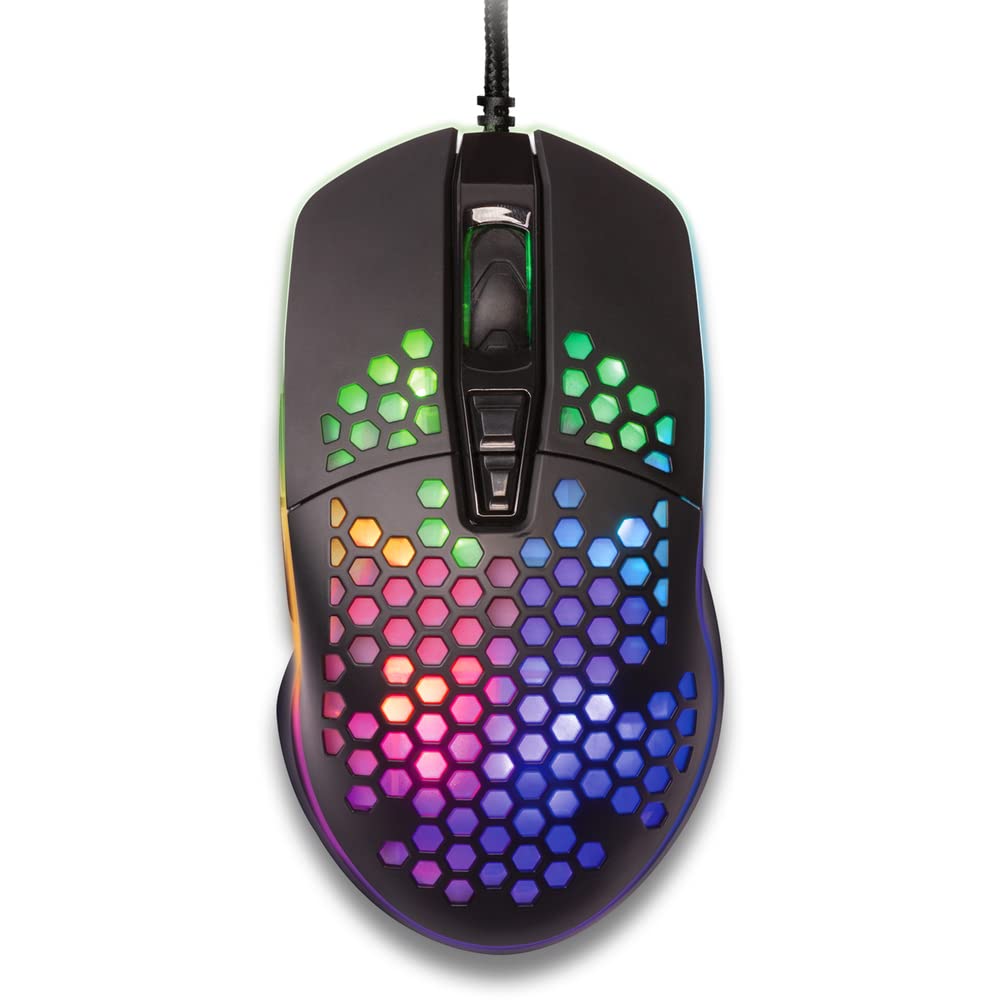
ചിത്രം 1: മുകളിൽ നിന്ന് താഴേക്ക് view of the YENKEE YMS 3030BK RGB Gaming Mouse, highlighting its ultra-light perforated design and ergonomic contours.
4. സജ്ജീകരണം
Follow these steps to set up your YENKEE YMS 3030BK gaming mouse:
- മൗസ് ബന്ധിപ്പിക്കുക: നിങ്ങളുടെ കമ്പ്യൂട്ടറിൽ ലഭ്യമായ USB പോർട്ടിലേക്ക് മൗസിന്റെ USB കണക്റ്റർ പ്ലഗ് ചെയ്യുക.
- ഡ്രൈവർ ഇൻസ്റ്റാളേഷൻ: Your operating system (Windows 7, 8, Vista, XP) should automatically detect and install the necessary drivers. No additional software installation is typically required for basic functionality.
- ഓപ്ഷണൽ സോഫ്റ്റ്വെയർ: For advanced customization of RGB lighting and button assignments, please visit the official YENKEE website to check for any dedicated software for the YMS 3030BK model.
5. പ്രവർത്തന നിർദ്ദേശങ്ങൾ
5.1 അടിസ്ഥാന പ്രവർത്തനം
- ഇടത് ക്ലിക്ക്: പ്രാഥമിക പ്രവർത്തനം, തിരഞ്ഞെടുപ്പ്.
- വലത് ക്ലിക്കിൽ: സന്ദർഭ മെനു, ദ്വിതീയ പ്രവർത്തനം.
- സ്ക്രോൾ വീൽ: Scroll up/down, middle click for specific functions (e.g., opening links in new tabs).
- സൈഡ് ബട്ടണുകൾ: Default functions are typically 'Forward' and 'Backward' in web ബ്രൗസറുകൾ അല്ലെങ്കിൽ file explorers. These can often be customized via software.
5.2 ഡിപിഐ അഡ്ജസ്റ്റ്മെന്റ്
The YMS 3030BK mouse features an IC 6651 sensor with a maximum resolution of 6400 DPI. You can adjust the DPI (Dots Per Inch) sensitivity on-the-fly using the dedicated DPI button, usually located behind the scroll wheel. Pressing this button will cycle through preset DPI levels, indicated by changes in the mouse's RGB lighting color or pattern. Refer to the optional software for precise DPI level configuration and customization.
5.3 RGB ലൈറ്റിംഗ് കസ്റ്റമൈസേഷൻ
The RGB backlight of your mouse can be customized to match your preferences. While some mice offer onboard controls for basic lighting effects, full customization of colors, patterns, and brightness is typically achieved through the dedicated YENKEE software (if available). Please download and install the software from the official YENKEE website for advanced lighting options.
6. പരിപാലനം
To ensure the longevity and optimal performance of your gaming mouse, follow these maintenance guidelines:
- വൃത്തിയാക്കൽ: Use a soft, dry cloth to wipe the surface of the mouse. For perforated areas, a soft brush or compressed air can help remove dust. Avoid using harsh chemicals or abrasive materials.
- സെൻസർ ക്ലീനിംഗ്: Occasionally clean the optical sensor on the underside of the mouse with a cotton swab lightly dampഐസോപ്രോപൈൽ ആൽക്കഹോൾ ചേർത്തത്. ഉപയോഗിക്കുന്നതിന് മുമ്പ് പൂർണ്ണമായും ഉണങ്ങിയെന്ന് ഉറപ്പാക്കുക.
- കേബിൾ കെയർ: കേടുപാടുകൾ ഒഴിവാക്കാൻ മൂർച്ചയുള്ള വളവുകളോ യുഎസ്ബി കേബിളിൽ അമിതമായി വലിക്കുന്നതോ ഒഴിവാക്കുക.
- സംഭരണം: ഉപയോഗത്തിലില്ലാത്തപ്പോൾ വൃത്തിയുള്ളതും വരണ്ടതുമായ അന്തരീക്ഷത്തിൽ മൗസ് സൂക്ഷിക്കുക.
7. പ്രശ്നപരിഹാരം
If you encounter issues with your YENKEE YMS 3030BK mouse, refer to the table below for common problems and solutions:
| പ്രശ്നം | സാധ്യമായ കാരണം | പരിഹാരം |
|---|---|---|
| മൗസ് പ്രതികരിക്കുന്നില്ല | അയഞ്ഞ യുഎസ്ബി കണക്ഷൻ, തകരാറുള്ള യുഎസ്ബി പോർട്ട്, ഡ്രൈവർ പ്രശ്നം. | USB കേബിൾ സുരക്ഷിതമായി പ്ലഗ് ഇൻ ചെയ്തിട്ടുണ്ടെന്ന് ഉറപ്പാക്കുക. മറ്റൊരു USB പോർട്ട് പരീക്ഷിക്കുക. നിങ്ങളുടെ കമ്പ്യൂട്ടർ പുനരാരംഭിക്കുക. ഡ്രൈവർ സ്റ്റാറ്റസിനായി ഉപകരണ മാനേജർ പരിശോധിക്കുക. |
| കഴ്സറിന്റെ ചലനം ക്രമരഹിതമോ ചാഞ്ചാട്ടമോ ആണ് | വൃത്തികെട്ട ഒപ്റ്റിക്കൽ സെൻസർ, അനുയോജ്യമല്ലാത്ത മൗസ് പാഡ് പ്രതലം. | Clean the optical sensor. Use a clean, uniform mouse pad. |
| DPI ക്രമീകരണം പ്രവർത്തിക്കുന്നില്ല | സോഫ്റ്റ്വെയർ സംഘർഷം, ബട്ടൺ തകരാറ്. | Ensure no conflicting software is running. If using custom software, check its settings. |
| RGB ലൈറ്റിംഗ് പ്രവർത്തിക്കുന്നില്ല അല്ലെങ്കിൽ തടസ്സപ്പെട്ടു | Software issue, power issue. | Check the YENKEE software settings. Unplug and replug the mouse. Restart your computer. |
8 സ്പെസിഫിക്കേഷനുകൾ
| ഫീച്ചർ | വിശദാംശങ്ങൾ |
|---|---|
| ബ്രാൻഡ് | യെങ്കി |
| മോഡൽ നമ്പർ | YMS 3030BK |
| കണക്റ്റിവിറ്റി ടെക്നോളജി | യുഎസ്ബി (കോർഡഡ് ഇലക്ട്രിക്) |
| മൂവ്മെന്റ് ഡിറ്റക്ഷൻ ടെക്നോളജി | Optical (IC 6651 Sensor) |
| പരമാവധി ഡിപിഐ | 6400 ഡിപിഐ |
| പ്രത്യേക സവിശേഷതകൾ | Ergonomic Design, Lightweight, Perforated Construction, RGB Backlight |
| നിറം | കറുപ്പ് |
| ഇനത്തിൻ്റെ ഭാരം | 4.2 ഔൺസ് (ഏകദേശം 119 ഗ്രാം) |
| ഉൽപ്പന്ന അളവുകൾ (LxWxH) | 5.43 x 2.44 x 9.06 ഇഞ്ച് (ഏകദേശം 13.8 x 6.2 x 23 സെ.മീ) |
| ഹാർഡ്വെയർ പ്ലാറ്റ്ഫോം | ഗെയിമിംഗ് |
| ഓപ്പറേറ്റിംഗ് സിസ്റ്റം അനുയോജ്യത | Windows 7, Windows 8, Windows Vista, Windows XP |
9. വാറൻ്റിയും പിന്തുണയും
വാറൻ്റി വിവരങ്ങൾ: For detailed warranty terms and conditions, please refer to the warranty card included with your product or visit the official YENKEE website. Warranty periods may vary by region and retailer.
ഉപഭോക്തൃ പിന്തുണ: If you require technical assistance or have questions regarding your YENKEE YMS 3030BK gaming mouse, please contact your retailer or visit the support section of the official YENKEE webബന്ധപ്പെടാനുള്ള വിവരങ്ങൾക്കും പതിവുചോദ്യങ്ങൾക്കുമുള്ള സൈറ്റ്.