
1. ആമുഖം
Welcome to the user manual for your Doro 1380 mobile phone. This guide provides essential information on how to set up, operate, and maintain your device. The Doro 1380 is designed for ease of use, featuring large keys, a clear display, and practical functions like an assistance button and camera.
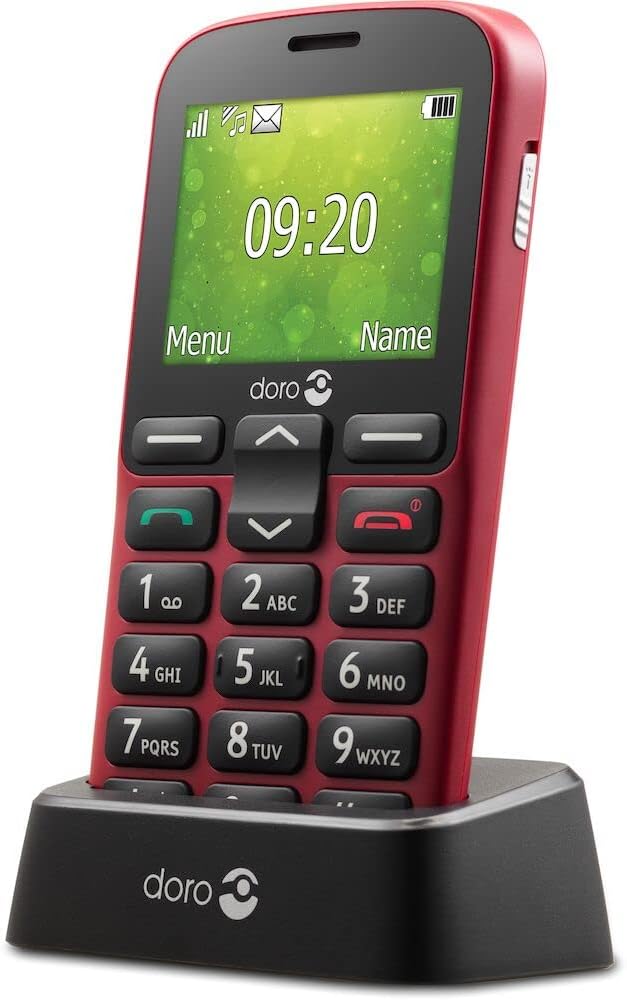
Image: The Doro 1380 mobile phone securely placed in its charging cradle.
2. സജ്ജീകരണം
2.1 പാക്കേജ് ഉള്ളടക്കം
നിങ്ങളുടെ പാക്കേജിൽ ഇനിപ്പറയുന്ന ഇനങ്ങൾ ഉണ്ടെന്ന് ഉറപ്പാക്കുക:
- ഡോറോ 1380 മൊബൈൽ ഫോൺ
- ബാറ്ററി
- ചാർജ്ജിംഗ് തൊട്ടിൽ
- വാൾ ചാർജർ
- Headset (may vary by region)
- ഉപയോക്തൃ മാനുവൽ (ഈ പ്രമാണം)
2.2 Inserting SIM Card(s) and Micro SD Card
- പിൻ കവർ നീക്കം ചെയ്യുക: Gently pry open the back cover of the phone.
- സിം കാർഡ്(കൾ) ചേർക്കുക: The Doro 1380 supports Dual SIM. Carefully slide your Micro SIM card(s) (3FF) into the designated slot(s) with the gold contacts facing down.
- Insert Micro SD card (optional): If you wish to expand storage, insert a Micro SD card (up to 16GB) into its slot.
- പിൻ കവർ മാറ്റിസ്ഥാപിക്കുക: Align the cover and press firmly until it clicks into place.

ചിത്രം: വശം view of the Doro 1380, showing the slim profile ബട്ടൺ പ്ലെയ്സ്മെന്റും.
2.3 ബാറ്ററി ഇൻസ്റ്റാളേഷനും ചാർജിംഗും
- ബാറ്ററി ഇൻസ്റ്റാൾ ചെയ്യുക: After inserting SIM/SD cards, place the battery into its compartment, ensuring the contacts align.
- പ്രാരംഭ ചാർജ്: Connect the wall charger to the charging cradle, then place the phone in the cradle. Alternatively, connect the wall charger directly to the phone. Charge the phone for at least 4 hours before first use. The charging indicator will show progress.

Image: Icon illustrating the charging cradle, a convenient way to keep your phone charged.
2.4 പവർ ഓൺ/ഓഫ്
- പവർ ഓണാക്കാൻ: Press and hold the red End Call/Power button until the Doro logo appears.
- പവർ ഓഫ് ചെയ്യാൻ: ചുവപ്പ് നിറത്തിലുള്ള എൻഡ് കോൾ/പവർ ബട്ടൺ അമർത്തിപ്പിടിക്കുക, തുടർന്ന് സ്ക്രീനിൽ 'പവർ ഓഫ്' തിരഞ്ഞെടുത്ത് സ്ഥിരീകരിക്കുക.
3. പ്രവർത്തന നിർദ്ദേശങ്ങൾ
3.1 കോളുകൾ ചെയ്യലും സ്വീകരിക്കലും
- ഒരു കോൾ ചെയ്യാൻ: കീപാഡ് ഉപയോഗിച്ച് ഫോൺ നമ്പർ നൽകി പച്ച കോൾ ബട്ടൺ അമർത്തുക.
- ഒരു കോളിന് ഉത്തരം നൽകാൻ: ഫോൺ റിംഗ് ചെയ്യുമ്പോൾ പച്ച കോൾ ബട്ടൺ അമർത്തുക.
- ഒരു കോൾ അവസാനിപ്പിക്കാൻ: ചുവന്ന എൻഡ് കോൾ ബട്ടൺ അമർത്തുക.
3.2 SMS സന്ദേശങ്ങൾ അയയ്ക്കൽ
- പ്രധാന മെനുവിൽ നിന്ന്, 'സന്ദേശങ്ങൾ' എന്നതിലേക്ക് നാവിഗേറ്റ് ചെയ്യുക.
- Select 'Write new message'.
- കീപാഡ് ഉപയോഗിച്ച് നിങ്ങളുടെ സന്ദേശം നൽകുക.
- Select 'Options' then 'Send' and choose the recipient from your contacts or enter a new number.
3.3 ക്യാമറ ഉപയോഗിക്കുന്നത്
The Doro 1380 features a VGA camera to capture photos.
- പ്രധാന മെനുവിൽ നിന്ന്, 'ക്യാമറ' തിരഞ്ഞെടുക്കുക.
- നിങ്ങളുടെ വിഷയത്തിന് നേരെ ക്യാമറ ചൂണ്ടുക.
- Press the 'OK' button to take a picture.
- Photos are saved to the phone's memory or Micro SD card.

ചിത്രം: പിൻഭാഗം view of the Doro 1380, highlighting the camera lens and the assistance button.

Image: Icon symbolizing the camera function.
3.4 സഹായ ബട്ടൺ
The assistance button provides a quick way to alert pre-selected contacts in an emergency.
- സജീവമാക്കൽ: Press and hold the assistance button on the back of the phone for 3 seconds, or press it twice consecutively within 1 second.
- പ്രവർത്തനം: The phone will automatically send an assistance SMS message to your configured contacts and then attempt to call them in a pre-set order.
- കോൺഫിഗറേഷൻ: Ensure emergency contacts are set up in the phone's settings under 'Assistance'.

Image: Icon depicting a hand pressing a button, representing the assistance function.
3.5 മറ്റ് പ്രധാന സവിശേഷതകൾ
- ക്രമീകരിക്കാവുന്ന ഫോണ്ട് വലുപ്പം: Customize text size for better readability in the display settings.
- ഫ്ലാഷ്ലൈറ്റ്: Activate the mini-torch feature from the menu for illumination.
- ബ്ലൂടൂത്ത്: Pair with compatible Bluetooth devices like headsets for hands-free communication.
- സ്പീക്കർഫോൺ: Use the speakerphone function during calls for hands-free conversations.
- Ringtone Indicator: A visual indicator flashes when there is an incoming call.
- കലണ്ടറും അലാറവും: Utilize the built-in calendar for scheduling and set alarms for reminders.
- Whitelist Function: Restrict incoming calls to only numbers on your approved list.
- ഇരട്ട സിം: The phone supports two SIM cards, allowing for separate numbers or plans.

Image: Icon symbolizing the integrated flashlight.

Image: Icon indicating the Whitelist feature for managing incoming calls.

Image: Icon illustrating the Dual SIM capability of the phone.
4. പരിപാലനം
4.1 ബാറ്ററി കെയർ
- അങ്ങേയറ്റത്തെ താപനിലയിലേക്ക് ബാറ്ററി തുറന്നുകാട്ടുന്നത് ഒഴിവാക്കുക.
- ബാറ്ററി പഞ്ചർ ചെയ്യുകയോ കേടുവരുത്തുകയോ ചെയ്യരുത്.
- ഫോൺ കൂടുതൽ നേരം ഉപയോഗിക്കില്ലെങ്കിൽ, ബാറ്ററിയുടെ ആരോഗ്യം നിലനിർത്താൻ ഇടയ്ക്കിടെ ചാർജ് ചെയ്യുക.
- പ്രാദേശിക നിയന്ത്രണങ്ങൾ അനുസരിച്ച് ബാറ്ററികൾ ഉത്തരവാദിത്തത്തോടെ സംസ്കരിക്കുക.
4.2 ഉപകരണം വൃത്തിയാക്കുന്നു
- ഫോണിന്റെ ഉപരിതലം വൃത്തിയാക്കാൻ മൃദുവായതും ഉണങ്ങിയതുമായ തുണി ഉപയോഗിക്കുക.
- കഠിനമായ രാസവസ്തുക്കളോ ഉരച്ചിലുകളോ ഉപയോഗിക്കുന്നത് ഒഴിവാക്കുക.
- ചാർജിംഗ് പോർട്ടുകൾ പൊടിയിൽ നിന്നും അവശിഷ്ടങ്ങളിൽ നിന്നും മുക്തമായി സൂക്ഷിക്കുക.
4.3 പൊതുവായ കൈകാര്യം ചെയ്യൽ
- Protect the phone from drops and impacts.
- Keep the phone away from water and excessive moisture.
- Do not attempt to disassemble the phone yourself.
5. പ്രശ്നപരിഹാരം
If you encounter issues with your Doro 1380, refer to the following common problems and solutions:
| പ്രശ്നം | സാധ്യമായ പരിഹാരം |
|---|---|
| ഫോൺ ഓണാക്കുന്നില്ല | ബാറ്ററി ശരിയായി ഇൻസ്റ്റാൾ ചെയ്തിട്ടുണ്ടെന്നും പൂർണ്ണമായും ചാർജ് ചെയ്തിട്ടുണ്ടെന്നും ഉറപ്പാക്കുക. കുറഞ്ഞത് 30 മിനിറ്റെങ്കിലും ഫോൺ ചാർജ് ചെയ്യാൻ ശ്രമിക്കുക. |
| നെറ്റ്വർക്ക് സിഗ്നൽ ഇല്ല | Check if the SIM card is correctly inserted. Move to an area with better network coverage. Contact your service provider. |
| ബാറ്ററി പെട്ടെന്ന് തീരുന്നു | Reduce screen brightness. Close unused applications. Ensure the phone is not in an area with poor signal, which can increase battery usage. |
| വിളിക്കുന്നയാൾക്ക് കേൾക്കാൻ കഴിയുന്നില്ല / വിളിക്കുന്നയാൾക്ക് എന്നെ കേൾക്കാൻ കഴിയുന്നില്ല. | Check volume settings. Ensure microphone is not blocked. Try restarting the phone. |
| Assistance button not working | Verify that emergency contacts are correctly configured in the settings. Ensure the feature is enabled. |
പ്രശ്നം നിലനിൽക്കുകയാണെങ്കിൽ, കൂടുതൽ സഹായത്തിനായി വാറന്റി, പിന്തുണ വിഭാഗം പരിശോധിക്കുക.
6 സ്പെസിഫിക്കേഷനുകൾ
Detailed technical specifications for the Doro 1380 mobile phone:
| ഫീച്ചർ | വിശദാംശങ്ങൾ |
|---|---|
| ബ്രാൻഡ് | ഡോറോ |
| മോഡലിൻ്റെ പേര് | ഡോറോ 1380 |
| മോഡൽ നമ്പർ | 8322 |
| ഓപ്പറേറ്റിംഗ് സിസ്റ്റം | ന്യൂക്ലിയസ് ഒ.എസ്. |
| സ്ക്രീൻ വലിപ്പം | 5.7 സെന്റീമീറ്റർ (2.4 ഇഞ്ച്) |
| റെസലൂഷൻ | 320 x 240 പിക്സലുകൾ |
| സെല്ലുലാർ ടെക്നോളജി | 2G |
| കണക്റ്റിവിറ്റി ടെക്നോളജി | ബ്ലൂടൂത്ത് |
| പ്രത്യേക സവിശേഷതകൾ | Visual ring indicator, Hands-free, Mini-torch, Alarm, Assistance button |
| ബാറ്ററി കോമ്പോസിഷൻ | Lithium-ion (800mAh) |
| സംസാര സമയം | 8 മണിക്കൂർ വരെ |
| സ്റ്റാൻഡ്ബൈ സമയം | 530 മണിക്കൂർ വരെ |
| സിം കാർഡ് തരം | മൈക്രോ സിം (3FF) |
| മെമ്മറി കാർഡ് പിന്തുണ | മൈക്രോ എസ്ഡി (16 ജിബി വരെ) |
7. വാറൻ്റിയും പിന്തുണയും
7.1 വാറൻ്റി വിവരങ്ങൾ
Your Doro 1380 mobile phone comes with a standard manufacturer's warranty. Please refer to the warranty card included in your product packaging for specific terms, conditions, and duration. Keep your proof of purchase for any warranty claims.
7.2 ഉപഭോക്തൃ പിന്തുണ
For technical assistance, troubleshooting beyond this manual, or warranty inquiries, please contact Doro customer support. You can find contact information on the official Doro website or in the documentation provided with your phone.
ഓൺലൈൻ ഉറവിടങ്ങൾ: Visit the official Doro website for FAQs, updated manuals, and support contact details.