
ആമുഖം
The ASUS ROG Crosshair X670E Extreme is an EATX gaming motherboard designed for AMD Ryzen 7000 Series processors using the AM5 (LGA 1718) socket. It features advanced power delivery, high-speed connectivity, and comprehensive cooling solutions to maximize system performance. This manual provides essential information for setting up, operating, maintaining, and troubleshooting your motherboard.

Image: The ASUS ROG Crosshair X670E Extreme motherboard, its retail packaging, Wi-Fi antenna, and an expansion card.
സജ്ജീകരണവും ഇൻസ്റ്റാളേഷനും
Proper installation is crucial for optimal performance and system stability. Ensure all components are compatible and installed correctly.
1. Component Compatibility
- സിപിയു: Supports AMD Ryzen 7000 Series Desktop Processors (LGA 1718 socket).
- റാം: Supports DDR5 memory modules. Refer to the motherboard's Qualified Vendor List (QVL) for tested and compatible memory kits.
- സംഭരണം: Supports PCIe 5.0 and PCIe 4.0 M.2 SSDs, and SATA 6Gb/s drives.
2. Motherboard Layout Overview
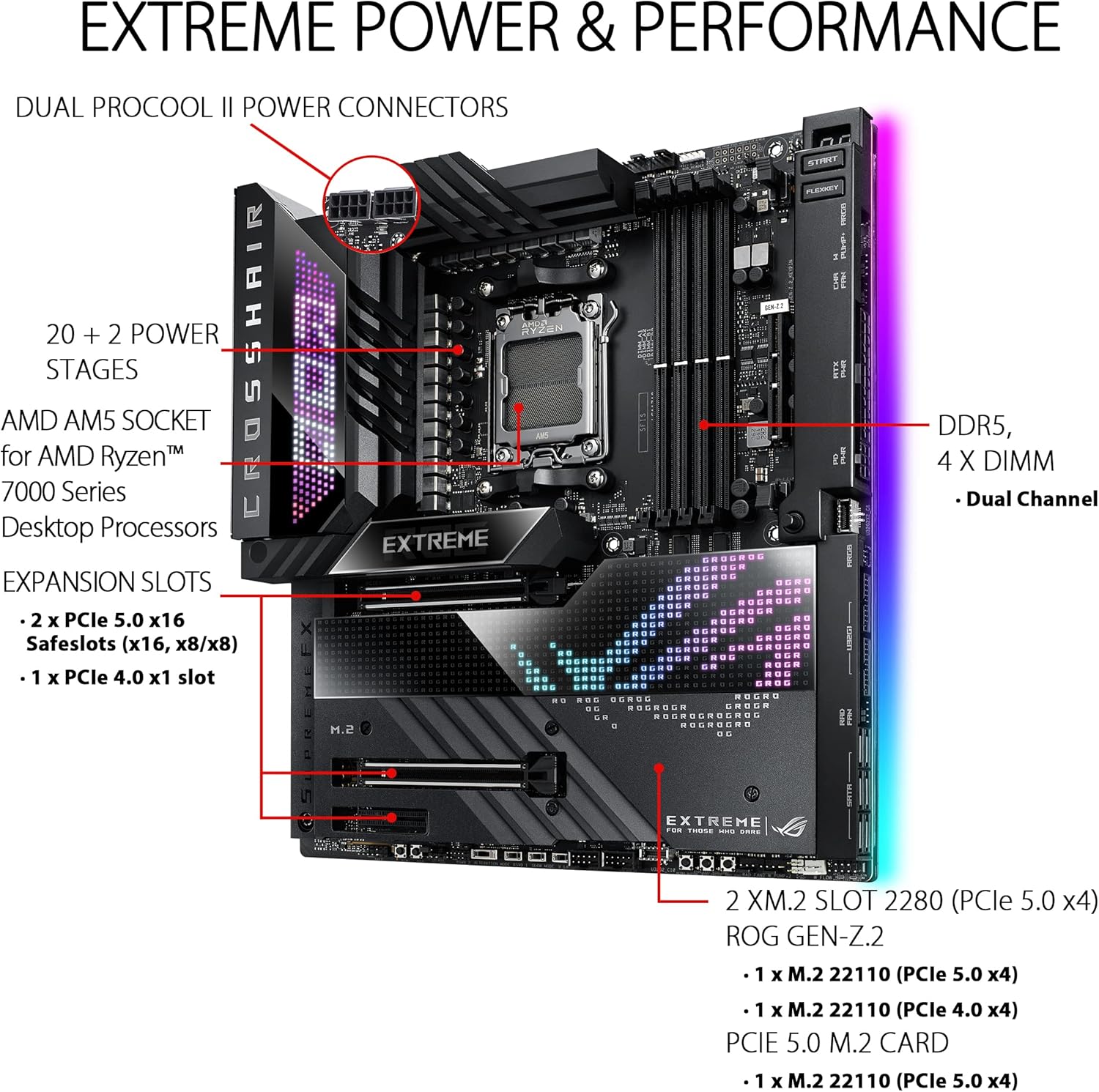
Image: A detailed diagram illustrating the motherboard's key components including the AMD AM5 socket, DDR5 DIMM slots, 20+2 power stages, Dual ProCool II power connectors, and PCIe 5.0 x16 expansion slots.
20+2 സംയുക്ത പവർ സപ്ലൈകളുള്ള ഒരു കരുത്തുറ്റ പവർ സൊല്യൂഷൻ മദർബോർഡിന്റെ സവിശേഷതയാണ്.tages and ProCool II power connectors. It includes four DDR5 DIMM slots for dual-channel memory configuration and multiple PCIe 5.0 x16 Safeslots for graphics cards and other expansion cards.
3. കൂളിംഗ് സിസ്റ്റം ഇന്റഗ്രേഷൻ

ചിത്രം: ഒരു ഡയഗ്രം ഷോasing the comprehensive cooling design, including large VRM heatsinks, integrated aluminum I/O cover, ROG GEN-Z.2, five M.2 heatsinks, dual M.2 with embedded backplates, and the ROG Water-Cooling Zone.
The motherboard incorporates an optimized thermal design with large VRM heatsinks, an integrated aluminum I/O cover, and multiple M.2 heatsinks to ensure stable operation under heavy loads. The ROG Water-Cooling Zone provides dedicated headers for custom liquid cooling setups.
4. ബോക്സിൽ എന്താണുള്ളത്?
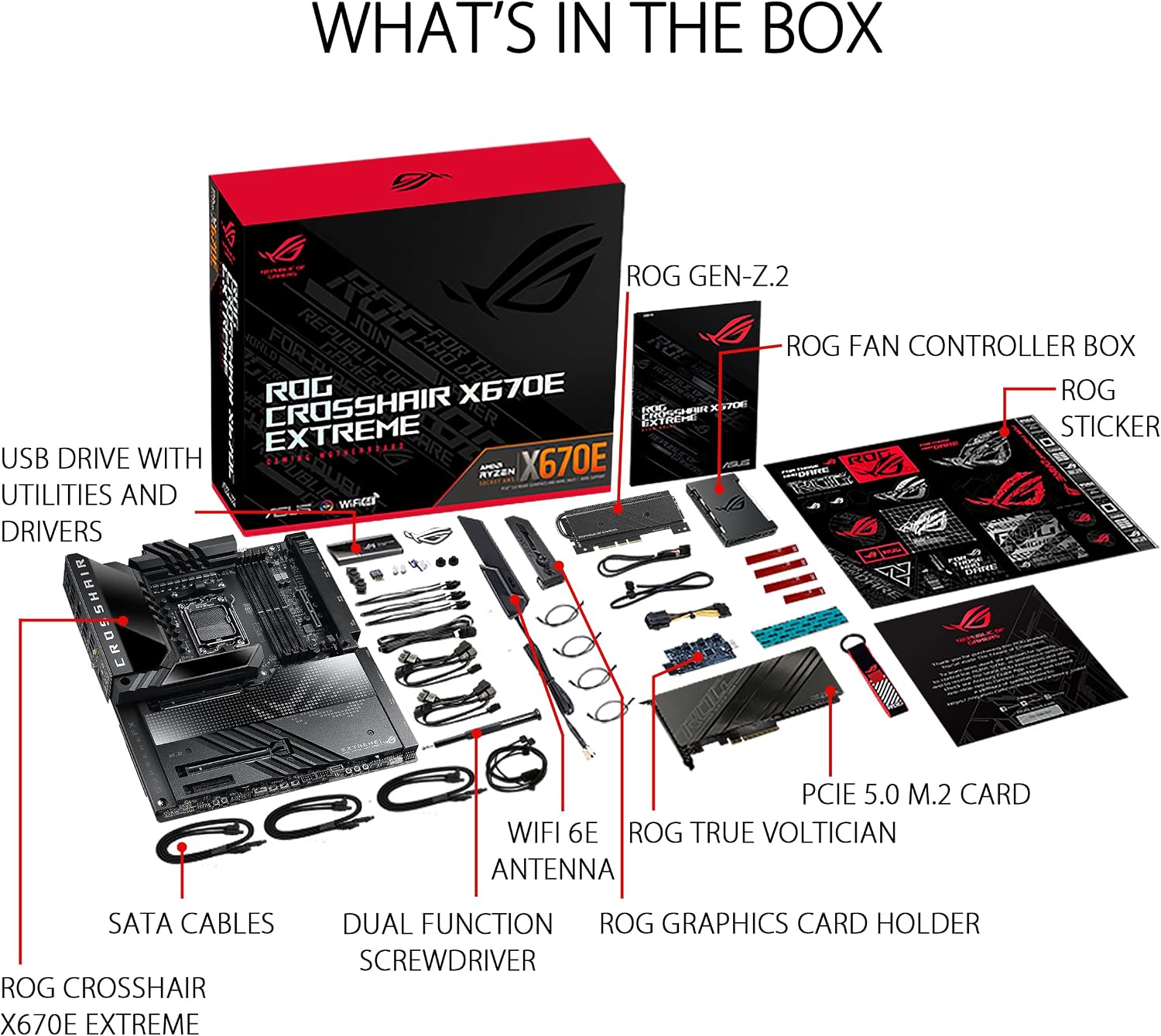
ചിത്രം: പൊട്ടിത്തെറിച്ച ഒരു view of the retail box contents, including the motherboard, ROG GEN-Z.2 card, ROG Fan Controller Box, USB drive with utilities and drivers, SATA cables, WiFi 6E antenna, dual function screwdriver, ROG True Voltician, PCIe 5.0 M.2 card, ROG Graphics Card Holder, and ROG stickers.
The package includes essential accessories for installation and enhanced functionality, such as the ROG GEN-Z.2 card, a USB drive with drivers, SATA cables, a WiFi 6E antenna, and a PCIe 5.0 M.2 card.
പ്രവർത്തന നിർദ്ദേശങ്ങൾ
This section covers the primary features and functionalities of your ASUS ROG Crosshair X670E Extreme motherboard.
1. ഇന്റലിജന്റ് കൺട്രോൾ സവിശേഷതകൾ
- AI കൂളിംഗ് II: Optimizes cooling performance and noise levels.
- AI നെറ്റ്വർക്കിംഗ്: Prioritizes network traffic for gaming and applications.
- ടു-വേ AI നോയ്സ്-റദ്ദാക്കൽ: Enhances audio clarity for communication.
2. കണക്റ്റിവിറ്റി

Image: The rear I/O panel showing various ports including USB 3.2 Gen 2, USB4 Type-C, Marvell AQtion 10Gb Ethernet, Intel 2.5Gb Ethernet, WiFi 6E antenna connectors, optical S/PDIF out, and LED-illuminated audio jacks. Also visible are the BIOS FlashBack and Clear CMOS buttons.
The motherboard offers extensive connectivity options including onboard Wi-Fi 6E, Marvell AQtion 10Gb Ethernet, Intel 2.5Gb Ethernet, multiple USB 3.2 Gen 2 ports, and USB4 Type-C ports for high-speed data transfer and networking.
3. Audio and Aesthetics

ചിത്രം: എ view of the motherboard emphasizing the SupremeFX ALC4082 Audio Codec, ESS ES9218 QUAD DAC, 2-inch LiveDash OLED, Anime Matrix LED, Edge Zone Lighting, and ROG Logo Lighting.
Experience immersive audio with the SupremeFX ALC4082 Audio Codec and ESS ES9218 QUAD DAC. The motherboard also features customizable aesthetics with Anime Matrix LED, a 2-inch LiveDash OLED display, Edge Zone Lighting, and ROG Logo Lighting.
മെയിൻ്റനൻസ്
Regular maintenance helps prolong the lifespan and ensure stable operation of your motherboard.
- പൊടി നീക്കം: മദർബോർഡിലെയും ഹീറ്റ്സിങ്കുകളിലെയും പൊടി ഇടയ്ക്കിടെ കംപ്രസ് ചെയ്ത വായു ഉപയോഗിച്ച് വൃത്തിയാക്കുക. വൃത്തിയാക്കുന്നതിന് മുമ്പ് സിസ്റ്റം ഓഫ് ചെയ്തിട്ടുണ്ടെന്നും പ്ലഗ് ഇൻ ചെയ്തിട്ടുണ്ടെന്നും ഉറപ്പാക്കുക.
- കണക്ഷൻ പരിശോധനകൾ: Verify that all cables (power, data, and peripheral) are securely connected.
- ബയോസ് അപ്ഡേറ്റുകൾ: Keep your BIOS updated to the latest version for improved compatibility, stability, and performance. Refer to the ASUS support webഏറ്റവും പുതിയ ബയോസ് പതിപ്പുകൾക്കും അപ്ഡേറ്റ് നിർദ്ദേശങ്ങൾക്കുമുള്ള സൈറ്റ്.
- സോഫ്റ്റ്വെയർ അപ്ഡേറ്റുകൾ: Ensure all drivers and utility software (e.g., Armoury Crate) are up-to-date.
ട്രബിൾഷൂട്ടിംഗ്
നിങ്ങൾ നേരിട്ടേക്കാവുന്ന പൊതുവായ പ്രശ്നങ്ങളെ ഈ വിഭാഗം അഭിസംബോധന ചെയ്യുകയും പരിഹാരങ്ങൾ നൽകുകയും ചെയ്യുന്നു.
1. System Fails to Boot or POST
- പവർ കണക്ഷനുകൾ പരിശോധിക്കുക: Ensure the 24-pin ATX power connector and 8-pin/4-pin CPU power connectors are firmly seated.
- മെമ്മറി പ്രശ്നങ്ങൾ: Reseat RAM modules. Try booting with only one RAM stick installed in the recommended slot (refer to your motherboard manual for specific slot recommendations).
- CMOS മായ്ക്കുക: ഉപയോഗിക്കുക CMOS ബട്ടൺ മായ്ക്കുക on the rear I/O panel to reset BIOS settings to default. This can resolve boot issues caused by incorrect settings.
- ബയോസ് ഫ്ലാഷ്ബാക്ക്: If the system does not POST after a BIOS update or if you suspect a corrupted BIOS, use the BIOS FlashBack button to update the BIOS without a CPU or RAM installed. Refer to the ASUS webവിശദമായ നിർദ്ദേശങ്ങൾക്കുള്ള സൈറ്റ്.
- ഗ്രാഫിക്സ് കാർഡ്: Ensure the graphics card is properly seated in its PCIe slot and connected to power. If your CPU has integrated graphics, try booting without a dedicated GPU.
2. ഡിസ്പ്ലേ ഔട്ട്പുട്ട് ഇല്ല
- Verify that your monitor is connected to the correct display output on your graphics card or motherboard (if using integrated graphics).
- സാധ്യമെങ്കിൽ മറ്റൊരു ഡിസ്പ്ലേ കേബിൾ അല്ലെങ്കിൽ മോണിറ്റർ ഉപയോഗിച്ച് പരീക്ഷിക്കുക.
3. അമിത ചൂടാക്കൽ പ്രശ്നങ്ങൾ
- Ensure all case fans and CPU cooler fans are functioning correctly.
- Check for proper airflow within the PC case.
- Verify that the CPU cooler is correctly installed and making good contact with the CPU.
- ഹീറ്റ്സിങ്കുകളിൽ നിന്നും ഫാനുകളിൽ നിന്നും പൊടി നീക്കം ചെയ്യുക.
സ്പെസിഫിക്കേഷനുകൾ
| ഫീച്ചർ | വിശദാംശങ്ങൾ |
|---|---|
| ബ്രാൻഡ് | ASUS |
| മോഡലിൻ്റെ പേര് | റോഗ് ക്രോസ്ഷെയർ X670E എക്സ്ട്രീം |
| സിപിയു സോക്കറ്റ് | LGA 1718 |
| അനുയോജ്യമായ പ്രോസസ്സറുകൾ | എഎംഡി റൈസൺ 7000 സീരീസ് ഡെസ്ക്ടോപ്പ് പ്രോസസ്സറുകൾ |
| ചിപ്സെറ്റ് തരം | AMD X670 |
| റാം മെമ്മറി ടെക്നോളജി | DDR5 |
| മെമ്മറി ക്ലോക്ക് സ്പീഡ് | 6400 MHz (OC) വരെ |
| റാം മെമ്മറി പരമാവധി വലുപ്പം | 128 ജിബി |
| ഗ്രാഫിക്സ് കാർഡ് ഇൻ്റർഫേസ് | പിസിഐ എക്സ്പ്രസ് 5.0 |
| Total PCIe Ports | 3 (2 x PCIe 5.0 x16, 1 x PCIe 4.0 x1) |
| M.2 സ്ലോട്ടുകൾ | 5 (including ROG GEN-Z.2 and PCIe 5.0 M.2 card) |
| Total SATA Ports | 6 |
| നെറ്റ്വർക്കിംഗ് | Onboard Wi-Fi 6E, Marvell AQtion 10Gb Ethernet, Intel 2.5Gb Ethernet |
| USB പോർട്ടുകൾ | Multiple USB 3.2 Gen 2, USB4 Type-C, USB 2.0 |
| ഓഡിയോ | SupremeFX ALC4082 Audio Codec, ESS ES9218 QUAD DAC |
| അളവുകൾ (L x W x H) | 12.6"L x 5"W x 14.9"H (EATX Form Factor) |
| ഇനത്തിൻ്റെ ഭാരം | 13.4 പൗണ്ട് |
വാറൻ്റിയും പിന്തുണയും
1. വാറൻ്റി വിവരങ്ങൾ
The ASUS ROG Crosshair X670E Extreme motherboard comes with a 3 വർഷത്തെ വാറൻ്റി. Please retain your proof of purchase for warranty claims. For detailed terms and conditions, refer to the warranty card included with your product or visit the official ASUS support webസൈറ്റ്.
2. സാങ്കേതിക പിന്തുണ
For further assistance, driver downloads, BIOS updates, and troubleshooting guides, please visit the official ASUS support webസൈറ്റ്:
You can also find additional resources and community forums on the Republic of Gamers (ROG) webസൈറ്റ്.
ഔദ്യോഗിക ഉൽപ്പന്ന വീഡിയോകൾ
The following video provides additional information and an overview ഉൽപ്പന്നത്തിൻ്റെ.
വീഡിയോ: ഉൽപ്പന്നം കഴിഞ്ഞുview Video by Amazon Product Imaging. This video provides a general overview of the ASUS ROG Crosshair X670E Extreme motherboard, showcasing അതിന്റെ രൂപകൽപ്പനയും പ്രധാന സവിശേഷതകളും.