
ആമുഖം
The AODELAN WTR-2 is a versatile wireless remote shutter release system designed for Canon EOS cameras. It functions as both a remote shutter release and a programmable timer, offering advanced control over your camera's exposure settings. This manual provides detailed instructions for setting up, operating, and maintaining your WTR-2 system.
The system operates using 2.4 GHz wireless transmission, providing a range of up to 60 meters (196.8 feet). It features an LCD screen for easy programming and monitoring of settings.
പാക്കേജ് ഉള്ളടക്കം
എല്ലാ ഇനങ്ങളും ഉണ്ടെന്ന് ഉറപ്പാക്കാൻ പാക്കേജ് ഉള്ളടക്കങ്ങൾ പരിശോധിക്കുക:
- WTR-2 Transmitter (Remote Control)
- WTR-2 Receiver
- Connecting Cable (C8 type for Canon)
- 2x ലാനിയാർഡുകൾ
- ഇൻസ്ട്രക്ഷൻ മാനുവൽ

Image: The complete package contents of the AODELAN WTR-2 wireless remote shutter release system.
ഉൽപ്പന്നം കഴിഞ്ഞുview
Transmitter (Remote Control)
The transmitter features an LCD display for setting timer functions and viewing current modes. It includes a two-stage shutter release button (half-press for autofocus, full-press for shutter release), mode buttons, and navigation controls.
റിസീവർ
The receiver connects to your camera's remote port and receives signals from the transmitter. It has a hot shoe mount for easy attachment to your camera or a cold shoe mount on a rig.

ചിത്രം: കഴിഞ്ഞുview of the AODELAN WTR-2 Transmitter and Receiver, highlighting key features like timer, time-lapse, bulb mode, 2.4G wireless, and operating range.
സജ്ജമാക്കുക
1. ബാറ്ററി ഇൻസ്റ്റാളേഷൻ
Both the transmitter and receiver require 2x AAA batteries (not included). Open the battery compartment on the back of each unit and insert the batteries, observing the correct polarity.

Image: Battery installation for the WTR-2 Transmitter and Receiver, showing the location for two AAA batteries in each unit.
2. Connecting the Receiver to your Camera
Attach the receiver to your camera's hot shoe or a cold shoe mount. Connect the C8 connecting cable to the receiver's port and then to your Canon camera's remote control terminal. Ensure the connection is secure.

Image: The C8 connecting cable being inserted into the 3-pin remote connection port of a Canon EOS camera.
3. പവർ ചെയ്യുന്നു
Turn on both the transmitter and the receiver using their respective ON/OFF buttons. The receiver's LED will blink red initially, then periodically blink green to indicate it is active and paired.
ഓപ്പറേറ്റിംഗ് മോഡുകൾ
The WTR-2 offers various shooting modes and timer functions. Use the മോഡ് button on the transmitter to cycle through the main shooting modes (S, C, B, 2S) and the ടൈമർ button to access timer settings.
Shutter Release Modes
- S (Single Shot): Takes a single photo with each full press of the shutter button.
- C (Continuous Shooting): Takes multiple photos as long as the shutter button is held down.
- B (Bulb Mode): Keeps the shutter open for as long as the shutter button is pressed, ideal for long exposures.
- 2S (2-Second Delay): Takes a single photo after a 2-second delay.
ടൈമർ പ്രവർത്തനങ്ങൾ
The WTR-2 provides advanced timer settings for precise control over your photography. Press the ടൈമർ button to access these functions. Use the arrow keys to navigate and the സെറ്റ് സ്ഥിരീകരിക്കാനുള്ള ബട്ടൺ.
- DELAY (Self-Timer): Sets a delay before the first exposure. Adjustable in 0.1-second increments.
- LONG (Long Exposure Timer): Sets the duration of the shutter opening for long exposures, especially useful in Bulb mode. Adjustable in 0.1-second increments.
- INTVL (Interval Timer): Sets the time interval between consecutive shots for time-lapse photography. Adjustable in 0.1-second increments.
- N (Number of Exposures): Sets the total number of photos to be taken in a sequence.
- BKLN (Bracketed Exposure): Automatically triggers a sequence of 3, 5, or 7 bracketed exposures for HDR photography.
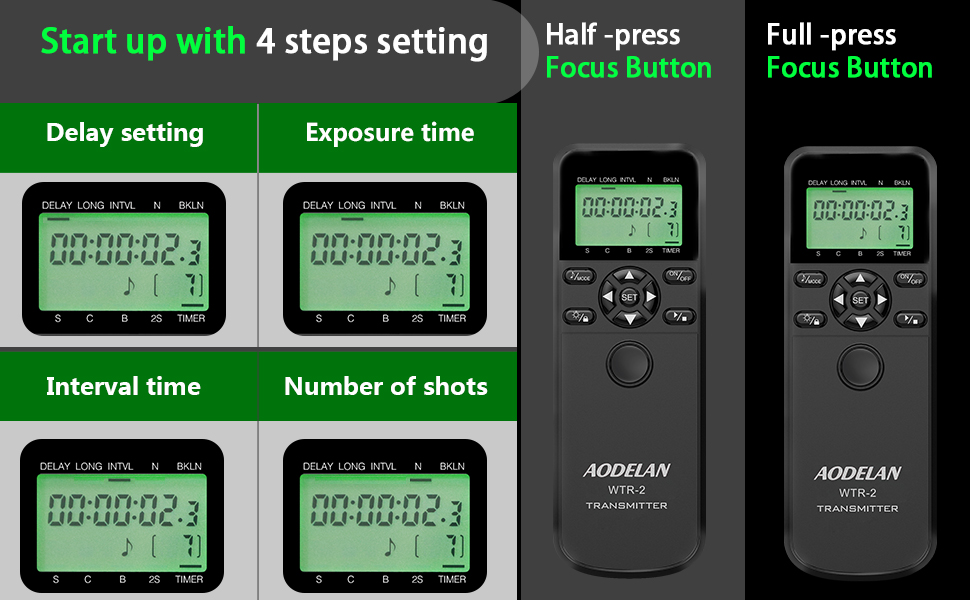
Image: The LCD display of the WTR-2 transmitter showing the settings for Delay, Long Exposure, Interval, and Number of Shots.
Example: Time-Lapse Photography
To set up a time-lapse sequence:
- സജ്ജമാക്കുക കാലതാമസം to your desired initial delay (e.g., 10 seconds).
- സജ്ജമാക്കുക നീണ്ട exposure time (if applicable, otherwise set to 0).
- സജ്ജമാക്കുക ഐ.എൻ.ടി.വി.എൽ (interval) between shots (e.g., 10 seconds).
- സജ്ജമാക്കുക N (number of exposures) (e.g., 120 shots for a 1-hour time-lapse with 30-second intervals).
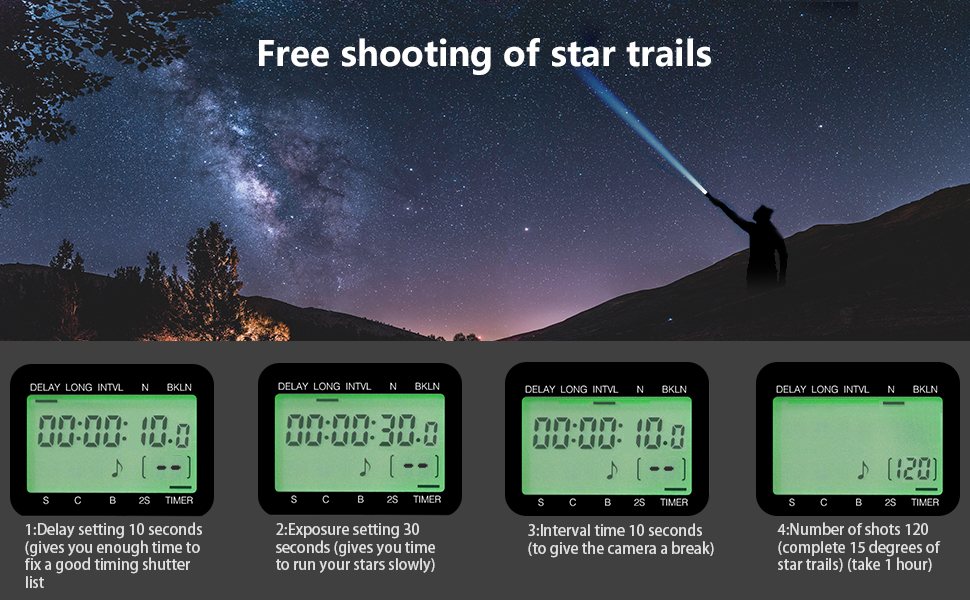
ചിത്രം: ഒരു മുൻ കാമുകൻample of star trail photography, illustrating how the WTR-2's timer functions (Delay, Exposure, Interval, Number of shots) can be configured for complex sequences.
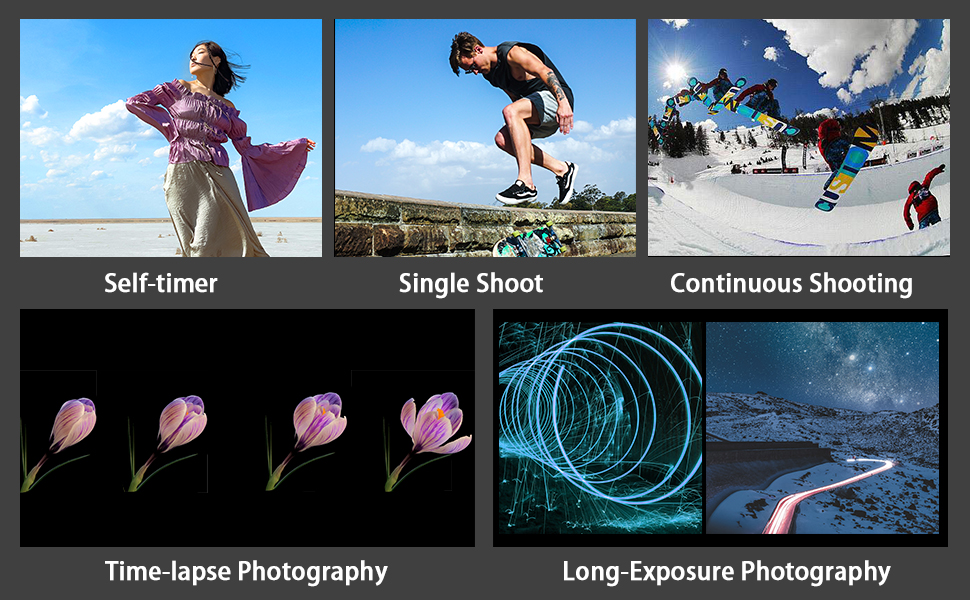
Image: Visual representations of various photography techniques achievable with the WTR-2, including self-timer, single shot, continuous shooting, time-lapse, and long exposure.
മെയിൻ്റനൻസ്
- ഉപകരണം വരണ്ടതായി സൂക്ഷിക്കുക. ഈർപ്പമോ മഴയോ ഏൽക്കരുത്.
- Clean the unit with a soft, dry cloth. Do not use harsh chemicals or abrasive cleaners.
- ഉപകരണം ദീർഘനേരം ഉപയോഗിക്കുന്നില്ലെങ്കിൽ, ചോർച്ച തടയാൻ ബാറ്ററികൾ നീക്കം ചെയ്യുക.
- നേരിട്ടുള്ള സൂര്യപ്രകാശത്തിൽ നിന്ന് തണുത്തതും വരണ്ടതുമായ സ്ഥലത്ത് സൂക്ഷിക്കുക.
ട്രബിൾഷൂട്ടിംഗ്
| പ്രശ്നം | സാധ്യമായ കാരണം / പരിഹാരം |
|---|---|
| ഉപകരണം പവർ ഓണാക്കുന്നില്ല. | ബാറ്ററി ഇൻസ്റ്റാളേഷൻ പരിശോധിച്ച് ബാറ്ററികൾ പുതിയതാണെന്ന് ഉറപ്പാക്കുക. ആവശ്യമെങ്കിൽ മാറ്റിസ്ഥാപിക്കുക. |
| Camera does not respond to shutter release. |
|
| LCD ഡിസ്പ്ലേ മങ്ങിയതോ ശൂന്യമോ ആണ്. | ട്രാൻസ്മിറ്ററിലെ ബാറ്ററികൾ മാറ്റിസ്ഥാപിക്കുക. |
| ടൈമർ ഫംഗ്ഷനുകൾ പ്രതീക്ഷിച്ചതുപോലെ പ്രവർത്തിക്കുന്നില്ല. | Review the timer settings on the transmitter's LCD. Ensure all parameters (Delay, Long, Interval, N) are correctly configured and activated. |
സ്പെസിഫിക്കേഷനുകൾ
| മോഡലിൻ്റെ പേര്: | WTR-2 |
| ബ്രാൻഡ്: | AODELAN |
| കണക്റ്റിവിറ്റി ടെക്നോളജി: | 2.4 GHz വയർലെസ് |
| പരമാവധി ശ്രേണി: | 60 മീറ്റർ (196.8 അടി) |
| അനുയോജ്യമായ ഉപകരണങ്ങൾ: | Canon EOS R3, R5, R5 C, 10D, 6D Mark II, 1D X Mark III, 1D X Mark II, 1D X, 1D C, 1DS Mark III, 1DS Mark II, 1Ds, 1D Mark IV, 1D Mark III, 1D Mark II N, 1D Mark II, 1D, 5D Mark II, 5D Mark III, 5D Mark IV, 5DS, 5DS R, 6D, 7D, 7D Mark II, 50D, 40D, 30D, 20D, D2000, D60, D30, EOS-1V, EOS-3 (C8 type connection) |
| ഊർജ്ജ സ്രോതസ്സ്: | 2x AAA batteries for Transmitter, 2x AAA batteries for Receiver (not included) |
| പ്രത്യേക സവിശേഷത: | Digital LCD Display, Timer Functions (Delay, Long Exposure, Interval, Number of Shots, Bracketed Exposure) |
| ബട്ടണുകളുടെ എണ്ണം: | 3 (main control buttons, plus navigation/set) |
| മാതൃരാജ്യം: | ചൈന |
വാറൻ്റിയും പിന്തുണയും
Specific warranty information is typically provided with your purchase documentation. For product support, technical assistance, or warranty claims, please refer to the contact information provided by your retailer or visit the official AODELAN webസൈറ്റ്.
കൂടുതൽ സഹായത്തിന്, നിങ്ങൾക്ക് ഇത് കൂടി റഫർ ചെയ്യാം AODELAN brand page on Amazon.