
1. ആമുഖം
Thank you for choosing the YULED S1-B 1-Channel Wireless AC Triac Dimmer. This compact dimmer is designed for precise brightness control of single-color LED light sources. It operates on a reliable 2.4GHz wireless frequency and features a convenient Push-DIM function for easy operation. The Triac dimming technology ensures smooth, flicker-free light adjustment. This manual provides essential information for safe installation, operation, and maintenance of your device.
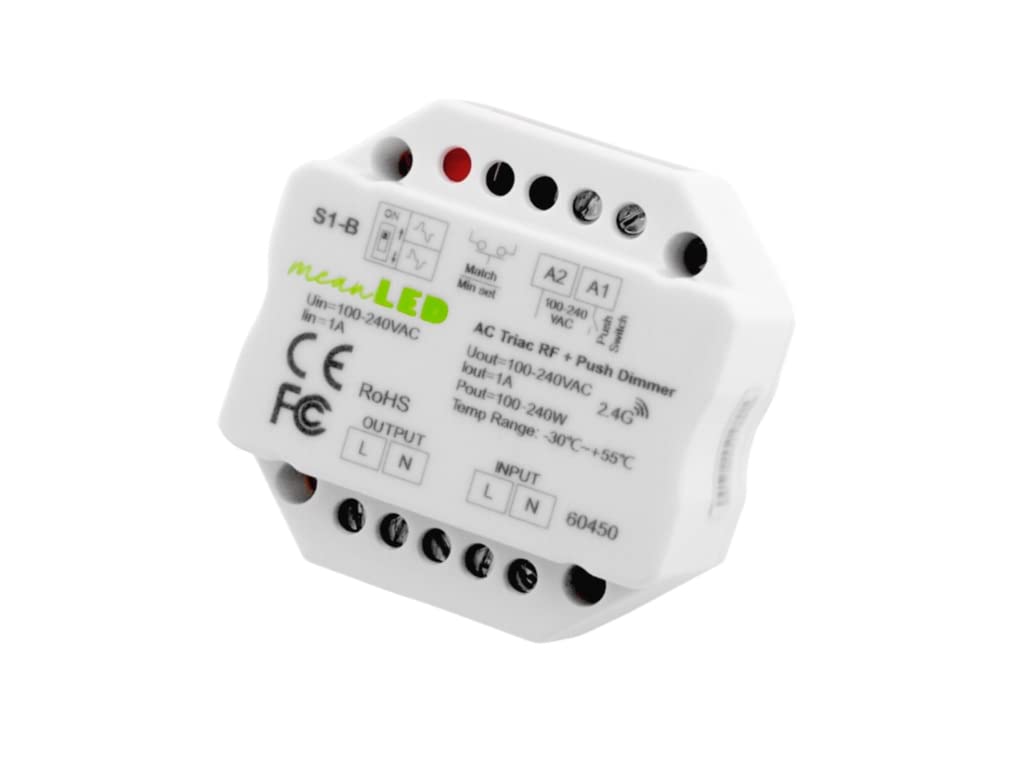
ചിത്രം 1.1: മുൻഭാഗം view of the YULED S1-B 1-Channel Wireless AC Triac Dimmer, showing input/output terminals and control switches.
2 സുരക്ഷാ വിവരങ്ങൾ
Please read this section carefully before installation and use. Failure to follow these instructions may result in electric shock, fire, or other hazards.
- Installation should only be performed by a qualified electrician.
- Ensure the power supply is disconnected before any installation or maintenance work.
- ഈർപ്പം അല്ലെങ്കിൽ അങ്ങേയറ്റത്തെ താപനിലയിലേക്ക് ഉപകരണം തുറന്നുകാട്ടരുത്.
- ഇൻപുട്ട് വോളിയം ആണെന്ന് പരിശോധിക്കുകtage and load current are within the specified limits.
- ഈ ഉപകരണം ഇൻഡോർ ഉപയോഗത്തിനായി മാത്രം രൂപകൽപ്പന ചെയ്തിട്ടുള്ളതാണ്.
- Do not attempt to repair or modify the device yourself. Contact qualified personnel for service.
3. ഉൽപ്പന്നം കഴിഞ്ഞുview
3.1 പ്രധാന സവിശേഷതകൾ
- Compact 1-Channel Dimmer: Specifically designed for single-color light sources, allowing precise brightness control.
- 2.4GHz Wireless Frequency: Ensures stable and secure communication with compatible devices.
- Push-DIM Function: Enables easy on/off switching and brightness adjustment with a simple button press.
- Triac Dimmable: Utilizes Triac dimming technology for smooth, flicker-free dimming without unwanted effects.
- ഉയർന്ന അനുയോജ്യത: Compatible with all meanLED R-series remote controls for seamless integration into existing lighting systems.
3.2 ഘടകങ്ങൾ
The YULED S1-B dimmer features input and output terminals, a match button, and a minimum dimming level adjustment switch.

ചിത്രം 3.1: മുകളിൽ view of the YULED S1-B Dimmer, highlighting the input (L, N) and output (L, N) terminals, Match button, and Min Set switch.

ചിത്രം 3.2: വശം view of the YULED S1-B Dimmer, illustrating the wiring connections for input and output.
4 സ്പെസിഫിക്കേഷനുകൾ
| ഫീച്ചർ | സ്പെസിഫിക്കേഷൻ |
|---|---|
| ബ്രാൻഡ് | YULED |
| മോഡൽ നമ്പർ | S1-B (60450) |
| ഇൻപുട്ട് വോളിയംtage | 100-240V AC |
| Putട്ട്പുട്ട് വോളിയംtage | 100-240V AC |
| ഔട്ട്പുട്ട് കറൻ്റ് | പരമാവധി 1A |
| ഔട്ട്പുട്ട് പവർ | പരമാവധി 240W |
| മങ്ങിയ തരം | Triac (Phase-cut) |
| വയർലെസ് ഫ്രീക്വൻസി | 2.4GHz |
| നിയന്ത്രണ രീതി | RF Wireless, Push-DIM |
| പ്രവർത്തന താപനില | -30°C മുതൽ +55°C വരെ |
| അളവുകൾ (L x W x H) | 5.2 x 5.2 x 2.6 സെ.മീ |
| ഭാരം | 90 ഗ്രാം |
| മൗണ്ടിംഗ് തരം | മതിൽ മൗണ്ട് |
5. ഇൻസ്റ്റലേഷൻ (സജ്ജീകരണം)
പ്രധാനപ്പെട്ടത്: Ensure the main power supply is switched off before commencing any wiring. Incorrect wiring can cause damage to the device or connected lighting.
5.1 വയറിംഗ് ഡയഗ്രം
The S1-B dimmer can be wired in two primary configurations: directly to a dimmable LED light or to a dimmable LED power supply (driver) which then connects to the LED light.

Image 5.1: Wiring diagrams for the S1-B dimmer. The left diagram shows direct connection to a dimmable LED light. The right diagram shows connection to a dimmable LED power supply (driver) which then connects to the LED light. Both diagrams illustrate input (L, N) and output (L, N) connections, as well as connections for external push switches (A1, A2).
5.2 കണക്ഷൻ ഘട്ടങ്ങൾ
- പവർ വിച്ഛേദിക്കുക: Turn off the main power supply at the circuit breaker before starting.
- ഇൻപുട്ട് വയറിംഗ്: Connect the AC power input (Live 'L' and Neutral 'N') to the "INPUT" terminals of the S1-B dimmer.
- ഔട്ട്പുട്ട് വയറിംഗ്: Connect the dimmable LED light or dimmable LED power supply to the "OUTPUT" terminals (Live 'L' and Neutral 'N') of the S1-B dimmer.
- Push Switch (Optional): If using an external push switch for Push-DIM functionality, connect it to the A1 and A2 terminals.
- സുരക്ഷിത കണക്ഷനുകൾ: എല്ലാ വയർ കണക്ഷനുകളും സുരക്ഷിതമാണെന്നും ശരിയായി ഇൻസുലേറ്റ് ചെയ്തിട്ടുണ്ടെന്നും ഉറപ്പാക്കുക.
- പവർ പുന ore സ്ഥാപിക്കുക: Once all connections are verified, restore power to the circuit.
6. ഓപ്പറേഷൻ
6.1 Push-DIM Function
The Push-DIM function allows for basic control using a standard momentary push switch connected to the A1 and A2 terminals.
- ഷോർട്ട് പ്രസ്സ്: A quick press and release of the push switch will turn the light ON or OFF.
- ലോംഗ് പ്രസ്സ്: Press and hold the push switch to gradually increase or decrease the brightness. Release the switch to set the desired brightness level.
6.2 Wireless Control (2.4GHz RF)
The S1-B dimmer can be paired with compatible meanLED R-series 2.4GHz RF remote controls for wireless dimming.
6.2.1 Pairing with a Remote Control
- പവർ സൈക്കിൾ: Turn off the power to the S1-B dimmer.
- പവർ പുന ore സ്ഥാപിക്കുക: പവർ വീണ്ടും ഓണാക്കുക.
- ജോടിയാക്കൽ ആരംഭിക്കുക: Within 5 seconds of restoring power, quickly press the "Match" button on the S1-B dimmer (or the corresponding ON/OFF button on your meanLED R-series remote control) 3 times.
- സ്ഥിരീകരണം: The connected light will flash 3 times to indicate successful pairing.
6.2.2 Unpairing from a Remote Control
- പവർ സൈക്കിൾ: Turn off the power to the S1-B dimmer.
- പവർ പുന ore സ്ഥാപിക്കുക: പവർ വീണ്ടും ഓണാക്കുക.
- Initiate Unpairing: Within 5 seconds of restoring power, quickly press the "Match" button on the S1-B dimmer (or the corresponding ON/OFF button on your meanLED R-series remote control) 5 times.
- സ്ഥിരീകരണം: The connected light will flash 5 times to indicate successful unpairing.
6.3 Minimum Dimming Level Adjustment
The S1-B dimmer includes a "Min Set" switch (often a small potentiometer or switch) to adjust the minimum dimming level. This can help prevent flickering or instability at very low brightness settings, especially with certain types of LED lights.
- ക്രമീകരിക്കുന്നു: Use a small screwdriver to carefully turn the "Min Set" adjustment. Test the dimming range after each adjustment until the desired stable minimum brightness is achieved.
7. പരിപാലനം
The YULED S1-B dimmer requires minimal maintenance.
- വൃത്തിയാക്കൽ: Ensure power is off before cleaning. Wipe the device with a soft, dry cloth. Do not use liquid cleaners or abrasive materials.
- പരിശോധന: വയറിംഗ് കണക്ഷനുകളുടെ ഇറുകിയതയ്ക്കും തേയ്മാനത്തിന്റെയോ കേടുപാടുകളുടെയോ ലക്ഷണങ്ങൾക്കും ഇടയ്ക്കിടെ പരിശോധിക്കുക.
- പരിസ്ഥിതി: Keep the device in a dry environment, away from direct sunlight and heat sources.
8. പ്രശ്നപരിഹാരം
| പ്രശ്നം | സാധ്യമായ കാരണം | പരിഹാരം |
|---|---|---|
| ലൈറ്റ് ഓണാക്കില്ല. | No power supply, incorrect wiring, faulty light source, dimmer not paired. | Check power connections. Verify wiring according to diagram. Test light source. Attempt to re-pair the dimmer with the remote. |
| Light flickers or dims unevenly. | Incompatible light source, minimum dimming level too low, loose connection. | Ensure light source is Triac dimmable. Adjust the "Min Set" switch. Check all wiring connections. |
| റിമോട്ട് കൺട്രോൾ പ്രവർത്തിക്കുന്നില്ല. | Remote not paired, remote battery low, remote out of range. | Re-pair the remote control. Replace remote battery. Ensure remote is within 30m range of the dimmer. |
| Push-DIM function not working. | Incorrect push switch wiring, faulty push switch. | Verify push switch wiring to A1/A2 terminals. Test the push switch for functionality. |
9. Recycling and Disposal Information
This product contains electronic components and should not be disposed of with general household waste. Please follow local regulations for the recycling of electronic waste. Proper disposal helps prevent potential negative consequences for the environment and human health.
പുനരുപയോഗത്തെക്കുറിച്ചുള്ള വിവരങ്ങൾക്ക് lamps and disposal of broken or damaged lamps, please refer to local guidelines or contact your municipal waste management authority.
10. വാറൻ്റിയും പിന്തുണയും
വാറന്റി വിവരങ്ങൾക്കോ സാങ്കേതിക പിന്തുണയ്ക്കോ, ദയവായി നിങ്ങളുടെ റീട്ടെയിലറെയോ നിർമ്മാതാവിനെയോ നേരിട്ട് ബന്ധപ്പെടുക. വാങ്ങിയതിന്റെ തെളിവായി നിങ്ങളുടെ വാങ്ങൽ രസീത് സൂക്ഷിക്കുക.
Manufacturer: YULED