
1. ആമുഖം
This manual provides essential information for the safe and efficient operation of your Brightown PTC-1901 Electric Ceramic Space Heater. Please read all instructions carefully before use and retain this manual for future reference.
2 പ്രധാനപ്പെട്ട സുരക്ഷാ വിവരങ്ങൾ
മുന്നറിയിപ്പ്: തീ, വൈദ്യുതാഘാതം അല്ലെങ്കിൽ പരിക്കുകൾ എന്നിവയ്ക്കുള്ള സാധ്യത കുറയ്ക്കുന്നതിന്, ഇനിപ്പറയുന്ന സുരക്ഷാ മുൻകരുതലുകൾ പാലിക്കുക:
- എല്ലായ്പ്പോഴും ഹീറ്ററുകൾ ഒരു വാൾ ഔട്ട്ലെറ്റിൽ/റെസെപ്റ്റാക്കിളിലേക്ക് നേരിട്ട് പ്ലഗ് ചെയ്യുക. ഒരു എക്സ്റ്റൻഷൻ കോഡ് അല്ലെങ്കിൽ റീലൊക്കേറ്റബിൾ പവർ ടാപ്പ് (ഔട്ട്ലെറ്റ്/പവർ സ്ട്രിപ്പ്) ഉപയോഗിച്ച് ഒരിക്കലും ഉപയോഗിക്കരുത്.
- ഈ ഹീറ്റർ ഉപയോഗിക്കുമ്പോൾ ചൂടായിരിക്കും. പൊള്ളൽ ഒഴിവാക്കാൻ, ചൂടുള്ള പ്രതലങ്ങളിൽ നഗ്നമായ ചർമ്മം തൊടാൻ അനുവദിക്കരുത്. ഈ ഹീറ്റർ ചലിപ്പിക്കുമ്പോൾ ഹാൻഡിലുകൾ ഉപയോഗിക്കുക.
- ഫർണിച്ചറുകൾ, തലയിണകൾ, കിടക്കകൾ, പേപ്പറുകൾ, വസ്ത്രങ്ങൾ, കർട്ടനുകൾ എന്നിവ പോലുള്ള ജ്വലന വസ്തുക്കൾ ഹീറ്ററിൻ്റെ മുൻവശത്ത് നിന്ന് കുറഞ്ഞത് 3 അടി (0.9 മീറ്റർ) അകലെ സൂക്ഷിക്കുക, വശങ്ങളിൽ നിന്നും പിന്നിൽ നിന്നും അകറ്റി നിർത്തുക.
- കുട്ടികൾ അല്ലെങ്കിൽ അസാധുവായവർ അല്ലെങ്കിൽ സമീപത്ത് ഏതെങ്കിലും ഹീറ്റർ ഉപയോഗിക്കുമ്പോൾ, ഹീറ്റർ പ്രവർത്തിക്കുകയും ശ്രദ്ധിക്കാതെ കിടക്കുകയും ചെയ്യുമ്പോഴെല്ലാം അതീവ ജാഗ്രത ആവശ്യമാണ്.
- കേടായ കോർഡ് അല്ലെങ്കിൽ പ്ലഗ് അല്ലെങ്കിൽ ഹീറ്റർ തകരാറുകൾക്ക് ശേഷം, ഏതെങ്കിലും വിധത്തിൽ വീഴുകയോ കേടുപാടുകൾ സംഭവിക്കുകയോ ചെയ്തുകൊണ്ട് ഹീറ്റർ പ്രവർത്തിപ്പിക്കരുത്.
- വെളിയിൽ ഉപയോഗിക്കരുത്.
- ഹീറ്റർ വിച്ഛേദിക്കുന്നതിന്, നിയന്ത്രണങ്ങൾ ഓഫാക്കുക, തുടർന്ന് ഔട്ട്ലെറ്റിൽ നിന്ന് പ്ലഗ് നീക്കം ചെയ്യുക.
- ഏതെങ്കിലും വെൻ്റിലേഷനിലേക്കോ എക്സ്ഹോസ്റ്റ് ഓപ്പണിംഗിലേക്കോ വിദേശ വസ്തുക്കൾ തിരുകുകയോ അനുവദിക്കുകയോ ചെയ്യരുത്, കാരണം ഇത് വൈദ്യുതാഘാതമോ തീയോ ഉണ്ടാക്കുകയോ ഹീറ്ററിന് കേടുപാടുകൾ വരുത്തുകയോ ചെയ്യാം.
- സാധ്യമായ തീപിടിത്തം തടയാൻ, ഒരു തരത്തിലും എയർ ഇൻടേക്ക് അല്ലെങ്കിൽ എക്സ്ഹോസ്റ്റ് തടയരുത്. ഒരു കിടക്ക പോലെ മൃദുവായ പ്രതലങ്ങളിൽ ഉപയോഗിക്കരുത്, അവിടെ തുറസ്സുകൾ തടസ്സപ്പെട്ടേക്കാം.
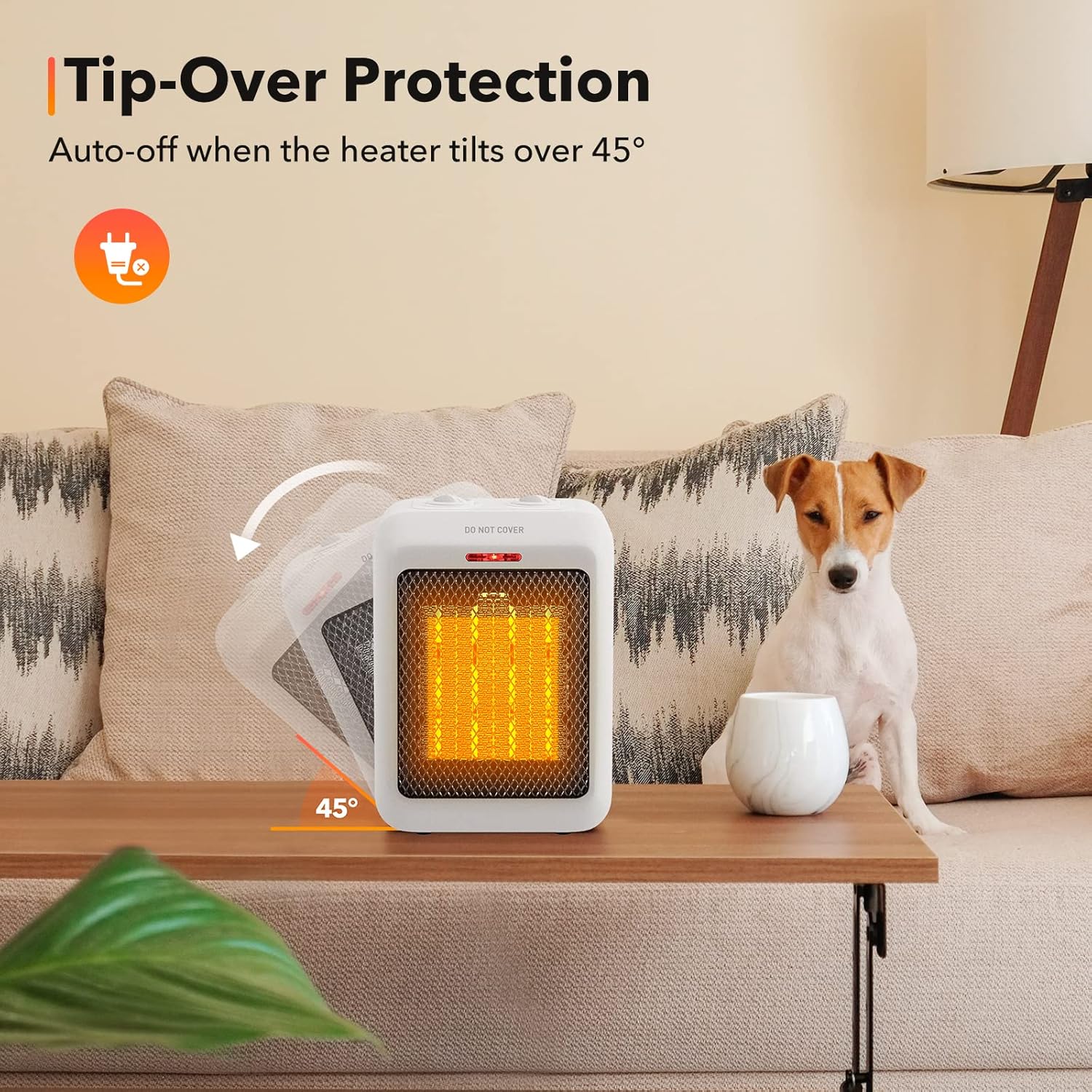
- This heater has an automatic safety shutoff system that will cut off power if the heater overheats. It also features a tip-over protection system that shuts the heater off if it is accidentally knocked over.

3. ഉൽപ്പന്ന സവിശേഷതകൾ
- വേഗത്തിലുള്ള ചൂടാക്കൽ: Equipped with PTC ceramic heating technology and a high-speed fan for rapid heat distribution.
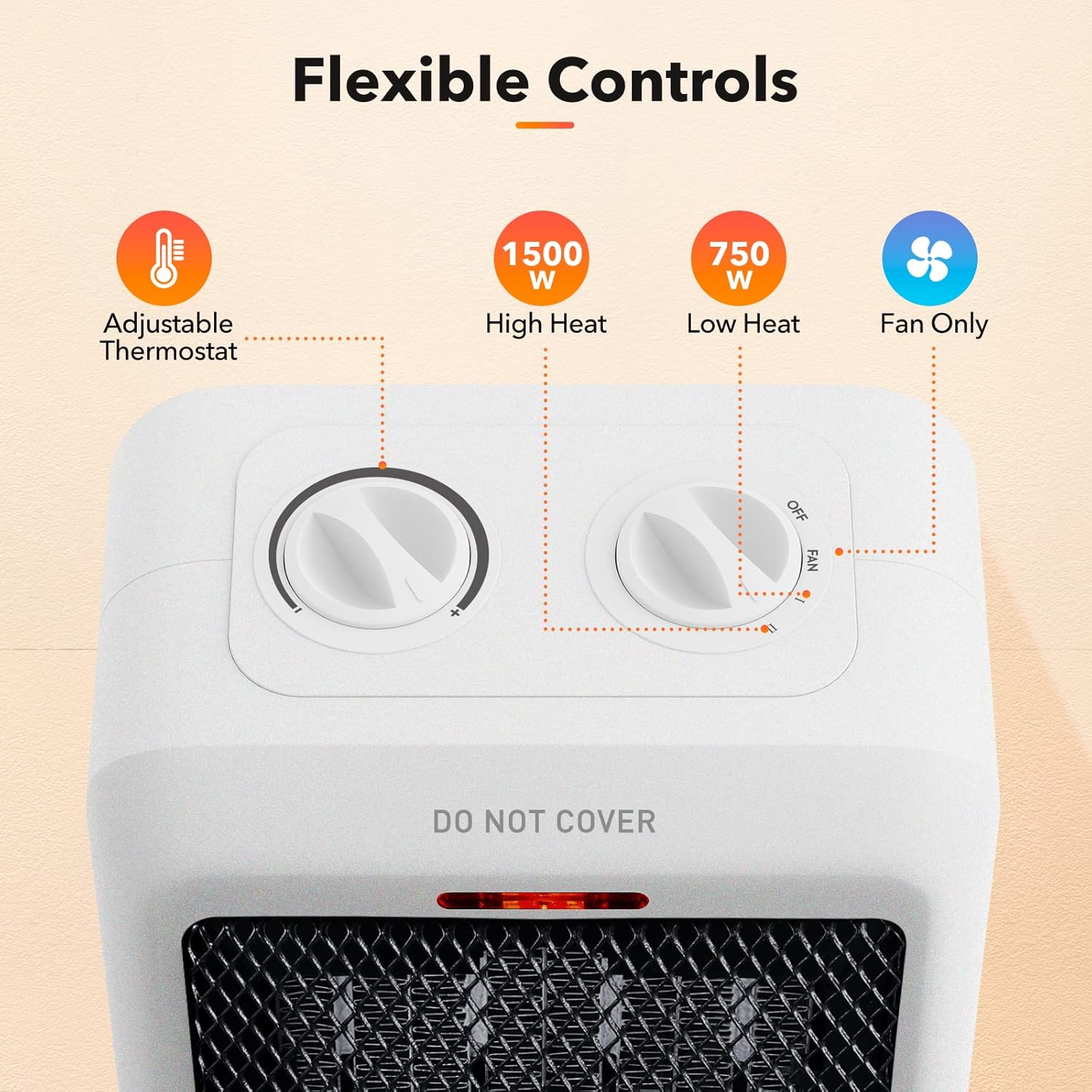
- മൂന്ന് മോഡുകൾ: Offers High Heat (1500W), Low Heat (750W), and Fan Only settings.
- കോംപാക്റ്റ് ഡിസൈൻ: Small and lightweight, ideal for personal spaces like desks, offices, or dorms.
- ബിൽറ്റ്-ഇൻ കാരി ഹാൻഡിൽ: എളുപ്പമുള്ള പോർട്ടബിലിറ്റിക്ക്.
- ഈടുനിൽക്കുന്ന പവർ കോർഡ്: Features a 6-foot long, thick, high-quality rubber insulated cord with a 2-prong connection.


4. സജ്ജീകരണം
- Unpack the heater and all accessories. Retain packaging for storage.
- Place the heater on a firm, level surface. Ensure it is at least 3 feet (0.9 m) away from walls, furniture, and other combustible materials.
- Ensure the power cord is not obstructed or pinched.
- ഹീറ്റർ നേരിട്ട് 120V AC, 60Hz വാൾ ഔട്ട്ലെറ്റിലേക്ക് പ്ലഗ് ചെയ്യുക. എക്സ്റ്റൻഷൻ കോഡുകളോ പവർ സ്ട്രിപ്പുകളോ ഉപയോഗിക്കരുത്.
5. പ്രവർത്തന നിർദ്ദേശങ്ങൾ
Your Brightown PTC-1901 heater features two rotary dials for control:
- Mode Dial (Right Dial): Selects the operating mode.
- Thermostat Dial (Left Dial): ആവശ്യമുള്ള താപനില ക്രമീകരിക്കുന്നു.
5.1 പവർ ഓൺ/ഓഫ്
- To turn on, rotate the Mode Dial from 'OFF' to 'FAN', 'I' (Low Heat), or 'II' (High Heat). The power indicator light will illuminate.
- To turn off, rotate the Mode Dial to 'OFF'. The power indicator light will turn off.
5.2 Selecting Heat Modes
- ഫാൻ: Activates the fan without heat, providing cool air circulation.
- I (Low Heat): Provides 750W of heat, suitable for lightly cold weather or maintaining warmth.
- II (High Heat): Provides 1500W of heat, suitable for quickly warming up a room in cold weather.
5.3 Adjusting Thermostat
- Once a heat mode ('I' or 'II') is selected, use the Thermostat Dial to set your desired room temperature.
- Rotate the dial towards '+' for higher temperatures and towards '-' for lower temperatures.
- സെറ്റ് താപനില നിലനിർത്താൻ ഹീറ്റർ സൈക്കിൾ ഓണും ഓഫും ചെയ്യും.
Video 1: Brightown PTC-1901 Electric Space Heater Overview. This video demonstrates the heater's features, including its compact size, controls, and safety mechanisms.
6. പരിപാലനം
6.1 വൃത്തിയാക്കൽ
- വൃത്തിയാക്കുന്നതിന് മുമ്പ് എല്ലായ്പ്പോഴും ഹീറ്റർ അൺപ്ലഗ് ചെയ്ത് പൂർണ്ണമായും തണുക്കാൻ അനുവദിക്കുക.
- ഒരു സോഫ്റ്റ് ഉപയോഗിക്കുക, ഡിamp ഹീറ്ററിന്റെ പുറംഭാഗങ്ങൾ തുടയ്ക്കാൻ തുണി.
- Do not use cleaning sprays, harsh chemicals, or abrasives.
- Gently vacuum the air intake and exhaust grilles to remove dust and lint.
6.2 സംഭരണം
ഉപയോഗത്തിലില്ലാത്തപ്പോൾ, ഹീറ്റർ തണുത്തതും വരണ്ടതുമായ സ്ഥലത്ത് സൂക്ഷിക്കുക. പൊടിയിൽ നിന്നും കേടുപാടുകളിൽ നിന്നും സംരക്ഷിക്കുന്നതിന് അതിന്റെ യഥാർത്ഥ പാക്കേജിംഗിൽ സൂക്ഷിക്കാൻ ശുപാർശ ചെയ്യുന്നു.
7. പ്രശ്നപരിഹാരം
- Heater does not operate:
- Ensure the power cord is securely plugged into a 120V wall outlet.
- Check if the Mode Dial is set to 'FAN', 'I', or 'II'.
- Verify that the Thermostat Dial is set to a temperature higher than the current room temperature.
- Check the tip-over safety switch on the bottom of the unit. Ensure the heater is on a flat, stable surface and the switch is fully depressed.
- നിങ്ങളുടെ വീട്ടിലെ സർക്യൂട്ട് ബ്രേക്കർ അല്ലെങ്കിൽ ഫ്യൂസ് ബോക്സ് പരിശോധിക്കുക.
- ഹീറ്റർ അപ്രതീക്ഷിതമായി ഓഫാകുന്നു:
- The overheat protection system may have activated. Unplug the heater, allow it to cool for 30 minutes, and ensure air intake/exhaust are not blocked.
- The tip-over protection system may have activated. Ensure the heater is upright on a stable surface.
- Reduced heat output:
- Ensure the air intake and exhaust grilles are clean and free of dust or obstructions.
- Verify the heater is set to the desired heat mode (750W or 1500W).
8 സ്പെസിഫിക്കേഷനുകൾ
| ഫീച്ചർ | സ്പെസിഫിക്കേഷൻ |
|---|---|
| ബ്രാൻഡ് | ബ്രൈടൗൺ |
| മോഡൽ നമ്പർ | PTC-1901 |
| പവർ ഉറവിടം | കോർഡഡ് ഇലക്ട്രിക് |
| പവർ ഔട്ട്പുട്ട് | 1500W / 750W |
| വാല്യംtage | 120V |
| ആവൃത്തി | 60Hz |
| ചൂടാക്കൽ ഘടകം | PTC സെറാമിക് |
| ചൂടാക്കൽ കവറേജ് | 200 ചതുരശ്ര അടി വരെ. |
| ഉൽപ്പന്ന അളവുകൾ | 4"D x 6.3"W x 8.3"H |
| ഇനത്തിൻ്റെ ഭാരം | 2.2 പൗണ്ട് |
| സുരക്ഷാ സവിശേഷതകൾ | Overheat Protection, Tip-Over Protection, Flame Retardant Material |
9. വാറൻ്റിയും പിന്തുണയും
For warranty information or technical support, please refer to the product packaging or contact Brightown customer service directly. Keep your purchase receipt as proof of purchase.


