
Sigma PCC 565
SIGMA PCC 565 Document Shredder User Manual
Model: PCC 565 | Brand: Sigma
1. പ്രധാന സുരക്ഷാ നിർദ്ദേശങ്ങൾ
Please read all instructions carefully before using the SIGMA PCC 565 document shredder. Keep this manual for future reference.
- Always keep the shredder out of reach of children and pets.
- Do not insert fingers, loose clothing, jewelry, or long hair into the paper or media entry slots.
- Unplug the shredder from the power outlet when not in use, before cleaning, or before moving.
- Do not shred metal objects, adhesive labels, or plastic materials other than CDs/DVDs/credit cards as specified.
- Do not open the shredder casing. ഉള്ളിൽ ഉപയോക്തൃ-സേവനയോഗ്യമായ ഭാഗങ്ങളൊന്നുമില്ല. എല്ലാ സേവനങ്ങളും യോഗ്യതയുള്ള സേവന ഉദ്യോഗസ്ഥരെ ഏൽപ്പിക്കുക.
- ഷ്രെഡർ ഒരു സ്ഥിരതയുള്ള, നിരപ്പായ പ്രതലത്തിൽ സ്ഥാപിച്ചിട്ടുണ്ടെന്ന് ഉറപ്പാക്കുക.
- Do not operate the shredder if the power cord or plug is damaged.
2. ഉൽപ്പന്നം കഴിഞ്ഞുview
The SIGMA PCC 565 is a versatile document shredder designed for home or small office use. It features a separate entry for CDs, DVDs, and credit cards, and includes automatic start/stop, overload, and overheat protection.
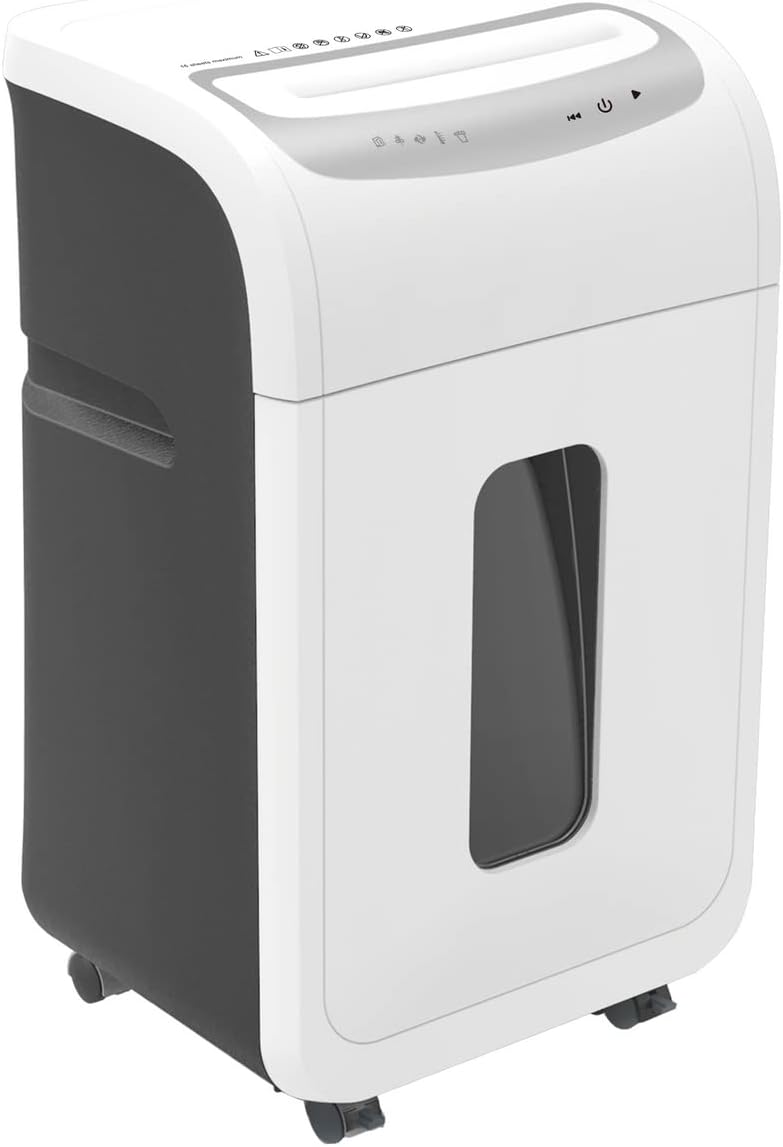
ചിത്രം: മുൻഭാഗം view of the SIGMA PCC 565 Document Shredder. It features a white and dark grey casing, with a transparent window on the front to view the waste bin level. The top panel includes control buttons and paper/media entry slots.
പ്രധാന സവിശേഷതകൾ:
- Shreds up to 16 sheets of 80 gsm paper simultaneously.
- Separate entry for CDs, DVDs, and credit cards.
- Automatic start/stop function.
- Overload protection to prevent paper jams.
- Overheat protection for motor longevity.
- Suitable for DIN A4 documents.
3. സജ്ജീകരണം
3.1 അൺപാക്കിംഗ്
- ഷ്രെഡർ അതിന്റെ പാക്കേജിംഗിൽ നിന്ന് ശ്രദ്ധാപൂർവ്വം നീക്കം ചെയ്യുക.
- Remove any protective materials or plastic bags.
- Ensure all components are present: shredder head, waste bin, and user manual.
3.2 പ്ലേസ്മെൻ്റ്
Place the shredder on a flat, stable surface. Ensure there is sufficient space around the unit for ventilation and to access the power outlet.
3.3 അസംബ്ലി
Carefully place the shredder head onto the top of the waste bin, ensuring it is securely seated. The shredder will not operate if the head is not correctly positioned.
3.4 പവർ കണക്ഷൻ
Plug the power cord into a standard electrical outlet. The shredder is now ready for operation.
4. പ്രവർത്തന നിർദ്ദേശങ്ങൾ
4.1 നിയന്ത്രണങ്ങൾ
The control panel is located on the top of the shredder head. It typically includes:
- Auto (I): The shredder is in standby mode and will automatically start when paper is inserted.
- ഓഫ് (O): The shredder is powered off.
- Reverse (<<): Manually reverses the shredding action to clear paper jams.
4.2 ഷ്രെഡിംഗ് പേപ്പർ
- Ensure the shredder is plugged in and the switch is set to 'Auto' (I).
- Insert up to 16 sheets of 80 gsm paper straight into the paper entry slot. Do not exceed the maximum capacity.
- The shredder will automatically start and shred the paper. Once shredding is complete, it will stop.
4.3 Shredding CDs/DVDs/Credit Cards
- Ensure the shredder is plugged in and the switch is set to 'Auto' (I).
- Insert one CD, DVD, or credit card into the separate media entry slot.
- The shredder will automatically start and shred the media. Once shredding is complete, it will stop.
4.4 ഓവർലോഡ്, ഓവർഹീറ്റ് പ്രൊട്ടക്ഷൻ
- ഓവർലോഡ് സംരക്ഷണം: If too much paper is inserted, the shredder may stop. Remove some sheets and try again. Use the 'Reverse' function if a jam occurs.
- അമിത ചൂടാക്കൽ സംരക്ഷണം: For continuous operation, the shredder may automatically shut off to prevent overheating. If this happens, allow the shredder to cool down for approximately 20-30 minutes before resuming operation.
5. പരിപാലനം
5.1 വേസ്റ്റ് ബിൻ ശൂന്യമാക്കൽ
- പവർ ഔട്ട്ലെറ്റിൽ നിന്ന് ഷ്രെഡർ ഊരിമാറ്റുക.
- മാലിന്യ ബിന്നിൽ നിന്ന് ഷ്രെഡർ ഹെഡ് ശ്രദ്ധാപൂർവ്വം ഉയർത്തുക.
- Empty the shredded material from the bin into a suitable recycling container.
- ഷ്രെഡർ ഹെഡ് വേസ്റ്റ് ബിന്നിൽ സുരക്ഷിതമായി സ്ഥാപിക്കുക.
5.2 വൃത്തിയാക്കലും എണ്ണ തേയ്ക്കലും
Regular cleaning and oiling help maintain shredder performance and extend its lifespan.
- ബാഹ്യ ശുചീകരണം: Unplug the shredder. Wipe the exterior with a soft, damp തുണി. ഉരച്ചിലുകളുള്ള ക്ലീനറുകളോ ലായകങ്ങളോ ഉപയോഗിക്കരുത്.
- ഓയിലിംഗ് ബ്ലേഡുകൾ: For optimal performance, oil the shredder blades regularly (e.g., after every 30 minutes of cumulative shredding or when performance decreases). Use shredder oil sheets or liquid shredder oil applied to a sheet of paper and shred it.
6. പ്രശ്നപരിഹാരം
If you encounter issues with your shredder, refer to the table below for common problems and solutions.
| പ്രശ്നം | സാധ്യമായ കാരണം | പരിഹാരം |
|---|---|---|
| ഷ്രെഡർ ഓണാകുന്നില്ല. | Not plugged in; Power switch off; Shredder head not seated correctly; Overheat protection active. | Ensure power cord is securely plugged in; Set switch to 'Auto' (I); Re-seat shredder head; Allow shredder to cool down for 20-30 minutes. |
| പേപ്പർ ജാം. | Too much paper inserted; Paper inserted crookedly. | Press 'Reverse' (<<) to clear paper. If necessary, unplug, remove shredder head, and carefully remove paper manually. Do not force. |
| പ്രവർത്തന സമയത്ത് ഷ്രെഡർ നിർത്തുന്നു. | Overheat protection active; Waste bin full. | Allow shredder to cool down; Empty the waste bin. |
| Poor shredding performance / Loud noise. | Blades need oiling; Waste bin too full. | Oil the shredder blades as per maintenance instructions; Empty the waste bin. |
7 സ്പെസിഫിക്കേഷനുകൾ
| മോഡൽ | PCC 565 |
| ബ്രാൻഡ് | സിഗ്മ |
| നിറം | വെള്ള |
| ഷ്രെഡ് തരം | Cross-cut (for paper, CDs/DVDs, credit cards) |
| Paper Shred Capacity | 16 ഷീറ്റുകൾ (80 gsm) |
| Media Shred Capacity | 1 CD/DVD or 1 Credit Card |
| പേപ്പർ എൻട്രി വീതി | Compatible with DIN A4 documents |
| Media Entry | Separate slot for CDs/DVDs/Credit Cards |
| അളവുകൾ (ഉയരം) | 60.2 സെ.മീ |
| പവർ ഉറവിടം | ഇലക്ട്രിക് കേബിൾ |
| ഓപ്പറേറ്റിംഗ് മോഡ് | ഓട്ടോമാറ്റിക് |
| സുരക്ഷാ സവിശേഷതകൾ | Overload protection, Overheat protection, Auto-disconnect |
8. വാറൻ്റിയും പിന്തുണയും
For warranty information, please refer to the warranty card included with your product or contact the retailer where you purchased the shredder. For technical support or service inquiries, please contact Sigma customer service or your local distributor.
Please have your model number (PCC 565) and purchase date ready when contacting support.
Ask a question about this manual
Ask about setup, troubleshooting, compatibility, parts, safety, or missing instructions. Manuals+ will review the question and use this page’s manual context to help answer it.