ആമുഖം
Thank you for choosing the Generic BL-602 TWS Wireless Earbuds. This manual provides essential information on how to set up, operate, and maintain your new earbuds. Please read it carefully before use to ensure optimal performance and longevity of your device.

Image: Generic BL-602 TWS Wireless Earbuds resting inside their open white charging case.
സജ്ജമാക്കുക
1. പാക്കേജ് ഉള്ളടക്കം
- BL-602 TWS Wireless Earbuds (Left and Right)
- ചാർജിംഗ് കേസ്
- യുഎസ്ബി ചാർജിംഗ് കേബിൾ
- ഉപയോക്തൃ മാനുവൽ
- Black Protective Case (optional accessory)
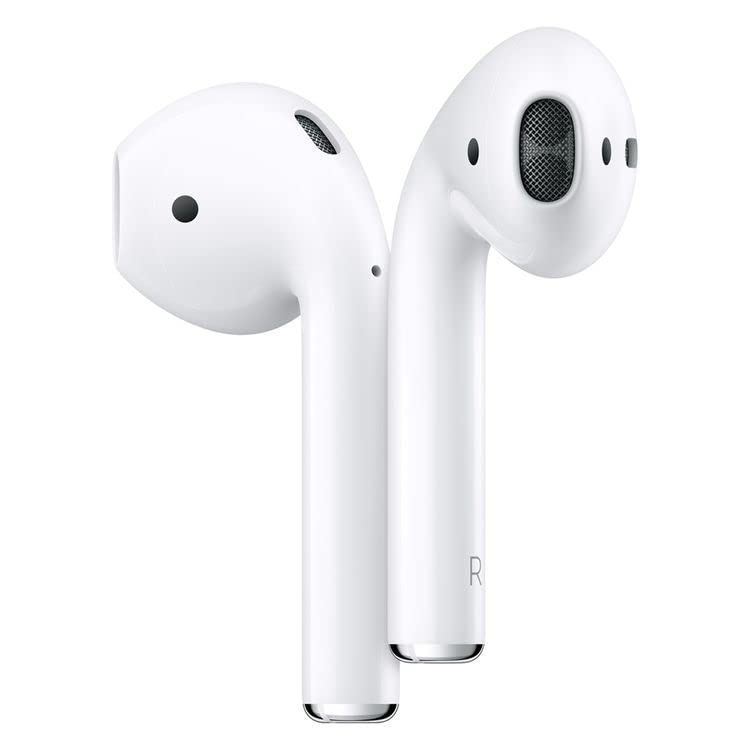
Image: The white charging case with a green indicator light, a black silicone protective case, and a white USB charging cable.
2. പ്രാരംഭ ചാർജിംഗ്
Before first use, fully charge the earbuds and the charging case. Connect the provided USB charging cable to the charging port on the case and a compatible USB power source. The indicator light on the case will show charging status. Once fully charged, the indicator light will change or turn off.
3. നിങ്ങളുടെ ഉപകരണവുമായി ജോടിയാക്കുന്നു
- ഇയർബഡുകൾ ചാർജ് ചെയ്തിട്ടുണ്ടെന്നും ചാർജിംഗ് കെയ്സിനുള്ളിൽ വച്ചിട്ടുണ്ടെന്നും ഉറപ്പാക്കുക.
- ചാർജിംഗ് കെയ്സിന്റെ ലിഡ് തുറക്കുക. ഇയർബഡുകൾ സ്വയമേവ ജോടിയാക്കൽ മോഡിലേക്ക് പ്രവേശിക്കും.
- നിങ്ങളുടെ ഉപകരണത്തിൽ (സ്മാർട്ട്ഫോൺ, ടാബ്ലെറ്റ് മുതലായവ), ബ്ലൂടൂത്ത് പ്രവർത്തനക്ഷമമാക്കുക.
- ഇതിനായി തിരയുക available Bluetooth devices and select "BL-602" from the list.
- കണക്റ്റ് ചെയ്തുകഴിഞ്ഞാൽ, ഒരു സ്ഥിരീകരണ ടോൺ നിങ്ങൾ കേൾക്കും, ഇയർബഡുകൾ ഉപയോഗത്തിന് തയ്യാറാകും.
പ്രവർത്തന നിർദ്ദേശങ്ങൾ
The BL-602 earbuds feature touch controls for easy management of music and calls.
ടച്ച് നിയന്ത്രണ പ്രവർത്തനങ്ങൾ:
- പ്ലേ/താൽക്കാലികമായി നിർത്തുക: ഇയർബഡുകളിൽ ഏതെങ്കിലുമൊന്നിൽ ഒറ്റ ടാപ്പ് ചെയ്യുക.
- അടുത്ത ട്രാക്ക്: വലതുവശത്തെ ഇയർബഡിൽ രണ്ടുതവണ ടാപ്പ് ചെയ്യുക.
- മുമ്പത്തെ ട്രാക്ക്: ഇടതുവശത്തെ ഇയർബഡിൽ രണ്ടുതവണ ടാപ്പ് ചെയ്യുക.
- ഉത്തരം/അവസാന കോൾ: ഇൻകമിംഗ് കോൾ വരുമ്പോൾ ഏത് ഇയർബഡിലും ഒറ്റ ടാപ്പ് ചെയ്യുക.
- കോൾ നിരസിക്കുക: ഇൻകമിംഗ് കോൾ വരുമ്പോൾ ഇയർബഡുകളിൽ ഏതെങ്കിലുമൊന്ന് 2 സെക്കൻഡ് അമർത്തിപ്പിടിക്കുക.
- വോയ്സ് അസിസ്റ്റന്റിനെ സജീവമാക്കുക: ഇയർബഡുകളിൽ ഏതെങ്കിലുമൊന്നിൽ മൂന്ന് തവണ ടാപ്പ് ചെയ്യുക.
- പവർ ഓൺ: Open the charging case lid or press and hold the touch area for 3 seconds if earbuds are out of case and off.
- പവർ ഓഫ്: Place earbuds back into the charging case and close the lid, or press and hold the touch area for 5 seconds.
മെയിൻ്റനൻസ്
വൃത്തിയാക്കൽ
- ഇയർബഡുകളും ചാർജിംഗ് കെയ്സും മൃദുവായതും ഉണങ്ങിയതും ലിന്റ് രഹിതവുമായ തുണി ഉപയോഗിച്ച് പതിവായി വൃത്തിയാക്കുക.
- അബ്രാസീവ് ക്ലീനറുകൾ, ആൽക്കഹോൾ, കെമിക്കൽ ലായകങ്ങൾ എന്നിവ ഉപയോഗിക്കരുത്.
- ഇയർബഡുകളിലെയും കെയ്സിലെയും ചാർജിംഗ് കോൺടാക്റ്റുകൾ വൃത്തിയുള്ളതും അവശിഷ്ടങ്ങൾ ഇല്ലാത്തതുമാണെന്ന് ഉറപ്പാക്കുക.
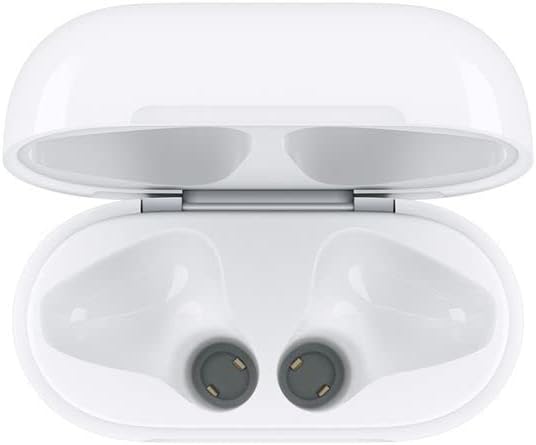
Image: Interior of the charging case, highlighting the charging contacts for the earbuds.
ബാറ്ററി കെയർ
- ബാറ്ററി ഇടയ്ക്കിടെ പൂർണ്ണമായും ഡിസ്ചാർജ് ചെയ്യുന്നത് ഒഴിവാക്കുക.
- ഉപയോഗത്തിലില്ലാത്തപ്പോൾ ഇയർബഡുകളും കെയ്സും തണുത്തതും വരണ്ടതുമായ സ്ഥലത്ത് സൂക്ഷിക്കുക.
- Charge the device at least once every three months if not used regularly to prevent battery degradation.
സംഭരണം
When not in use, store the earbuds in their charging case to protect them from dust, damage, and to keep them charged. The optional black protective case can provide additional protection.
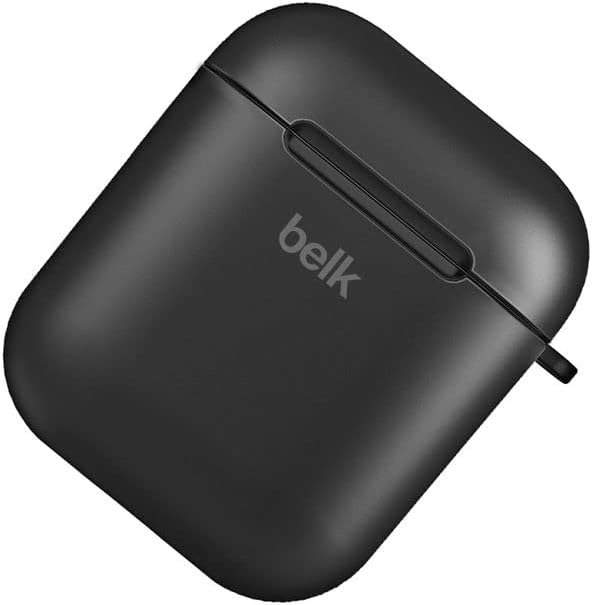
Image: A closed black protective case, designed to hold the earbud charging case.
ട്രബിൾഷൂട്ടിംഗ്
| പ്രശ്നം | സാധ്യമായ പരിഹാരം |
|---|---|
| ഇയർബഡുകൾ ജോടിയാക്കുന്നില്ല |
|
| No sound from one or both earbuds |
|
| ചാർജിംഗ് കേസ് ചാർജുചെയ്യുന്നില്ല |
|
| ഇയർബഡുകൾ ചാർജ് ചെയ്യുന്നില്ല, എന്തെങ്കിലും കാരണത്താൽ |
|
സ്പെസിഫിക്കേഷനുകൾ
- മോഡൽ: BL-602
- ആശയവിനിമയ ശ്രേണി: <10 meters (standard environment)
- ഫ്രീക്വൻസി പ്രതികരണം: 20Hz - 20kHz
- പിന്തുണ പ്രോട്ടോക്കോളുകൾ: HSP/HFP/A2DP/AVRCP
- Earbud Impedance: 32 ഓം
- ഓപ്പറേറ്റിംഗ് വോളിയംtage: 3.1-4.2V
- ശക്തി: 5mW
- ഇയർബഡ് ബാറ്ററി ശേഷി: 45mAh
- ചാർജ്ജ് കേസ് ബാറ്ററി ശേഷി: 400mAh
- മെറ്റീരിയൽ: പ്ലാസ്റ്റിക്
- നിയന്ത്രണ രീതി: സ്പർശിക്കുക
- അനുയോജ്യമായ ഉപകരണങ്ങൾ: Phones, Tablets, Desktop computers, Laptops, Mobile phones, Smart speakers, TVs, Car audio systems, Digital video game consoles
- നിറം: വെള്ള
- ചെവി സ്ഥാപിക്കൽ: ചെവിയിൽ
- കണക്റ്റിവിറ്റി ടെക്നോളജി: വയർലെസ് (ബ്ലൂടൂത്ത്)
- ഉൾപ്പെടുത്തിയ ഘടകങ്ങൾ: യുഎസ്ബി ചാർജിംഗ് കേബിൾ
- പാക്കേജ് അളവുകൾ: 10 x 10 x 10 സെ.മീ; 100 ഗ്രാം
വാറൻ്റി & പിന്തുണ
This product comes with a standard manufacturer's warranty. Please refer to your purchase documentation for specific warranty terms and conditions.
ഉപഭോക്തൃ പിന്തുണ
For any inquiries or support needs, please contact your retailer or the manufacturer's customer service. Most email inquiries are typically answered within 24 hours.

Image: Graphic detailing general service information including delivery, payment, and customer support response times.


