
1. ആമുഖം
This manual provides essential information for the proper assembly, operation, and maintenance of your Whadda WMMI211 Air Quality Monitor. Please read these instructions carefully before using the device to ensure safe and efficient performance. The WMMI211 is designed to measure various environmental parameters including equivalent CO2 (eCO2), total volatile organic compounds (TVOC), barometric pressure, temperature, and humidity.
2 സുരക്ഷാ വിവരങ്ങൾ
- ഉപകരണം വെള്ളത്തിൽ നിന്നും ഉയർന്ന ആർദ്രതയുള്ള അന്തരീക്ഷത്തിൽ നിന്നും അകറ്റി നിർത്തുക.
- ഉപകരണത്തെ ദീർഘനേരം തീവ്രമായ താപനിലയിലോ നേരിട്ടുള്ള സൂര്യപ്രകാശത്തിലോ തുറന്നുകാട്ടരുത്.
- ശക്തമായ ആഘാതങ്ങൾക്ക് ഉപകരണം ഇടുകയോ ഇടുകയോ ചെയ്യുന്നത് ഒഴിവാക്കുക.
- ഉപകരണം തുറക്കാനോ പരിഷ്ക്കരിക്കാനോ ശ്രമിക്കരുത്. എല്ലാ സേവനങ്ങളും യോഗ്യതയുള്ള ഉദ്യോഗസ്ഥർക്ക് റഫർ ചെയ്യുക.
- Use only the specified power adapter or USB cable for power supply.
3. പാക്കേജ് ഉള്ളടക്കം
താഴെ പട്ടികപ്പെടുത്തിയിരിക്കുന്ന എല്ലാ ഘടകങ്ങളും നിങ്ങളുടെ പാക്കേജിൽ ഉണ്ടെന്ന് ഉറപ്പാക്കുക:
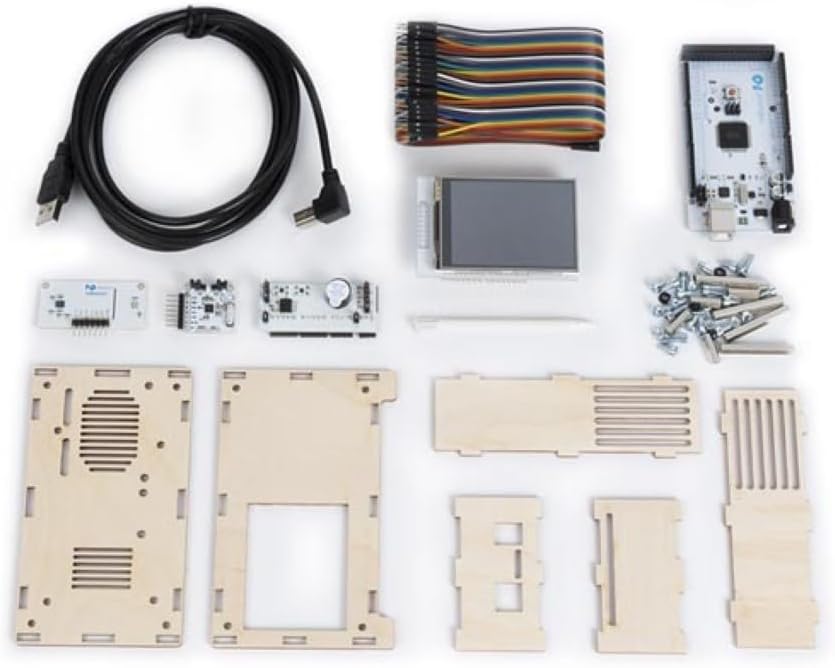
- Main circuit board with display
- Environmental sensor module
- Wooden enclosure panels
- യുഎസ്ബി പവർ കേബിൾ
- Connecting wires/ribbon cable
- Screws and nuts for assembly
- Small screwdriver (if included)

ചിത്രം 3.1: All components of the Whadda WMMI211 Air Quality Monitor kit, including circuit boards, display, wooden panels, cables, and fasteners.
4. സജ്ജീകരണവും അസംബ്ലിയും
The Whadda WMMI211 is provided as a kit requiring assembly. Follow these steps carefully:
- ഘടകങ്ങൾ തയ്യാറാക്കുക: Unpack all components and identify each part as per the package contents list.
- Assemble Enclosure: Carefully interlock the wooden panels to form the main enclosure. Ensure the display opening is correctly oriented.
- Mount Main Board: Secure the main circuit board into the designated slots or standoffs within the enclosure using the provided screws and nuts.
- ഡിസ്പ്ലേ ബന്ധിപ്പിക്കുക: Connect the display module to the main circuit board using the ribbon cable. Ensure the connection is firm and correctly oriented.
- Install Sensor Module: Connect the environmental sensor module to the main board using the appropriate connecting wires. Position the sensor module in its designated area, often with ventilation slots.
- സുരക്ഷിത പാനലുകൾ: Once all internal components are connected, secure the remaining wooden panels, ensuring all screws are tightened gently to avoid damaging the wood.
- പവർ കണക്ഷൻ: Connect the USB power cable to the device's USB port and then to a suitable USB power source (e.g., a computer USB port or a 5V USB power adapter).
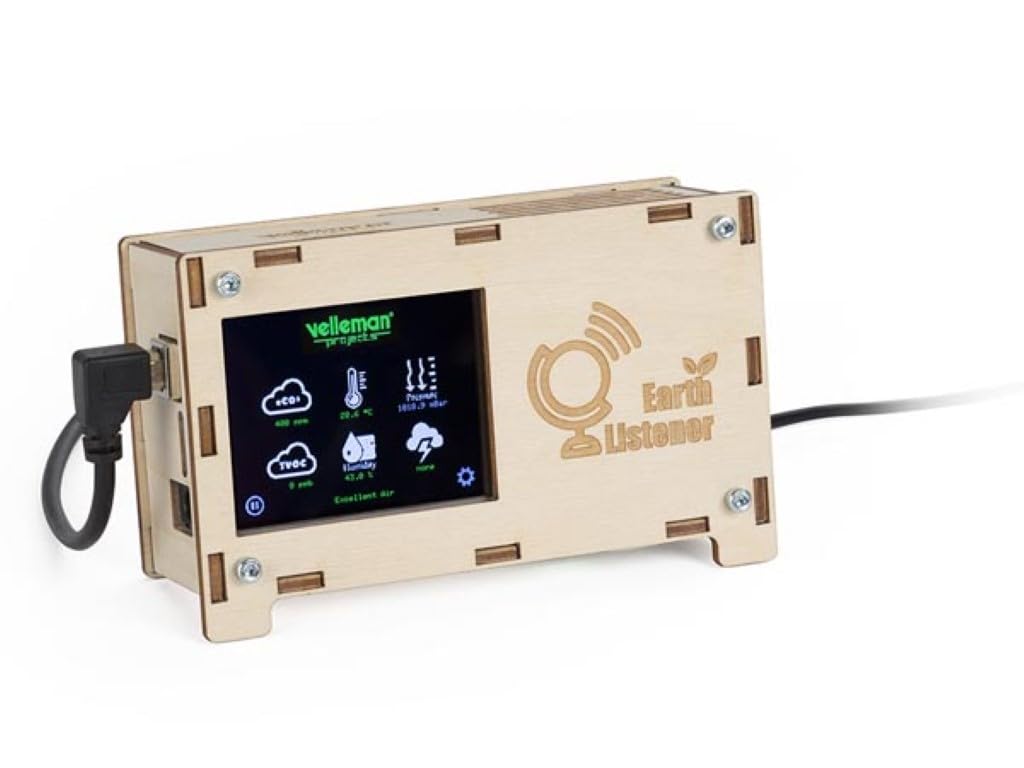
ചിത്രം 4.1: ഫ്രണ്ട് view of the fully assembled Whadda WMMI211 Air Quality Monitor, showing the display and USB power connection.

ചിത്രം 4.2: വശം view of the assembled Whadda WMMI211, highlighting the wooden enclosure and fasteners.
ചിത്രം 4.3: താഴെ view of the assembled Whadda WMMI211, showing ventilation slots for sensor operation.
5. പ്രവർത്തന നിർദ്ദേശങ്ങൾ
Once assembled and powered, the Whadda WMMI211 will automatically begin to display environmental readings.
- പവർ ഓൺ: Connect the USB cable to a power source. The device will power on automatically and the display will illuminate.
- പ്രാരംഭ സന്നാഹം: Allow the device approximately 5-10 minutes for the sensors to stabilize and provide accurate readings.
- ഡിസ്പ്ലേ വായിക്കുന്നു: The display shows various parameters with corresponding icons:
- eCO2: Equivalent Carbon Dioxide levels (in ppm).
- TVOC: Total Volatile Organic Compounds (in ppb).
- താപനില: Ambient temperature (in °C or °F).
- ഈർപ്പം: Relative humidity (in %).
- സമ്മർദ്ദം: Barometric pressure (in hPa or mbar).
- Navigation/Settings: If buttons are present (as indicated by a gear icon on the display), they typically allow you to cycle through display modes, adjust brightness, or access calibration options. Refer to the on-screen prompts for specific functions.
- പവർ ഓഫ്: Disconnect the USB power cable to turn off the device.
6. പരിപാലനം
- വൃത്തിയാക്കൽ: Gently wipe the device's exterior with a soft, dry cloth. Do not use liquid cleaners or abrasive materials. Ensure no dust or debris obstructs the sensor ventilation slots.
- സംഭരണം: ഉപയോഗത്തിലില്ലാത്തപ്പോൾ, ഉപകരണം തണുത്തതും വരണ്ടതുമായ സ്ഥലത്ത് സൂക്ഷിക്കുക, നേരിട്ടുള്ള സൂര്യപ്രകാശത്തിൽ നിന്നും തീവ്രമായ താപനിലയിൽ നിന്നും അകറ്റി നിർത്തുക.
- സെൻസർ കാലിബ്രേഷൻ: The sensors are typically factory-calibrated. If you suspect inaccurate readings, consult the manufacturer's support for potential recalibration procedures.
7. പ്രശ്നപരിഹാരം
| പ്രശ്നം | സാധ്യമായ കാരണം | പരിഹാരം |
|---|---|---|
| ഉപകരണം പവർ ഓണാക്കുന്നില്ല. | വൈദ്യുതി വിതരണമോ തകരാറുള്ള കണക്ഷനോ ഇല്ല. | Check USB cable connection and power source. Try a different USB port or adapter. |
| ഡിസ്പ്ലേ ശൂന്യമാണ് അല്ലെങ്കിൽ പിശകുകൾ കാണിക്കുന്നു. | Loose display cable or software issue. | Ensure display ribbon cable is securely connected. Power cycle the device. |
| Readings appear inaccurate. | Sensor warm-up period not complete, or environmental interference. | Allow 5-10 minutes for sensor stabilization. Ensure device is not near strong air currents, heat sources, or chemical fumes. |
| ഉപകരണം പ്രതികരിക്കുന്നില്ല. | താൽക്കാലിക സോഫ്റ്റ്വെയർ തകരാർ. | Disconnect power for 10 seconds, then reconnect to perform a hard reset. |
8 സ്പെസിഫിക്കേഷനുകൾ
- മോഡൽ നമ്പർ: WMMI211
- നിർമ്മാതാവ്: വദ്ദ
- ഉൽപ്പന്ന അളവുകൾ: 17.78 x 12.7 x 6.35 സെ.മീ
- ഇനത്തിൻ്റെ ഭാരം: 425.24 ഗ്രാം (15 ഔൺസ്)
- പ്രത്യേക സവിശേഷതകൾ: Measures eCO2, TVOC, Barometric Pressure, Temperature, Humidity
- വൈദ്യുതി വിതരണം: USB 5V (via USB cable)
9. വാറൻ്റിയും പിന്തുണയും
For warranty information, technical support, or service inquiries, please refer to the official Whadda webസൈറ്റിൽ ബന്ധപ്പെടുക അല്ലെങ്കിൽ നിങ്ങളുടെ റീട്ടെയിലറെ ബന്ധപ്പെടുക. വാങ്ങിയതിന്റെ തെളിവായി നിങ്ങളുടെ വാങ്ങൽ രസീത് സൂക്ഷിക്കുക.