
ആമുഖം
Thank you for choosing the VIFLYKOO Weather Station. This device provides real-time indoor and outdoor temperature and humidity monitoring, atmospheric pressure readings, and a 12-hour weather forecast. This manual will guide you through the setup, operation, and maintenance of your weather station to ensure optimal performance.
പാക്കേജ് ഉള്ളടക്കം
എല്ലാ ഇനങ്ങളും ഉണ്ടെന്ന് ഉറപ്പാക്കാൻ പാക്കേജ് ഉള്ളടക്കങ്ങൾ പരിശോധിക്കുക:
- 1 x VIFLYKOO Weather Station Main Unit
- 3 x വയർലെസ് റിമോട്ട് സെൻസറുകൾ
- 1 x USB കേബിൾ
- 1 x User Manual (Multi-language)
ഉൽപ്പന്നം കഴിഞ്ഞുview
Familiarize yourself with the main unit's components and controls:

This image shows the rear panel of the VIFLYKOO Weather Station main unit, highlighting key features and controls.
- Table stand hole
- ബാറ്ററി കവർ
- Max/Min reading button
- Resetting and sensor scanning button
- Data/Time setting button
- മതിൽ ഹുക്ക്
- Snooze/Light display button
- Display in °C or °F button
- Display in 12 or 24 hour format button
- അലാറം ക്രമീകരണ ബട്ടൺ
- DC 5V power input socket
സജ്ജമാക്കുക
1. പ്രധാന യൂണിറ്റിന് പവർ നൽകുന്നു
The main weather station unit can be powered by either a USB cable or batteries.

This image illustrates the two power modes for the main unit (USB cable or 3 AAA batteries) and the battery compartment for the outdoor transmitter (2 AA batteries).
- യുഎസ്ബി പവർ: Connect the included USB cable to the DC 5V power input socket (11) on the back of the main unit and plug the other end into a USB power adapter (not included) or a computer USB port.
- ബാറ്ററി പവർ: Open the battery cover (2) and insert 3 AAA batteries (not included) according to the polarity markings. When operating on batteries, the backlight will only illuminate for 8 seconds after pressing the 'Snooze/Light' button.
2. Installing Remote Sensors
Each wireless remote sensor requires 2 AA batteries (not included).
- Open the battery compartment on the back of each remote sensor.
- Insert 2 AA batteries, observing the correct polarity.
- ബാറ്ററി കമ്പാർട്ട്മെൻ്റ് സുരക്ഷിതമായി അടയ്ക്കുക.
3. സെൻസർ പ്ലേസ്മെന്റ്
The remote sensors have a transmission range of up to 100 meters. Choose suitable locations for accurate readings.
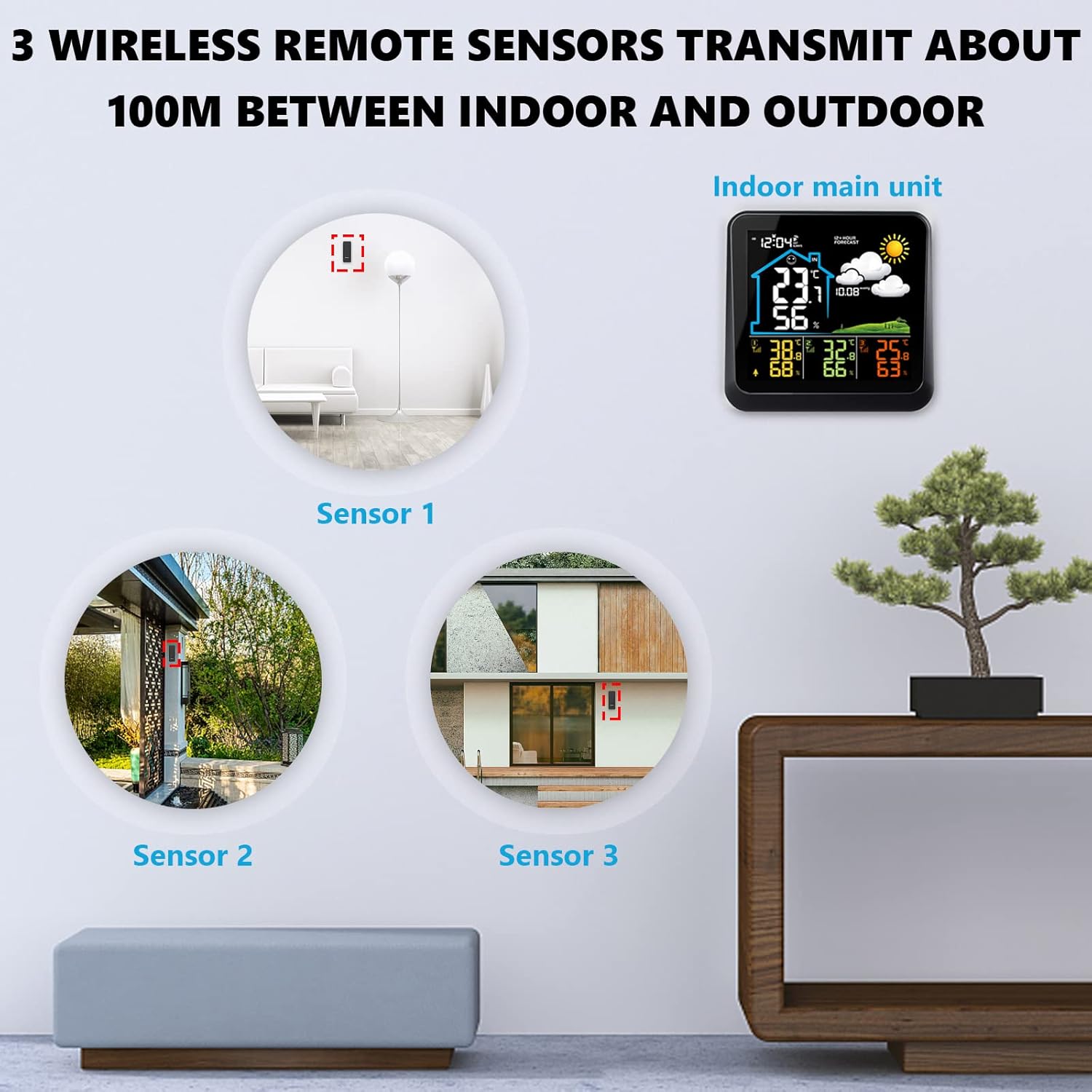
This image demonstrates suitable locations for placing the three wireless remote sensors, such as a baby's room, a wine cellar, or a garden, to monitor temperature and humidity.
- Place sensors in areas where you need to monitor temperature and humidity, such as baby rooms, wine cellars, gardens, or backyards.
- Ensure sensors are protected from direct sunlight and heavy rain for accurate outdoor readings.
- Avoid placing sensors near large metal objects or strong electromagnetic interference sources.
4. Initial Settings (Time, Date, Units)
After powering on, the main unit will automatically search for the remote sensors. Once connected, you can set the time, date, and preferred units.
- Press the 'Data/Time setting' button (5) to enter time setting mode.
- Use the 'Max/Min reading' (3) and 'Resetting and sensor scanning' (4) buttons to adjust values.
- Press 'Data/Time setting' (5) again to confirm and move to the next setting (e.g., year, month, day, 12/24 hour format).
- To switch between Celsius (°C) and Fahrenheit (°F), press the 'Display in °C or °F' button (8).
- To switch between 12-hour and 24-hour time format, press the 'Display in 12 or 24 hour' button (9).
പ്രവർത്തന നിർദ്ദേശങ്ങൾ
1. ഡിസ്പ്ലേ സവിശേഷതകൾ
The color LCD screen displays various information at a glance:
- ഇൻഡോർ/ഔട്ട്ഡോർ താപനിലയും ഈർപ്പവും
- 12 മണിക്കൂർ കാലാവസ്ഥാ പ്രവചനം
- അന്തരീക്ഷമർദ്ദം (hPa)
- സമയവും തീയതിയും
- കംഫർട്ട് ലെവൽ ഇൻഡിക്കേറ്റർ
- ബാറ്ററി സൂചകം
2. അലാറം സജ്ജീകരിക്കൽ
ഒരു അലാറം സജ്ജമാക്കാൻ:
- Press the 'Alarm setting' button (10) to enter alarm setting mode.
- Use the adjustment buttons (3, 4) to set the desired alarm time.
- Press 'Alarm setting' (10) again to confirm.
3. Snooze/Backlight Function
- ബാറ്ററി പ്രവർത്തനം: Press the 'Snooze/Light display' button (7) to illuminate the screen for 8 seconds.
- USB പ്രവർത്തനം: Repeatedly press the 'Snooze/Light display' button (7) to cycle through low brightness, high brightness, or off modes.
- When an alarm sounds, press the 'Snooze/Light display' button (7) to activate the snooze function. The alarm will sound again after a short interval.
4. Max/Min Readings
Press the 'Max/Min reading' button (3) to view the maximum and minimum recorded temperature and humidity values. Press again to cycle through current, maximum, and minimum readings.
5. കാലാവസ്ഥാ പ്രവചനം
The station provides a 12-hour weather forecast based on atmospheric pressure trends. The forecast accuracy is approximately 75%.

This image shows the various weather forecast icons used by the station: Sunny, Freeze, Cloudy, Partly Cloudy, and Rainy.
Forecast icons include: Sunny, Sunny to Cloudy, Cloudy, Rainy, Snowy.
Note: If the weather station is moved, it may take 12 to 24 hours for the atmospheric pressure to adjust and recalculate the forecast.
6. Indoor Comfort Indicator
The display includes a comfort indicator based on indoor humidity levels:

This image displays the main unit's screen, indicating comfort levels: optimal (40-70% RH), high (70-100% RH), and low (0-40% RH).
- ഒപ്റ്റിമൽ: 40-70% Relative Humidity (RH)
- ഉയർന്നത്: 70-100% RH
- താഴ്ന്നത്: 0-40% RH
മെയിൻ്റനൻസ്
1. ബാറ്ററി മാറ്റിസ്ഥാപിക്കൽ
- When the battery indicator appears on the main unit, replace the 3 AAA batteries.
- For remote sensors, replace the 2 AA batteries when their performance degrades.
- എല്ലാ ബാറ്ററികളും ഒരേ സമയം ഒരേ തരത്തിലുള്ള പുതിയവ ഉപയോഗിച്ച് മാറ്റിസ്ഥാപിക്കുക.
2. വൃത്തിയാക്കൽ
പ്രധാന യൂണിറ്റും സെൻസറുകളും ഒരു സോഫ്റ്റ്, ഡി ക്ലീനർ ഉപയോഗിച്ച് തുടയ്ക്കുക.amp തുണി. അബ്രാസീവ് ക്ലീനറുകൾ ഉപയോഗിക്കരുത് അല്ലെങ്കിൽ ഉപകരണങ്ങൾ വെള്ളത്തിൽ മുക്കരുത്.
ട്രബിൾഷൂട്ടിംഗ്
| പ്രശ്നം | സാധ്യമായ കാരണം | പരിഹാരം |
|---|---|---|
| പ്രധാന യൂണിറ്റിൽ ഡിസ്പ്ലേ ഇല്ല. | പവർ ഇല്ല അല്ലെങ്കിൽ ബാറ്ററികൾ കുറവാണ്. | Connect USB power or replace AAA batteries. |
| Remote sensor not connecting / Incorrect outdoor readings | Sensor batteries low or dead; sensor out of range; interference. | Replace AA batteries in sensor. Move sensor closer to main unit. Avoid obstacles. Press 'Resetting and sensor scanning' button (4) on main unit to re-scan. |
| Display shows 'LL.L' or 'HH.H' | Temperature or humidity is outside the measurable range. | This indicates the reading is below the minimum ('LL.L') or above the maximum ('HH.H') operating range. The device is functioning as expected under extreme conditions. |
| കൃത്യമല്ലാത്ത കാലാവസ്ഥാ പ്രവചനം | Station recently moved; forecast is an estimation. | Allow 12-24 hours for the station to recalibrate after moving. Forecasts are based on atmospheric pressure trends and are not 100% accurate. |
സ്പെസിഫിക്കേഷനുകൾ

This image provides the physical dimensions of the main weather station unit (14.5cm x 14cm) and the remote sensor (10cm x 3.8cm).
| ഫീച്ചർ | വിശദാംശങ്ങൾ |
|---|---|
| ബ്രാൻഡ് | VIFLYKOO |
| മോഡൽ നമ്പർ | 3 സെൻസർ |
| ഡിസ്പ്ലേ തരം | കളർ എൽസിഡി |
| കണക്റ്റിവിറ്റി ടെക്നോളജി | വയർലെസ്, യുഎസ്ബി |
| പവർ സോഴ്സ് (മെയിൻ യൂണിറ്റ്) | USB cable (included) or 3 x AAA batteries (not included) |
| Power Source (Remote Sensors) | ഓരോ സെൻസറിനും 2 x AA ബാറ്ററികൾ (ഉൾപ്പെടുത്തിയിട്ടില്ല) |
| ഇൻഡോർ താപനില ശ്രേണി | 0 ° C മുതൽ +50 ° C വരെ (32 ° F മുതൽ 122 ° F വരെ) |
| Do ട്ട്ഡോർ താപനില ശ്രേണി | -30 °C മുതൽ +60 °C വരെ (-22 °F മുതൽ 140 °F വരെ) |
| ഈർപ്പം പരിധി | 20% മുതൽ 90% വരെ RH |
| വയർലെസ് ട്രാൻസ്മിഷൻ ദൂരം | 100 മീറ്റർ വരെ (തുറന്ന സ്ഥലത്ത്) |
| പ്രത്യേക സവിശേഷതകൾ | 12-hour weather forecast, Max/Min records, Alarm, Snooze, Comfort indicator |
| പ്രധാന യൂണിറ്റ് അളവുകൾ | Approx. 14.5 cm x 14 cm |
| Remote Sensor Dimensions | Approx. 10 cm x 3.8 cm |
വാറൻ്റിയും പിന്തുണയും
ഉൽപ്പന്ന വാറന്റി, ഉപഭോക്തൃ പിന്തുണ എന്നിവയെക്കുറിച്ചുള്ള വിവരങ്ങൾ സാധാരണയായി നിങ്ങളുടെ വാങ്ങൽ ഡോക്യുമെന്റേഷനിലോ നിർമ്മാതാവിന്റെ ഔദ്യോഗിക പ്രഖ്യാപനത്തിലോ നൽകും. website. Please refer to those resources for details on warranty coverage, returns, and technical assistance.