
നായകൻ1999
Xdobo Hero Bluetooth Wireless Speaker User Manual
മോഡൽ: Hero1999
1. ആമുഖം
Thank you for choosing the Xdobo Hero Bluetooth Wireless Speaker. This manual provides essential information for the safe and optimal use of your device. The Xdobo Hero is a powerful 50W portable speaker featuring a super loud subwoofer bass sound, True Wireless Stereo (TWS) functionality, a 6600mAh battery with power bank capability, and IPX7 waterproof rating, making it suitable for various indoor and outdoor environments.
2 സുരക്ഷാ വിവരങ്ങൾ
ഈ ഉൽപ്പന്നം ഉപയോഗിക്കുന്നതിന് മുമ്പ് ദയവായി എല്ലാ സുരക്ഷാ നിർദ്ദേശങ്ങളും വായിച്ച് മനസ്സിലാക്കുക. ഭാവിയിലെ റഫറൻസിനായി ഈ മാനുവൽ സൂക്ഷിക്കുക.
- സ്പീക്കറിനെ തീവ്രമായ താപനിലയിലോ, നേരിട്ടുള്ള സൂര്യപ്രകാശത്തിലോ, ഉയർന്ന ആർദ്രതയിലോ തുറന്നുകാട്ടരുത്.
- While the speaker is IPX7 waterproof, it is designed to withstand immersion in water up to 1 meter for 30 minutes. Do not submerge it for extended periods or in depths greater than 1 meter. Ensure all port covers are securely closed before exposure to water.
- സ്പീക്കർ ഡിസ്അസംബ്ലിംഗ് ചെയ്യുകയോ നന്നാക്കുകയോ പരിഷ്കരിക്കുകയോ ചെയ്യരുത്. ഇത് വാറന്റി അസാധുവാക്കുകയും സുരക്ഷാ അപകടങ്ങൾ ഉണ്ടാക്കുകയും ചെയ്തേക്കാം.
- ചാർജ് ചെയ്യുന്നതിന് നൽകിയിരിക്കുന്ന ചാർജിംഗ് കേബിളോ സാക്ഷ്യപ്പെടുത്തിയ ടൈപ്പ്-സി കേബിളോ മാത്രം ഉപയോഗിക്കുക.
- സ്പീക്കറിന്റെ കാന്തിക ഘടകങ്ങൾ തടസ്സപ്പെട്ടേക്കാം എന്നതിനാൽ അത് മെഡിക്കൽ ഉപകരണങ്ങളിൽ നിന്ന് അകറ്റി നിർത്തുക.
- പ്രാദേശിക നിയന്ത്രണങ്ങൾ അനുസരിച്ച് ഉൽപ്പന്നവും അതിന്റെ ബാറ്ററിയും ഉത്തരവാദിത്തത്തോടെ നിർമാർജനം ചെയ്യുക.
- Avoid listening at high volume levels for prolonged periods to prevent hearing damage.
3. പാക്കേജ് ഉള്ളടക്കം
പാക്കേജിൽ എല്ലാ ഇനങ്ങളും ഉണ്ടെന്ന് ഉറപ്പാക്കുക:
- Xdobo Hero Bluetooth Wireless Speaker
- ടൈപ്പ്-സി യുഎസ്ബി ചാർജിംഗ് കേബിൾ
- AUX ഓഡിയോ കേബിൾ
- ഉപയോക്തൃ മാനുവൽ (ഈ പ്രമാണം)
4. ഉൽപ്പന്നം കഴിഞ്ഞുview
സ്പീക്കറിന്റെ ഘടകങ്ങളും നിയന്ത്രണങ്ങളും സ്വയം പരിചയപ്പെടുത്തുക.

ചിത്രം 4.1: മുൻഭാഗം view of the Xdobo Hero speaker, highlighting the control buttons and speaker grille.

ചിത്രം 4.2: ക്ലോസപ്പ് view of the Xdobo Hero's connection options, including the AUX port, TF Card slot, USB port, and Type-C charging port.
നിയന്ത്രണ പാനൽ പ്രവർത്തനങ്ങൾ:
- പവർ ബട്ടൺ (⏻): Press and hold to power on/off. Short press to play/pause.
- വോളിയം താഴേക്ക് (-): വോളിയം കുറയ്ക്കാൻ ചെറുതായി അമർത്തുക. മുമ്പത്തെ ട്രാക്കിനായി ദീർഘനേരം അമർത്തുക.
- വോളിയം കൂട്ടുക (+): വോളിയം കൂട്ടാൻ ഷോർട്ട് പ്രസ്സ് ചെയ്യുക. അടുത്ത ട്രാക്കിനായി ദീർഘനേരം അമർത്തുക.
- മോഡ് ബട്ടൺ (എം): Short press to switch between Bluetooth, AUX, USB Disk, and TF Card modes.
- പ്ലേ/താൽക്കാലിക ബട്ടൺ (⏸ ⏸ മിനിമലിസ്റ്റ്): പ്ലേ/താൽക്കാലികമായി നിർത്താൻ ഹ്രസ്വമായി അമർത്തുക.
- ബ്ലൂടൂത്ത് ഇൻഡിക്കേറ്റർ ലൈറ്റ്: Indicates Bluetooth status (flashing for pairing, solid for connected).
തുറമുഖങ്ങൾ:
- ടൈപ്പ്-സി ചാർജിംഗ് പോർട്ട്: സ്പീക്കറിന്റെ ആന്തരിക ബാറ്ററി ചാർജ് ചെയ്യുന്നതിന്.
- USB പോർട്ട്: For playing music from a USB flash drive or for power bank function.
- ഓക്സ് പോർട്ട്: For connecting external audio devices via the 3.5mm audio cable.
- ടിഎഫ് കാർഡ് സ്ലോട്ട്: For playing music from a Micro SD (TF) card.
5. സജ്ജീകരണം
5.1 സ്പീക്കർ ചാർജ് ചെയ്യുന്നു
Before first use, fully charge the speaker. The charging time is approximately 2-3 hours.
- Open the rubber cover protecting the ports.
- Connect the Type-C end of the charging cable to the speaker's Type-C port.
- ചാർജിംഗ് കേബിളിന്റെ USB-A അറ്റം ഒരു USB പവർ അഡാപ്റ്ററുമായി (ഉൾപ്പെടുത്തിയിട്ടില്ല) അല്ലെങ്കിൽ ഒരു കമ്പ്യൂട്ടറിന്റെ USB പോർട്ടുമായി ബന്ധിപ്പിക്കുക.
- ചാർജ് ചെയ്യുമ്പോൾ ചാർജിംഗ് ഇൻഡിക്കേറ്റർ ലൈറ്റ് പ്രകാശിക്കുകയും പൂർണ്ണമായി ചാർജ് ചെയ്യുമ്പോൾ ഓഫാകുകയും ചെയ്യും.
5.2 പവർ ഓൺ/ഓഫ്
- പവർ ഓൺ: പവർ ബട്ടൺ അമർത്തിപ്പിടിക്കുക (⏻) 2-3 സെക്കൻഡ് നേരത്തേക്ക് കേൾക്കാവുന്ന ഒരു പ്രോംപ്റ്റ് കേൾക്കുന്നത് വരെ.
- പവർ ഓഫ്: പവർ ബട്ടൺ അമർത്തിപ്പിടിക്കുക (⏻) 2-3 സെക്കൻഡ് നേരത്തേക്ക് കേൾക്കാവുന്ന ഒരു പ്രോംപ്റ്റ് കേൾക്കുന്നത് വരെ.
6. പ്രവർത്തന നിർദ്ദേശങ്ങൾ
6.1 ബ്ലൂടൂത്ത് ജോടിയാക്കൽ
Connect your Xdobo Hero speaker to a Bluetooth-enabled device.
- Power on the speaker. It will automatically enter Bluetooth pairing mode, indicated by a flashing blue LED light.
- നിങ്ങളുടെ ഉപകരണത്തിൽ ബ്ലൂടൂത്ത് പ്രവർത്തനക്ഷമമാക്കുക (സ്മാർട്ട്ഫോൺ, ടാബ്ലെറ്റ്, കമ്പ്യൂട്ടർ).
- ഇതിനായി തിരയുക "Xdobo Hero" in the list of available Bluetooth devices.
- Select "Xdobo Hero" to connect. Once connected, the blue LED light will become solid, and you will hear a confirmation sound.
- പാസ്വേഡ് ആവശ്യപ്പെടുകയാണെങ്കിൽ, "0000" എന്ന് നൽകുക.
6.2 ട്രൂ വയർലെസ് സ്റ്റീരിയോ (TWS) ഫംഗ്ഷൻ
Pair two Xdobo Hero speakers for a stereo sound experience.
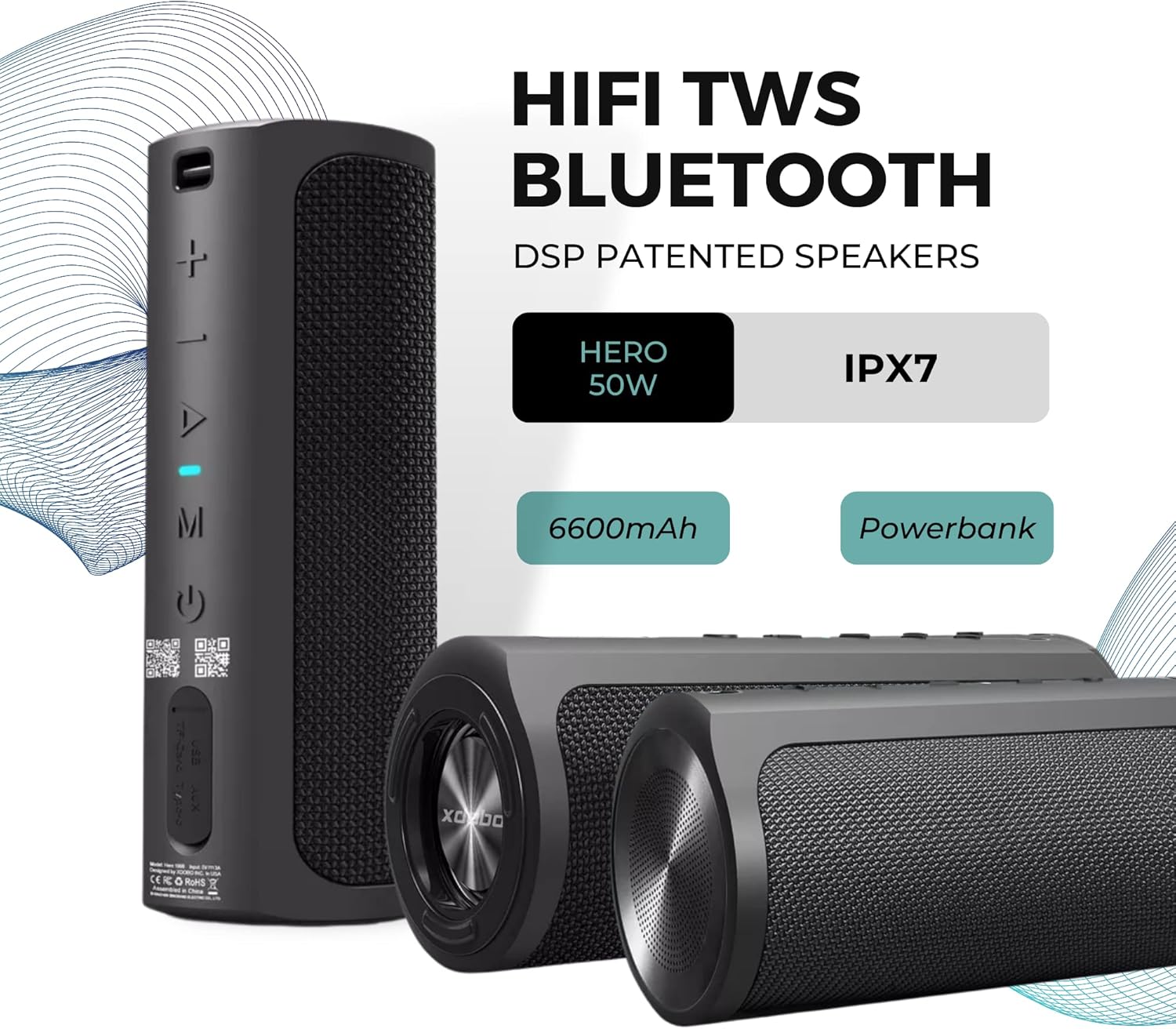
Figure 6.1: Two Xdobo Hero speakers ready for True Wireless Stereo (TWS) pairing.
- Ensure both Xdobo Hero speakers are powered on and not connected to any Bluetooth device.
- സ്പീക്കറുകളിലൊന്നിൽ (ഇത് പ്രാഥമിക സ്പീക്കറായിരിക്കും), പവർ ബട്ടൺ രണ്ടുതവണ അമർത്തുക. TWS പെയറിംഗ് മോഡ് സൂചിപ്പിക്കുന്ന ഒരു നിർദ്ദേശം നിങ്ങൾ കേൾക്കും.
- The two speakers will automatically search and pair with each other. Once connected, you will hear a confirmation sound, and the LED on the primary speaker will flash, while the secondary speaker's LED will be solid.
- ഇപ്പോൾ, വിഭാഗം 6.1-ൽ വിവരിച്ചിരിക്കുന്നതുപോലെ ബ്ലൂടൂത്ത് വഴി നിങ്ങളുടെ ഉപകരണം പ്രാഥമിക സ്പീക്കറുമായി ബന്ധിപ്പിക്കുക.
6.3 AUX മോഡ്
Use the speaker with devices that do not have Bluetooth capability.
- Connect one end of the 3.5mm AUX audio cable to the speaker's AUX port.
- മറ്റേ അറ്റം നിങ്ങളുടെ ഉപകരണത്തിന്റെ ഓഡിയോ ഔട്ട്പുട്ട് ജാക്കുമായി ബന്ധിപ്പിക്കുക (ഉദാ. MP3 പ്ലെയർ, കമ്പ്യൂട്ടർ).
- Short press the Mode button (M) on the speaker until it enters AUX mode.
- Audio will now play through the speaker. Control playback from your connected device.
6.4 USB Disk / TF Card Mode
Play music directly from a USB flash drive or TF (Micro SD) card.
- Insert a USB flash drive into the USB port or a TF card into the TF card slot.
- Short press the Mode button (M) on the speaker until it enters USB Disk or TF Card mode.
- The speaker will automatically begin playing audio fileചേർത്ത സംഭരണ ഉപകരണത്തിൽ നിന്നുള്ള s.
- Use the Volume Up/Down buttons for track navigation (long press) and volume control (short press).
6.5 പവർ ബാങ്ക് പ്രവർത്തനം
Use the Xdobo Hero's 6600mAh battery to charge other devices.

Figure 6.2: The Xdobo Hero speaker functioning as a power bank, charging a smartphone via its USB port.
- Connect your device's charging cable (e.g., smartphone, tablet) to the USB port on the Xdobo Hero speaker.
- The speaker will automatically begin charging your connected device.
- Note: Using the power bank function will consume the speaker's battery.
7. പരിപാലനം
- വൃത്തിയാക്കൽ: ഒരു സോഫ്റ്റ് ഉപയോഗിച്ച് സ്പീക്കർ തുടയ്ക്കുക, ഡിamp cloth. Do not use abrasive cleaners or solvents. Ensure port covers are closed when cleaning with a damp തുണി.
- സംഭരണം: Store the speaker in a cool, dry place away from direct sunlight and extreme temperatures. If storing for a long period, charge the battery to about 50% every few months to maintain battery health.
- ജല സംരക്ഷണം: Always ensure the rubber port cover is securely sealed when using the speaker near water or in wet conditions to maintain its IPX7 waterproof rating.
8. പ്രശ്നപരിഹാരം
If you encounter issues with your Xdobo Hero speaker, refer to the following common problems and solutions:
| പ്രശ്നം | സാധ്യമായ കാരണം | പരിഹാരം |
|---|---|---|
| സ്പീക്കർ പവർ ഓൺ ചെയ്യുന്നില്ല. | കുറഞ്ഞ ബാറ്ററി. | സ്പീക്കർ പൂർണ്ണമായും ചാർജ് ചെയ്യുക. |
| ബ്ലൂടൂത്ത് വഴി ജോടിയാക്കാൻ കഴിയില്ല. | സ്പീക്കർ ജോടിയാക്കൽ മോഡിലല്ല; ഉപകരണത്തിന്റെ ബ്ലൂടൂത്ത് ഓഫാണ്; സ്പീക്കർ ഇതിനകം മറ്റൊരു ഉപകരണവുമായി ബന്ധിപ്പിച്ചിരിക്കുന്നു. | Ensure speaker is flashing blue LED; turn on device's Bluetooth; disconnect from other devices. |
| ശബ്ദമില്ല. | Volume too low; incorrect mode selected; cable not fully inserted (AUX). | Increase volume on speaker and device; press Mode button to select correct input; ensure cables are securely connected. |
| TWS ജോടിയാക്കൽ പരാജയപ്പെടുന്നു. | സ്പീക്കറുകൾ വളരെ അകലെയാണ്; ഒരു സ്പീക്കർ ഇതിനകം ഒരു ഉപകരണവുമായി ബന്ധിപ്പിച്ചിരിക്കുന്നു. | Place speakers closer; ensure both speakers are disconnected from other devices before initiating TWS pairing. |
| പവർ ബാങ്ക് പ്രവർത്തനം പ്രവർത്തിക്കുന്നില്ല. | Speaker battery is too low; cable issue. | Ensure speaker has sufficient charge; try a different USB cable. |
9 സ്പെസിഫിക്കേഷനുകൾ
Detailed technical specifications for the Xdobo Hero Bluetooth Wireless Speaker.

Figure 9.1: Physical dimensions of the Xdobo Hero speaker.
- മോഡലിൻ്റെ പേര്: കഥാനായകന്
- ഇനം മോഡൽ നമ്പർ: Hero1999
- ഔട്ട്പുട്ട് പവർ: 50W
- സ്പീക്കർ തരം: Soundbar, Full-Range with Passive Bass
- ഫ്രീക്വൻസി റേഞ്ച്: 80Hz-20KHz
- ബ്ലൂടൂത്ത് പതിപ്പ്: 5.0
- ട്രാൻസ്മിഷൻ ദൂരം: ≥18m (Open area)
- ബാറ്ററി ശേഷി: 6600mAh Lithium Battery
- കളിക്കുന്ന സമയം: ≥6 hours (at 50% volume)
- ചാർജിംഗ് സമയം: ≤2-3 hours
- വാട്ടർപ്രൂഫ് റേറ്റിംഗ്: IPX7
- മെറ്റീരിയൽ: എബിഎസ് പ്ലാസ്റ്റിക്
- ഉൽപ്പന്ന അളവുകൾ: 10D x 25W x 10H centimetres
- ഇനത്തിൻ്റെ ഭാരം: 0.87 Kilograms (870 g)
- കണക്റ്റിവിറ്റി: Bluetooth, AUX, USB, TF Card
- പ്രത്യേക സവിശേഷതകൾ: DSP Patented Speakers, TWS Function, Power Bank Function, Lanyard Slot
10. വാറൻ്റിയും പിന്തുണയും
The Xdobo Hero Bluetooth Wireless Speaker comes with a 7 Day Replacement Warranty വാങ്ങിയ തീയതി മുതൽ. ഈ വാറന്റി നിർമ്മാണ വൈകല്യങ്ങളും സാധാരണ ഉപയോഗത്തിൽ നിന്ന് ഉണ്ടാകുന്ന പ്രശ്നങ്ങളും ഉൾക്കൊള്ളുന്നു.
For technical support, warranty claims, or any questions regarding your product, please contact your retailer or the manufacturer's customer service. Please have your purchase receipt and product model number (Hero1999) ready when contacting support.
For more information, visit the official Xdobo webസൈറ്റ് അല്ലെങ്കിൽ നിങ്ങളുടെ വാങ്ങൽ കേന്ദ്രവുമായി ബന്ധപ്പെടുക.
Ask a question about this manual
Ask about setup, troubleshooting, compatibility, parts, safety, or missing instructions. Manuals+ will review the question and use this page’s manual context to help answer it.