
RC-CAS07 (Replacement)
വിദൂര നിയന്ത്രണ ഉപയോക്തൃ മാനുവൽ
For Aiwa Compact Disc Carry Component Stereo Audio Systems
Models: CX-LEM57, CX-LEM52, RC-CAS07, XR-EM30, XR-EM31, XR-EM20, CX-LEM30, CX-LEM31, CX-LEM20, XR-M918, XR-M919, MX-LM918
ബ്രാൻഡ്: ജനറിക്
ആമുഖം
This manual provides essential instructions for the setup, operation, and maintenance of your replacement remote control for various Aiwa Compact Disc Carry Component Stereo Audio Systems. This remote is designed as an infrared replacement. Please ensure your original remote matches the appearance of this replacement for optimal compatibility.
സജ്ജമാക്കുക
ബാറ്ററി ഇൻസ്റ്റാളേഷൻ
റിമോട്ട് കൺട്രോളിന് ആവശ്യമാണ് രണ്ട് (2) AA ബാറ്ററികൾ (ഉൾപ്പെടുത്തിയിട്ടില്ല).
- റിമോട്ട് കൺട്രോളിന്റെ പിൻഭാഗത്ത് ബാറ്ററി കമ്പാർട്ട്മെന്റ് കണ്ടെത്തുക.
- ബാറ്ററി കമ്പാർട്ട്മെന്റ് കവർ തുറക്കാൻ താഴേക്ക് സ്ലൈഡ് ചെയ്യുക അല്ലെങ്കിൽ ഒരു അമ്പടയാളം സൂചിപ്പിക്കുന്ന ദിശയിലേക്ക് സ്ലൈഡ് ചെയ്യുക.
- കമ്പാർട്ടുമെന്റിനുള്ളിലെ അടയാളപ്പെടുത്തലുകളുമായി പോസിറ്റീവ് (+), നെഗറ്റീവ് (-) ടെർമിനലുകൾ ശരിയായി വിന്യസിക്കുന്നുണ്ടെന്ന് ഉറപ്പാക്കിക്കൊണ്ട് രണ്ട് AA ബാറ്ററികൾ ഇടുക.
- സുരക്ഷിതമായി ക്ലിക്ക് ചെയ്യുന്നതുവരെ ബാറ്ററി കമ്പാർട്ട്മെന്റ് കവർ തിരികെ സ്ഥലത്തേക്ക് സ്ലൈഡുചെയ്ത് അടയ്ക്കുക.
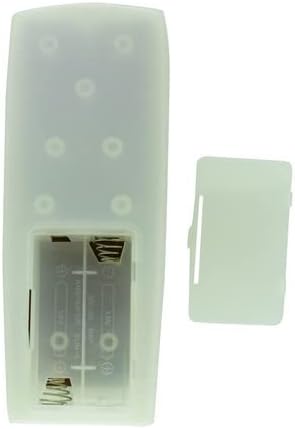
ചിത്രം 1: പിൻഭാഗം view of the remote control with the battery cover removed, illustrating the battery compartment.
പ്രവർത്തന നിർദ്ദേശങ്ങൾ
പൊതുവായ ഉപയോഗം
This remote control is an infrared (IR) replacement. Point the remote directly at the IR receiver on your Aiwa stereo system. Ensure there are no obstructions between the remote and the stereo system.

ചിത്രം 2: മുൻഭാഗം view വിദൂര നിയന്ത്രണത്തിന്റെ.
പ്രധാന പ്രവർത്തനങ്ങൾ
- പവർ: Turns the stereo system on or off.
- വോളിയം +/-: ഓഡിയോ ഔട്ട്പുട്ട് ലെവൽ ക്രമീകരിക്കുന്നു.
- പ്ലേ/താൽക്കാലികമായി നിർത്തുക: Starts or pauses playback of audio.
- SKIP/SEARCH: ട്രാക്കുകൾക്കിടയിൽ നാവിഗേറ്റ് ചെയ്യുന്നു അല്ലെങ്കിൽ ഒരു ട്രാക്കിനുള്ളിൽ ഫാസ്റ്റ്-ഫോർവേഡ്/റിവൈൻഡ് ചെയ്യുന്നു.
- Numerical Buttons (0-9, +10): നേരിട്ടുള്ള ട്രാക്ക് തിരഞ്ഞെടുക്കലിനോ ഇൻപുട്ടിനോ വേണ്ടി.
- ഫംഗ്ഷൻ: Selects different audio sources or modes (e.g., CD, Radio, MD).
- DISPLAY/CHARACTER: Changes display information or enters characters.
- നൽകുക: തിരഞ്ഞെടുക്കലുകൾ സ്ഥിരീകരിക്കുന്നു.
- MD EDIT/REC: Functions related to MiniDisc recording and editing (if applicable to your system).
അനുയോജ്യതയെക്കുറിച്ചുള്ള കുറിപ്പ്: This is a replacement remote. While designed to be compatible, it may not offer all the exact same functions as your original remote. Refer to your stereo system's original manual for specific functions if needed.
മെയിൻ്റനൻസ്
വൃത്തിയാക്കൽ
To clean the remote control, wipe it with a soft, dry cloth. Do not use abrasive cleaners, solvents, or chemical sprays, as these can damage the surface or internal components.
ബാറ്ററി മാറ്റിസ്ഥാപിക്കൽ
Replace batteries when the remote's response becomes sluggish or stops working. Always replace both batteries at the same time with new AA batteries. Do not mix old and new batteries, or different types of batteries. Remove batteries if the remote will not be used for an extended period to prevent leakage.
ട്രബിൾഷൂട്ടിംഗ്
- റിമോട്ട് പ്രതികരിക്കുന്നില്ല:
- Check if batteries are inserted correctly with the correct polarity.
- പഴയ ബാറ്ററികൾ പുതിയവ ഉപയോഗിച്ച് മാറ്റിസ്ഥാപിക്കുക.
- Ensure there are no obstructions between the remote and the stereo system's IR receiver.
- Confirm you are pointing the remote directly at the stereo system.
- ചില പ്രവർത്തനങ്ങൾ പ്രവർത്തിക്കുന്നില്ല:
- This remote is a replacement and may not support all functions of your original remote. Verify if the specific function was present on the original remote and if this replacement is designed to support it.
- Ensure your stereo system model is listed as compatible.
- ഇടപെടൽ:
- Strong light sources (like direct sunlight or fluorescent lights) can interfere with IR signals. Try operating the remote in a different lighting condition.
If issues persist, please contact the seller for further assistance.
സ്പെസിഫിക്കേഷനുകൾ
| ഫീച്ചർ | വിശദാംശങ്ങൾ |
|---|---|
| കണക്റ്റിവിറ്റി ടെക്നോളജി | ഇൻഫ്രാറെഡ് |
| അനുയോജ്യമായ ഉപകരണങ്ങൾ | Aiwa Stereo System (Specific models listed in title) |
| പവർ ഉറവിടം | 2 x AA ബാറ്ററികൾ (ഉൾപ്പെടുത്തിയിട്ടില്ല) |
| നിറം | Random (as per product listing) |
| നിർമ്മാതാവ് | ഈസിട്രി |
| ASIN | B0BJDVGDWJ |
വാറൻ്റിയും പിന്തുണയും
This product is a replacement remote control. Specific warranty details are not provided in the product information. For any questions, concerns, or support regarding this replacement remote, please contact the seller directly through the platform where it was purchased.
പ്രധാനപ്പെട്ടത്: As stated by the manufacturer, this replacement remote may not offer all the full same functions as your original remote. Please verify compatibility with your specific Aiwa model before purchase.
Ask a question about this manual
Ask about setup, troubleshooting, compatibility, parts, safety, or missing instructions. Manuals+ will review the question and use this page’s manual context to help answer it.