
1. ആമുഖം
This manual provides essential information for setting up, operating, and maintaining your DOOGEE X98 Pro smartphone. Please read it carefully to ensure proper use and to maximize the device's performance and longevity.

ചിത്രം 1: ഓവർview of DOOGEE X98 Pro key features.
2. പാക്കേജ് ഉള്ളടക്കം
നിങ്ങളുടെ ഉൽപ്പന്ന പാക്കേജിൽ എല്ലാ ഇനങ്ങളും ഉണ്ടെന്ന് ഉറപ്പാക്കുക:
- DOOGEE X98 Pro Mobile Phone
- യുഎസ്ബി ടൈപ്പ്-സി കേബിൾ
- Protective Film (pre-applied or in box)
- SIM Card Pin Ejector
- 5V/2A ചാർജർ
- ഉപയോക്തൃ മാനുവൽ (ഈ പ്രമാണം)
3. ഉപകരണ ലേഔട്ട്
Familiarize yourself with the physical components of your DOOGEE X98 Pro.

Figure 2: Rear design of the DOOGEE X98 Pro.
The device features a minimalist design with precision-engineered rounded edges for a comfortable grip. Key components include:
- പവർ ബട്ടൺ: വശത്ത് സ്ഥിതിചെയ്യുന്നു, ഉപകരണം ഓൺ/ഓഫ് ചെയ്യുന്നതിനോ സ്ക്രീൻ ഉണർത്തുന്നതിനോ ഉറങ്ങുന്നതിനോ ഉപയോഗിക്കുന്നു.
- വോളിയം ബട്ടണുകൾ: പവർ ബട്ടണിന് സമീപം സ്ഥിതിചെയ്യുന്നു, മീഡിയയും കോൾ വോളിയവും ക്രമീകരിക്കാൻ ഉപയോഗിക്കുന്നു.
- യുഎസ്ബി ടൈപ്പ്-സി പോർട്ട്: താഴെ, ചാർജ് ചെയ്യുന്നതിനും ഡാറ്റ കൈമാറ്റത്തിനുമായി.
- 3.5 എംഎം ഹെഡ്ഫോൺ ജാക്ക്: വയർഡ് ഹെഡ്ഫോണുകൾ ബന്ധിപ്പിക്കുന്നതിന്.
- Dual Rear Camera Module: Located on the back, includes the 12MP AI main camera and 2MP portrait camera with triple LED flash.
- മുൻ ക്യാമറ: Located at the top of the display, an 8MP AI Beautify camera.
- സിം/എസ്ഡി കാർഡ് ട്രേ: On the side, for inserting Nano SIM cards and a microSD card.
4. സജ്ജീകരണം
4.1. സിം, SD കാർഡുകൾ ചേർക്കൽ
- നിങ്ങളുടെ ഫോണിന്റെ വശത്ത് സിം കാർഡ് ട്രേ കണ്ടെത്തുക.
- Insert the SIM ejector pin into the small hole on the tray to open it.
- ട്രേ ശ്രദ്ധാപൂർവ്വം പുറത്തെടുക്കുക.
- Place your Nano SIM card(s) and/or microSD card into the designated slots on the tray. Ensure the gold contacts face downwards. The phone supports dual Nano SIMs or one Nano SIM and one microSD card up to 1TB.
- ട്രേ അതിന്റെ സ്ഥാനത്ത് ക്ലിക്കായി വരുന്നത് വരെ ഫോണിലേക്ക് പതുക്കെ തിരികെ തള്ളുക.
4.2. പ്രാരംഭ പവർ ഓൺ
- Press and hold the Power button on the side of the phone until the DOOGEE logo appears.
- ഭാഷാ തിരഞ്ഞെടുപ്പ്, വൈ-ഫൈ കണക്ഷൻ, ഗൂഗിൾ അക്കൗണ്ട് സജ്ജീകരണം, സുരക്ഷാ ക്രമീകരണങ്ങൾ എന്നിവയുൾപ്പെടെയുള്ള പ്രാരംഭ സജ്ജീകരണം പൂർത്തിയാക്കാൻ ഓൺ-സ്ക്രീൻ നിർദ്ദേശങ്ങൾ പാലിക്കുക.
4.3 ബാറ്ററി ചാർജ് ചെയ്യുന്നു
Before first use, it is recommended to fully charge the device. Use the provided 5V/2A charger and Type-C USB cable.
- Connect the Type-C end of the USB cable to the phone's charging port.
- Connect the USB-A end of the cable to the power adapter.
- ഒരു മതിൽ ഔട്ട്ലെറ്റിലേക്ക് പവർ അഡാപ്റ്റർ പ്ലഗ് ചെയ്യുക.
- ചാർജിംഗ് ഇൻഡിക്കേറ്റർ സ്ക്രീനിൽ ദൃശ്യമാകും.
The 4200mAh battery supports 10W fast charging.
5. പ്രവർത്തന നിർദ്ദേശങ്ങൾ
5.1. അടിസ്ഥാന നാവിഗേഷൻ
The DOOGEE X98 Pro runs on Android 12.0, offering an intuitive user experience. Navigation is primarily touch-based:
- ടാപ്പ് ചെയ്യുക: ഒരു ഇനം തിരഞ്ഞെടുക്കുകയോ ഒരു ആപ്പ് തുറക്കുകയോ ചെയ്യുക.
- സ്വൈപ്പ്: Scroll through lists, home screens, or app drawers.
- പിഞ്ച്: ഫോട്ടോകളിൽ സൂം ഇൻ ചെയ്യുകയോ സൂം ഔട്ട് ചെയ്യുകയോ ചെയ്യുക, web പേജുകൾ.
- ലോംഗ് പ്രസ്സ്: സന്ദർഭോചിത മെനുകൾ ആക്സസ് ചെയ്യുക അല്ലെങ്കിൽ ഐക്കണുകൾ നീക്കുക.
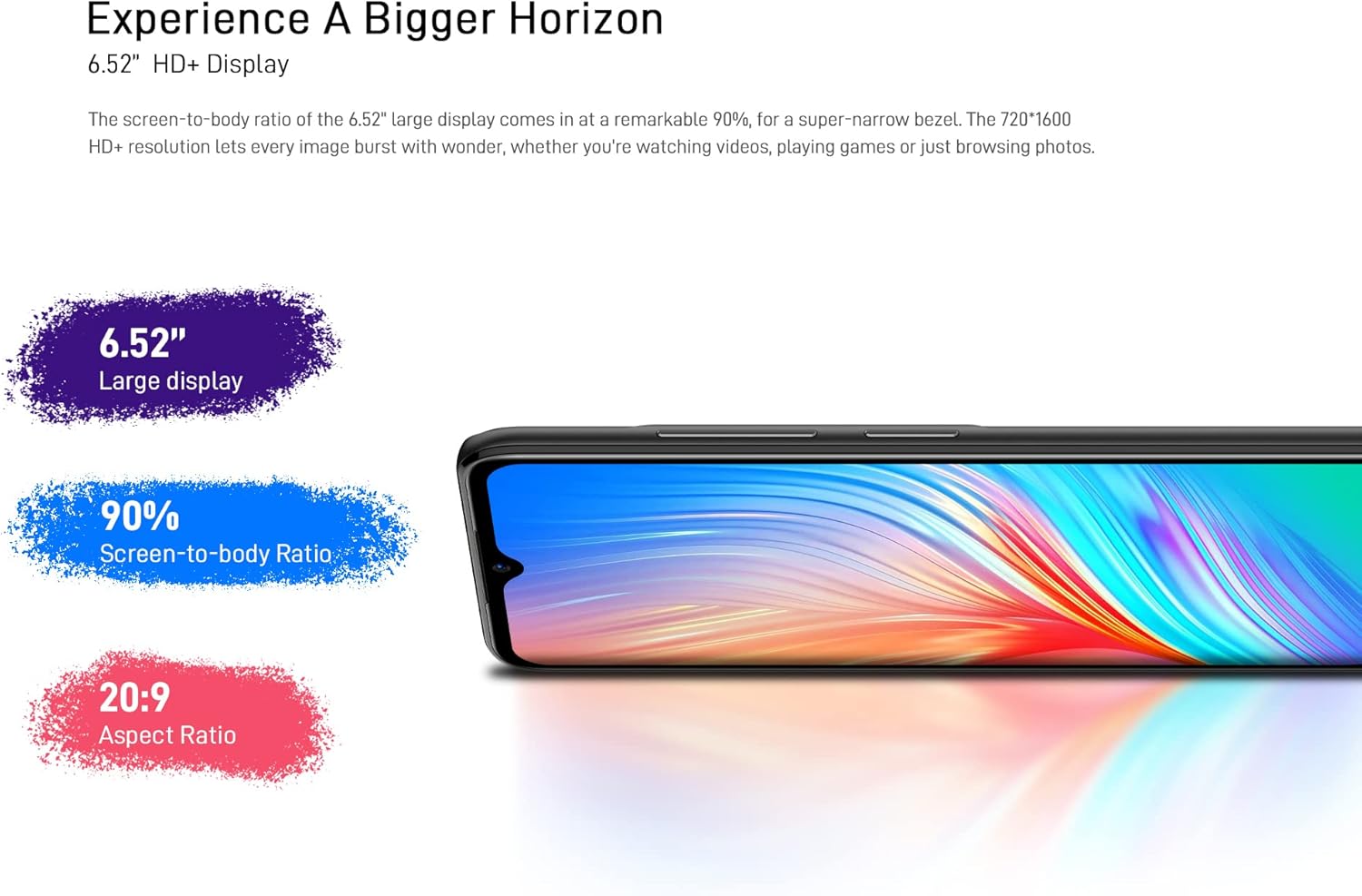
Figure 3: The 6.52-inch HD+ display.
5.2. ഫെയ്സ് അൺലോക്ക്
The device supports face recognition for quick and secure unlocking.
- പോകുക ക്രമീകരണങ്ങൾ > സുരക്ഷ > ഫെയ്സ് അൺലോക്ക്.
- നിങ്ങളുടെ മുഖം രജിസ്റ്റർ ചെയ്യാൻ ഓൺ-സ്ക്രീൻ നിർദ്ദേശങ്ങൾ പാലിക്കുക.
- Ensure good lighting conditions during registration for optimal performance.
5.3. ക്യാമറ ഉപയോഗം
The DOOGEE X98 Pro features a 12MP AI Dual Rear Camera and an 8MP Front Camera.
Rear Camera (12MP AI Dual Camera)

Figure 4: Rear camera specifications.
വിവിധ മോഡുകൾ ആക്സസ് ചെയ്യാൻ ക്യാമറ ആപ്പ് തുറക്കുക:
- ഫോട്ടോ: Standard mode for capturing still images. Features include AI Beauty, HDR, and a 78.1° visual angle with F1.8 aperture.
- ഛായാചിത്രം: Utilizes the 2MP portrait camera for depth effects.
- രാത്രി മോഡ്: Enhances clarity in low-light conditions.
- സ്ലോ മോഷൻ: സ്ലോ മോഷനിൽ വീഡിയോകൾ റെക്കോർഡുചെയ്യുന്നു.

ചിത്രം 5: ഉദാample of Night Mode photography.
Front Camera (8MP AI Beautify)
The 8MP front camera is designed for clear selfies and video calls, featuring AI Beautify mode.
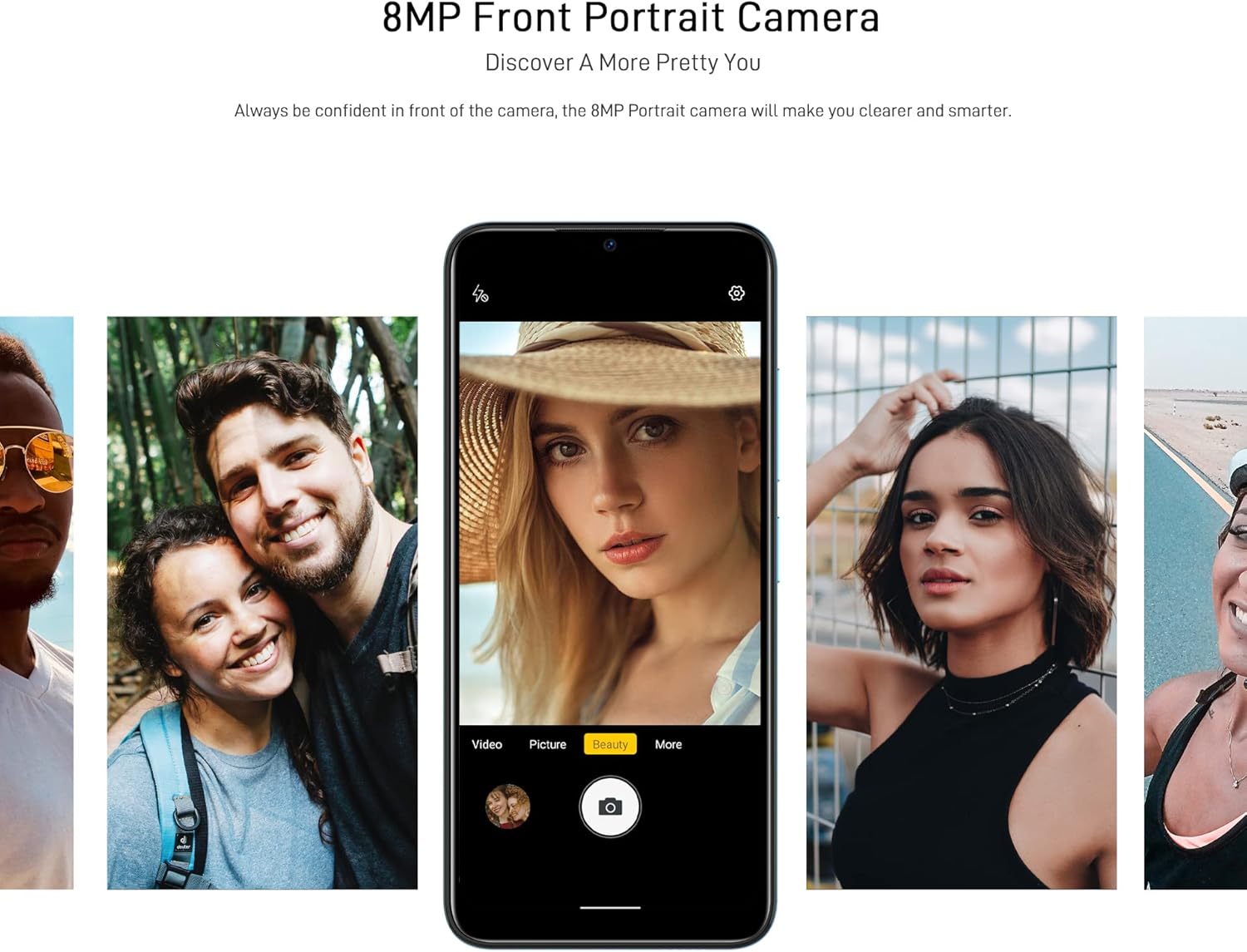
Figure 6: Front camera in use for portraits.
5.4. കണക്റ്റിവിറ്റി
- വൈഫൈ: വയർലെസ് നെറ്റ്വർക്കുകളിലേക്ക് കണക്റ്റുചെയ്യുക വഴി ക്രമീകരണങ്ങൾ > നെറ്റ്വർക്കും ഇന്റർനെറ്റും > വൈ-ഫൈ. Supports 2.4G (b/g/n).
- ബ്ലൂടൂത്ത്: മറ്റ് ബ്ലൂടൂത്ത് ഉപകരണങ്ങളുമായി ജോടിയാക്കുക വഴി ക്രമീകരണങ്ങൾ > കണക്റ്റുചെയ്ത ഉപകരണങ്ങൾ > ബ്ലൂടൂത്ത്. Supports BT5.0.
- മൊബൈൽ ഡാറ്റ: മൊബൈൽ ഡാറ്റ പ്രവർത്തനക്ഷമമാക്കുകയോ പ്രവർത്തനരഹിതമാക്കുകയോ ചെയ്യുക ക്രമീകരണം > നെറ്റ്വർക്കും ഇന്റർനെറ്റും > മൊബൈൽ നെറ്റ്വർക്ക്. Supports 2G/3G/4G LTE.
- ജിപിഎസ്: The device supports GPS, Glonass, Galileo, and Beido for accurate navigation.
- OTG: On-The-Go (OTG) functionality allows connecting USB peripherals like flash drives.
5.5. സ്റ്റോറേജ് മാനേജ്മെൻ്റ്
The phone comes with 64GB of internal storage, expandable up to 1TB using a microSD card. To manage storage, go to ക്രമീകരണങ്ങൾ > സംഭരണം.
6. പരിപാലനം
6.1. നിങ്ങളുടെ ഉപകരണം വൃത്തിയാക്കൽ
നിങ്ങളുടെ ഫോണിന്റെ സ്ക്രീനും ബോഡിയും വൃത്തിയാക്കാൻ മൃദുവായ, ലിന്റ് രഹിത തുണി ഉപയോഗിക്കുക. കഠിനമായ രാസവസ്തുക്കളോ ഉരച്ചിലുകളോ ഉള്ള വസ്തുക്കൾ ഉപയോഗിക്കുന്നത് ഒഴിവാക്കുക.
6.2. സോഫ്റ്റ്വെയർ അപ്ഡേറ്റുകൾ
Regularly check for system updates to ensure your device has the latest features and security patches. Go to ക്രമീകരണങ്ങൾ > സിസ്റ്റം > സിസ്റ്റം അപ്ഡേറ്റ്.
6.3. ബാറ്ററി പരിചരണം
- ഉയർന്ന താപനിലയിൽ ഫോൺ തുറന്നുവെക്കുന്നത് ഒഴിവാക്കുക.
- ബാറ്ററി ഇടയ്ക്കിടെ പൂർണ്ണമായും തീർന്നുപോകാൻ അനുവദിക്കരുത്.
- ഒറിജിനൽ അല്ലെങ്കിൽ സാക്ഷ്യപ്പെടുത്തിയ അനുയോജ്യമായ ചാർജറും കേബിളും മാത്രം ഉപയോഗിക്കുക.
7. പ്രശ്നപരിഹാരം
If you encounter issues with your DOOGEE X98 Pro, try the following solutions:
- ഉപകരണം ഓണാക്കുന്നില്ല: ബാറ്ററി ചാർജ്ജ് ചെയ്തിട്ടുണ്ടെന്ന് ഉറപ്പാക്കുക. ചാർജർ കണക്റ്റ് ചെയ്ത് വീണ്ടും പവർ ചെയ്യാൻ ശ്രമിക്കുന്നതിന് മുമ്പ് കുറച്ച് മിനിറ്റ് കാത്തിരിക്കുക.
- ആപ്പുകൾ ക്രാഷാകുകയോ മരവിക്കുകയോ ചെയ്യുന്നു: Close the app and reopen it. If the issue persists, restart the phone. Clear the app's cache via ക്രമീകരണങ്ങൾ > ആപ്പുകൾ > [ആപ്പ് നാമം] > സംഭരണവും കാഷെയും > കാഷെ മായ്ക്കുക.
- മോശം ബാറ്ററി ലൈഫ്: സ്ക്രീൻ തെളിച്ചം കുറയ്ക്കുക, വൈഫൈ അല്ലെങ്കിൽ ബ്ലൂടൂത്ത് പോലുള്ള ഉപയോഗിക്കാത്ത സവിശേഷതകൾ പ്രവർത്തനരഹിതമാക്കുക, പശ്ചാത്തല ആപ്പുകൾ അടയ്ക്കുക. ബാറ്ററി ഉപയോഗം പരിശോധിക്കുക ക്രമീകരണങ്ങൾ > ബാറ്ററി പവർ-ആകർഷകമായ ആപ്പുകൾ തിരിച്ചറിയാൻ.
- Connectivity issues (Wi-Fi/Bluetooth/Mobile Data): Toggle the respective connection off and on. Restart your phone or the router/paired device.
- Face Unlock not working: നിങ്ങളുടെ മുഖം നല്ല വെളിച്ചമുള്ളതാണെന്നും തടസ്സങ്ങളൊന്നുമില്ലെന്നും ഉറപ്പാക്കുക. ആവശ്യമെങ്കിൽ നിങ്ങളുടെ മുഖം വീണ്ടും രജിസ്റ്റർ ചെയ്യുക.
സ്ഥിരമായ പ്രശ്നങ്ങൾക്ക്, ഒരു ഫാക്ടറി റീസെറ്റ് നടത്തുന്നത് പരിഗണിക്കുക (ക്രമീകരണങ്ങൾ > സിസ്റ്റം > റീസെറ്റ് ഓപ്ഷനുകൾ > എല്ലാ ഡാറ്റയും മായ്ക്കുക (ഫാക്ടറി റീസെറ്റ്)). മുന്നറിയിപ്പ്: ഇത് നിങ്ങളുടെ ഫോണിലെ എല്ലാ ഡാറ്റയും മായ്ക്കും. തുടരുന്നതിന് മുമ്പ് പ്രധാനപ്പെട്ട ഡാറ്റയുടെ ബാക്കപ്പ് എടുക്കുക.
8 സ്പെസിഫിക്കേഷനുകൾ
Detailed technical specifications for the DOOGEE X98 Pro:
| ഫീച്ചർ | സ്പെസിഫിക്കേഷൻ |
|---|---|
| മോഡൽ | X98 പ്രോ |
| ഓപ്പറേറ്റിംഗ് സിസ്റ്റം | ആൻഡ്രോയിഡ് 12.0 |
| പ്രോസസ്സർ | MediaTek Helio G25 Octa Core, 2.3 GHz, 12nm |
| ജിപിയു | IMG-GE8320, up to 650 MHz |
| റാം | 4 ജിബി |
| ആന്തരിക സംഭരണം | 64 ജിബി |
| വികസിപ്പിക്കാവുന്ന സംഭരണം | TFlash/microSD card up to 1TB |
| പ്രദർശിപ്പിക്കുക | 6.52-inch HD+ Waterdrop Screen, 720*1600 resolution, 90% screen-to-body ratio |
| പിൻ ക്യാമറ | 12MP SONY AI Dual Camera (f/1.8, 78.1° visual angle) + 2MP Portrait Camera, Triple LED Flash |
| മുൻ ക്യാമറ | 8MP AI Beautify Camera |
| ബാറ്ററി | 4200mAh, 10W Type-C Fast Charge |
| സിം കാർഡ് | Dual Nano SIM (or 1 Nano SIM + 1 microSD) |
| നെറ്റ്വർക്ക് ബാൻഡുകൾ | 2G GSM, 3G, 4G LTE |
| വൈഫൈ | 2.4G (b/g/n) |
| ബ്ലൂടൂത്ത് | BT5.0 |
| നാവിഗേഷൻ | GPS, Glonass, Galileo, Beido |
| സെൻസറുകൾ | Face Unlock, G-sensor, Proximity Sensor, Ambient Light Sensor, Compass (Magnetic), Geomagnetism |
| തുറമുഖങ്ങൾ | ടൈപ്പ്-സി, 3.5mm ഹെഡ്ഫോൺ ജാക്ക് |
| അളവുകൾ | 165.3mm x 76.3mm x 8.8mm |
| ഭാരം | 205g (ബാറ്ററി ഉൾപ്പെടെ) |

Figure 7: MediaTek Helio G25 Octa-core Processor.

Figure 8: Optimized performance for gaming.
9 സുരക്ഷാ വിവരങ്ങൾ
ഇനിപ്പറയുന്ന സുരക്ഷാ മാർഗ്ഗനിർദ്ദേശങ്ങൾ പാലിക്കുക:
- ഉപകരണം സ്വയം ഡിസ്അസംബ്ലിംഗ് ചെയ്യുകയോ നന്നാക്കുകയോ പരിഷ്ക്കരിക്കുകയോ ചെയ്യരുത്.
- തീവ്രമായ ഊഷ്മാവ്, നേരിട്ടുള്ള സൂര്യപ്രകാശം അല്ലെങ്കിൽ ഉയർന്ന ആർദ്രത എന്നിവയിലേക്ക് ഉപകരണം എക്സ്പോഷർ ചെയ്യുന്നത് ഒഴിവാക്കുക.
- Use only approved accessories (charger, cable, etc.).
- ഉപകരണം വെള്ളത്തിൽ നിന്നും മറ്റ് ദ്രാവകങ്ങളിൽ നിന്നും അകറ്റി നിർത്തുക.
- പ്രാദേശിക നിയന്ത്രണങ്ങൾ അനുസരിച്ച് ഉപകരണവും അതിന്റെ ബാറ്ററിയും ഉത്തരവാദിത്തത്തോടെ നിർമാർജനം ചെയ്യുക.
10. വാറൻ്റിയും പിന്തുണയും
For warranty information, please refer to the warranty card included in your product package or visit the official DOOGEE website. For technical support or service inquiries, please contact DOOGEE customer service through their official channels.