
ആമുഖം
The Audizio Brescia is an all-in-one audio system designed for versatile listening experiences. It integrates multiple audio sources including Internet Radio, DAB+, FM radio, CD player, USB MP3 playback, and Bluetooth 5.0 connectivity. Featuring a built-in 120W amplifier, it allows direct connection to passive speakers, making it a complete stereo solution. This manual provides detailed instructions for setup, operation, and maintenance of your Audizio Brescia unit.
ബോക്സിൽ എന്താണുള്ളത്
- Audizio Brescia Main Unit
- റിമോട്ട് കൺട്രോൾ
- പവർ അഡാപ്റ്റർ
- ദ്രുത ആരംഭ ഗൈഡ്
- FM/DAB ആന്റിന
- ആർസിഎ ഓഡിയോ കേബിൾ
- 3.5 എംഎം ഓക്സ് കേബിൾ

നിയന്ത്രണങ്ങളും കണക്ഷനുകളും
ഫ്രണ്ട് പാനൽ
The front panel features the primary controls and display for operating the Audizio Brescia.
- പവർ ബട്ടൺ: യൂണിറ്റ് ഓണാക്കുകയോ ഓഫാക്കുകയോ ചെയ്യുന്നു.
- മോഡ് ബട്ടൺ: Cycles through available audio sources (Internet Radio, DAB+, FM, CD, USB, Bluetooth, AUX).
- MENU/INFO Button: Accesses the menu or displays information about the current track/station.
- Skip/Fast Forward/Rewind Buttons: Navigates tracks or stations.
- പ്ലേ/താൽക്കാലികമായി നിർത്തുക ബട്ടൺ: സിഡി, യുഎസ്ബി, ബ്ലൂടൂത്ത് എന്നിവയ്ക്കുള്ള പ്ലേബാക്ക് നിയന്ത്രിക്കുന്നു.
- TFT ഡിസ്പ്ലേ: 2.8-inch color display showing current status, menus, and track information.
- USB പോർട്ട്: MP3 പ്ലേബാക്കിനായി USB സംഭരണ ഉപകരണങ്ങൾ ബന്ധിപ്പിക്കുന്നതിന്.
- ഹെഡ്ഫോൺ ജാക്ക് (3.5 മിമി): സ്വകാര്യ ശ്രവണത്തിനായി.
- FAV ബട്ടൺ: Accesses or saves favorite stations/presets.
- ബാക്ക് ബട്ടൺ: മുമ്പത്തെ മെനുവിലേക്കോ സ്ക്രീനിലേക്കോ മടങ്ങുന്നു.
- NAVIGATION/OK Knob: Rotates to navigate menus and presses to confirm selections.
- വോളിയം നോബ്: മാസ്റ്റർ വോളിയം ലെവൽ ക്രമീകരിക്കുന്നു.

പിൻ പാനൽ
The rear panel provides all necessary input and output connections.
- വൈദ്യുതി സ്വിച്ച്: മെയിൻ പവർ ഓൺ/ഓഫ് സ്വിച്ച്.
- പവർ ഇൻപുട്ട്: വിതരണം ചെയ്ത പവർ അഡാപ്റ്ററുമായി ബന്ധിപ്പിക്കുന്നു.
- Speaker Output (L/R): Screw terminals for connecting passive speakers (4-8 Ohm impedance).
- പ്രീ ഔട്ട് (L/R): RCA outputs for connecting to an external ampലൈഫയർ അല്ലെങ്കിൽ പവർഡ് സ്പീക്കറുകൾ.
- AUX IN (L/R): RCA inputs for connecting external audio sources.
- OPTICAL Input (Toslink): Digital audio input for connecting devices like TVs.
- COAXIAL Input (RCA): ഡിജിറ്റൽ ഓഡിയോ ഇൻപുട്ട്.
- ആന്റിന കണക്ടറുകൾ: For DAB+/FM antenna and Wi-Fi antenna.

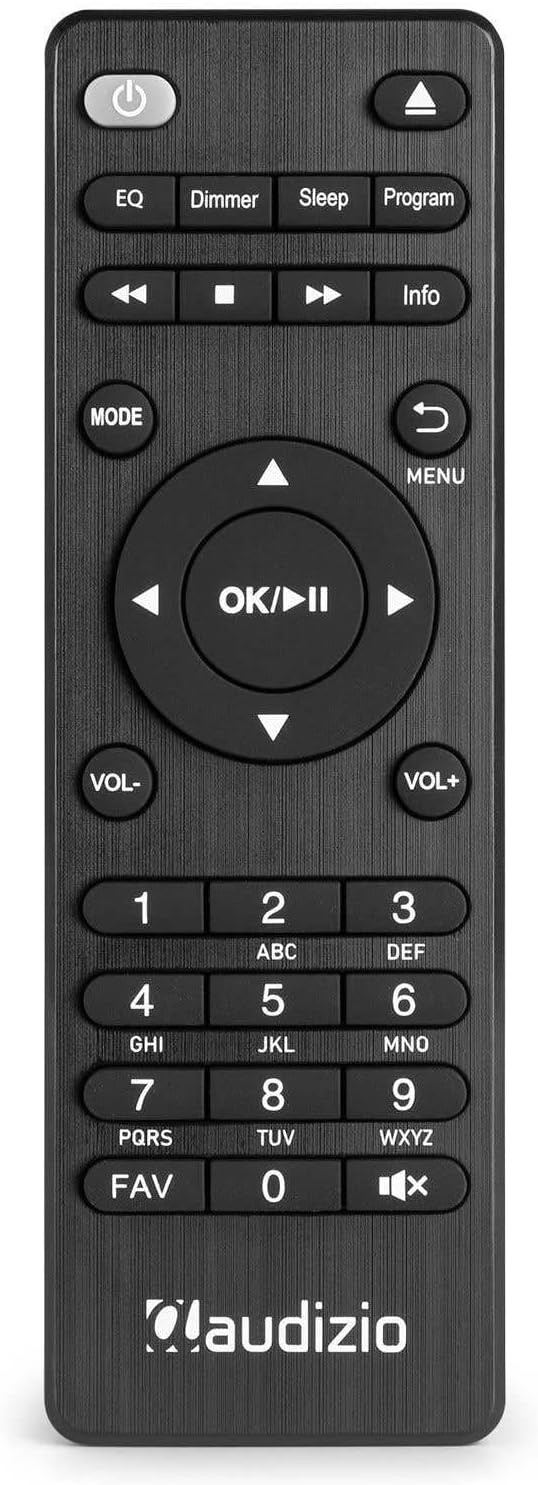
റിമോട്ട് കൺട്രോൾ
ഉൾപ്പെടുത്തിയിരിക്കുന്ന റിമോട്ട് കൺട്രോൾ ദൂരെ നിന്ന് സൗകര്യപ്രദമായ പ്രവർത്തനത്തിനായി പൂർണ്ണ പ്രവർത്തനം നൽകുന്നു.
സജ്ജമാക്കുക
- അൺപാക്ക് ചെയ്യുന്നു: പാക്കേജിംഗിൽ നിന്ന് യൂണിറ്റും എല്ലാ അനുബന്ധ ഉപകരണങ്ങളും ശ്രദ്ധാപൂർവ്വം നീക്കം ചെയ്യുക.
- സ്പീക്കർ കണക്ഷൻ: Connect your passive speakers to the SPEAKER OUTPUT terminals on the rear panel. Ensure correct polarity (+ to + and - to -). The amplifier supports speakers with an impedance of 4-8 Ohms.
- ആന്റിന കണക്ഷൻ: Connect the supplied DAB+/FM antenna to the corresponding connector on the rear panel. For optimal reception, extend the antenna fully. Attach the Wi-Fi antenna to its designated port.
- പവർ കണക്ഷൻ: Connect the power adapter to the DC IN port on the rear of the unit, then plug the adapter into a wall outlet.
- പ്രാരംഭ പവർ ഓൺ: Flip the main power switch on the rear panel to the 'ON' position. Press the Power button on the front panel or remote control to turn on the unit.
- ആദ്യ തവണ സജ്ജീകരണ വിസാർഡ്: Upon first power-on, the unit will guide you through an initial setup wizard. Follow the on-screen prompts to select language, time/date, and connect to your Wi-Fi network.
പ്രവർത്തന നിർദ്ദേശങ്ങൾ
പവർ ഓൺ/ഓഫ്
യൂണിറ്റ് ഓണാക്കാനോ ഓഫാക്കാനോ, അമർത്തുക ശക്തി button on the front panel or the remote control. Ensure the main power switch on the rear is in the 'ON' position.
മോഡ് തിരഞ്ഞെടുക്കൽ
അമർത്തുക മോഡ് button on the front panel or remote control to cycle through the available audio sources: Internet Radio, DAB+, FM, CD, USB, Bluetooth, and AUX.
ഇൻ്റർനെറ്റ് റേഡിയോ
- Select 'Internet Radio' mode using the മോഡ് ബട്ടൺ.
- If not already connected, the unit will prompt you to connect to a Wi-Fi network. Use the NAVIGATION/OK knob to select your network and enter the password.
- Once connected, you can browse stations by location, genre, or search.
- To save a station as a favorite, tune to the desired station and press the FAV button. Follow the on-screen instructions to assign a preset number.
DAB+ റേഡിയോ
- Select 'DAB+' mode.
- The unit will automatically scan for available DAB+ stations. This may take a few minutes.
- ഉപയോഗിക്കുക NAVIGATION/OK knob or the Skip buttons to browse the list of found stations.
- അമർത്തുക OK ഒരു സ്റ്റേഷൻ തിരഞ്ഞെടുക്കാൻ.
- To save a station, press the FAV button and assign a preset number.
എഫ്എം റേഡിയോ
- Select 'FM' mode.
- ഉപയോഗിക്കുക NAVIGATION/OK knob to manually tune or press and hold the Skip buttons to auto-scan for the next available station.
- To save a station, press the FAV button and assign a preset number.
സിഡി പ്ലെയർ
- Select 'CD' mode.
- Gently insert a CD into the slot-loading drive on the front panel. The unit will automatically draw in the disc.
- Playback should begin automatically. Use the Play/Pause and Skip buttons for control.
- To eject the CD, press the Eject button (usually indicated by a triangle with a line below it) on the remote or front panel.

USB പ്ലേബാക്ക്
- MP3 അടങ്ങിയ ഒരു USB സ്റ്റോറേജ് ഉപകരണം (ഉദാ. USB സ്റ്റിക്ക്) ഇടുക. fileമുൻ പാനലിലെ USB പോർട്ടിലേക്ക് s.
- Select 'USB' mode.
- The unit will scan the USB device. Use the NAVIGATION/OK knob to browse folders and files.
- അമർത്തുക OK to select and play a file.

ബ്ലൂടൂത്ത്
- Select 'Bluetooth' mode. The unit will enter pairing mode, indicated on the display.
- On your mobile device, enable Bluetooth and search for 'Audizio Brescia'.
- Select 'Audizio Brescia' to pair. Once paired, you can stream audio from your device to the unit.

Spotify കണക്റ്റ്
The Audizio Brescia supports Spotify Connect, allowing you to control music playback directly from the Spotify app on your smartphone or tablet.
- Ensure your Audizio Brescia is connected to the same Wi-Fi network as your mobile device.
- Open the Spotify app on your mobile device.
- Play a song and tap the 'Devices Available' icon (usually a speaker or computer icon).
- Select 'Audizio Brescia' from the list of available devices. The unit's display will show the Spotify logo and current track information.

AUX ഇൻപുട്ട്
Connect external audio devices (e.g., MP3 players, smartphones) to the AUX IN RCA ports on the rear panel using the supplied RCA cable or a 3.5mm to RCA cable. Select 'AUX' mode to listen to the connected device.
അലാറവും സ്ലീപ്പ് ടൈമറും
The unit includes dual alarm functions and a sleep timer. Access these settings through the main menu or dedicated buttons on the remote control to configure wake-up times, alarm sources, and sleep duration.
സ്പെസിഫിക്കേഷനുകൾ
| ഫീച്ചർ | സ്പെസിഫിക്കേഷൻ |
|---|---|
| ബ്രാൻഡ് | ഓഡിസിയോ |
| മോഡൽ | Brescia (102.270) |
| Ampജീവിത തരം | ക്ലാസ് ഡി |
| ഔട്ട്പുട്ട് പവർ | 120 വാട്ട്സ് (പരമാവധി) |
| സ്പീക്കർ ഇംപെഡൻസ് | 4-8 ഓം |
| കണക്റ്റിവിറ്റി | Wi-Fi, Bluetooth 5.0, USB, AUX, Optical, Coaxial |
| റേഡിയോ ട്യൂണർ | ഇന്റർനെറ്റ് റേഡിയോ, DAB+, FM |
| സിഡി പ്ലെയർ | Slot-loading |
| USB പ്ലേബാക്ക് | MP3 compatible |
| പ്രദർശിപ്പിക്കുക | 2.8-inch TFT Color Display |
| വൈദ്യുതി വിതരണം | 220-240V AC / 50Hz |
| അളവുകൾ (W x D x H) | 43 x 32 x 7.5 സെ.മീ |
| ഭാരം | 3.3 കി.ഗ്രാം |
| മെറ്റീരിയൽ | അലുമിനിയം ഫ്രണ്ട് പാനൽ |
ട്രബിൾഷൂട്ടിംഗ്
- ശക്തിയില്ല: Ensure the power adapter is securely connected to both the unit and the wall outlet. Check that the main power switch on the rear panel is 'ON'.
- ശബ്ദമില്ല: Verify speaker connections and polarity. Check the volume level. Ensure the correct audio source is selected. If using external inputs (AUX, Optical, Coaxial), confirm the source device is playing and its volume is up.
- മോശം റേഡിയോ റിസപ്ഷൻ (DAB+/FM): Extend the antenna fully. Try repositioning the antenna or the unit for better signal. For FM, consider switching to mono reception if stereo signal is weak.
- Internet Radio Not Connecting: Check your Wi-Fi network connection and password. Ensure the unit is within range of your Wi-Fi router. Restart your router and the Audizio Brescia.
- ബ്ലൂടൂത്ത് ജോടിയാക്കൽ പ്രശ്നങ്ങൾ: Ensure the unit is in Bluetooth pairing mode. Delete 'Audizio Brescia' from your mobile device's Bluetooth list and try pairing again. Ensure no other devices are currently connected to the unit via Bluetooth.
- CD Not Playing/Ejecting: Ensure the CD is inserted correctly. Check if the disc is scratched or dirty. Try a different CD. If the disc is stuck, power cycle the unit.
- USB പ്ലേബാക്ക് പ്രശ്നങ്ങൾ: Ensure the USB device is formatted to a compatible file system (e.g., FAT32) and contains supported audio files (MP3). Try a different USB device.
മെയിൻ്റനൻസ്
- വൃത്തിയാക്കൽ: യൂണിറ്റിന്റെ പുറംഭാഗം വൃത്തിയാക്കാൻ മൃദുവായതും ഉണങ്ങിയതുമായ തുണി ഉപയോഗിക്കുക. അബ്രസീവ് ക്ലീനറുകളോ ലായകങ്ങളോ ഉപയോഗിക്കരുത്.
- സിഡി ഡ്രൈവ്: Avoid touching the lens inside the CD drive. Use a specialized CD lens cleaner if playback issues occur due to dust.
- വെൻ്റിലേഷൻ: അമിതമായി ചൂടാകുന്നത് തടയാൻ യൂണിറ്റിന് ചുറ്റും മതിയായ വായുസഞ്ചാരം ഉറപ്പാക്കുക. വെന്റിലേഷൻ ദ്വാരങ്ങൾ തടയരുത്.
- സംഭരണം: യൂണിറ്റ് ദീർഘനേരം സൂക്ഷിക്കുകയാണെങ്കിൽ, അത് വൈദ്യുതിയിൽ നിന്ന് വിച്ഛേദിച്ച് തണുത്തതും വരണ്ടതുമായ സ്ഥലത്ത് സൂക്ഷിക്കുക.
വാറൻ്റിയും പിന്തുണയും
Your Audizio Brescia unit is covered by a manufacturer's warranty. Please refer to the warranty card included with your product for specific terms and conditions. For technical support, service, or further inquiries, please contact your retailer or visit the official Audizio webബന്ധപ്പെടാനുള്ള വിവരങ്ങൾക്കുള്ള സൈറ്റ്.