
RHYTHM 8RZ234SR04
RHYTHM D234 8RZ234SR04 Radio Alarm Clock User Manual
Model: 8RZ234SR04
1. ആമുഖം
വാങ്ങിയതിന് നന്ദി.asing the RHYTHM D234 8RZ234SR04 Radio Alarm Clock. This digital alarm clock features a radio-controlled timekeeping function, an electronic sound alarm with snooze, a thermometer, a hygrometer, and a calendar display. Its compact design and clear LCD make it suitable for various indoor environments. Please read this manual thoroughly before use to ensure proper operation and to maximize the clock's features.
2 സുരക്ഷാ വിവരങ്ങൾ
- യൂണിറ്റിനെ തീവ്രമായ താപനില, നേരിട്ടുള്ള സൂര്യപ്രകാശം അല്ലെങ്കിൽ ഉയർന്ന ഈർപ്പം എന്നിവയ്ക്ക് വിധേയമാക്കരുത്.
- യൂണിറ്റ് താഴെയിടുകയോ ശക്തമായ ആഘാതങ്ങൾക്ക് വിധേയമാക്കുകയോ ചെയ്യുന്നത് ഒഴിവാക്കുക.
- യൂണിറ്റ് ഡിസ്അസംബ്ലിംഗ് ചെയ്യാനോ പരിഷ്ക്കരിക്കാനോ ശ്രമിക്കരുത്. ഇത് വാറന്റി അസാധുവാക്കും.
- ബാറ്ററികൾ കുട്ടികൾക്ക് ലഭ്യമാകാതെ സൂക്ഷിക്കുക. വിഴുങ്ങിയാൽ ഉടൻ വൈദ്യസഹായം തേടുക.
- ഉപയോഗിച്ച ബാറ്ററികൾ പ്രാദേശിക ചട്ടങ്ങൾക്കനുസൃതമായി നീക്കം ചെയ്യുക.
- Use only the specified battery type (AA batteries).
3. പാക്കേജ് ഉള്ളടക്കം
പാക്കേജിൽ എല്ലാ ഇനങ്ങളും ഉണ്ടെന്ന് ഉറപ്പാക്കുക:
- RHYTHM D234 8RZ234SR04 Radio Alarm Clock
- ഉപയോക്തൃ മാനുവൽ (ഈ പ്രമാണം)
4. ഉൽപ്പന്നം കഴിഞ്ഞുview
The RHYTHM D234 8RZ234SR04 features a clear LCD display and easily accessible front-facing control buttons for intuitive operation.
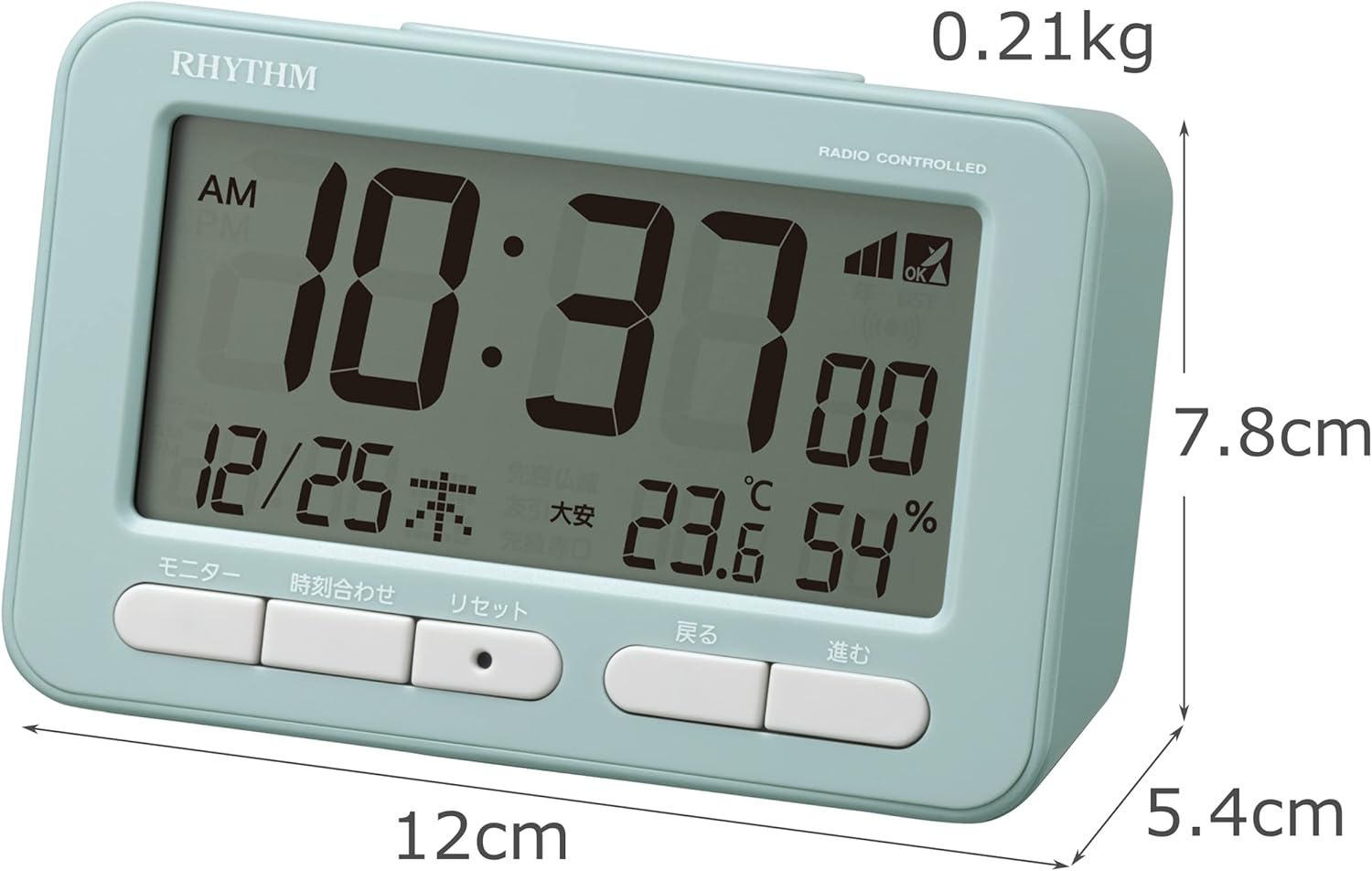
ചിത്രം 4.1: ഫ്രണ്ട് view of the RHYTHM D234 8RZ234SR04 Radio Alarm Clock, showing its dimensions (7.8cm H x 12cm W x 5.4cm D) and weight (0.21kg).

ചിത്രം 4.2: വിശദമായി view of the clock's large LCD display and the front control buttons, including 'Monitor', 'Time Set', 'Reset', 'Back', and 'Forward'.
വിവരങ്ങൾ പ്രദർശിപ്പിക്കുക:
- സമയം: Displays current time in AM/PM or 24-hour format.
- തീയതി: ആഴ്ചയിലെ മാസം, ദിവസം, ദിവസം എന്നിവ കാണിക്കുന്നു.
- താപനില: Displays current ambient temperature in Celsius.
- ഈർപ്പം: Shows current ambient humidity percentage.
- Radio Wave Reception Indicator: സിഗ്നൽ ശക്തിയെ സൂചിപ്പിക്കുന്നു.
- Alarm ON/OFF Indicator: Shows if the alarm is active.
നിയന്ത്രണ ബട്ടണുകൾ:
- നിരീക്ഷിക്കുക: Activates backlight or cycles display modes.
- ടൈം സെറ്റ്: Enters time/date setting mode.
- പുന SE സജ്ജമാക്കുക: ഫാക്ടറി ഡിഫോൾട്ടുകളിലേക്ക് ക്ലോക്ക് പുനഃസജ്ജമാക്കുന്നു.
- BACK (<): Adjusts settings backward.
- FORWARD (>): Adjusts settings forward.
- സ്നൂസ്/ലൈറ്റ്: Activates snooze during alarm or backlight when pressed.
5. സജ്ജീകരണം
5.1 ബാറ്ററി ഇൻസ്റ്റാളേഷൻ
- ക്ലോക്കിന്റെ പിൻഭാഗത്ത് സ്ഥിതി ചെയ്യുന്ന ബാറ്ററി കമ്പാർട്ട്മെന്റ് കവർ തുറക്കുക.
- Insert two (2) AA batteries (not included) according to the polarity indicators (+ and -) inside the compartment.
- ബാറ്ററി കമ്പാർട്ട്മെൻ്റ് കവർ സുരക്ഷിതമായി അടയ്ക്കുക.
5.2 Initial Power On and Radio Wave Reception
Upon battery installation, the clock will automatically attempt to receive radio time signals to set the correct time and date. This process may take several minutes.

ചിത്രം 5.1: Illustration of radio wave time signal reception from two transmission stations, ensuring accurate timekeeping.
- സിഗ്നൽ ലഭിക്കാൻ ഏറ്റവും അനുയോജ്യമായ രീതിയിൽ ക്ലോക്ക് ഒരു ജനാലയ്ക്ക് സമീപം വയ്ക്കുക.
- തടസ്സമുണ്ടാക്കുന്ന ഇലക്ട്രോണിക് ഉപകരണങ്ങൾക്ക് സമീപം (ഉദാ: ടിവി, കമ്പ്യൂട്ടറുകൾ, മൊബൈൽ ഫോണുകൾ) വയ്ക്കുന്നത് ഒഴിവാക്കുക.
- A signal strength indicator will appear on the display during reception. Once synchronized, the indicator will show a stable signal.
6. പ്രവർത്തന നിർദ്ദേശങ്ങൾ
6.1 മാനുവൽ സമയവും തീയതിയും ക്രമീകരണം
If radio signal reception is poor or unavailable, you can set the time and date manually:
- അമർത്തിപ്പിടിക്കുക ടൈം സെറ്റ് സമയ ഡിസ്പ്ലേ മിന്നിത്തുടങ്ങുന്നത് വരെ ബട്ടൺ അമർത്തുക.
- ഉപയോഗിക്കുക BACK (<) ഒപ്പം FORWARD (>) മണിക്കൂർ ക്രമീകരിക്കാൻ ബട്ടണുകൾ. അമർത്തുക ടൈം സെറ്റ് സ്ഥിരീകരിച്ച് മിനിറ്റുകളിലേക്ക് നീങ്ങുക.
- മിനിറ്റ്, വർഷം, മാസം, ദിവസം എന്നിങ്ങനെ പ്രക്രിയ ആവർത്തിക്കുക.
- അമർത്തുക ടൈം സെറ്റ് ക്രമീകരണ മോഡിൽ നിന്ന് പുറത്തുകടക്കാൻ അവസാനമായി ഒരിക്കൽ കൂടി.
6.2 അലാറം സജ്ജമാക്കുന്നു
- അമർത്തുക അലാറം സെറ്റ് button (usually located on the side or back, if not on front, refer to product diagram). The alarm time will flash.
- ഉപയോഗിക്കുക BACK (<) ഒപ്പം FORWARD (>) buttons to set the desired alarm hour. Press അലാറം സെറ്റ് സ്ഥിരീകരിക്കാൻ.
- ഉപയോഗിച്ച് മിനിറ്റ് ക്രമീകരിക്കുക BACK (<) ഒപ്പം FORWARD (>) ബട്ടണുകൾ. അമർത്തുക അലാറം സെറ്റ് സ്ഥിരീകരിക്കാനും പുറത്തുകടക്കാനും.
- അലാറം സജീവമാക്കുന്നതിനും നിർജ്ജീവമാക്കുന്നതിനും, അമർത്തുക അലാറം ഓൺ / ഓഫ് ചെയ്യുക switch or button. An alarm icon will appear/disappear on the display.
6.3 സ്നൂസ് ഫംഗ്ഷൻ ഉപയോഗിക്കൽ
അലാറം മുഴങ്ങുമ്പോൾ, വലിയ ബട്ടൺ അമർത്തുക സ്നൂസ് / ലൈറ്റ് button on the top of the clock. The alarm will pause for approximately 5 minutes and then sound again. This can be repeated multiple times.
6.4 Display Modes and Backlight
The clock continuously displays time, date, temperature, and humidity. To temporarily illuminate the display, press the സ്നൂസ് / ലൈറ്റ് button. The backlight will activate for a few seconds.

ചിത്രം 6.1: The clock's display illuminated by its backlight, showing time, date, temperature, and humidity clearly in low light conditions.
6.5 12/24 മണിക്കൂർ ഫോർമാറ്റ്
To switch between 12-hour (AM/PM) and 24-hour formats, locate the 12/24എച്ച് button (often on the back or side) and press it. The display will change accordingly.
7. പരിപാലനം
7.1 വൃത്തിയാക്കൽ
Wipe the clock with a soft, dry cloth. Do not use abrasive cleaners, solvents, or spray directly onto the unit, as this may damage the finish or internal components.
7.2 ബാറ്ററി മാറ്റിസ്ഥാപിക്കൽ
When the display becomes dim or the clock functions irregularly, it is time to replace the batteries. Follow the battery installation steps in Section 5.1. Replace both batteries simultaneously with new ones of the same type.
8. പ്രശ്നപരിഹാരം
| പ്രശ്നം | സാധ്യമായ കാരണം | പരിഹാരം |
|---|---|---|
| ഡിസ്പ്ലേ ഇല്ല അല്ലെങ്കിൽ മങ്ങിയ ഡിസ്പ്ലേ | ഡെഡ് അല്ലെങ്കിൽ തെറ്റായി ചേർത്ത ബാറ്ററികൾ. | ബാറ്ററികൾ പുതിയ AA ബാറ്ററികൾ ഉപയോഗിച്ച് മാറ്റിസ്ഥാപിക്കുക, ശരിയായ പോളാരിറ്റി ഉറപ്പാക്കുക. |
| തെറ്റായ സമയം/തീയതി | Poor radio signal reception or manual setting error. | Move the clock to a location with better signal. Perform manual time setting if necessary. |
| അലാറം മുഴങ്ങുന്നില്ല | അലാറം സജീവമാക്കിയിട്ടില്ല അല്ലെങ്കിൽ തെറ്റായി സജ്ജീകരിച്ചിട്ടില്ല. | അലാറം ഓണാക്കിയിട്ടുണ്ടെന്നും അലാറം സമയം ശരിയായി സജ്ജീകരിച്ചിട്ടുണ്ടെന്നും ഉറപ്പാക്കുക. |
| താപനില/ഈർപ്പനില അളവുകൾ കൃത്യമല്ലെന്ന് തോന്നുന്നു | Unit placed near heat/cold sources or in extreme conditions. | Relocate the clock to a stable indoor environment away from direct heat, cold, or moisture. Allow time for readings to stabilize. |
9 സ്പെസിഫിക്കേഷനുകൾ
- മോഡൽ നമ്പർ: 8RZ234SR04
- അളവുകൾ: 7.8 cm (H) x 12 cm (W) x 5.4 cm (D)
- ഭാരം: Approximately 0.21 kg (7.5 oz)
- ഊർജ്ജ സ്രോതസ്സ്: 2 x AA batteries (sold separately)
- പ്രസ്ഥാനം: Radio-controlled (Automatic time synchronization)
- ഡിസ്പ്ലേ തരം: എൽസിഡി
- അലാറം: Electronic sound, 4-level volume change, with Snooze function
- Thermometer Range: -9.9°C മുതൽ 50°C വരെ
- Hygrometer Range: 20% മുതൽ 95% വരെ
- കലണ്ടർ: Programs until December 31, 2099
- മെറ്റീരിയൽ: പ്ലാസ്റ്റിക്
- മൗണ്ടിംഗ് തരം: ടേബിൾടോപ്പ്
- പ്രത്യേക സവിശേഷതകൾ: Backlight, 12/24-hour display option
10. വാറൻ്റിയും പിന്തുണയും
For warranty information and customer support, please refer to the documentation provided at the time of purchase or contact your local RHYTHM distributor. Keep your purchase receipt as proof of purchase for any warranty claims.
Ask a question about this manual
Ask about setup, troubleshooting, compatibility, parts, safety, or missing instructions. Manuals+ will review the question and use this page’s manual context to help answer it.