
1. ആമുഖം
Thank you for choosing the RORRY D2 Portable Charger. This compact and versatile power bank is designed to keep your devices charged on the go. It features a 5000mAh battery, built-in Lightning and Type-C cables, and a dedicated wireless charging pad for Apple Watch. This manual provides essential information for safe and efficient use of your device.

Image 1.1: RORRY D2 Portable Charger with Apple Watch charging.
2. ഉൽപ്പന്നം കഴിഞ്ഞുview
The RORRY D2 portable charger integrates multiple charging solutions into a single, compact unit.
ഘടകങ്ങൾ:
- Apple Watch Wireless Charging Pad: For convenient wireless charging of your Apple Watch.
- ബിൽറ്റ്-ഇൻ മിന്നൽ കേബിൾ: For Apple iPhone, iPad, and AirPods.
- ബിൽറ്റ്-ഇൻ ടൈപ്പ്-സി കേബിൾ: For Android devices, Nintendo Switch, and other Type-C compatible devices.
- USB-C ഇൻപുട്ട്/ഔട്ട്പുട്ട് പോർട്ട്: Used for recharging the power bank and can also serve as an additional output for charging other devices.
- LED ഇൻഡിക്കേറ്റർ ലൈറ്റുകൾ: Four lights indicate the remaining battery capacity.
- പവർ ബട്ടൺ: പവർ ബാങ്ക് സജീവമാക്കുകയും ബാറ്ററി നില പരിശോധിക്കുകയും ചെയ്യുന്നു.
- കാരബൈനർ: For easy attachment to bags or keys, enhancing portability.

Image 2.1: Internal components and features of the RORRY D2.

ചിത്രം 2.2: വിശദമായത് view of the built-in cables and ports.
3. പവർ ബാങ്കിൽ നിന്ന് നിരക്ക് ഈടാക്കുന്നു
To ensure your RORRY D2 is ready for use, recharge it via the USB-C input port.
- Connect a compatible USB-C charging cable (not included) to the USB-C input/output port on the side of the power bank.
- Connect the other end of the cable to a USB power adapter (e.g., wall charger, computer USB port).
- ചാർജിംഗ് പുരോഗതി കാണിക്കുന്നതിനായി LED ഇൻഡിക്കേറ്റർ ലൈറ്റുകൾ പ്രകാശിക്കും. പൂർണ്ണമായി ചാർജ് ചെയ്യുമ്പോൾ നാല് ലൈറ്റുകളും ഉറച്ചതായിരിക്കും.
ചാർജിംഗ് വഴി കടന്നുപോകുക:
The RORRY D2 supports pass-through charging, allowing you to charge the power bank itself while simultaneously charging your devices. Simply connect the power bank to a power source and then connect your devices to the power bank.

Image 3.1: Pass-through charging in action.
4. നിങ്ങളുടെ ഉപകരണങ്ങൾ ചാർജ്ജുചെയ്യുന്നു
The RORRY D2 offers multiple ways to charge your electronic devices.
4.1. Apple Watch Wireless Charging
- Press the power button on the RORRY D2 to activate it.
- Place your Apple Watch directly onto the wireless charging pad on the top surface of the power bank.
- Ensure the Apple Watch is centered on the pad for optimal charging. The watch display will indicate charging status.

Image 4.1: Apple Watch charging wirelessly.
4.2. Using Built-in Cables
- Gently pull out the desired built-in cable (Lightning or Type-C) from its storage slot.
- Connect the cable to your compatible device.
- The power bank will automatically begin charging your device. If not, press the power button.
4.3. ഒരേസമയം ചാർജ് ചെയ്യൽ
The RORRY D2 can charge up to four devices simultaneously:
- One Apple Watch via the wireless charging pad.
- One device via the built-in Lightning cable.
- One device via the built-in Type-C cable.
- One additional device via the USB-C input/output port (used as an output).

Image 4.2: Charging multiple devices simultaneously.
5. എൽഇഡി ഇൻഡിക്കേറ്റർ ലൈറ്റുകൾ
The RORRY D2 features four LED lights that indicate the remaining battery capacity:
- 4 ലൈറ്റുകൾ: 75% - 100% ശേഷി
- 3 ലൈറ്റുകൾ: 50% - 75% ശേഷി
- 2 ലൈറ്റുകൾ: 25% - 50% ശേഷി
- 1 വെളിച്ചം: 0% - 25% ശേഷി
When charging the power bank, the lights will blink to indicate charging status and become solid when fully charged.
6. സുരക്ഷാ സവിശേഷതകൾ
The RORRY D2 is equipped with multiple safety protections to ensure safe charging for both the power bank and your devices. It is PSE certified, meeting Japanese domestic safety standards.
- ഓവർചാർജ് പരിരക്ഷണം: ബാറ്ററി അമിതമായി ചാർജ് ചെയ്യുന്നത് തടയുന്നു.
- അമിത ഡിസ്ചാർജ് സംരക്ഷണം: ബാറ്ററി പൂർണ്ണമായും തീർന്നുപോകാതെ സംരക്ഷിക്കുന്നു.
- ഉയർന്ന താപനില സംരക്ഷണം: Monitors and regulates the device's temperature during operation.
- ഓവർ-വോളിയംtagഇ സംരക്ഷണം: അമിതമായ വോളിയത്തിനെതിരായ സംരക്ഷണങ്ങൾtagഇ ഇൻപുട്ട്.
- ഷോർട്ട് സർക്യൂട്ട് സംരക്ഷണം: ഷോർട്ട് സർക്യൂട്ട് ഉണ്ടായാൽ യാന്ത്രികമായി പവർ ഓഫ് ചെയ്യുന്നു.

Image 6.1: Safety protection icons.
7. Portability and Design
Designed for convenience, the RORRY D2 is lightweight and compact, making it an ideal travel companion.
- ഒതുക്കമുള്ള വലിപ്പം: Measuring approximately 9.8 x 7.2 x 1.7 cm, it fits easily in a pouch or pocket.
- ഭാരം കുറഞ്ഞ: Weighing approximately 126g, it is lighter than many smartphones.
- സംയോജിത കാരാബിനർ: Allows you to attach the power bank to your bag, backpack, or keys for easy access and to prevent loss.

Image 7.1: RORRY D2 attached to a bag.
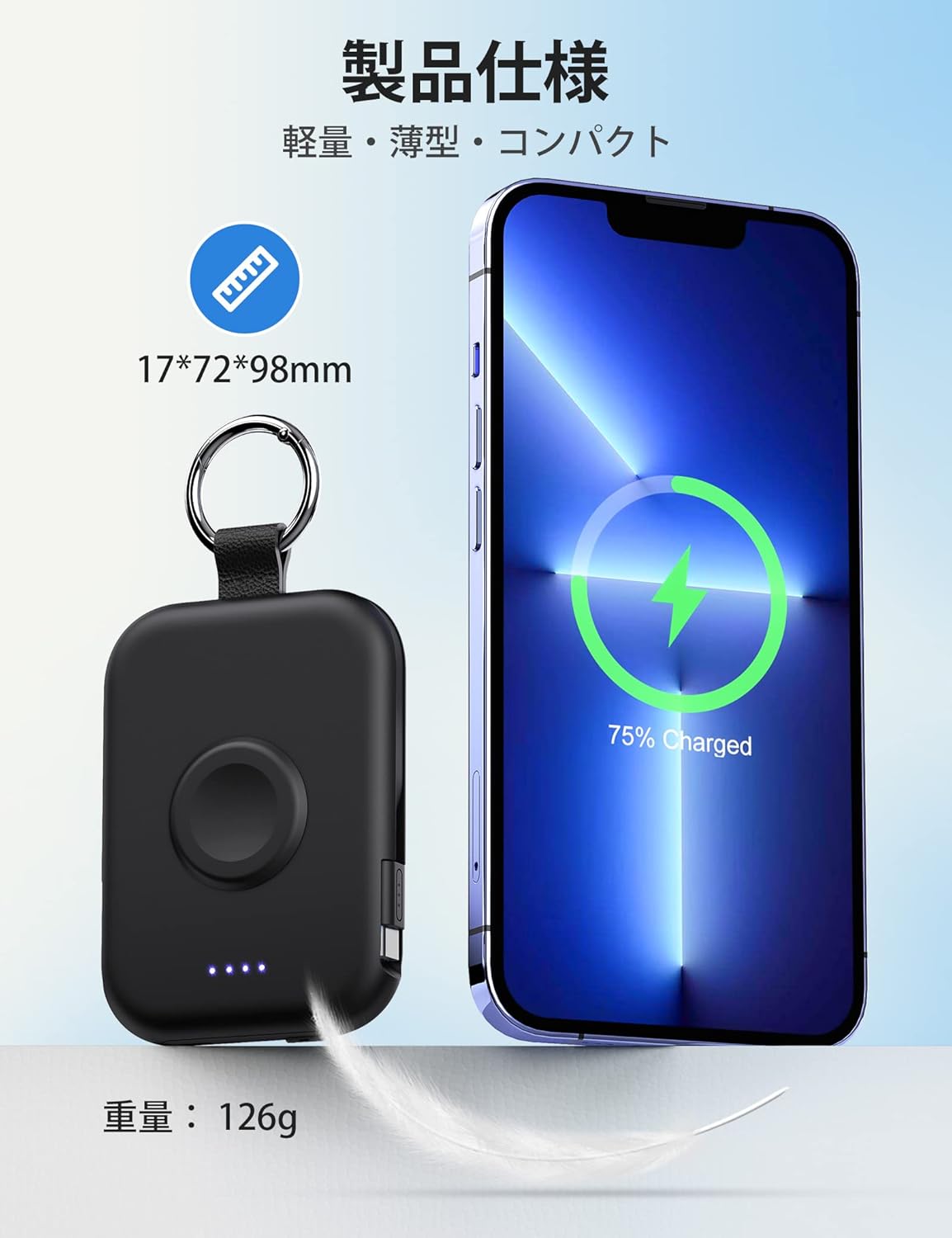
Image 7.2: Size and weight comparison.
8 സ്പെസിഫിക്കേഷനുകൾ
| ഫീച്ചർ | വിവരണം |
|---|---|
| മോഡൽ നമ്പർ | D2 |
| ബാറ്ററി ശേഷി | 5000mAh |
| അളവുകൾ | 9.8 x 7.2 x 1.7 സെ.മീ |
| ഭാരം | ഏകദേശം 126 ഗ്രാം |
| ബിൽറ്റ്-ഇൻ കേബിളുകൾ | മിന്നൽ, ടൈപ്പ്-സി |
| വയർലെസ് ചാർജിംഗ് | For Apple Watch (up to 3.5W Max) |
| ഇൻപുട്ട്/ഔട്ട്പുട്ട് പോർട്ട് | USB-C |
| അനുയോജ്യത | Apple Watch Ultra3/2/Ultra/11/10/9/8/7/6/SE/5/4/3 (all series), iPhone/iPad/AirPods (all series), Android, Nintendo Switch |
| സുരക്ഷാ സർട്ടിഫിക്കേഷനുകൾ | PSE സർട്ടിഫൈഡ് |
| ഫീച്ചറുകൾ | Charging indicator lights, Carabiner, Pass-through charging |
9. പരിപാലനം
- പവർ ബാങ്ക് വരണ്ടതും ഈർപ്പത്തിൽ നിന്ന് അകറ്റി നിർത്തുന്നതും ഉറപ്പാക്കുക.
- തീവ്രമായ താപനില ഒഴിവാക്കുക.
- ഉപകരണം താഴെയിടുകയോ, തുളയ്ക്കുകയോ, വേർപെടുത്തുകയോ ചെയ്യരുത്.
- മൃദുവായതും ഉണങ്ങിയതുമായ തുണി ഉപയോഗിച്ച് ഉപരിതലം വൃത്തിയാക്കുക. കഠിനമായ രാസവസ്തുക്കൾ ഉപയോഗിക്കരുത്.
- ദീർഘകാലത്തേക്ക് ഉപയോഗിക്കാത്തപ്പോൾ തണുത്തതും വരണ്ടതുമായ സ്ഥലത്ത് സൂക്ഷിക്കുക.
10. പ്രശ്നപരിഹാരം
10.1. Device Not Charging
- പവർ ബാങ്ക് ആവശ്യത്തിന് ചാർജ്ജ് ചെയ്തിട്ടുണ്ടെന്ന് ഉറപ്പാക്കുക (LED ഇൻഡിക്കേറ്ററുകൾ പരിശോധിക്കുക).
- പവർ ബാങ്ക് സജീവമാക്കാൻ പവർ ബട്ടൺ അമർത്തുക.
- Check that cables are securely connected to both the power bank and your device.
- For wireless charging, ensure your Apple Watch is correctly positioned on the charging pad.
- Try using a different cable or port if available.
10.2. Power Bank Not Recharging
- Ensure the USB-C charging cable is properly connected to the power bank's input port and the power adapter.
- പവർ അഡാപ്റ്റർ ശരിയായി പ്രവർത്തിക്കുന്നുണ്ടെന്നും ഒരു ലൈവ് ഔട്ട്ലെറ്റിൽ പ്ലഗ് ചെയ്തിട്ടുണ്ടെന്നും പരിശോധിക്കുക.
- മറ്റൊരു USB-C കേബിളോ പവർ അഡാപ്റ്ററോ പരീക്ഷിച്ചുനോക്കൂ.
11. വാറൻ്റിയും പിന്തുണയും
The RORRY D2 Portable Charger comes with a one-year warranty from the date of purchase. If you have any questions, concerns, or require assistance, please contact our customer support team. We prioritize your safety and satisfaction.
ബന്ധപ്പെടാനുള്ള വിവരങ്ങൾ: Please refer to the contact details provided with your product packaging or visit the official RORRY webപിന്തുണയ്ക്കുള്ള സൈറ്റ്.