
1 സുരക്ഷാ വിവരങ്ങൾ
അസംബ്ലി ചെയ്യുന്നതിനും ഉപയോഗിക്കുന്നതിനും മുമ്പ് ദയവായി എല്ലാ നിർദ്ദേശങ്ങളും ശ്രദ്ധാപൂർവ്വം വായിക്കുക. ഭാവി റഫറൻസിനായി ഈ മാനുവൽ സൂക്ഷിക്കുക.
- Ensure not to exceed the maximum weight capacity of 300 പൗണ്ട്. ഓവർലോഡ് ചെയ്യുന്നത് കേടുപാടുകളോ പരിക്കോ ഉണ്ടാക്കാം.
- Adjust the chair according to the user's height and follow the assembly instructions precisely for safe use.
- കുട്ടികളെ അസംബ്ലി ഏരിയയിൽ നിന്ന് അകറ്റി നിർത്തുക. ചെറിയ ഭാഗങ്ങൾ ശ്വാസംമുട്ടലിന് കാരണമായേക്കാം.
- Regularly check all bolts and screws to ensure they are tightened. Re-tighten if necessary.
- കസേരയിൽ നിൽക്കരുത്.
- Use the chair only for its intended purpose as an office or desk chair.

Image: SGS BIFMA certified gas lift, indicating compliance with safety and durability standards.
2. പാക്കേജ് ഉള്ളടക്കം
അസംബ്ലി ആരംഭിക്കുന്നതിന് മുമ്പ് എല്ലാ ഘടകങ്ങളും നിലവിലുണ്ടെന്ന് ഉറപ്പാക്കുക. ഏതെങ്കിലും ഭാഗങ്ങൾ നഷ്ടപ്പെട്ടാലോ കേടുപാടുകൾ സംഭവിച്ചാലോ, ദയവായി ഉപഭോക്തൃ പിന്തുണയുമായി ബന്ധപ്പെടുക.
- Backrest Assembly (1)
- സീറ്റ് തലയണ (1)
- ഹെഡ്റെസ്റ്റ് (1)
- ആംറെസ്റ്റുകൾ (2)
- ഗ്യാസ് ലിഫ്റ്റ് സിലിണ്ടർ (1)
- Star Base (1)
- കാസ്റ്റേഴ്സ് (5)
- Mechanism Plate (1)
- Hardware Kit (Screws, Washers, Allen Wrench) (1)
- ഉപയോക്തൃ മാനുവൽ (1)
3. അസംബ്ലി നിർദ്ദേശങ്ങൾ
Assembly typically takes 10-15 minutes. Follow these steps carefully.
- കാസ്റ്ററുകൾ ബേസിലേക്ക് ഘടിപ്പിക്കുക: Insert the five casters into the holes at the end of each leg of the star base until they click securely into place.
- ഗ്യാസ് ലിഫ്റ്റ് ചേർക്കുക: നക്ഷത്ര അടിത്തറയുടെ മധ്യത്തിലുള്ള ദ്വാരത്തിൽ ഗ്യാസ് ലിഫ്റ്റ് സിലിണ്ടർ വയ്ക്കുക.
- സീറ്റിൽ മെക്കാനിസം പ്ലേറ്റ് ഘടിപ്പിക്കുക: Align the mechanism plate with the pre-drilled holes on the underside of the seat cushion. Ensure the lever is on the right side when facing the front of the seat. Secure with screws from the hardware kit using the provided Allen wrench.

ചിത്രം: അടിവശം view of the chair's mechanism plate, which attaches to the seat and controls adjustments.
- സീറ്റിൽ ആംറെസ്റ്റുകൾ ഘടിപ്പിക്കുക: Secure the armrests to the sides of the seat cushion using the designated screws. Ensure they are firmly attached.
- സീറ്റിൽ ബാക്ക്റെസ്റ്റ് ഘടിപ്പിക്കുക: Align the backrest with the mounting points on the seat cushion and armrests. Secure with screws.
- ഹെഡ്റെസ്റ്റ് ഘടിപ്പിക്കുക: Insert the headrest into the top of the backrest until it is securely in place.
- സീറ്റ് ഗ്യാസ് ലിഫ്റ്റുമായി ബന്ധിപ്പിക്കുക: Carefully place the assembled seat and backrest onto the gas lift cylinder, ensuring it is centered and fully seated.

ചിത്രം: മുന്നിലും പിന്നിലും view of the fully assembled Flysky Ergonomic Office Desk Chair.
4. പ്രവർത്തന നിർദ്ദേശങ്ങൾ
The Flysky Ergonomic Office Desk Chair offers multiple adjustments for personalized comfort.
4.1 Adjusting Chair Height
- To raise the seat: While standing, pull the lever located under the right side of the seat upwards. The seat will rise. Release the lever at the desired height.
- To lower the seat: While seated, pull the lever located under the right side of the seat upwards. The seat will lower. Release the lever at the desired height.

Image: Close-up of the height adjustment lever located beneath the seat.
4.2 Adjusting Recline and Tilt Tension
- Recline Function (90°-120°): Push the same lever used for height adjustment inwards to lock the backrest in an upright position (90° work mode). Pull the lever outwards to unlock the recline function, allowing the backrest to tilt back (up to 120° rest/sleep mode).
- ടിൽറ്റ് ടെൻഷൻ: Rotate the round knob located under the front-center of the seat. Turn clockwise to increase tilt tension (making it harder to recline) or counter-clockwise to decrease tension (making it easier to recline).

Image: Diagram illustrating the tilt and rocking function, showing the height lock lever and tilt tension knob.
4.3 Adjusting Headrest
- ഉയരം ക്രമീകരിക്കൽ: Gently pull the headrest up or push it down to adjust its vertical position (up to 3.2 inches).
- ആംഗിൾ അഡ്ജസ്റ്റ്മെൻ്റ്: Rotate the headrest forward or backward (up to 90°) to find the optimal angle for neck support.
ചിത്രം: വിശദമായത് view of the adjustable headrest, showing lift, down, forward, backward, and rotation capabilities.
4.4 Adjusting Lumbar Support
- The chair features a 3D self-adaptive elastic lumbar pillow designed to conform to your lower back. No manual adjustment is typically required for its position, as it flexes with your posture.

ചിത്രം: കഴിഞ്ഞുview of ergonomic design, highlighting headrest, back support, lumbar support, and hip support.
4.5 Using Flip-Up Armrests
- To flip up the armrests: Gently lift the armrests upwards until they lock into a vertical position. This allows the chair to be pushed closer to a desk or stored more compactly.
- To lower the armrests: Pull the armrests downwards until they return to their horizontal position.

Image: Illustration of the flip-up armrest feature, showing the armrest in both down and up positions.
5. പരിപാലനം
Proper maintenance will extend the life and appearance of your chair.
- വൃത്തിയാക്കൽ: പരസ്യം ഉപയോഗിച്ച് വൃത്തിയാക്കുകamp cloth. For mesh areas, use a soft brush or vacuum cleaner to remove dust and debris. Avoid harsh chemicals or abrasive cleaners.
- പരിശോധന: Periodically check all screws and bolts for tightness. Re-tighten as needed to prevent loosening and ensure stability.
- കാസ്റ്റർ കെയർ: സുഗമമായ റോളിംഗ് ഉറപ്പാക്കാൻ കാസ്റ്ററുകൾ രോമങ്ങളും അവശിഷ്ടങ്ങളും ഇല്ലാതെ സൂക്ഷിക്കുക.

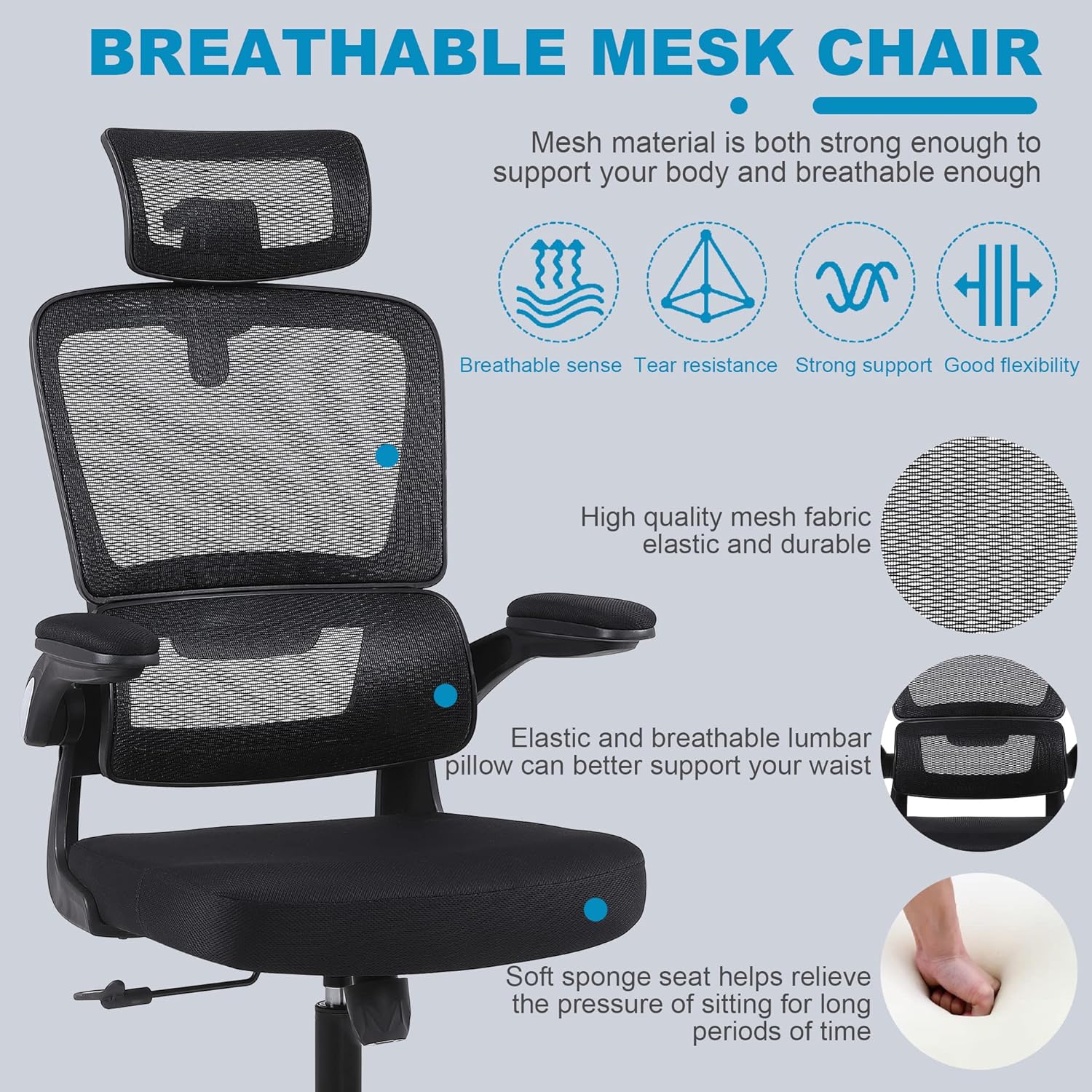
Image: Close-up of the breathable mesh fabric used for the chair's backrest and headrest.
6. പ്രശ്നപരിഹാരം
പൊതുവായ പ്രശ്നങ്ങളും അവയുടെ പരിഹാരങ്ങളും അറിയാൻ ഈ വിഭാഗം കാണുക.
| ഇഷ്യൂ | സാധ്യമായ കാരണം | പരിഹാരം |
|---|---|---|
| കസേര ആടുന്നു അല്ലെങ്കിൽ അസ്ഥിരമായി തോന്നുന്നു | അയഞ്ഞ സ്ക്രൂകൾ അല്ലെങ്കിൽ അസമമായ അസംബ്ലി. | Check and tighten all screws, especially those connecting the seat, backrest, and mechanism plate. Ensure casters are fully inserted. |
| കസേര ഉയരം ക്രമീകരിക്കുന്നില്ല. | Gas lift lever not engaged correctly or gas lift cylinder malfunction. | Ensure the lever is fully pulled up. If the issue persists, the gas lift cylinder may need replacement. Contact customer support. |
| കാസ്റ്ററുകൾ സുഗമമായി ഉരുളുന്നില്ല | കാസ്റ്ററുകളിലോ കേടായ കാസ്റ്ററുകളിലോ കുടുങ്ങിയ അവശിഷ്ടങ്ങൾ. | Remove any hair or debris from the caster wheels. If damaged, casters can be replaced. |
| ബാക്ക്റെസ്റ്റ് ചാരിയിരിക്കുകയോ ലോക്ക് ചെയ്യുകയോ ചെയ്യുന്നില്ല | Recline lever not engaged or tilt tension too high. | Pull the recline lever outwards to unlock. Adjust the tilt tension knob counter-clockwise to reduce tension. |
7 സ്പെസിഫിക്കേഷനുകൾ
Key technical specifications for the Flysky Ergonomic Office Desk Chair Model S5016.
| ഫീച്ചർ | വിശദാംശങ്ങൾ |
|---|---|
| മോഡലിൻ്റെ പേര് | എസ് 5016 |
| ബ്രാൻഡ് | ഫ്ലൈസ്കി |
| നിറം | മെഷ് ബ്ലാക്ക് |
| ഉൽപ്പന്ന അളവുകൾ (D x W x H) | 28"D x 22"W x 42"H (Adjustable height) |
| പരമാവധി ഭാരം ശുപാർശ | 300 പൗണ്ട് |
| ഇനത്തിൻ്റെ ഭാരം | 20 പൗണ്ട് |
| ബാക്ക് സ്റ്റൈൽ | മെഷ് ബാക്ക് |
| പ്രത്യേക സവിശേഷതകൾ | Adjustable Height, Arm Rest (Flip-Up), Ergonomic, Head Support, Rolling, Lumbar Support |
| ചാരിയിരിക്കുന്ന പൊസിഷൻ കൗണ്ട് | >=2 (90°-120°) |
| മെറ്റീരിയൽ പൂരിപ്പിക്കുക | മെഷ് |
| ഫർണിച്ചർ ബേസ് മൂവ്മെൻ്റ് | സ്വിവൽ |

Image: Diagram showing the key dimensions of the Flysky Ergonomic Office Desk Chair.

Image: Illustration of the chair's sturdy base, highlighting its 300 lbs weight capacity.
8. വാറൻ്റിയും പിന്തുണയും
For warranty information, technical support, or to inquire about replacement parts, please contact Flysky customer service. Refer to the contact information provided with your purchase or visit the official Flysky webസൈറ്റ്.
We are committed to assisting you with any questions or concerns regarding your product.