
Contixo E9
Contixo E9 Smart Floodlight Security Camera User Manual
മോഡൽ: E9
1. ആമുഖം
The Contixo E9 Smart Floodlight Security Camera is designed to provide comprehensive outdoor surveillance with advanced features. This manual will guide you through the installation, setup, and operation of your new security camera, ensuring optimal performance and security for your property.
പ്രധാന സവിശേഷതകൾ:
- 2.5K (3MP) Full HD Video: High-resolution live streaming and recording.
- Adjustable Bright Floodlight: Up to 1000 Lumens for enhanced visibility and deterrence.
- Colored & Infrared Night Vision: Clear surveillance even in low-light conditions.
- ടു-വേ ഓഡിയോ: സന്ദർശകരുമായി ആശയവിനിമയം നടത്തുക അല്ലെങ്കിൽ നുഴഞ്ഞുകയറ്റക്കാരെ വിദൂരമായി തടയുക.
- പിആർ മോഷൻ കണ്ടെത്തൽ: Accurate detection with customizable sensitivity.
- സൈറൺ അലാറം: Deter unwanted activity with an audible alarm.
- IP65 കാലാവസ്ഥാ പ്രതിരോധം: വ്യത്യസ്ത കാലാവസ്ഥകളിൽ പുറം ഉപയോഗത്തിനായി ഈടുനിൽക്കുന്ന ഡിസൈൻ.
- Cloud/SD Card Storage: Flexible options for video footagഇ സംഭരണം.
- സ്മാർട്ട് ആപ്പ് നിയന്ത്രണം: Manage settings and view feeds via the Xodo Smart App.
- വോയ്സ് അസിസ്റ്റൻ്റ് ഇൻ്റഗ്രേഷൻ: Amazon Alexa, Google Assistant എന്നിവയുമായി പൊരുത്തപ്പെടുന്നു.
2. ബോക്സിൽ എന്താണുള്ളത്?
Please check the contents of your package to ensure all items are present and in good condition.
- 1x Contixo E9 Smart Floodlight Security Camera
- 1x ഉപയോക്തൃ മാനുവൽ (ഈ പ്രമാണം)
- 4x മൗണ്ടിംഗ് സ്ക്രൂകൾ
- 1x USB കേബിൾ
- 1x പവർ അഡാപ്റ്റർ
3. സജ്ജീകരണവും ഇൻസ്റ്റാളേഷനും
Follow these steps to install and set up your Contixo E9 camera.
3.1 പ്രീ-ഇൻസ്റ്റലേഷൻ ചെക്ക്ലിസ്റ്റ്
- Ensure you have a 2.4GHz Wi-Fi network available at the installation location. The camera does not support 5GHz Wi-Fi.
- Identify a suitable outdoor location with access to a power outlet. The camera requires a wired power connection and is not battery-operated.
- ഡൗൺലോഡ് ചെയ്യുക Xodo Smart App നിങ്ങളുടെ സ്മാർട്ട്ഫോണിന്റെ ആപ്പ് സ്റ്റോറിൽ നിന്ന് (iOS അല്ലെങ്കിൽ Android).
3.2 ഫിസിക്കൽ ഇൻസ്റ്റലേഷൻ
- മൗണ്ടിംഗ് സ്ഥലം തിരഞ്ഞെടുക്കുക: ആവശ്യമുള്ളത് നൽകുന്ന ഒരു സ്ഥലം തിരഞ്ഞെടുക്കുക viewing angle and is within reach of a power outlet. The camera is IP65 weatherproof, suitable for outdoor environments.
- ക്യാമറ ഘടിപ്പിക്കുക: Use the provided screws to securely mount the camera to a wall or suitable surface. Ensure the mounting is stable.
- പവർ ബന്ധിപ്പിക്കുക: Plug the USB cable into the camera and connect the power adapter to a nearby electrical outlet. The camera will power on.

Image: The Contixo E9 camera showing its USB power cable and plug adapter, highlighting the easy DIY installation process. A power socket is required for operation.
3.3 ആപ്പ് സജ്ജീകരണവും ജോടിയാക്കലും
- Open Xodo Smart App: Launch the Xodo Smart App on your smartphone. If you are a new user, register an account.
- ഉപകരണം ചേർക്കുക: Tap the "+" icon or "Add Device" to begin the pairing process. Select "Security Camera" or "Smart Floodlight Camera" from the device list.
- ഓൺ-സ്ക്രീൻ നിർദ്ദേശങ്ങൾ പിന്തുടരുക: The app will guide you through connecting the camera to your 2.4GHz Wi-Fi network. This typically involves scanning a QR code displayed on your phone with the camera lens.
- നിങ്ങളുടെ ക്യാമറയ്ക്ക് പേര് നൽകുക: Once connected, assign a name to your camera (e.g., "Front Yard Camera," "Back Door Floodlight").

Image: A smartphone screen showing the Xodo Smart App, illustrating the various controls available for the camera, including live view, dimming, siren activation, and real-time notifications.
4. പ്രവർത്തന നിർദ്ദേശങ്ങൾ
Learn how to use the various functions of your Contixo E9 camera.
4.1 തത്സമയം View ഒപ്പം റെക്കോർഡിംഗ്
- തത്സമയ ഫീഡ് ആക്സസ് ചെയ്യുക: Open the Xodo Smart App and select your camera to view the live 2.5K HD video stream.
- Manual Recording/Snapshots: Use the controls within the app to manually record video or take still images from the live feed.
- പ്ലേബാക്ക്: റെക്കോർഡ് ചെയ്ത foo ആക്സസ് ചെയ്യുകtage from the cloud storage (subscription required) or a locally inserted Micro SD card (not included).

Image: The Contixo E9 camera mounted on a building, with a smartphone showing its live 2.5K Full HD video feed, demonstrating real-time monitoring.
4.2 ടു-വേ ഓഡിയോ
The camera features a built-in microphone and speaker for two-way communication.
- Initiate Talk: അതേസമയം viewing the live feed, tap the microphone icon in the app to speak through the camera's speaker.
- കേൾക്കുക: The camera's microphone will pick up audio from its surroundings, allowing you to hear what's happening.
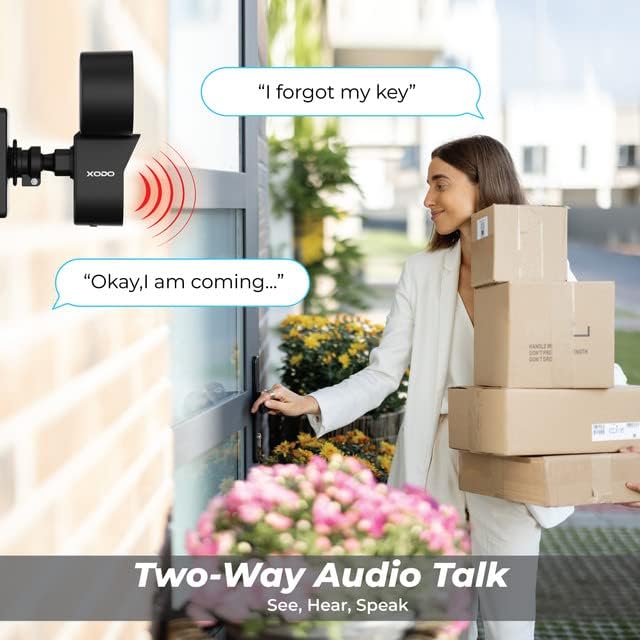
Image: A visual representation of the two-way audio feature, showing a user communicating with a delivery person via the camera.
4.3 മോഷൻ ഡിറ്റക്ഷനും അലേർട്ടുകളും
The E9 camera uses PIR motion detection to identify activity and send alerts.
- പ്രവർത്തനക്ഷമമാക്കുക/പ്രവർത്തനരഹിതമാക്കുക: Adjust motion detection settings within the Xodo Smart App.
- സംവേദനക്ഷമത: Customize the PIR sensitivity to reduce false alarms (e.g., from passing cars or small animals).
- അറിയിപ്പുകൾ: Receive instant push notifications on your smartphone when motion is detected.
- സൈറൺ അലാറം: Activate the built-in siren manually or set it to trigger automatically upon motion detection via the app.

Image: The Contixo E9 camera detecting a figure at night, with icons indicating flashlight alarm, siren alert, and motion detection notifications, highlighting its security capabilities.
4.4 Night Vision and Floodlight Control
The E9 camera offers versatile night vision options and an adjustable floodlight.
- Colored Night Vision: The floodlight can illuminate the area to provide full-color video at night.
- ഇൻഫ്രാറെഡ് നൈറ്റ് വിഷൻ: For discreet monitoring, the camera can use infrared LEDs for black and white night vision without the floodlight.
- ഫ്ലഡ്ലൈറ്റ് തെളിച്ചം: Adjust the floodlight brightness (800lm-1000lm) and schedule its operation through the Xodo Smart App.

Image: Comparison of Smart Mode, Color Light Mode, and Infrared Mode for night vision, illustrating the camera's ability to provide clear footage വ്യത്യസ്ത ലൈറ്റിംഗ് സാഹചര്യങ്ങളിൽ.
4.5 Smart Assistant Integration
Integrate your Contixo E9 camera with Amazon Alexa or Google Assistant for voice control.
- Connect Accounts: Link your Xodo Smart account to your Alexa or Google Home app.
- വോയ്സ് കമാൻഡുകൾ: Use commands like "Alexa, show me the backyard" or "Hey Google, show the front door camera" to view your live feed on compatible smart displays.

Image: A user interacting with a smart assistant to view the camera feed, highlighting compatibility with Amazon Alexa and Google Assistant.
5. പരിപാലനം
ശരിയായ അറ്റകുറ്റപ്പണി നിങ്ങളുടെ ക്യാമറയുടെ ദീർഘായുസ്സും മികച്ച പ്രകടനവും ഉറപ്പാക്കുന്നു.
- വൃത്തിയാക്കൽ: Periodically clean the camera lens and floodlight cover with a soft, damp പൊടിയും അവശിഷ്ടങ്ങളും നീക്കം ചെയ്യാൻ തുണി ഉപയോഗിക്കുക. കഠിനമായ രാസവസ്തുക്കൾ ഉപയോഗിക്കരുത്.
- ഫേംവെയർ അപ്ഡേറ്റുകൾ: Regularly check the Xodo Smart App for available firmware updates. Updates often include performance improvements and security enhancements.
- പവർ കണക്ഷൻ: Ensure the power cable remains securely connected and free from damage.
6. പ്രശ്നപരിഹാരം
If you encounter issues with your Contixo E9 camera, refer to the following common solutions.
| പ്രശ്നം | സാധ്യമായ പരിഹാരം |
|---|---|
| ക്യാമറ വൈഫൈയിലേക്ക് കണക്റ്റ് ചെയ്യുന്നില്ല. |
|
| തത്സമയം ഇല്ല view അല്ലെങ്കിൽ റെക്കോർഡിംഗ്. |
|
| Motion detection is too sensitive/not sensitive enough. |
|
| ടു-വേ ഓഡിയോ വ്യക്തമല്ല അല്ലെങ്കിൽ പ്രവർത്തിക്കുന്നില്ല. |
|
If these solutions do not resolve your issue, please contact Contixo customer support.
7 സ്പെസിഫിക്കേഷനുകൾ
| ഫീച്ചർ | വിശദാംശങ്ങൾ |
|---|---|
| മോഡലിൻ്റെ പേര് | E9 |
| വീഡിയോ റെസല്യൂഷൻ | 2.5K (3MP), 2304 pixels |
| കണക്റ്റിവിറ്റി | Wired Power, Wi-Fi (2.4GHz only) |
| നൈറ്റ് വിഷൻ | Colored & Infrared Night Vision |
| ഫ്ലഡ്ലൈറ്റ് തെളിച്ചം | 800lm-1000lm (Adjustable) |
| ഓഡിയോ | 2-Way Audio (Microphone & Speaker) |
| മോഷൻ ഡിറ്റക്ഷൻ | പിഐആർ മോഷൻ സെൻസർ |
| സ്റ്റോറേജ് ഓപ്ഷനുകൾ | Cloud Storage (subscription), Micro SD Card (not included) |
| കാലാവസ്ഥാ പ്രൂഫ് റേറ്റിംഗ് | IP65 |
| അനുയോജ്യമായ ഉപകരണങ്ങൾ | Smartphone (iOS/Android), Amazon Alexa, Google Assistant |
| പവർ ഉറവിടം | കോർഡഡ് ഇലക്ട്രിക് |
| ഇനത്തിൻ്റെ അളവുകൾ | 7.1 x 4.7 x 5.5 ഇഞ്ച് |
| ഇനത്തിൻ്റെ ഭാരം | 1.4 പൗണ്ട് |
8. വാറൻ്റിയും പിന്തുണയും
8.1 വാറൻ്റി വിവരങ്ങൾ
Contixo products are covered by a limited warranty. For specific details regarding your product's warranty period and terms, please refer to the warranty card included in your product packaging or visit the official Contixo webസൈറ്റ്.
8.2 ഉപഭോക്തൃ പിന്തുണ
If you require further assistance, technical support, or have questions not covered in this manual, please contact Contixo customer support:
- ഓൺലൈൻ പിന്തുണ: സന്ദർശിക്കുക Contixo Store on Amazon അല്ലെങ്കിൽ അവരുടെ ഉദ്യോഗസ്ഥൻ webപതിവുചോദ്യങ്ങൾക്കും പിന്തുണാ ഉറവിടങ്ങൾക്കുമുള്ള സൈറ്റ്.
- ബന്ധപ്പെടാനുള്ള വിവരങ്ങൾ: Refer to your product packaging or the Contixo webഏറ്റവും പുതിയ ബന്ധപ്പെടാനുള്ള വിവരങ്ങൾ (ഫോൺ, ഇമെയിൽ) ലഭിക്കുന്ന സൈറ്റ്.
Ask a question about this manual
Ask about setup, troubleshooting, compatibility, parts, safety, or missing instructions. Manuals+ will review the question and use this page’s manual context to help answer it.